
1. Уводзіны
This user manual provides essential information for the safe and efficient use of your Gigaset COMFORT 500A Trio cordless phone system. This system includes a base station and three cordless handsets, designed for reliable communication in your home or office. Please read these instructions carefully before initial use to ensure proper setup and operation.
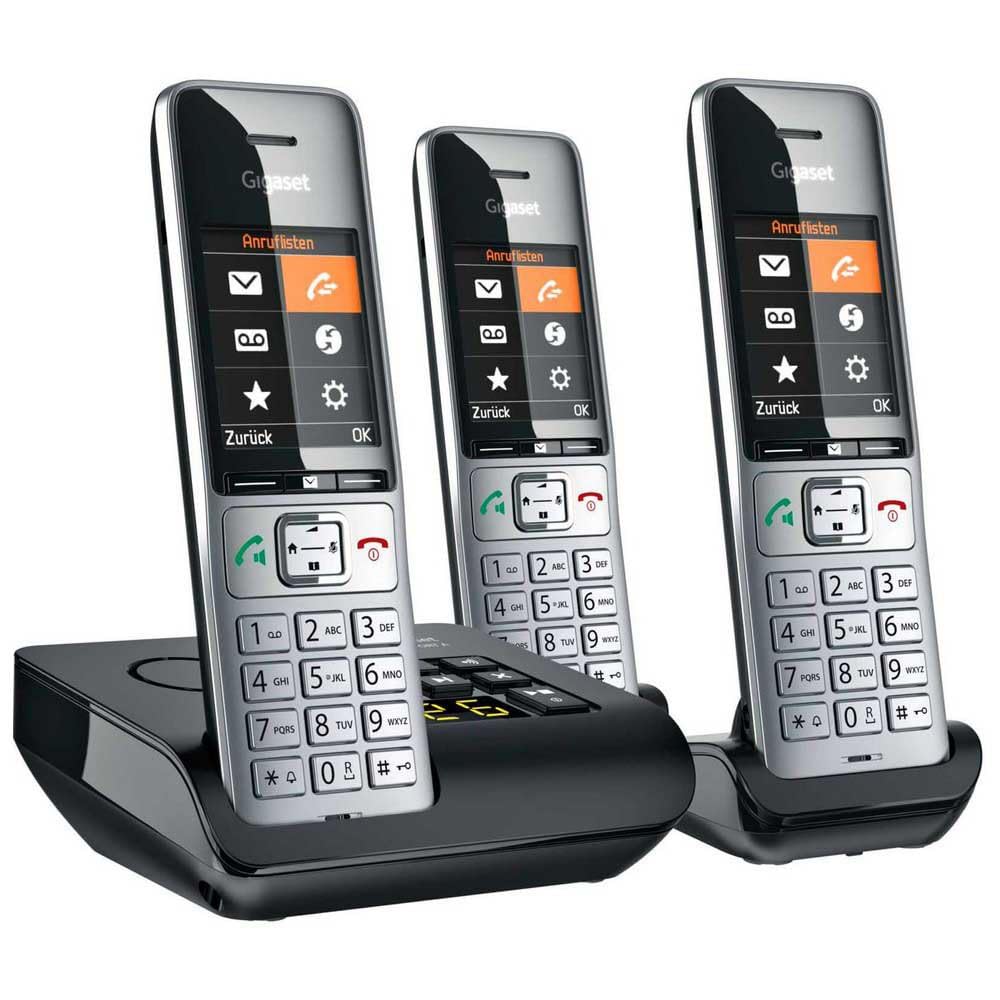
Image 1.1: The Gigaset COMFORT 500A Trio system, featuring a black base station with an integrated answering machine and three silver and black cordless handsets.
2. Змесціва ўпакоўкі
Verify that all items are present in your package. If any items are missing or damaged, contact your retailer immediately.
- 1x Gigaset COMFORT 500A Base Station
- 3x Gigaset COMFORT 500A Handsets
- 3x Handset Battery Covers
- 6x AAA Rechargeable Batteries (2 per handset)
- 1x Power Adapter for Base Station
- 1x Phone Line Cable
- 2x Handset Charging Cradles (for the two additional handsets)
- 2x Power Adapters for Charging Cradles
- 1x Кіраўніцтва карыстальніка (гэты дакумент)
3. Інструкцыі па тэхніцы бяспекі
Observe the following safety precautions to prevent injury or damage to your device:
- Use only the provided power adapters and phone line cable.
- Use only the specified rechargeable batteries. Do not use non-rechargeable batteries.
- Не падвяргайце прыладу ўздзеянню вады, вільгаці або экстрэмальных тэмператур.
- Avoid placing the base station or charging cradles near heat sources or direct sunlight.
- Не адкрывайце прыладу casinг. Рамонт павінен выконвацца толькі аўтарызаваным абслугоўваючым персаналам.
- Захоўвайце прыладу ў месцах, недаступных дзецям.
4. Настройка
4.1. Падключэнне базавай станцыі
- Размясціце базавую станцыю на роўнай, устойлівай паверхні, далей ад іншых электронных прылад, якія могуць выклікаць перашкоды.
- Connect the supplied phone line cable to the ТЭЛ socket on the base station and to your telephone wall socket.
- Connect the supplied power adapter to the УЛАДА socket on the base station and plug it into a mains power outlet.
- For the additional charging cradles, connect their respective power adapters and plug them into mains power outlets.
4.2. Усталёўка батарэй у тэлефон
- Адкрыйце вечка батарэйнага адсека на задняй панэлі кожнага тэлефона.
- Insert the two supplied AAA rechargeable batteries, observing the correct polarity (+/-).
- Зачыняйце вечка батарэйнага адсека, пакуль яно не зафіксуецца на месцы з пстрычкай.
- Place each handset into its respective base station or charging cradle to charge. The display will indicate charging. Allow at least 8 hours for the initial charge.

Малюнак 4.2.1: Крупны план view of a Gigaset COMFORT 500A handset, highlighting its clear display, navigation keys, and numeric keypad. The handset is designed for comfortable handling.
4.3. Рэгістрацыя трубкі
Your handsets are typically pre-registered to the base station at the factory. If a handset displays "Register Handset" or similar, follow these steps for manual registration:
- On the base station, press and hold the registration/paging button (usually marked with a signal icon) for approximately 3 seconds. The base station will enter registration mode.
- On the handset, navigate to the menu, select Налады, тады Рэгістрацыя, і Рэгістрацыя трубкі.
- Enter the system PIN (default is usually 0000). Confirm with OK.
- The handset will search for the base station and register. A confirmation message will appear on the handset display once successful.
5. Кіраванне тэлефонам
5.1. Здзяйсненне і прыём званкоў
- Здзяйсненне званка: Pick up a handset, dial the number, and press the green call key. Alternatively, dial first, then press the call key.
- Прыём званка: Калі тэлефон зазваніць, націсніце зялёную клавішу выкліку.
- Завяршэнне выкліку: Press the red end call key or place the handset back in its cradle.
- Ідэнтыфікатар абанента: Incoming call numbers will be displayed if the service is active and supported by your network provider.
5.2. Using the Digital Answering Machine
The Gigaset COMFORT 500A Trio includes an integrated digital answering machine in the base station.
- Актывацыя/дэактывацыя: Access the answering machine menu via the handset or use the dedicated button on the base station (if available).
- Listening to Messages: New messages are indicated on the handset display and/or by a flashing LED on the base station. Press the play button on the base station or navigate through the handset menu to listen.
- Запіс аб'явы: You can record a personalized outgoing message through the handset menu.
5.3. Тэлефонная кніга
Store frequently used numbers in the phonebook for quick dialing.
- Saving a Contact: Navigate to the Phonebook menu, select "New Entry," enter the name and number, then save.
- Набор з тэлефоннай кнігі: Open the Phonebook, scroll to the desired contact, and press the green call key.
5.4. Налады
Customize your phone system through the handset's settings menu.
- Аб'ём: Adjust handset speaker, ringer, and earpiece volume.
- Рынгтоны: Select different melodies for internal and external calls.
- Мова адлюстравання: Change the language of the handset display.
- Дата і час: Set the correct date and time for accurate call logging and answering machine timestamps.
6. Тэхнічнае абслугоўванне
6.1. Уборка
Clean the device surfaces with a soft, damp тканіна. Не выкарыстоўвайце абразіўныя ачышчальнікі або растваральнікі.
6.2. Сыход за батарэяй
- Always use the specified rechargeable batteries.
- Калі тэлефон не будзе выкарыстоўвацца працяглы час, выміце батарэйкі, каб прадухіліць іх уцечку.
- Утылізуйце старыя батарэйкі ў адпаведнасці з мясцовымі правіламі.
7. Выпраўленне непаладак
| праблема | Магчымая прычына | Рашэнне |
|---|---|---|
| Няма сігналу набору | Phone line cable not connected or faulty. | Check phone line connection. Try a different phone line socket or cable. |
| Handset display is blank or "Register Handset" appears | Batteries are flat or handset is not registered. | Place handset in base/charger to charge. If still blank, check battery installation. If "Register Handset" appears, follow Section 4.3. |
| Немагчыма рабіць/прымаць званкі | Base station not powered or phone line issue. | Ensure base station power adapter is connected. Check phone line connection. Contact your service provider if the issue persists. |
| Дрэнная якасць гуку | Handset too far from base station or interference. | Move closer to the base station. Avoid placing the base near other electronic devices (Wi-Fi routers, microwaves). |
8. Тэхнічныя характарыстыкі
- мадэль: L36852-H3023-B111
- Тып прадукту: DECT Cordless Phone System with Digital Answering Machine
- колер: Чорны, серабрысты
- Dimensions (Base Station): Прыблізна 24 х 69 х 2.5 см (Д х Ш х В)
- Вага (тавар): 1 Kilogram (total package weight)
- Час размовы: Да 4 гадзін
- Power Source (Handsets): Battery-Powered (Rechargeable AAA batteries)
- матэрыял: Акрыланітрылбутадыенстырол (АБС)
- Асаблівасці: Caller ID, Basic Conference Call Capability, Multiple Line Support
- Тып аўтаадказчыка: Лічбавы
- Сумяшчальныя прылады: PSTN, basic communication devices
9. Гарантыя і падтрымка
Your Gigaset COMFORT 500A Trio system comes with a 2-гадовая гарантыя вытворцы з даты пакупкі. Калі ласка, захавайце пацвярджэнне пакупкі для прэтэнзій па гарантыі.
For technical support, service, or further information, please refer to the official Gigaset website or contact your local Gigaset service center. Contact details can typically be found on the Gigaset webна сайце або ў гарантыйным талоне, які пастаўляецца з вашым прадуктам.