
1. Уводзіны
This manual provides comprehensive instructions for the setup, operation, and maintenance of your Cherry MW 9100 Wireless Rechargeable Mouse. The MW 9100 is a compact, versatile mouse offering dual connectivity options (Bluetooth or 2.4 GHz USB receiver) and a convenient rechargeable battery.
Асноўныя функцыі ўключаюць у сябе:
- Compact design with charging functionality.
- Flexible operation: use while charging via USB-C cable.
- Dual connectivity: Bluetooth or 2.4 GHz USB receiver.
- Magnetic storage for the USB receiver, ideal for travel.
- Adjustable DPI settings for varied usage.
2. Змесціва ўпакоўкі
Праверце наяўнасць усіх прадметаў у камплекце:
- Cherry MW 9100 Wireless Rechargeable Mouse
- Зарадны кабель USB-C
- USB-прыёмнік 2.4 ГГц
- Ахоўны чахол
- Інструкцыя па эксплуатацыі (гэты дакумент)
3. Настройка
3.1 Зарадка мышы
The Cherry MW 9100 mouse features a built-in rechargeable battery. Before initial use, or when the battery is low, connect the included USB-C cable to the mouse and to a USB power source (e.g., computer USB port, USB wall adapter). The mouse can be used normally while charging.

Малюнак 3.1: Топ view of the Cherry MW 9100 mouse, showing the charging indicator light.
3.2 Падключэнне мышы
The MW 9100 offers two connection methods: 2.4 GHz wireless via USB receiver or Bluetooth.
Бесправадное злучэнне 3.2.1 2.4 ГГц
- Locate the USB receiver. It is magnetically stored in a compartment on the underside of the mouse.
- Устаўце USB-прыёмнік у свабодны порт USB на вашым кампутары.
- On the underside of the mouse, slide the switch to the "RF" position.
- Мышка павінна аўтаматычна падключыцца да кампутара.
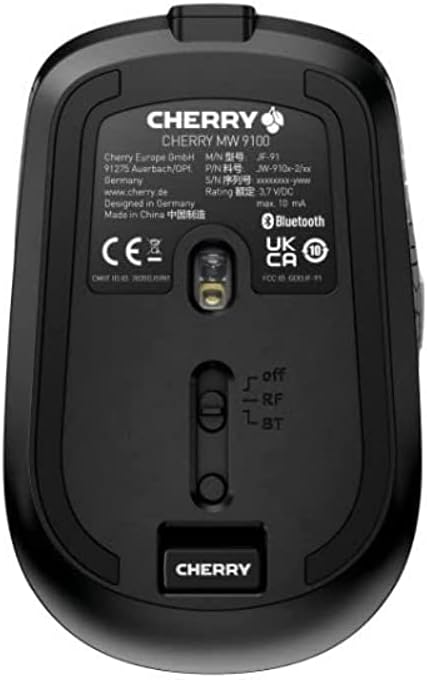
Малюнак 3.2: Underside of the Cherry MW 9100 mouse, highlighting the USB receiver storage and the connection mode switch.
3.2.2 Злучэнне Bluetooth
- On the underside of the mouse, slide the switch to the "BT" (Bluetooth) position.
- Press and hold the small pairing button located near the connection switch on the underside of the mouse until the LED indicator on the mouse starts blinking, indicating pairing mode.
- На камп'ютары або прыладзе адкрыйце налады Bluetooth і знайдзіце новыя прылады.
- Select "Cherry MW 9100" from the list of available devices to complete the pairing process.
4. Інструкцыя па эксплуатацыі
4.1 Асноўныя функцыі
The Cherry MW 9100 mouse features standard left and right click buttons, a scroll wheel (which also functions as a middle click button), and two side buttons for navigation (typically forward/back).
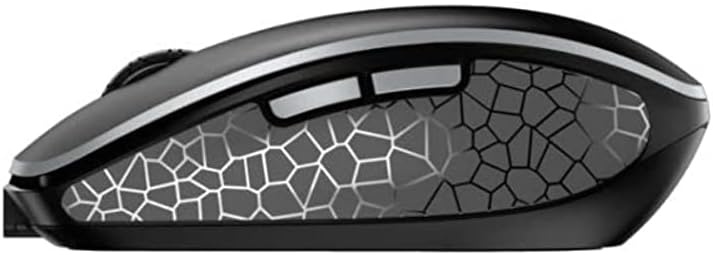
Малюнак 4.1: Збоку view of the Cherry MW 9100 mouse, illustrating the ergonomic design and side buttons.
4.2 Рэгуляванне DPI
The mouse includes a DPI (Dots Per Inch) button, usually located near the scroll wheel, allowing you to adjust the cursor sensitivity. Press this button to cycle through different DPI settings to match your preference or task requirements.

Малюнак 4.2: A hand demonstrating the comfortable grip on the Cherry MW 9100 mouse during use.
5. Тэхнічнае абслугоўванне
To ensure optimal performance and longevity of your Cherry MW 9100 mouse:
- Уборка: Use a soft, dry cloth to clean the mouse surface. For stubborn dirt, a slightly damp cloth can be used, but ensure no moisture enters the device. Avoid harsh chemicals or abrasive materials.
- захоўванне: When not in use, especially during travel, store the mouse in the provided protective pouch to prevent scratches and damage.
- Сыход за батарэяй: Пазбягайце частай поўнай разрадкі батарэі. Зараджайце мыш, калі з'явіцца індыкатар нізкага зараду батарэі.
6. Выпраўленне непаладак
| праблема | Магчымая прычына | Рашэнне |
|---|---|---|
| Мышка не рэагуе | Low battery, incorrect connection mode, USB receiver not connected, Bluetooth not paired. |
|
| Intermittent connection (Bluetooth) | Interference, device driver issues, distance from device. |
|
| Рух курсора няўстойлівы або павольны | Dirty optical sensor, low battery, incorrect DPI setting. |
|
7. Тэхнічныя характарыстыкі
| Асаблівасць | Дэталь |
|---|---|
| Марка | Вішнёвы |
| Нумар мадэлі | JW-9100US-2 |
| Тэхналогія падлучэння | Bluetooth, 2.4 GHz USB Wireless |
| Выяўленне руху | Аптычны |
| Асаблівасці | Лёгкі, партатыўны, акумулятарны |
| Памеры прадукту | 4 х 3 х 2 цалі |
| Вага прадмета | 6.4 унцыі |
| Колер | Чорны |
8. Гарантыя і падтрымка
For warranty information and technical support, please refer to the official Cherry website or contact Cherry customer service directly. Keep your proof of purchase for warranty claims.
вытворца: ВІШНЯ
Webсайт: www.cherry.de