
1. Уводзіны
This manual provides essential information for the safe and efficient use of your OPPO F21 Pro (5G) smartphone. Please read this manual thoroughly before using your device to ensure optimal performance and longevity.
The OPPO F21 Pro (5G) is a high-performance smartphone featuring a 2.2 GHz Octa-core processor, 8GB of RAM, and 128GB of internal storage, expandable via microSDXC. It operates on Android 12 and is powered by a non-removable 4500 mAh Li-Po battery. Key features include a 6.43-inch AMOLED display, a 64 MP AI Triple Camera system, and 5G connectivity.
2. Налада прылады
2.1 Змест пакета
- OPPO F21 Pro (5G) Smartphone
- Кабель USB
- Кароткае кіраўніцтва па запуску (можа адрознівацца ў залежнасці ад рэгіёна)
- Safety Information (may vary by region)
2.2 Устаўка SIM-карт і карт MicroSD
Your OPPO F21 Pro (5G) supports Dual-SIM functionality and a microSDXC card for expanded storage. The device uses Nano-SIM cards.
- Знайдзіце латок для SIM-карты на бакавой частцы тэлефона.
- Устаўце інструмент для выцягвання SIM-карты (калі ён ёсць) у невялікую адтуліну побач з латком і акуратна націсніце, пакуль латок не выскочыць.
- Устаўце карту(ы) Nano-SIM і/або карту microSDXC у прызначаныя слоты на латку. Пераканайцеся, што залатыя кантакты накіраваны ўніз.
- Асцярожна ўстаўце латок назад у тэлефон, пакуль ён не будзе ўраўноўвацца з бакамі.
Важная заўвага аб сумяшчальнасці з сеткамі для пакупнікоў з ЗША:
This smartphone is not compatible with CDMA networks, including VERIZON, SPRINT, and US CELLULAR. Please verify 3G or 4G/LTE compatibility with your network provider before purchase.
2.3 Уключэнне/выключэнне
- Каб уключыць: Націсніце і ўтрымлівайце кнопку харчавання (размешчаную з правага боку), пакуль не з'явіцца лагатып OPPO.
- Каб выключыць: Націсніце і ўтрымлівайце кнопку харчавання, затым абярыце «Выключыць харчаванне» з опцый на экране.
- Каб перазапусціць: Націсніце і ўтрымлівайце кнопку харчавання, затым абярыце «Перазагрузка» з прапанаваных варыянтаў.
2.4 Пачатковая налада
Upon first power-on, follow the on-screen instructions to complete the initial setup process. This includes selecting your language, connecting to Wi-Fi, setting up your Google account, and configuring security features like Face Recognition.
3. Кіраванне прыладай
3.1 Асноўная навігацыя
Your OPPO F21 Pro (5G) runs on Android 12, offering an intuitive user interface. Use gestures or navigation buttons (configurable in settings) to move between apps, return to the home screen, and access recent applications.
3.2 Функцыі дысплея

The front of the OPPO F21 Pro (5G) features a vibrant AMOLED display with a punch-hole cutout for the front camera.

Падрабязны view of the punch-hole front camera, integrated seamlessly into the display.
The device features a 6.43-inch AMOLED display with a resolution of 1080 x 2400 pixels, protected by Schott Xensation glass. This display provides vivid colors and deep blacks for an enhanced viewвопыту.
3.3 Выкарыстанне камеры
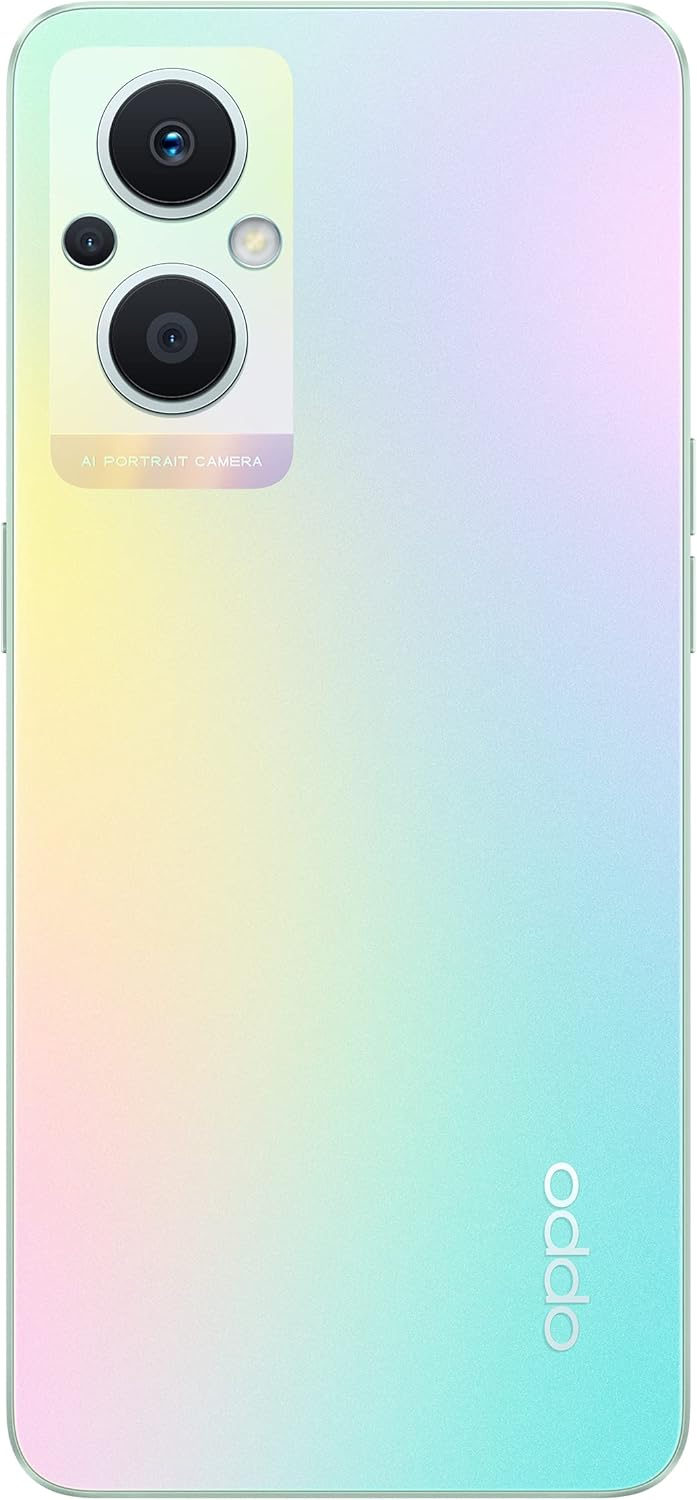
The back of the OPPO F21 Pro (5G) showcases its triple camera system and sleek design.

Падрабязны view of the AI Portrait Camera module on the rear, highlighting the lenses and flash.
The OPPO F21 Pro (5G) is equipped with a versatile camera system:
- Задняя камера: 64 MP (wide, f/1.7, PDAF), 2 MP (macro, f/2.4), 2 MP (depth, f/2.4).
- Пярэдняя камера: 16 MP (wide, f/2.4).
Access the Camera app from your home screen or app drawer. Select various shooting modes such as Photo, Video, Portrait, Macro, and more. Tap the screen to focus and press the shutter button to capture images or start/stop video recording.
3.4 Падключэнне
- Сетка 5G: Supports N1/ N8/ N28/ N41/ N77/ N78 SA/NSA bands.
- Wi-Fi: Падключыцеся да бесправадных сетак для доступу ў Інтэрнэт.
- Bluetooth: Спалучайце з бесправаднымі аксэсуарамі, такімі як навушнікі і дынамікі.
- USB Type-C: Для зарадкі і перадачы дадзеных.
3.5 Функцыі бяспекі
The device includes Face Recognition for convenient and secure unlocking. You can set this up in the Security settings menu.
4. Тэхнічнае абслугоўванне
4.1 Сыход за акумулятарам
Your OPPO F21 Pro (5G) is equipped with a 4500 mAh Lithium-Polymer battery. To maximize battery life:
- Пазбягайце экстрэмальных тэмператур.
- Use the original charger and USB cable provided.
- Пазбягайце частай поўнай разрадкі акумулятара.
- Аптымізуйце параметры батарэі ў меню налад прылады.
4.2 Ачыстка прылады
The device is rated as Water Resistant. To clean your phone:
- Перад чысткай адключыце прыладу.
- Выкарыстоўвайце мяккую тканіну без ворса.
- Пазбягайце выкарыстання агрэсіўных хімікатаў, абразіўных ачышчальнікаў або сціснутага паветра.
- Не апускайце прыладу ў ваду.
4.3 Абнаўленне праграмнага забеспячэння
Regularly check for and install software updates to ensure your device has the latest features, security patches, and performance improvements. You can check for updates in the device's Settings menu under 'About phone' or 'Software update'.
5. Выпраўленне непаладак
If you encounter issues with your OPPO F21 Pro (5G), try the following basic troubleshooting steps:
- Прылада не адказвае: Націсніце і ўтрымлівайце кнопку харчавання каля 10-15 секунд, каб прымусова перазагрузіць кампутар.
- Праблемы з сеткай: Ensure your SIM card is correctly inserted. Check your network settings and ensure mobile data or Wi-Fi is enabled. Restart your device.
- Збой праграмы: Close and reopen the app. Clear the app's cache and data in Settings > Apps. If the issue persists, uninstall and reinstall the app.
- Хуткая разрадка батарэі: Review battery usage in Settings to identify power-hungry apps. Reduce screen brightness, disable unnecessary features (GPS, Bluetooth, Wi-Fi) when not in use.
- Сховішча запоўнена: Выдаліць непатрэбнае files, photos, and videos. Move media to a microSD card if installed. Clear app caches.
Па больш складаных пытаннях звярніцеся ў афіцыйную службу падтрымкі OPPO webсайт або звярніцеся ў службу падтрымкі.
6. Тэхнічныя характарыстыкі

Надview of the OPPO F21 Pro (5G) showcasing its main features including the 64MP AI Triple Camera, AMOLED screen, and Qualcomm Snapdragon 5G SoC.

The OPPO F21 Pro (5G) in Rainbow Spectrum, displaying both its front and rear aesthetics.
| Асаблівасць | Спецыфікацыя |
|---|---|
| Марка | OPPO |
| Назва мадэлі | OPPO F21 Pro (5G) |
| Аперацыйная сістэма | Android 12.0 |
| Працэсар | Qualcomm SM6375 Snapdragon 695 5G (6 нм), васьміядзерны (2x2.2 ГГц Kryo 660 Gold і 6x1.7 ГГц Kryo 660 Silver) |
| АЗП | 8 ГБ |
| Унутраная памяць | 128 ГБ |
| Сховішча з магчымасцю пашырэння | microSDXC |
| Памер экрана | 6.43 цалі (16.33 сантыметры) |
| Тып дысплея | AMOLED |
| дазвол | 1080 х 2400 пікселяў |
| Задняя камера | 64 MP (wide), 2 MP (macro), 2 MP (depth) |
| Пярэдняя камера | 16 МП (шырокавугольны) |
| Ёмістасць батарэі | 4500 mAh (Lithium-Polymer, non-removable) |
| Сотавая тэхналогія | 5G (Dual SIM) |
| Бесправадныя тэхналогіі | Wi-Fi, Bluetooth |
| Тып раздыма | USB тыпу C |
| Біяметрычная бяспека | Распазнаванне твараў |
| Узровень воданепранікальнасці | Водатрывалы |
| Памеры | 6.3 х 2.87 х 0.31 цалі |
| Вага прадмета | 173 грам |
7. Інфармацыя аб гарантыі
Your OPPO F21 Pro (5G) smartphone comes with a 1-гадовая гарантыя вытворцыГэтая гарантыя распаўсюджваецца на дэфекты матэрыялаў і вырабу пры нармальным выкарыстанні. Калі ласка, захавайце пацвярджэнне пакупкі для прэтэнзій па гарантыі.
The warranty does not cover damage caused by misuse, accidents, unauthorized modifications, or normal wear and tear. For full terms and conditions, please refer to the warranty card included in your product packaging or visit the official OPPO webсайт.
8. Падтрымка
For further assistance, technical support, or to find service centers, please visit the official OPPO support webсайт:
You may also find helpful FAQs and community forums on the support webсайт.


