
1. Уводзіны
Thank you for choosing the USX MOUNT TV Wall Mount. This manual provides essential information for the safe and correct installation, operation, and maintenance of your new TV wall mount. Please read these instructions thoroughly before installation and retain them for future reference.
2. Інфармацыя па бяспецы
ПАПЯРЭДЖАННЕ: Failure to read and follow these instructions may result in serious personal injury, property damage, or voiding of your warranty. If you have any questions, please contact customer service.
- Пераканайцеся, што паверхня для мацавання можа бяспечна вытрымаць сумарную вагу мацавання і тэлевізара.
- Не перавышайце максімальную грузападымальнасць 35 кг (77 фунта).
- This product is designed for installation on wood studs or solid concrete walls only. Do not install on drywall alone.
- Заўсёды выкарыстоўвайце прыбор для пошуку драўляных стойкаў, каб дакладна знайсці іх.
- Use appropriate safety gear during installation, including eye protection.
- Two people are recommended for installation to ensure safety.
3. Змесціва ўпакоўкі
Verify that all components are present and undamaged before beginning installation. If any parts are missing or defective, contact customer service.
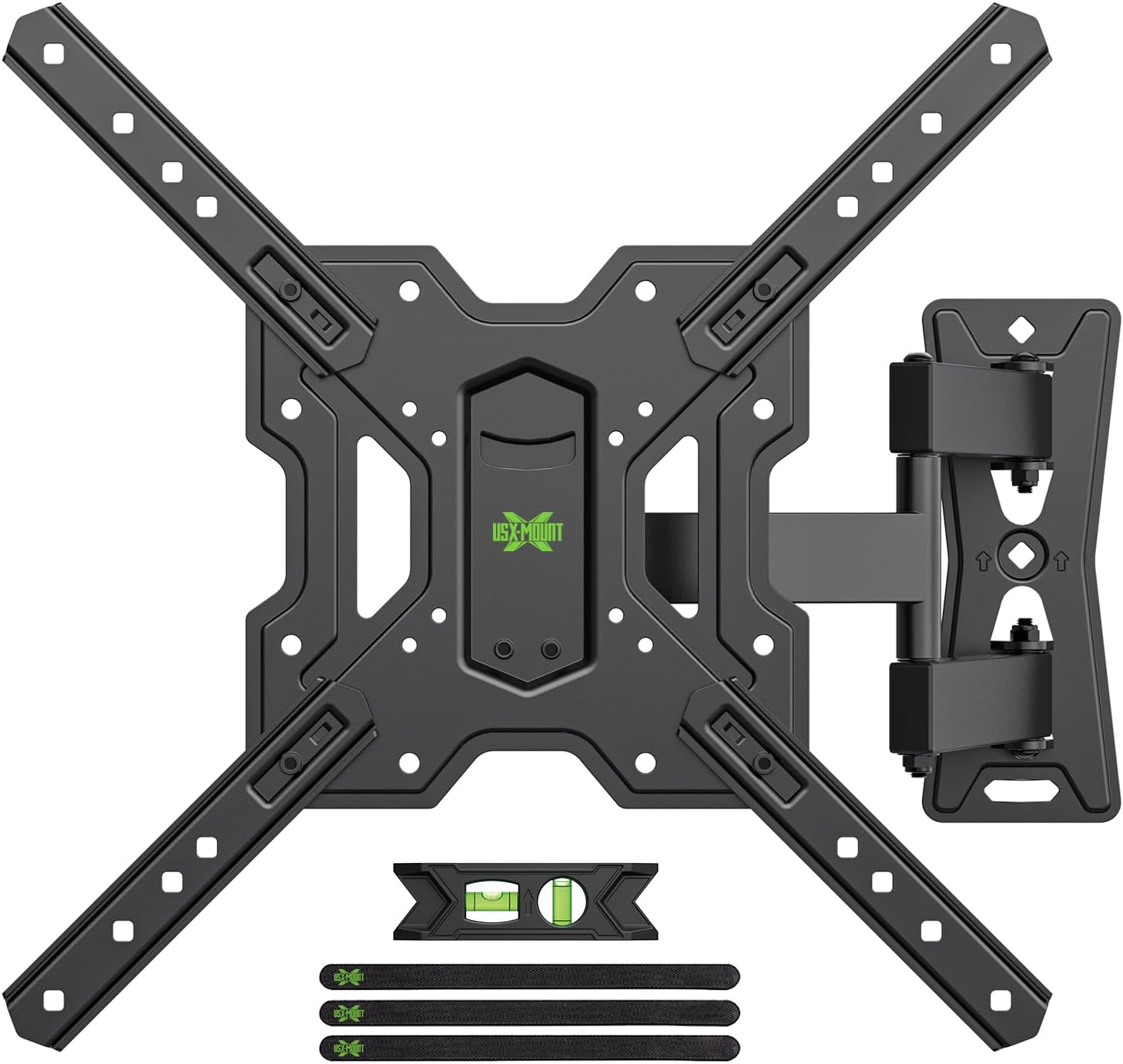
Малюнак 3.1: Скончанаview of the USX MOUNT TV Wall Mount and all included accessories, such as the main mount assembly, VESA extension arms, bubble level, and cable ties.
Уключанае абсталяванне:
- Зборка насценнай пласціны
- TV Plate (VESA Adapter)
- Various screws, washers, and spacers for TV attachment
- Lag bolts and concrete anchors for wall attachment
- Пузырьковый ўзровень
- Кабельныя сцяжкі
- Шасцігранны ключ
4. Тэхнічныя характарыстыкі
| Асаблівасць | Спецыфікацыя |
|---|---|
| Сумяшчальныя памеры тэлевізараў | 26-55 цаляў |
| Максімальная грузападымальнасць | 35 кг (77 фунтаў) |
| Сумяшчальнасць VESA | 75x75mm, 100x100mm, 100x200mm, 200x100mm, 200x200mm, 150x150mm, 200x300mm, 200x400mm, 300x200mm, 300x300mm, 400x200mm, 400x300mm, 400x400mm |
| Кут нахілу | ад +5° да -15° |
| Кут павароту | ±90° (у залежнасці ад памеру тэлевізара) |
| Рэгуляванне ўзроўню | ±4° |
| Адлегласць да Сцяна | Ад 70 мм (мін.) да 480 мм (макс.) |
| Матэрыял | сталь |
| Колер | Чорны |

Малюнак 4.1: VESA compatibility chart and maximum load capacity for the mount. Always check your TV's VESA pattern before installation.

Малюнак 4.2: Visual representation of various VESA mounting patterns supported by the mount, indicating horizontal and vertical screw hole distances.
5. Інструкцыя па ўстаноўцы
Крок 1: Прымацуйце падстаўку для тэлевізара да тэлевізара
- Асцярожна пакладзеце тэлевізар экранам уніз на мяккую чыстую паверхню, каб пазбегнуць пашкоджання экрана.
- Вызначце мантажныя адтуліны VESA на задняй панэлі тэлевізара.
- Выберыце адпаведныя шрубы, шайбы і распоркі з прадастаўленага камплекта мацавання, якія падыходзяць да мантажных адтулін вашага тэлевізара.
- Attach the TV plate (VESA adapter) to the back of your TV using the selected hardware. Ensure it is securely fastened but do not overtighten.
Крок 2: Прымацуеце насценную пласціну да сцяны
ВАЖНА: Determine your wall type before proceeding. This mount is suitable for wood stud walls and solid concrete walls.

Малюнак 5.1: Illustration of compatible wall types for installation: wood stud and solid concrete. Ensure your wall matches one of these types.
Для драўляных сцен з каркасамі:
- Use a stud finder to locate the edges and center of the wood stud. Mark the center of the stud.
- Position the wall plate at your desired height and use the integrated bubble level to ensure it is perfectly horizontal. Mark the pilot hole locations.
- Drill pilot holes into the center of the stud at the marked locations. The drill bit size should be 5/32" (4 mm) and the depth approximately 2.36" (60 mm).
- Attach the wall plate to the wall using the provided lag bolts. Tighten securely with a wrench.
For Solid Concrete Walls:
- Position the wall plate at your desired height and use the integrated bubble level to ensure it is perfectly horizontal. Mark the pilot hole locations.
- Drill pilot holes into the concrete at the marked locations. The drill bit size should be 3/8" (10 mm) and the depth approximately 2.36" (60 mm).
- Insert the concrete anchors into the drilled holes. Tap them gently with a hammer until they are flush with the wall surface.
- Attach the wall plate to the wall using the provided lag bolts. Tighten securely with a wrench.
Step 3: Hang and Secure TV to Wall Plate
- With assistance, carefully lift the TV (with the TV plate attached) and hook it onto the wall plate.
- Ensure the TV is properly seated and centered on the wall plate.
- Secure the TV to the wall plate using the safety screws or locking mechanisms provided. This prevents accidental dislodgement.
Відэа 5.1: A short demonstration of the installation process, including attaching the TV plate, mounting the wall plate, and hanging the TV. This video also briefly shows the leveling and tilting adjustments.
6. Інструкцыя па эксплуатацыі (рэгуляванне)
Your USX MOUNT TV Wall Mount offers various adjustments for optimal viewінж.
Рэгуляванне нахілу:
The mount allows for a tilt range of +5° to -15°. To adjust the tilt:
- Locate the tilt adjustment knobs on the TV plate.
- Loosen the knobs to allow the TV to tilt freely.
- Adjust the TV to your desired vertical angle.
- Tighten the knobs to secure the TV in place.
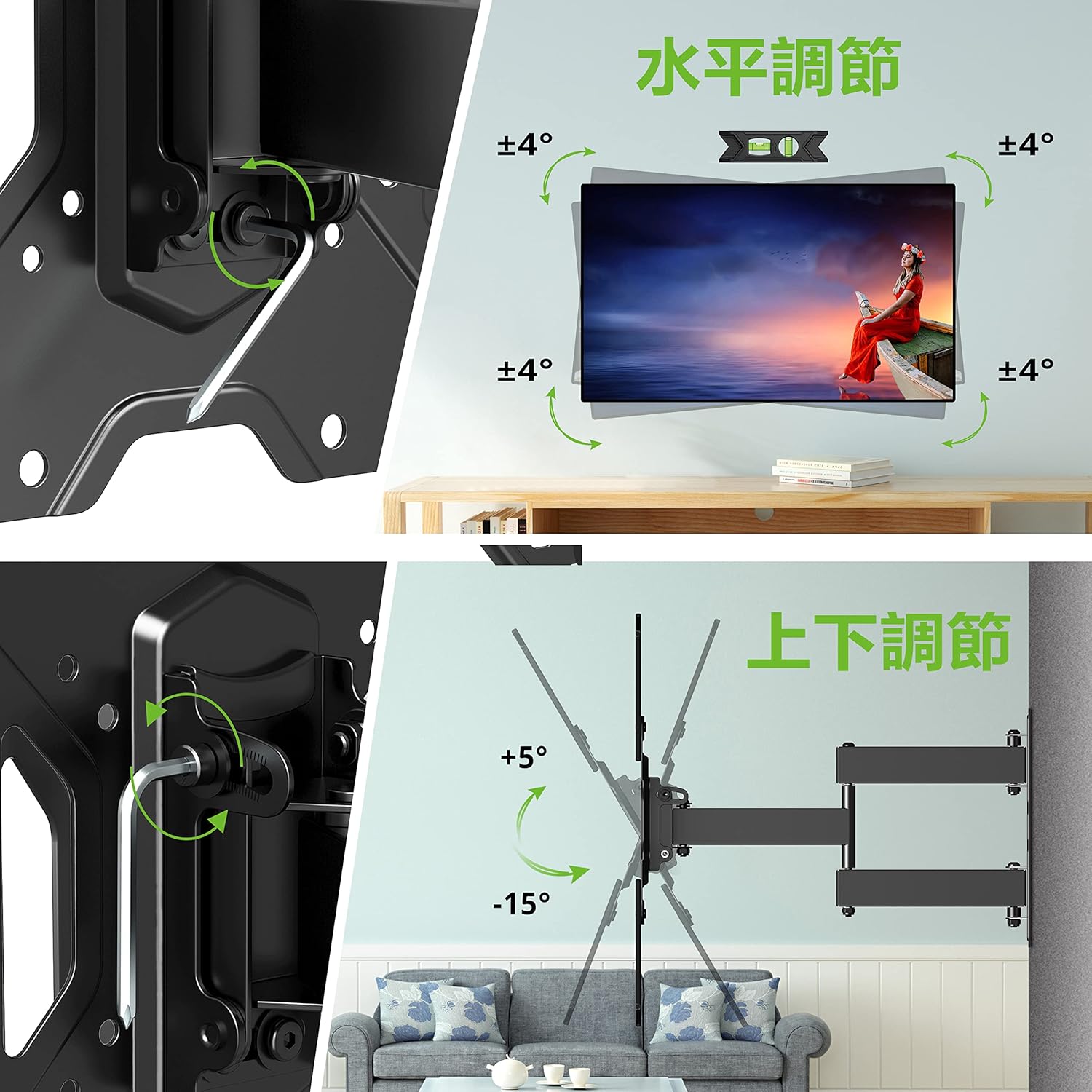
Малюнак 6.1: Visual guide for adjusting the horizontal level and vertical tilt of the TV. The top panel shows ±4° leveling, and the bottom panel shows +5° to -15° tilt.

Малюнак 6.2: This image illustrates the adjustable distance from the wall (70mm to 426mm) and the tilt angles (+5° backward, -15° forward) of the TV mount.
Рэгуляванне павароту:
The mount allows for a swivel of up to ±90° (left/right), depending on the size of your TV. To adjust the swivel:
- Gently push or pull the TV to the desired left or right angle.
- The friction joints will hold the TV in position.

Малюнак 6.3: This diagram demonstrates the ±90° swivel capability of the TV mount, allowing for flexible viewздымкі пад рознымі ракурсамі ў пакоі.
Рэгуляванне ўзроўню:
The mount allows for a level adjustment of ±4° after installation. To adjust the level:
- Use the provided hex key to loosen the leveling screws on the TV plate.
- Adjust the TV until it is perfectly level using the bubble level.
- Tighten the leveling screws to secure the TV in the desired horizontal position.
7. Тэхнічнае абслугоўванне
- Перыядычна правярайце ўсе шрубы і балты, каб пераканацца, што яны зацягнуты. Пры неабходнасці падцягвайце.
- Чысціце мацаванне мяккай сухой тканінай. Пазбягайце абразіўных ачышчальнікаў або растваральнікаў.
- Ensure cables are managed neatly using the provided cable ties to prevent strain or damage.
8. Выпраўленне непаладак
If you encounter any issues during or after installation, please refer to the following common solutions:
- Тэлевізар не параўноўваецца з роўным становішчам: Use the level adjustment feature as described in Section 6.
- Мацаванне адчуваецца свабодным: Recheck all wall and TV attachment points and tighten any loose fasteners. Ensure the wall type is appropriate for installation.
- Цяжкасці з рэгуляваннем нахілу/павароту: Ensure all adjustment knobs/screws are sufficiently loosened before attempting to move the TV.
If the problem persists, contact USX MOUNT customer support.
9. Гарантыя і падтрымка
USX MOUNT provides a 10-year quality guarantee from the date of purchase. This warranty covers manufacturing defects and ensures the product's structural integrity under normal use.
For any questions, missing parts, or support needs, please contact USX MOUNT customer service. Our team is dedicated to providing assistance and ensuring your satisfaction.
Кантактная інфармацыя: Please refer to the contact details provided with your purchase or visit the official USX MOUNT webсайт.