
FLEXISPOT EC5B-EU3+PR1206-Black
FLEXISPOT EC5 Standing Desk User Manual
Model: EC5B-EU3+PR1206-Black
Уводзіны
This manual provides comprehensive instructions for the assembly, operation, maintenance, and troubleshooting of your FLEXISPOT EC5 Standing Desk. Please read this manual thoroughly before use to ensure proper setup and safe operation.

Figure 1: FLEXISPOT EC5 Standing Desk with a black tabletop and black frame, set up in an office environment.
The FLEXISPOT EC5 is an electric height-adjustable desk designed to promote a healthier work environment by allowing seamless transitions between sitting and standing positions. It features a robust dual-motor system, a smart control panel with memory presets, and a durable construction.
Асноўныя характарыстыкі:
- Three-tier frame for height adjustment from 60.5cm to 125cm.
- Supports heavy loads up to 125kg (or 160kg with upgraded design).
- Smooth and quiet lifting speed of 38mm/second.
- Programmable digital memory with 3 preset options for customized heights.
- Collision protection system for enhanced safety.
- Durable MDF tabletop with scratch-resistant laminate.
Ўстаноўка і зборка
The FLEXISPOT EC5 Standing Desk is designed for straightforward assembly. All necessary tools are included, and detailed instructions are provided to guide you through the process, typically taking 20-25 minutes.
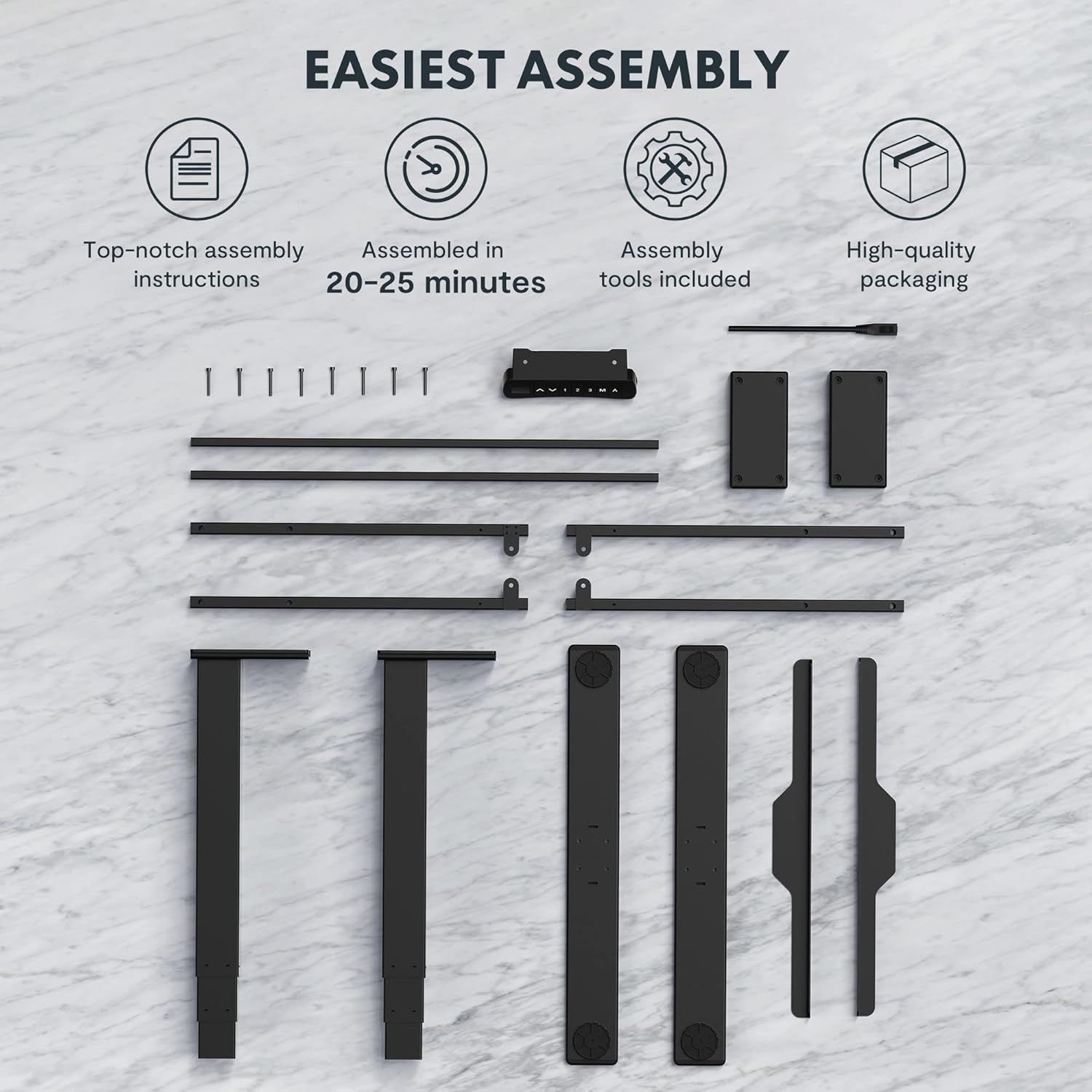
Figure 2: All components and tools required for assembling the FLEXISPOT EC5 Standing Desk.
Змест пакета:
- Desk Frame (legs, crossbars)
- Tabletop (if included in package)
- Control Panel with Cable
- Адаптар сілкавання і кабель
- Assembly Hardware (screws, bolts)
- Інструменты для зборкі (напрыклад, шасцігранны ключ)
- Кіраўніцтва па эксплуатацыі
Этапы зборкі (агульныяview):
- Распакуйце ўсе кампаненты і звярніцеся да спісу дэталяў.
- Assemble the desk legs to the crossbars, ensuring all connections are secure.
- Attach the assembled frame to the tabletop using the provided screws.
- Mount the control panel to the underside of the tabletop in an accessible location.
- Connect all cables (motor cables to control box, control panel cable to control box, power cable to control box).
- Ensure all cables are neatly managed and secured to prevent snagging.
- Усталюйце стол у патрэбным месцы, пераканаўшыся, што ён знаходзіцца на роўнай паверхні.
For detailed, step-by-step assembly instructions, please refer to the separate assembly guide included in your product packaging.
Інструкцыя па эксплуатацыі
The FLEXISPOT EC5 Standing Desk features an intuitive control panel for easy height adjustment and memory functions.

Figure 3: The EC5 control panel, featuring height display, up/down buttons, and memory presets.
Асноўная аперацыя:
- Рэгуляванне вышыні: Выкарыстоўвайце ▲ і ▼ arrows on the control panel to raise or lower the desk to your desired height. The current height will be displayed on the digital screen.
- Дыяпазон вышыні: The desk can be adjusted from a minimum height of 60.5 cm (23.8 inches) to a maximum height of 125 cm (49.2 inches).
Налады памяці:
The EC5 desk allows you to save up to three preferred height settings for quick adjustments.
- Захаванне перадусталёўкі:
- Адрэгулюйце стол на патрэбную вам вышыню.
- Націсніце "М" кнопка. На дысплеі з'явіцца «S-».
- Within 3 seconds, press the desired number button ("1", "2", або "3") to save the current height to that preset. The display will show "S-1", "S-2", or "S-3" to confirm.
- Выклік прэсета:
- Проста націсніце адпаведную лічбавую кнопку ("1", "2", або "3"). Стол аўтаматычна перамясціцца на захаваную вышыню.
Функцыя прадухілення сутыкненняў:
The desk is equipped with an anti-collision system. If the desk encounters an obstacle while moving up or down, it will automatically stop and reverse slightly to prevent damage. Ensure the area around the desk is clear during operation.
Тэхнічнае абслугоўванне
Regular maintenance ensures the longevity and optimal performance of your FLEXISPOT EC5 Standing Desk.
- Уборка: Працярыце паверхню стала і раму мяккай губкайamp тканінай. Пазбягайце абразіўных ачышчальнікаў або агрэсіўных хімічных рэчываў, якія могуць пашкодзіць пакрыццё.
- Кабельнае кіраванне: Periodically check that all cables are securely connected and neatly organized to prevent tangling or damage.
- Зашпількі: Occasionally check all screws and bolts to ensure they are tight. Retighten if necessary, but do not overtighten.
- Ёмістасць вагі: Do not exceed the maximum weight capacity of 125kg (or 160kg for upgraded models) to prevent damage to the motors and frame.
- Асяроддзе: Use the desk in a dry indoor environment. Avoid exposure to extreme temperatures or high humidity.
Ліквідацыю непаладак
If you encounter issues with your FLEXISPOT EC5 Standing Desk, refer to the following common problems and solutions:
| праблема | Магчымая прычына | Рашэнне |
|---|---|---|
| Стол не рухаецца. | Power cable disconnected, motor cable loose, overload. | Check all cable connections. Ensure power is supplied. Reduce weight on desk if overloaded. |
| Стол рухаецца няроўна або выдае незвычайныя гукі. | Uneven load, loose fasteners, obstruction. | Distribute weight evenly. Check and tighten all fasteners. Clear any obstructions. |
| Лічбавы дысплей паказвае код памылкі. | System malfunction, sensor issue. | Refer to the full troubleshooting guide in your product manual for specific error codes. Try unplugging the desk for 10 seconds and plugging it back in to reset. |
| Anti-collision feature is too sensitive or not working. | Sensor calibration needed, obstruction. | Ensure no constant obstructions. Consult the full manual for anti-collision sensitivity adjustment or reset procedures. |
If the problem persists after attempting these solutions, please contact FLEXISPOT customer support.
Тэхнічныя характарыстыкі прадукту
Detailed technical specifications for the FLEXISPOT EC5 Standing Desk:
| Асаблівасць | Спецыфікацыя |
|---|---|
| Марка | ФЛЕКСІСПОТ |
| Нумар мадэлі | EC5B-EU3+PR1206-Black |
| UPC | 810072812643 |
| Дыяпазон рэгулявання вышыні | 60.5 см - 125 см (23.8" - 49.2") |
| Хуткасць ўздыму | 38 мм/секунду |
| Максімальная грузападымальнасць | 125 кг (275 фунты) - Upgraded models may support up to 160 kg |
| Колькасць рухавікоў | 2 |
| Кадр Сtages | 3 |
| Панэль кіравання | Digital display with 3 memory presets |
| Tabletop Dimensions (H x W x D) | 2.5 х 140 х 70 см (0.98 цалі Г х 55.12 цалі Ш х 27.56 цаля В) |
| Матэрыял стальніцы | MDF with high pressure scratch resistant laminate |
| Базавы матэрыял | Engineered Wood (for tabletop), Metal (for frame) |
| Колер | Чорны |
| Патрабуецца зборка | так |
| Тып гарантыі | Абмежаваны |

Figure 4: The EC5 desk frame is designed for stability and can support significant weight, with some models supporting up to 160KG.
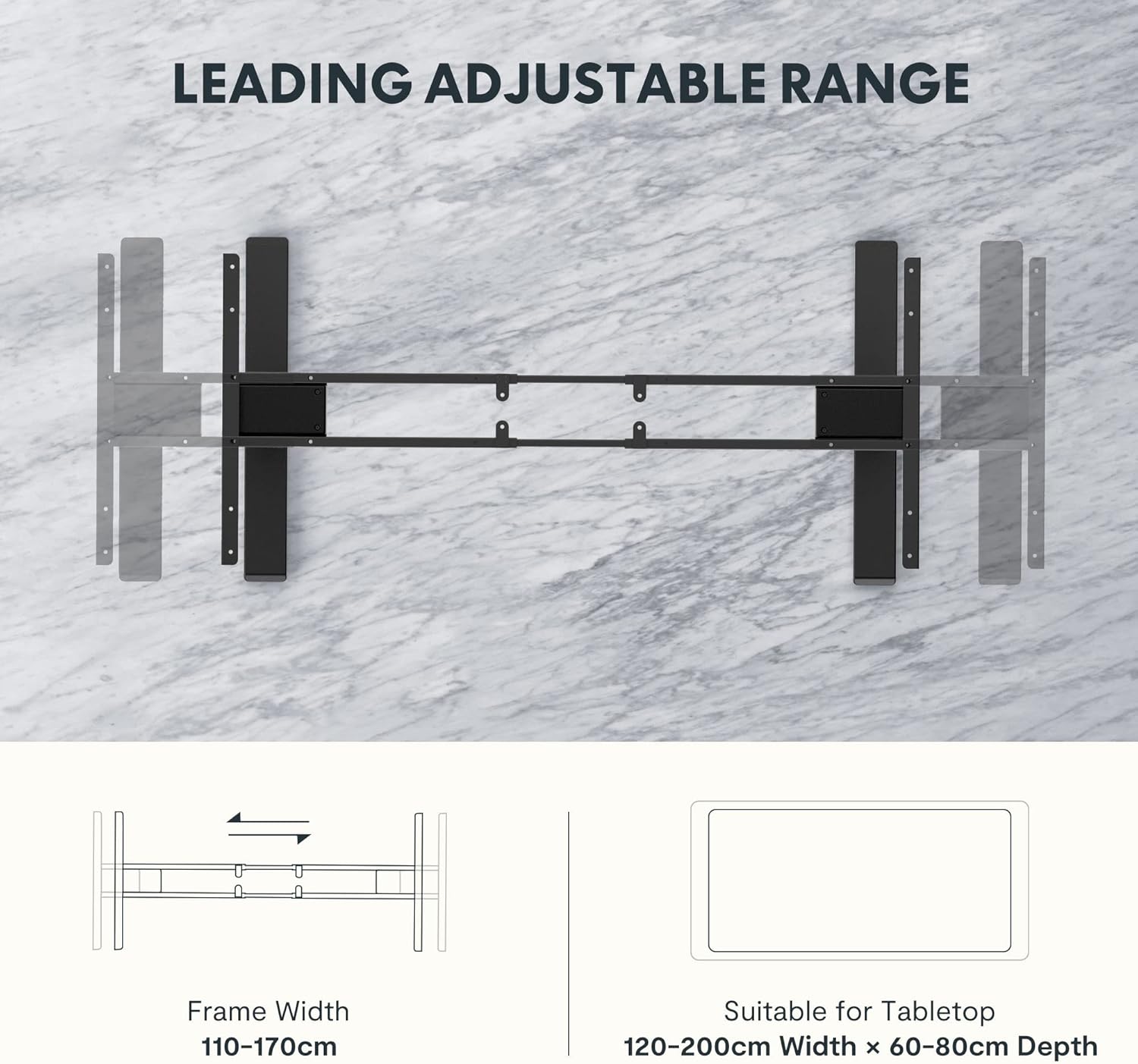
Figure 5: The adjustable frame accommodates various tabletop sizes, offering flexibility for different workspace needs.
Гарантыя і падтрымка
Інфармацыя аб гарантыі:
The FLEXISPOT EC5 Standing Desk comes with a Абмежаваная гарантыя. Please refer to the warranty card included with your product for specific terms, conditions, and duration of coverage. This warranty typically covers manufacturing defects in materials and workmanship under normal use.
Падтрымка кліентаў:
For technical assistance, warranty claims, or any questions regarding your FLEXISPOT EC5 Standing Desk, please contact FLEXISPOT customer support. You can typically find contact information on the FLEXISPOT official webсайце або на ўпакоўцы вашага прадукту.
When contacting support, please have your model number (EC5B-EU3+PR1206-Black) and proof of purchase readily available.