
Уводзіны
This manual provides instructions for the setup, operation, and maintenance of your YAOHUIMI replacement remote control for Fujitsu air conditioning units. This remote is designed to be compatible with a wide range of Fujitsu split type and wall-mounted inverter air conditioners, including models such as ASG18RBA-W, ABU22, AB14A, AB14R, AB18A, AB18R, AB24A, AB24R, and many others listed in the compatibility section.
Please read this manual carefully before using the remote control to ensure proper function and to maximize its lifespan.
Настройка
1. Устаноўка батарэі
Для пульта дыстанцыйнага кіравання патрэбныя дзве батарэйкі тыпу AAA (не ўключаны ў камплект). Каб усталяваць іх, выканайце наступныя дзеянні:
- Знайдзіце крышку батарэйнага адсека на задняй частцы пульта дыстанцыйнага кіравання.
- Зрушыце вечка ўніз або націсніце на зашчапку і падніміце яго, каб адкрыць.
- Insert two new AAA batteries, ensuring the positive (+) and negative (-) terminals match the diagrams inside the compartment.
- Зачыніце вечка батарэйнага адсека, засунуўшы яго на месца да пстрычкі.

Image: Back of the remote control with the battery compartment indicated.
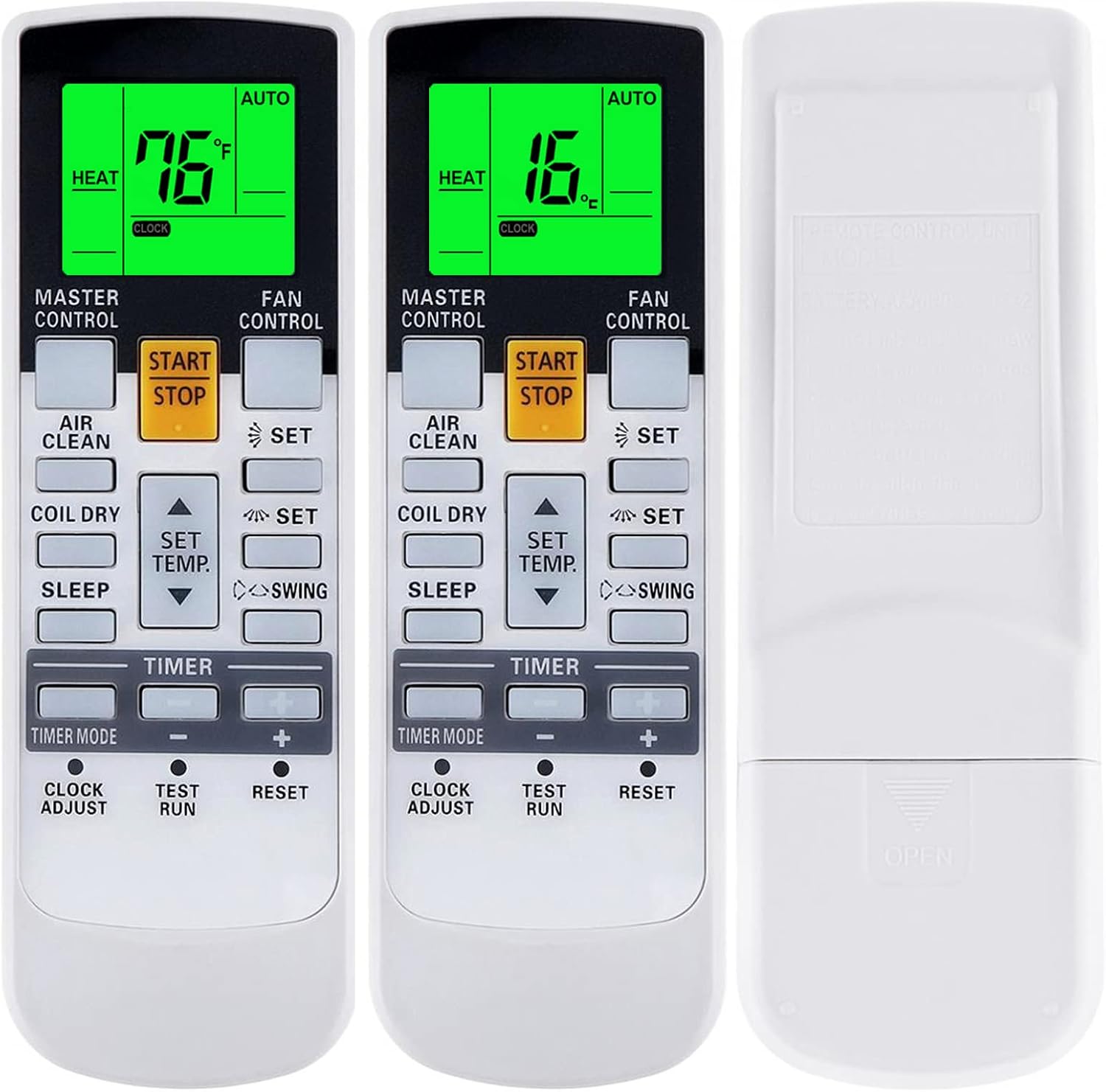
Выява: спераду і ззаду views of the remote, showing how to open the battery cover.
2. Першапачатковае выкарыстанне
This replacement remote control is pre-programmed and generally does not require pairing. Once batteries are installed, it should be ready for immediate use with compatible Fujitsu air conditioning units. Point the remote directly at the indoor unit's receiver.
Інструкцыя па эксплуатацыі
Азнаёмцеся з кнопкамі і іх функцыямі:
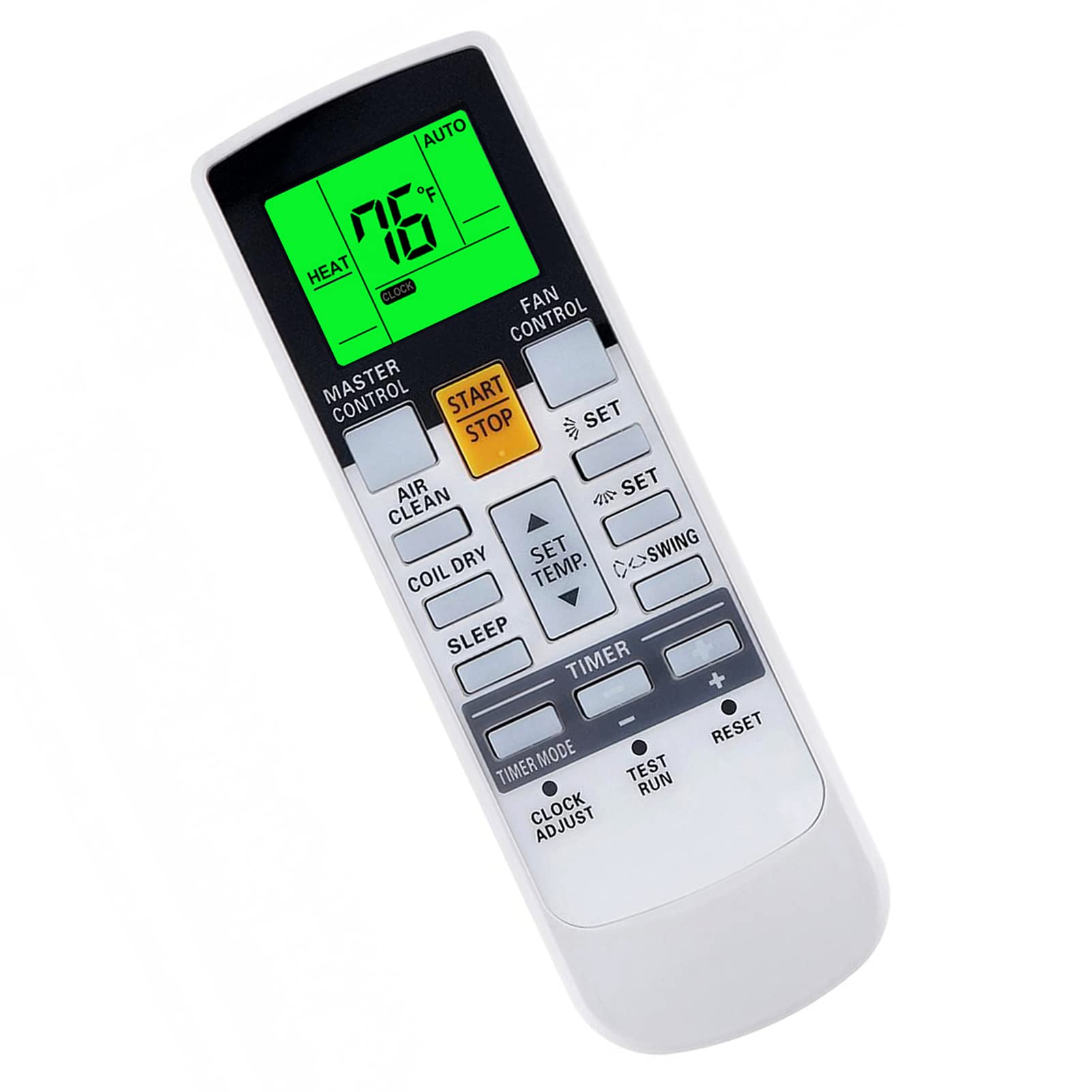
Выява: Зверхуview of the remote control's buttons and display.
- СТАРТ / СТОП: Powers the air conditioner ON or OFF.
- ГАЛАЎНЫ КАНТРОЛЬ: Cycles through operating modes (e.g., Auto, Cool, Dry, Heat, Fan).
- КІРАВАННЕ ВЕНТЫЛЯТАРАМ: Рэгулюе хуткасць вентылятара (напрыклад, аўтаматычная, нізкая, сярэдняя, высокая).
- SET TEMP. (Up/Down Arrows): Рэгулюе патрэбную тэмпературу.
- АРЭЛІ: Кіруе функцыяй павароту жалюзі.
- АЧЫСТКА ПАВЕТРА: Activates or deactivates the air purification function (if available on your AC unit).
- COIL DRY: Initiates the coil dry function to prevent mold growth.
- СОН: Актывуе рэжым сну для камфортнай працы ў начны час.
- РЭЖЫМ ТАЙМЕРА: Sets or cancels timer functions.
- НАЛАДКА ГАДЗІННІКА: Усталёўвае бягучы час на дысплеі пульта дыстанцыйнага кіравання.
- TEST RUN: Толькі для службовага выкарыстання.
- Скінуць: Resets the remote control to factory default settings.
Асаблівасці
- Fahrenheit and Celsius Display: The remote control can display temperature in both Fahrenheit (°F) and Celsius (°C). This is typically toggled by a specific button or a combination of buttons (refer to your AC unit's manual if unsure, or try pressing the 'SET' button while adjusting temperature).
- Зялёная падсветка: The display features a green backlight for easy operation in low-light conditions. This backlight activates automatically when buttons are pressed.

Image: Remote display showing temperature in both Fahrenheit and Celsius, highlighting the green backlight.
Advanced Functions (If Applicable)
Some Fujitsu AC units support advanced heating or economy functions. These functions are only available if your original remote control had corresponding buttons. To activate these, press and hold the indicated button for approximately 4 seconds:
- 10°C АПЯКЛЕННЕ: Maintains a minimum temperature of 10°C (50°F) to prevent freezing.
- 50°F HEAT: Same as 10°C HEAT.
- MINI.HEAT: A low-power heating mode.
- ЭКАНОМІКА: Operates the unit in an energy-saving mode.

Image: Instructions for activating advanced heating and economy functions by holding a button.
Тэхнічнае абслугоўванне
Замена батарэі
Replace batteries when the remote control's display becomes dim or when the remote no longer responds to button presses. Always replace both batteries at the same time with new AAA batteries. Do not mix old and new batteries, or different types of batteries.
Уборка
Працірайце пульт дыстанцыйнага кіравання мяккай сухой тканінай. Не выкарыстоўвайце вадкія ачышчальнікі, спрэі або абразіўныя матэрыялы, бо яны могуць пашкодзіць паверхню пульта дыстанцыйнага кіравання або ўнутраныя кампаненты.
Ліквідацыю непаладак
- Пульт не адказвае:
- Праверце, ці правільна ўсталяваныя батарэйкі з захаваннем палярнасці.
- Заменіце старыя батарэі на новыя.
- Ensure there are no obstructions between the remote control and the air conditioner's indoor unit.
- Make sure you are within the effective operating range (typically 8 meters or 26 feet).
- Дысплей цьмяны або пусты:
- Звычайна гэта сведчыць аб нізкім узроўні зараду батарэі. Заменіце батарэі.
- Кандыцыянер не выконвае належную функцыю:
- Verify that the air conditioner unit is powered on and not in standby mode.
- Confirm that the selected mode (Cool, Heat, Fan, etc.) and temperature settings are appropriate.
- Ensure the remote control is compatible with your specific Fujitsu AC model. While this remote is broadly compatible, some very old or very new models might have unique protocols.
Тэхнічныя характарыстыкі
| Марка | YAOHUIMI |
| Нумар мадэлі | A420220331-BEIGUANG-99 |
| Сумяшчальныя прылады | Fujitsu ASG18RBA-W, ABU22, AB14A, AB14R, AB18A, AB18R, AB24A, AB24R, and many other Fujitsu Split Type and Wall Mounted Inverter Air Conditioners (refer to product description for extensive list) |
| Тэхналогія падлучэння | Інфрачырвоны |
| Тып кантролера | Кіраванне кнопкамі |
| Асаблівасці | Ergonomic design, Fahrenheit/Celsius display, Green Backlight |
| Крыніца харчавання | 2 х ААА батарэі (не ўключаны) |
Інфармацыя аб гарантыі
Please refer to the seller's return policy and any specific warranty information provided at the time of purchase. Typically, replacement remote controls come with a limited warranty against manufacturing defects. Keep your proof of purchase for any warranty claims.
Падтрымка кліентаў
If you encounter any issues that cannot be resolved using the troubleshooting guide, or if you have questions regarding compatibility or functionality, please contact the seller or manufacturer directly through the platform where the purchase was made. Provide your order number and the model number of your remote control (A420220331-BEIGUANG-99) for faster assistance.