
1. Уводзіны
This manual provides essential information for the installation, operation, and maintenance of your NVIDIA GeForce RTX 3090 Ti Founders Edition graphics card. Please read this manual thoroughly before proceeding with installation to ensure proper functionality and to prevent damage.
2. Што ў скрынцы
Verify that all components are present and in good condition upon unboxing:
- NVIDIA GeForce RTX 3090 Ti Founders Edition Graphics Card
- Кабель адаптара харчавання
3. Прадукт скончыўсяview
The NVIDIA GeForce RTX 3090 Ti Founders Edition is a high-performance graphics processing unit designed for demanding computing tasks, including gaming, content creation, and professional applications. It features advanced cooling solutions and multiple display outputs.

Малюнак 3.1: Пад вуглом view of the NVIDIA GeForce RTX 3090 Ti Founders Edition graphics card, showcasing its dual-fan design and sleek black finish.

Малюнак 3.2: Задняя частка view of the graphics card, showing the multiple display output ports (HDMI and DisplayPort) and the ventilation grille.
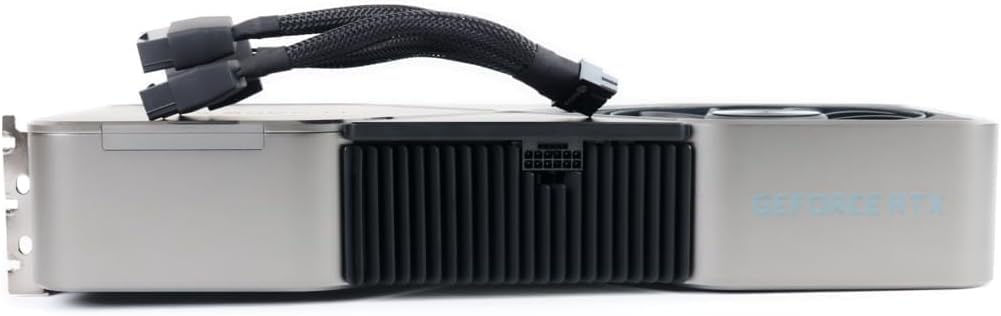
Малюнак 3.3: бок view of the graphics card with the 12-pin power adapter cable connected, illustrating the power input location.
4. Настройка і ўстаноўка
Before installation, ensure your system's power supply unit (PSU) meets the recommended wattage for the RTX 3090 Ti. It is recommended to consult your motherboard's manual for PCIe slot compatibility and proper installation procedures.
- Сістэма адключэння харчавання: Цалкам выключыце кампутар і адключыце кабель харчавання ад разеткі.
- Адкрыць корпус ПК: Каб атрымаць доступ да матчынай платы, зніміце бакавую панэль корпуса кампутара.
- Знайдзіце слот PCIe: Знайдзіце даступны слот PCIe x16 на матчынай плаце.
- Зняць вечкі слотаў: Remove the necessary expansion slot covers from the back of your PC case that align with the chosen PCIe slot.
- Устаўце відэакарту: Carefully align the graphics card with the PCIe slot and press down firmly until it is securely seated. Ensure the retention clip on the PCIe slot locks into place.
- Бяспечная карта: Secure the graphics card to the PC case using screws or the case's retention mechanism.
- Падключыце харчаванне: Connect the included power adapter cable to the graphics card's 12-pin power connector. Then, connect the other end(s) of the adapter cable to your PSU's PCIe power connectors (typically 8-pin or 6+2-pin). Ensure all connections are firm.
- Зачыніць корпус ПК: Заменіце бакавую панэль корпуса кампутара.
- Падключэнне дысплея: Connect your monitor(s) to the display output ports (HDMI or DisplayPort) on the graphics card.
- Уключэнне і ўстаноўка драйвераў: Reconnect the power cable and power on your system. Once the operating system loads, download and install the latest graphics drivers from the official NVIDIA webсайт (nvidia.com/drivers).
5. Інструкцыя па эксплуатацыі
Once installed and drivers are updated, your NVIDIA GeForce RTX 3090 Ti Founders Edition is ready for use. The card will automatically manage its performance based on the demands of applications and games. For optimal performance, ensure your operating system and games are up-to-date.
- Панэль кіравання NVIDIA: Access the NVIDIA Control Panel (usually found in your system tray or desktop right-click menu) to customize display settings, 3D settings, and other graphics-related preferences.
- Вопыт GeForce: Install NVIDIA GeForce Experience for automatic driver updates, game optimization, and features like ShadowPlay for recording gameplay.
- Маніторынг тэмпературы: Monitor the GPU temperature using third-party software to ensure it operates within safe limits, especially during prolonged high-load activities.
6. Тэхнічнае абслугоўванне
Рэгулярнае тэхнічнае абслугоўванне дапамагае забяспечыць даўгавечнасць і аптымальную прадукцыйнасць вашай відэакарты.
- Выдаленне пылу: Periodically clean dust from the fans and heatsink using compressed air. Ensure the system is powered off and unplugged before cleaning. Hold the fan blades gently to prevent them from spinning rapidly during cleaning.
- Абнаўленні драйвераў: Keep your graphics drivers updated to the latest version from the official NVIDIA webсайт.
- Паток паветра ў сістэме: Забяспечце добрую цыркуляцыю паветра ўнутры корпуса ПК, каб прадухіліць назапашванне цяпла.
7. Выпраўленне непаладак
Калі ў вас узніклі праблемы, звярніцеся да наступных распаўсюджаных крокаў па ліквідацыі непаладак:
- Няма вываду на дысплей:
- Пераканайцеся, што відэакарта цалкам усталявана ў слот PCIe.
- Verify all power cables are securely connected to the graphics card and PSU.
- Check that the monitor cable is connected to the graphics card, not the motherboard's integrated graphics port.
- Паспрабуйце іншы кабель дысплея або манітор.
- Праблемы з драйверамі / збоі:
- Perform a clean installation of the latest NVIDIA drivers. Use Display Driver Uninstaller (DDU) in Safe Mode to remove old drivers before installing new ones.
- Праверце на наяўнасць канфліктаў з іншым праграмным забеспячэннем.
- Перагрэў:
- Ensure proper case airflow and fan operation.
- Clean dust from the graphics card's heatsink and fans.
- Verify ambient room temperature is not excessively high.
- Праблемы з прадукцыйнасцю:
- Ensure your system meets the minimum requirements for the applications/games you are running.
- Праверце фонавыя працэсы, якія спажываюць рэсурсы сістэмы.
- Verify that the graphics card is running at its expected clock speeds (can be monitored with third-party tools).
8. Тэхнічныя характарыстыкі
Key technical specifications for the NVIDIA GeForce RTX 3090 Ti Founders Edition:
| Асаблівасць | Дэталь |
|---|---|
| Марка | NVIDIA |
| Нумар мадэлі | 9001G1362505000 |
| Графічны супрацэсар | NVIDIA GeForce RTX 3090 |
| Памер аператыўнай памяці відэакарты | 24 ГБ |
| Максімальны дазвол экрана | 3840x2160 |
| Інтэрфейс вываду відэа | HDMI (and DisplayPort, implied by images) |
| Вага прадмета | 7.08 фунта |
| Памеры прадукту (ДxШxВ) | 12 х 4 х 0.1 цалі |
9. Гарантыя і падтрымка
For warranty information and technical support, please refer to the official NVIDIA webсайт або звярніцеся ў службу падтрымкі кліентаў. Захоўвайце пацвярджэнне пакупкі для прэтэнзій па гарантыі.
- Планы абароны: Additional protection plans may be available from your retailer. For example, a 4-Year Protection Plan or a monthly Complete Protect plan.
- Палітыка вяртання: Standard return policies typically allow for refund/replacement within 30 days of purchase, subject to retailer terms.
- Афіцыйная падтрымка: Наведайце nvidia.com/support for drivers, FAQs, and contact options.