
Ysametp M10
Кіраўніцтва карыстальніка міні-праектара Ysametp M10
1080P Full HD Supported Portable Video Projector
Уводзіны
Дзякуй за пакупкуasing the Ysametp Mini Projector M10. This portable video projector is designed to provide a high-quality home theater experience with its 1080P Full HD support and 10000 Lux LED light source. It features dual built-in stereo speakers with an SRS sound system for immersive audio. Its compact size and multi-connection capabilities make it ideal for various entertainment and presentation needs. Please read this manual thoroughly before operating the projector to ensure proper use and maintenance.
Інфармацыя па бяспецы
Каб забяспечыць бяспечную працу і падоўжыць тэрмін службы праектара, калі ласка, выконвайце наступныя меры бяспекі:
- Не блакуйце вентыляцыйныя адтуліны. Забяспечце дастатковую цыркуляцыю паветра вакол праектара, каб пазбегнуць перагрэву.
- Не падвяргайце праектар уздзеянню дажджу або вільгаці, каб пазбегнуць паражэння электрычным токам або пажару.
- Не адкрывайце праектар casing. Па ўсіх пытаннях тэхнічнага абслугоўвання звяртайцеся да кваліфікаванага персаналу.
- Выкарыстоўвайце толькі адаптар сілкавання, які пастаўляецца з праектарам.
- Размясціце праектар на ўстойлівай, роўнай паверхні, каб прадухіліць яго падзенне.
- Пазбягайце прамога траплення ў вочы аб'ектыва праектара падчасamp уключаны.
- Адключайце праектар ад разеткі падчас навальніцы або калі ён не выкарыстоўваецца працяглы час.
Змест пакета
Калі ласка, праверце змесціва пакета пасля распакавання:
- 1 x Ysametp Mini Projector M10
- 1 х кабель HDMI
- 1 x 3-in-1 AV Line
- 1 х Шнур харчавання
- 1 х штатыў
- 1 x Drawstring Backpack
- 1 х пульт дыстанцыйнага кіравання (батарэі не ўключаны)
- 1 х Кіраўніцтва карыстальніка

Прадукт скончаныview
Familiarize yourself with the projector's components and connection ports.

Парты ўводу/вываду:
- Порт HDMI: Connect to devices like TV sticks, laptops, gaming consoles.
- Порт USB: Падключыце USB-назапашвальнікі для прайгравання медыяфайлаў.
- Слот TF карты: Insert TF cards for media playback.
- Порт VGA: Connect to computers or laptops.
- AV-порт: Connect to older devices like DVD players using the 3-in-1 AV cable.
- 3.5 мм аўдыяраз'ём: Падключыце знешнія навушнікі або дынамікі.
Настройка
1. Placement and Screen Size
Position the projector on a flat, stable surface. The projection size can range from 32 inches to 200 inches, with an optimal projection distance between 3.6 feet and 16.4 feet.

2. Падключэнне сілкавання
Connect the supplied power cord to the projector's power input and then plug it into a power outlet.
3. Рэгуляванне фокусу і трапецыяпадобных скажэнняў
After powering on, adjust the focus and keystone knobs located on top of the projector to achieve a clear and rectangular image. The focus ring adjusts image sharpness, while the keystone correction corrects trapezoidal distortion if the projector is not perfectly perpendicular to the screen.
Інструкцыя па эксплуатацыі
1. Уключэнне/выключэнне
- Каб уключыць: Націсніце кнопку харчавання на праектары або пульце дыстанцыйнага кіравання.
- Каб выключыць: Press the power button again. The projector will go through a shutdown sequence.
2. Выбар крыніцы ўводу
Use the "Source" button on the remote control or the projector's control panel to select the desired input source (HDMI, USB, TF, VGA, AV).
3. Падключэнне прылад
- HDMI: Connect an HDMI cable from your device (e.g., TV Stick, laptop, game console) to the projector's HDMI port.
- USB/TF-карта: Insert a USB drive or TF card into the respective port. The projector will automatically detect the media or prompt you to select it.
- VGA: Connect a VGA cable from your PC/laptop to the projector's VGA port.
- АВ: Use the provided 3-in-1 AV cable to connect to devices with AV output.
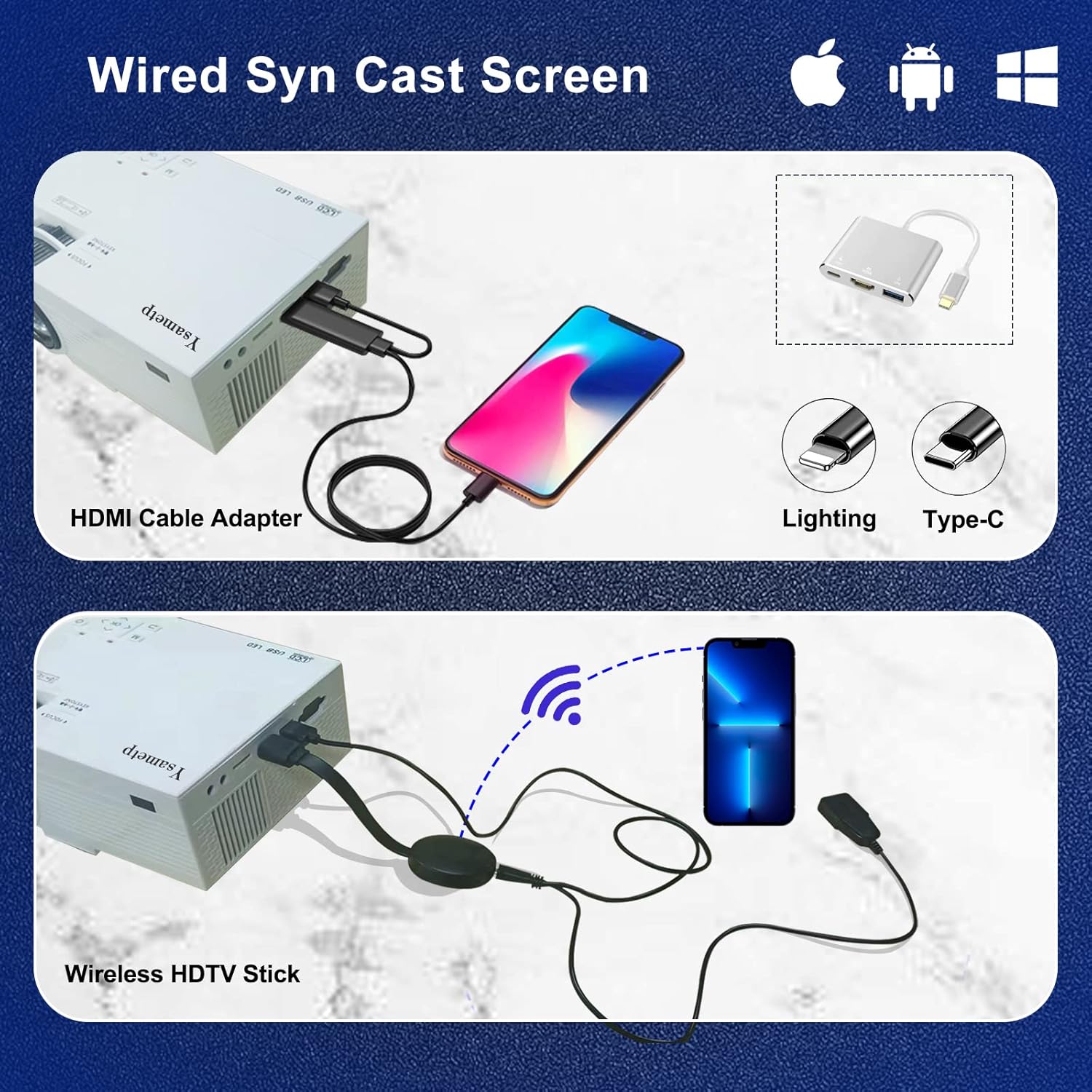
4. Wired Screen Mirroring (for Smartphones)
To mirror your smartphone screen, you will need an HDMI adapter (e.g., Lightning to HDMI for iPhone, USB-C to HDMI for Android) or a Miracast dongle/TV stick (like Roku, Fire TV Stick).

5. Аўдыёвыхад
The projector has dual built-in stereo speakers. For external audio, connect headphones or external speakers to the 3.5mm audio jack.

Тэхнічнае абслугоўванне
1. Уборка
- Аб'ектыў: Выкарыстоўвайце мяккую тканіну без ворса, спецыяльна прызначаную для аптычных лінзаў. Не выкарыстоўвайце абразіўныя ачышчальныя сродкі.
- Casing: Wipe the projector's exterior with a soft, dry cloth. Do not use liquid or aerosol cleaners.
- Вентыляцыя: Regularly check and clean the ventilation openings to prevent dust buildup, which can affect cooling performance.
2. Захоўванне
When not in use, store the projector in a cool, dry place, away from direct sunlight and extreme temperatures. Use the provided drawstring backpack for protection during storage or transport.
3. LED Lifespan
The built-in LED light source is designed to support up to 55,000 hours of use, providing long-lasting performance.
Ліквідацыю непаладак
| праблема | Магчымая прычына / рашэнне |
|---|---|
| Няма выявы на экране. |
|
| Выява размытая. |
|
| Выява мае форму трапецыі. |
|
| Няма гуку. |
|
| Не працуе пульт дыстанцыйнага кіравання. |
|
Тэхнічныя характарыстыкі
| Асаблівасць | Дэталь |
|---|---|
| Марка | Ісаметп |
| мадэль | М10 |
| Тэхналогія адлюстравання | ВК |
| Роднае дазвол | 1920 x 1080 Pixels (Full HD Supported) |
| Яркасць выявы | 11000 люкс |
| Каэфіцыент кантраснасці выявы | 10000:1 |
| Суадносіны бакоў | 4:3 |
| Памер праекцыі | 32 - 200 цаляў |
| Адлегласць праекцыі | 3.6ft - 16.4ft |
| Тэрмін службы святлодыёда | 55,000 гадзіны |
| Узровень шуму | 31 дБ |
| Ватtage | 60 ват |
| Абсталяванне інтэрфейсу | VGA, USB, HDMI, 3.5mm Audio, TF Card |
| Памеры (Д х Ш х У) | 23.88 х 15.49 х 8.13 см |
| Вага | 975.22 г (прыблізна 2.15 фунт) |
Гарантыя і падтрымка
Ysametp provides a 3-гадовая гарантыя на прадукт for the Mini Projector M10.
If you encounter any problems or have questions regarding your projector, please do not hesitate to contact our customer support. Refer to the contact information provided on the product packaging or the official Ysametp webсайт для дапамогі.