
1. Уводзіны
This manual provides detailed instructions for the safe installation, operation, and maintenance of your TroposAir Fusion 66-inch Smart Ceiling Fan. Please read all instructions carefully before beginning installation and retain this manual for future reference. This ceiling fan is designed for both indoor and outdoor (damp-rated) use, featuring a high-efficiency DC motor and smart control capabilities.
2. Інфармацыя па бяспецы
Заўсёды выконвайце асноўныя меры бяспекі пры ўсталёўцы і эксплуатацыі электрапрыбораў, каб знізіць рызыку пажару, паражэння электрычным токам і траўмаў.
- Перад устаноўкай або абслугоўваннем пераканайцеся, што электраэнергія адключана з дапамогай аўтаматычнага выключальніка.
- Уся праводка павінна адпавядаць нацыянальным і мясцовым электрычным нормам. Калі вы не знаёмыя з праводкай, звярніцеся да кваліфікаванага электрыка.
- Мантажная канструкцыя павінна быць здольная вытрымаць вагу вентылятара (прыблізна 35 фунта).
- Не эксплуатуйце вентылятар з пашкоджанымі лапаткамі або корпусам.
- Трымайце рукі, адзенне і іншыя прадметы далей ад лапатак вентылятара падчас яго працы.
- Гэты вентылятар damp-rated, suitable for covered outdoor areas, but not for direct exposure to water.
3. Змесціва ўпакоўкі
Перад пачаткам усталёўкі пераканайцеся, што ўсе кампаненты наяўныя:
- Матор рухавіка вентылятара
- Fan Blades (10 count)
- Падвесны кранштэйн
- Уніз
- Пульт дыстанцыйнага кіравання з насценным мацаваннем
- Набор фурнітуры (шрубы, шайбы, гайкі)
- Кіраўніцтва па эксплуатацыі
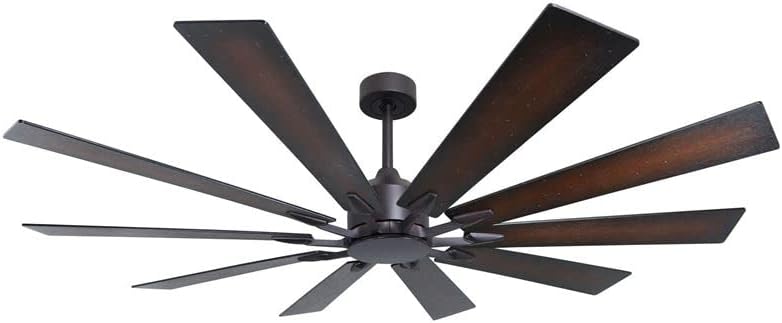
Image 1: TroposAir Fusion 66-inch Smart Ceiling Fan, Oil Rubbed Bronze finish. This image displays the fan's central motor housing, downrod, and ten long, dark-finished blades extending outwards, characteristic of its windmill design.
4. Настройка і ўстаноўка
Professional installation is recommended for optimal safety and performance. This fan supports dual-mount installation (standard or angled ceiling).
- Мантаж падвеснага кранштэйна: Secure the hanging bracket to a ceiling joist or an outlet box rated for fan support. Ensure all screws are tightened securely.
- Assembling the Downrod: Insert the downrod through the canopy and coupling, securing it with the provided pin and clip.
- Падключэнне вентылятара: Connect the fan's electrical wires to the household wiring according to the wiring diagram provided in the separate installation guide. Ensure all connections are secure with wire nuts.
- Падключэнне вентылятарнага рухавіка: Carefully lift the fan motor assembly and hang it onto the hanging bracket.
- Ўстаноўка лязоў: Attach each of the ten fan blades to the motor housing using the unique blade mounting system and screws provided. Ensure all blades are firmly secured.
- Замацаванне навеса: Slide the canopy up and secure it to the hanging bracket, covering the wiring connections.
- Уключэнне і тэст: Restore power at the circuit breaker and test the fan's basic functions using the remote control.
- Smart Feature Setup (WiFi): Refer to the separate smart control guide for instructions on connecting your fan to your home WiFi network and integrating with smart home systems.
5. Інструкцыя па эксплуатацыі
The TroposAir Fusion fan is controlled via the included remote control and can also be integrated with smart home systems via WiFi.
Функцыі дыстанцыйнага кіравання:
- Уключэнне/выключэнне харчавання: Націсніце кнопку харчавання, каб уключыць або выключыць вентылятар.
- Хуткасць вентылятара: Выкарыстоўвайце кнопкі хуткасці, каб пераключацца паміж 6 хуткасцямі вентылятара.
- Зваротная функцыя: Press the reverse button to change the direction of blade rotation. This is useful for seasonal air circulation (downward airflow for cooling in summer, upward airflow for heat distribution in winter).
- Кіраванне святлом: If a light kit is installed (sold separately), use the light button to turn the light on/off and adjust brightness.
- Праграмуемыя функцыі: The remote may include programmable timer functions. Refer to the remote's specific instructions for details.
Smart Control (WiFi):
Once connected to your home WiFi network, the fan can be controlled and programmed through a compatible smart home application. This allows for advanced scheduling, voice control, and integration with other smart devices.
6. Тэхнічнае абслугоўванне
Рэгулярнае тэхнічнае абслугоўванне забяспечвае аптымальную прадукцыйнасць і даўгавечнасць вашага потолочного вентылятара.
- Уборка: Перыядычна працірайце лопасці вентылятара і корпус рухавіка мяккай анучайamp тканіна. Не выкарыстоўвайце абразіўныя ачышчальнікі або растваральнікі. Перад чысткай пераканайцеся, што электрычнасць адключана.
- Баланс ляза: If the fan wobbles, check that all blade screws are tight and that blades are not warped. A balancing kit (not included) may be used if necessary.
- змазка: The fan motor features permanently lubricated and sealed bearings, requiring no additional lubrication.
- Электрычныя злучэнні: Annually inspect all electrical connections for tightness.
7. Выпраўленне непаладак
Калі ў вас узніклі праблемы з вентылятарам, выканайце наступныя распаўсюджаныя дзеянні па ліквідацыі непаладак:
- Fan Does Not Start:
- Check that power is supplied to the fan at the circuit breaker.
- Пераканайцеся, што ўсе правадныя злучэнні надзейныя.
- Verify remote control batteries are fresh and correctly inserted.
- Fan Makes Noise:
- Check that all motor housing screws are tight.
- Ensure blade attachment screws are secure.
- Verify the canopy is not touching the ceiling.
- Ваганні вентылятара:
- Ensure the hanging bracket is securely mounted.
- Check that all blade screws are tightened evenly.
- Verify blades are not bent or damaged.
- Пульт дыстанцыйнага кіравання не працуе:
- Заменіце батарэі.
- Ensure the remote is within range of the fan's receiver.
- Re-pair the remote with the fan if necessary (refer to remote instructions).
8. Тэхнічныя характарыстыкі
| Асаблівасць | Спецыфікацыя |
|---|---|
| Марка | TroposAir |
| Назва мадэлі | Фьюжн |
| Колер | Бронза, нацёртая алеем |
| Памер | 66 inches (Blade Length) |
| Памеры прадукту | 66" Г x 66" Ш x 17.5" У |
| Колькасць лязоў | 10 |
| Тып рухавіка | High Efficiency DC-Motor |
| Хуткасці вентылятара | 6 |
| Метад кантролю | Remote, WiFi (Smart Feature) |
| Выкарыстанне ў памяшканні/на вуліцы | Damp Rated (Indoor/Covered Outdoor) |
| тtage | 120 В (пастаянны ток) |
| Ватtage | 45.00 Вт |
| Ёмістасць паветранага патоку | 10494 кубічных футаў у хвіліну |
| Асаблівасці | Programmable, WiFi, Reverse Function |
| Уключаныя кампаненты | Downrod, Fan Blades, Fan Motor, Hanging Bracket, Remote |
9. Гарантыя і падтрымка
For warranty information and technical support, please refer to the documentation included with your purchase or contact TroposAir customer service directly. Keep your proof of purchase for warranty claims.
вытворца: TroposAir
UPC: 840246111241