
1. Уводзіны
Thank you for choosing the Pantum BP5100DN Monochrome Laser Printer. This manual provides essential information for the safe and efficient use of your printer. Please read it thoroughly before operating the device and keep it for future reference.
The Pantum BP5100DN is designed for high-speed, high-quality monochrome printing, featuring automatic two-sided printing and versatile connectivity options including USB and Ethernet.
2. Інфармацыя па бяспецы
- Заўсёды стаўце прынтар на ўстойлівую, роўную паверхню.
- Забяспечце належную вентыляцыю вакол прынтара, каб пазбегнуць перагрэву.
- Не падвяргайце прынтар уздзеянню вады або празмернай вільготнасці.
- Use only the specified power supply and connect to a grounded outlet.
- Падчас працы трымайце рукі і свабодную вопратку далей ад рухомых частак.
- Не дакранайцеся да блока тэрмазамацавання, бо ён можа быць вельмі гарачым.
- Не спрабуйце абслугоўваць прынтар самастойна. Звярніцеся да кваліфікаванага абслугоўваючага персаналу.
3. Што ў скрынцы
Праверце, ці ўсе пералічаныя ніжэй прадметы ўваходзяць у вашу ўпакоўку:
- Pantum BP5100DN Monochrome Laser Printer
- Сеткавы шнур
- Кабель інтэрфейсу USB
- Кіраўніцтва па хуткай наладзе
- Starter cartridge (3000 pages)
- Starter drum (30000 pages)

Figure 3.1: Package Contents. This image displays the Pantum BP5100DN printer along with its accessories: power cord, USB interface cable, quick setup guide, starter toner cartridge, and starter drum unit.
4. Прадукт скончыўсяview
4.1. Printer Components
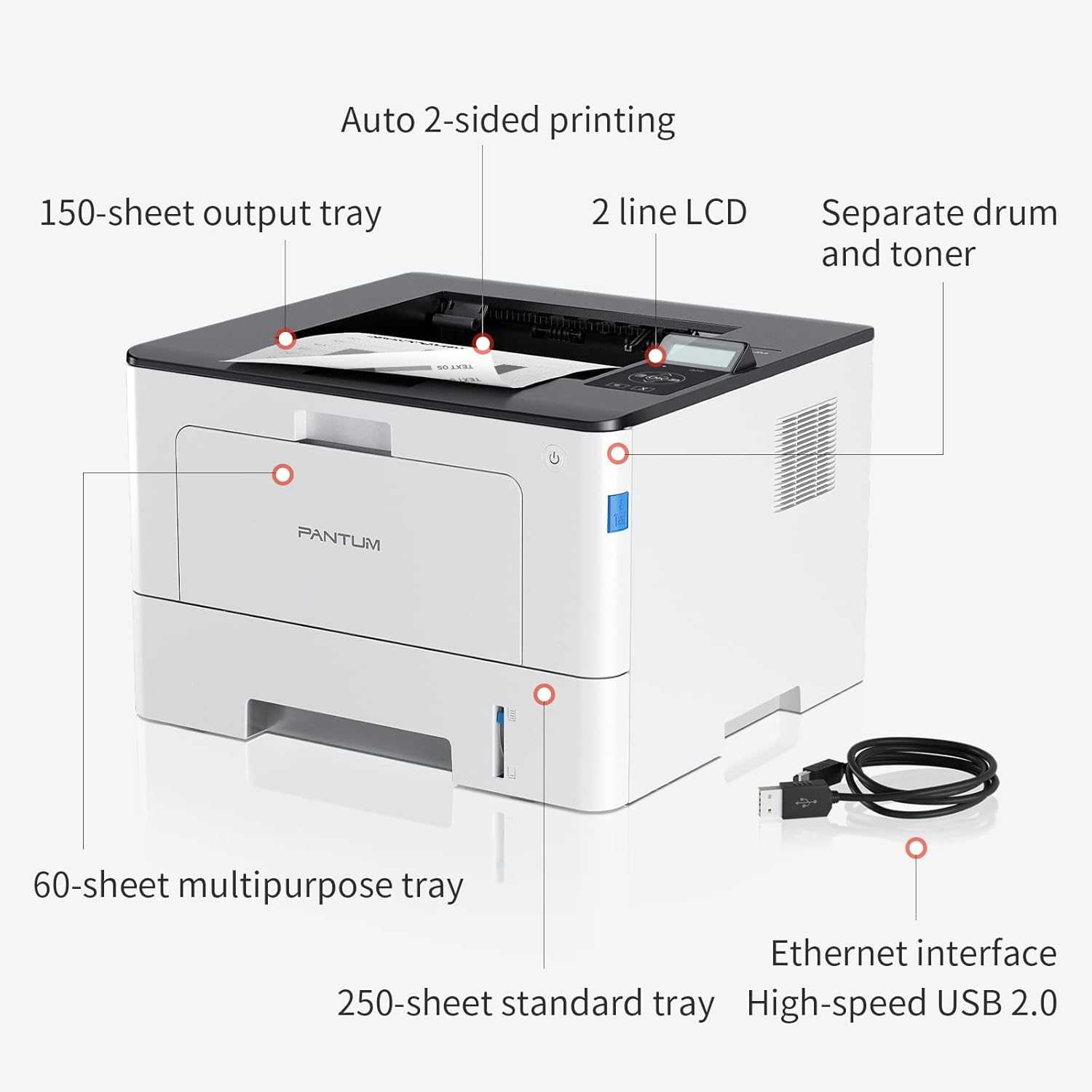
Figure 4.1: Printer Components. Key features include a 150-sheet output tray, a 2-line LCD display, separate drum and toner units, a 60-sheet multipurpose tray, a 250-sheet standard tray, an Ethernet interface, and a High-speed USB 2.0 port.
4.2. Памеры

Figure 4.2: Printer Dimensions. The printer measures approximately 14.33 inches (W) x 10.12 inches (H) x 13.54 inches (D).
4.3. Панэль кіравання

Figure 4.3: Control Panel. The control panel includes a 2-line LCD display for status messages and menu navigation, along with buttons for OK, arrow controls, and cancel functions.
5. Настройка
5.1. Распакаванне і размяшчэнне
- Акуратна дастаньце прынтар з упакоўкі.
- Зніміце з прынтара ўсе ахоўныя стужкі і ўпаковачныя матэрыялы.
- Place the printer on a firm, level surface with adequate space for ventilation.
5.2. Toner and Drum Installation
- Адкрыйце пярэднюю крышку прынтара.
- Unpack the drum unit and toner cartridge.
- Insert the toner cartridge into the drum unit until it clicks into place.
- Insert the combined drum and toner unit into the printer.
- Зачыніце пярэднюю крышку.
5.3. Загрузка паперы
- Pull out the standard paper tray or open the multipurpose tray.
- Адрэгулюйце накіроўвалыя паперы ў адпаведнасці з памерам вашай паперы.
- Load paper into the tray, ensuring it is flat and not exceeding the maximum capacity (250 sheets for standard tray, 60 sheets for multipurpose tray).
- Зачыніце латок для паперы.
5.4. Магутнасць і падключэнне
- Падключыце шнур харчавання да прынтара, а затым да заземленай электрычнай разеткі.
- For USB connection: Connect the provided USB 2.0 cable from the printer to your computer.
- For Ethernet connection: Connect an Ethernet cable from the printer to your network router or switch.
- Націсніце кнопку харчавання, каб уключыць прынтар.
6. Інструкцыя па эксплуатацыі
6.1. Ўстаноўка драйвера
For optimal performance, install the printer drivers from the official Pantum website or the provided installation media. The printer supports easy one-step installation for quick setup.
6.2. Друк дакумента
- Адкрыйце дакумент, які вы хочаце раздрукаваць, на камп'ютары або мабільнай прыладзе.
- Выберыце опцыю друку ў вашым дадатку.
- Choose the Pantum BP5100DN from the list of available printers.
- Па меры неабходнасці адкарэктуйце параметры друку (напрыклад, колькасць копій, памер паперы, двухбаковы друк).
- Націсніце кнопку «Друк».
The printer offers fast printing speeds of up to 40 pages per minute (A4) / 42 pages per minute (Letter) in black and white. It also supports automatic two-sided printing to save paper.
6.3. Мабільны друк
The Pantum BP5100DN supports direct printing of office documents from mobile devices. Ensure your mobile device and printer are connected to the same network or via USB OTG (if supported by your device and printer).
7. Тэхнічнае абслугоўванне
7.1. Replacing Toner Cartridge and Drum Unit
When the toner is low or the drum unit reaches its end of life, the printer's display will show a message. Refer to the instructions provided with the replacement consumables for proper installation. The starter toner cartridge yields approximately 3000 pages, and the starter drum unit yields approximately 30000 pages.
7.2. Чыстка прынтара
- Перад чысткай выключыце прынтар і адключыце шнур сілкавання ад сеткі.
- Працярыце знешнія паверхні прынтара мяккай тканінай без ворса.
- Use a dry cloth to clean the paper path and rollers if paper jams occur frequently.
- Не выкарыстоўвайце абразіўныя ачышчальнікі або растваральнікі.
8. Выпраўленне непаладак
If you encounter issues with your printer, refer to the following common solutions:
- Прынтар не адказвае: Праверце падключэнні сілкавання, падключэнні кабеля USB/Ethernet і пераканайцеся, што прынтар уключаны. Перазагрузіце прынтар і камп'ютар.
- Захрасанне паперы: Open all covers and carefully remove any jammed paper. Ensure paper is loaded correctly and not creased or damaged.
- Дрэнная якасць друку: Check toner levels. If print quality is faded, especially with cut and paste text, ensure you are using the correct print settings and consider replacing the toner cartridge or drum unit if they are near end-of-life.
- Праблемы з падключэннем: For Ethernet, verify network cable connection and IP address settings. For USB, try a different USB port or cable.
- Паведамленні пра памылкі: Consult the printer's display for specific error codes and refer to the quick setup guide or online support for detailed solutions.
For persistent issues, please contact customer service for support.
9. Тэхнічныя характарыстыкі
| Асаблівасць | Спецыфікацыя |
|---|---|
| Назва мадэлі | BP5100DN |
| Тэхналогія друку | Лазерная |
| Вывад на прынтэр | Манахромны |
| Максімальная хуткасць друку (монахромны) | 40 ppm (A4) / 42 ppm (Letter) |
| Максімальны дазвол друку | 1200 x 1200 dpi |
| Двухбаковы друк | Так (аўтаматычна) |
| Тэхналогія падлучэння | Ethernet, USB 2.0 |
| Максімальная ёмістасць аркуша ўводу | 250 sheets (Standard Tray), 60 sheets (Multipurpose Tray) |
| Друкаваныя СМІ | Папера (звычайная) |
| Памер ліста | A4, Letter, etc. |
| Сумяшчальныя прылады | Smartphones, PCs |
| Ватtage | 650 ват |
| Вага прадмета | 9.07 kg (approx. 9 kg 70 g) |
| Вытворца | Пантум |
10. Гарантыя і падтрымка
The Pantum BP5100DN Monochrome Laser Printer comes with a 1-year warranty from the date of purchase. For warranty claims, technical support, or any inquiries, please refer to the contact information provided in your quick setup guide or visit the official Pantum webсайт.
For a better experience, please kindly refer to the user manual or contact customer service for support.