
1. Уводзіны
This manual provides essential instructions for the installation, operation, and maintenance of your Chieftec Scorpion 3 White ATX Case (Model GL-03W-OP). Please read this manual thoroughly before beginning assembly to ensure proper setup and to maximize the lifespan of your product.
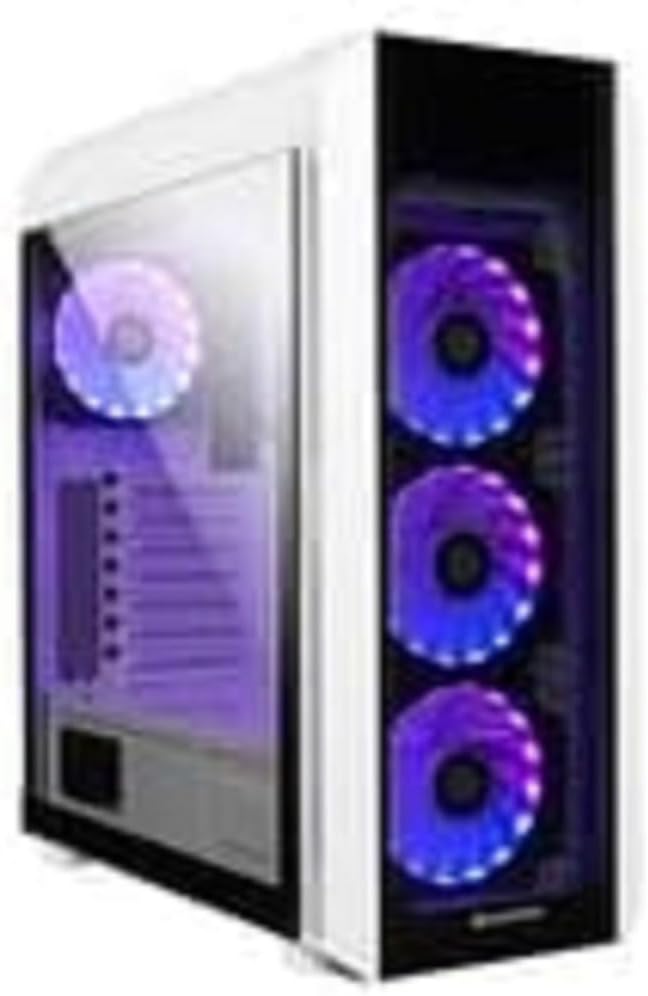
Малюнак 1: The Chieftec Scorpion 3 White ATX Case, showcasing its white exterior, tempered glass side panel, and three front-mounted, illuminated cooling fans. A single illuminated fan is visible at the rear.
2. Усталёўка і ўстаноўка кампанентаў
This section guides you through the process of installing your computer components into the Chieftec Scorpion 3 White ATX Case.
2.1. Падрыхтоўка
- Ensure you have all necessary components: motherboard, CPU, RAM, graphics card, storage drives, and power supply unit (PSU).
- Gather tools: Phillips head screwdriver, zip ties for cable management.
- Працуйце на чыстай паверхні без статычнай электрычнасці. Падумайце аб выкарыстанні антыстатычнага бранзалета.
2.2. Адкрыццё справы
- Carefully remove the side panels. Typically, the tempered glass side panel is secured with thumbscrews at the rear.
- Set the panels aside on a soft, non-abrasive surface to prevent scratches.
2.3. Усталёўка блока сілкавання (БС)
- The Chieftec Scorpion 3 supports rear-mount PSUs.
- Slide the PSU into its designated bay at the bottom rear of the case.
- Secure the PSU with screws from the exterior rear of the case.
2.4. Устаноўка мацярынскай платы
- Усталюйце экран уводу/вываду ў выраз у задняй частцы корпуса.
- Align your ATX motherboard with the pre-installed standoffs.
- Акуратна ўстаўце матчыну плату на апоры і замацуйце яе шрубамі.
2.5. Усталёўка назапашвальніка
- Locate the drive bays for 2.5" SSDs and 3.5" HDDs.
- Install your storage drives into the appropriate bays and secure them.
2.6. Відэакарта і карты пашырэння
- Зніміце неабходныя вечкі слотаў PCIe з задняй панэлі корпуса.
- Insert your graphics card or other expansion cards into the motherboard's PCIe slots and secure them with screws.
2.7. Кіраванне кабелем
- Route all cables (PSU, data, front panel) through the designated cutouts to the rear of the motherboard tray.
- Use zip ties or Velcro straps to bundle and secure cables for improved airflow and aesthetics.
2.8. Закрыццё справы
- Once all components are installed and cables managed, reattach the side panels.
- Secure the tempered glass panel with its thumbscrews.
3. Кіраванне корпусам
The Chieftec Scorpion 3 White ATX Case provides the housing and cooling for your PC components. Its operation primarily involves the use of the front panel controls and integrated cooling system.
3.1. Элементы кіравання на пярэдняй панэлі
- Кнопка харчавання: Press to turn on or off your computer.
- Кнопка скіду: Press to restart your computer.
- Парты USB: Падключыце прылады USB.
- Аўдыёраздымы: Падключыце навушнікі і мікрафоны.
3.2. Сістэма астуджэння
The case is equipped with multiple fan mounts and pre-installed 120mm fans to ensure optimal airflow.
- Ensure all fans are properly connected to your motherboard or a fan controller.
- Monitor system temperatures using software to ensure adequate cooling.
- The illuminated fans provide aesthetic appeal and can often be controlled via motherboard software for RGB lighting effects.
4. Тэхнічнае абслугоўванне
Regular maintenance helps ensure optimal performance and longevity of your Chieftec Scorpion 3 White ATX Case and its components.
4.1. Уборка пылу
- Частата: Clean dust filters and interior components every 3-6 months, or more frequently in dusty environments.
- Пылавыя фільтры: The case features removable dust filters (e.g., top, front, bottom). Gently remove and clean them with water and mild soap, or use a vacuum cleaner. Ensure they are completely dry before reinstallation.
- Інтэр'ер: Use compressed air to blow dust out of fans, heatsinks, and other components. Hold fan blades gently to prevent over-spinning.
4.2. Знешняя ўборка
- Працярыце вонкавыя паверхні мяккай, damp тканінай. Пазбягайце абразіўных ачышчальнікаў або растваральнікаў.
- For the tempered glass panel, use a glass cleaner and a microfiber cloth to prevent streaks.
5. Выпраўленне непаладак
This section addresses common issues you might encounter with your PC build within the Chieftec Scorpion 3 White ATX Case.
5.1. Сістэма не ўключаецца
- Праверце злучэнне харчавання: Ensure the PSU is switched on and all power cables (24-pin ATX, 8-pin CPU, PCIe power) are securely connected to the motherboard and components.
- Раздымы на пярэдняй панэлі: Verify that the front panel power switch cable is correctly connected to the motherboard's front panel header. Refer to your motherboard manual for the correct pinout.
- PSU Functionality: Test the PSU independently if possible, or try a known working PSU.
5.2. Вентылятары не круцяцца або RGB-падсветка не ўключаецца
- Падключэнне вентылятараў: Ensure all fan power cables are securely connected to the motherboard fan headers or a fan controller.
- RGB Connections: If applicable, verify that RGB cables are connected to the correct RGB headers on the motherboard or a dedicated RGB controller.
- Праграмнае кіраванне: Check your motherboard's BIOS/UEFI settings or dedicated fan/RGB control software for fan speed and lighting settings.
5.3. Poor Airflow or High Temperatures
- Назапашванне пылу: Clean dust filters and internal components as described in the Maintenance section.
- Арыентацыя вентылятара: Ensure fans are oriented correctly for optimal airflow (e.g., front fans as intake, rear/top fans as exhaust).
- Кабельнае кіраванне: Палепшыце кіраванне кабелямі, каб паменшыць перашкоды для паветранага патоку.
6. Тэхнічныя характарыстыкі
Detailed technical specifications for the Chieftec Scorpion 3 White ATX Case (Model GL-03W-OP).
| Асаблівасць | Дэталь |
|---|---|
| Марка | Шэфтэк |
| серыял | Scorpion 3 White |
| Нумар мадэлі | GL-03W-OP |
| Тып корпуса | Сярэдняя вежа |
| Сумяшчальнасць матчыных поплаткаў | ATX |
| Матэрыял | Акрыланітрыл-бутадыен-стырол (АБС) пластык |
| Колер | Black (Note: Product name indicates White, but specification lists Black. Please verify product color upon receipt.) |
| Вага прадмета | 2.2 фунта |
| Памеры прадукту (ДxШxВ) | 19.69 х 19.69 х 11.02 цалі |
| Тып мацавання блока харчавання | Мацаванне ззаду |
| Спосаб астуджэння | паветра |
| Памер вентылятара | 120 Millimeters (pre-installed fans) |
Note: Specifications are subject to change without prior notice. Please refer to the manufacturer's official webсайт для самай актуальнай інфармацыі.
7. Інфармацыя аб гарантыі
Chieftec products are manufactured to high-quality standards. For specific warranty terms and conditions applicable to your Chieftec Scorpion 3 White ATX Case (Model GL-03W-OP), please refer to the warranty card included with your product or visit the official Chieftec webсайт.
Typically, product warranties cover defects in materials and workmanship under normal use. Damage resulting from improper installation, accident, abuse, modification, or unauthorized repair is generally not covered.
8. Падтрымка кліентаў
Should you encounter any issues or have questions regarding your Chieftec Scorpion 3 White ATX Case, please contact Chieftec customer support.
- Інтэрнэт-падтрымка: Visit the official Chieftec webсайт з часта задаванымі пытаннямі, загрузкай драйвераў і рэсурсамі падтрымкі.
- Кантактная інфармацыя: Refer to the product packaging or Chieftec's official webсайт для атрымання рэгіянальнай кантактнай інфармацыі (тэлефон, электронная пошта).
When contacting support, please have your product model (GL-03W-OP) and purchase information readily available.