
1. Уводзіны
This manual provides essential information for the safe and efficient operation of your Vamvo Mini Projector. Designed for portability and versatility, this projector supports native 1080P resolution with 4K compatibility, features WiFi 6 and Bluetooth 5.4 connectivity, and includes a 180° adjustable stand for flexible projection. Please read this manual thoroughly before use and retain it for future reference.

Figure 1: Vamvo Mini Projector highlighting key features.
2. Што ў скрынцы
Пераканайцеся, што ў камплекце ёсць усе наступныя прадметы:
- Vamvo Mini Projector
- Пульт дыстанцыйнага кіравання
- Кабель HDMI
- Адаптар сілкавання
- Кіраўніцтва карыстальніка
- Гарантыйны талон
3. Прадукт скончыўсяview
The Vamvo Mini Projector is designed for ease of use and high-quality projection. Its compact form factor includes an integrated 180° adjustable stand, allowing for versatile placement and projection angles.
3.1 Асноўныя магчымасці
- Уласцівае разрозненне 1080P з падтрымкай 4K: Забяспечвае выразнае і выразнае візуальнае адлюстроўванне.
- Высокая яркасць і кантраснасць: Features 15,000 lumens brightness and a 10,000:1 contrast ratio for vivid colors and sharp details.
- Рэгуляваная на 180° падстаўка: Provides flexible positioning for projection on walls, ceilings, or other surfaces.
- Wi-Fi 6 і Bluetooth 5.4: Ensures fast and stable wireless connectivity for streaming and audio.
- Убудаваныя дынамікі: Інтэграваныя дынамікі забяспечваюць выхад гуку.
- Auto Keystone & Motorized Focus: Simplifies setup by automatically correcting image distortion and allowing precise focus adjustments via remote.

Figure 2: Projector's visual performance metrics.
3.2 Парты і падключэнні
The projector offers various ports for connecting external devices:
- HDMI: For connecting TV sticks, laptops, gaming consoles (PS5, Xbox), etc.
- USB: For connecting USB drives or other USB-compatible devices.
- Тып C: For one-touch wireless mirroring with iOS/Android devices (adapters and cables not included).
- 3.5 мм AUX: Для падлучэння знешніх дынамікаў або навушнікаў.
- Уваход пастаяннага току: Ўвод магутнасці.
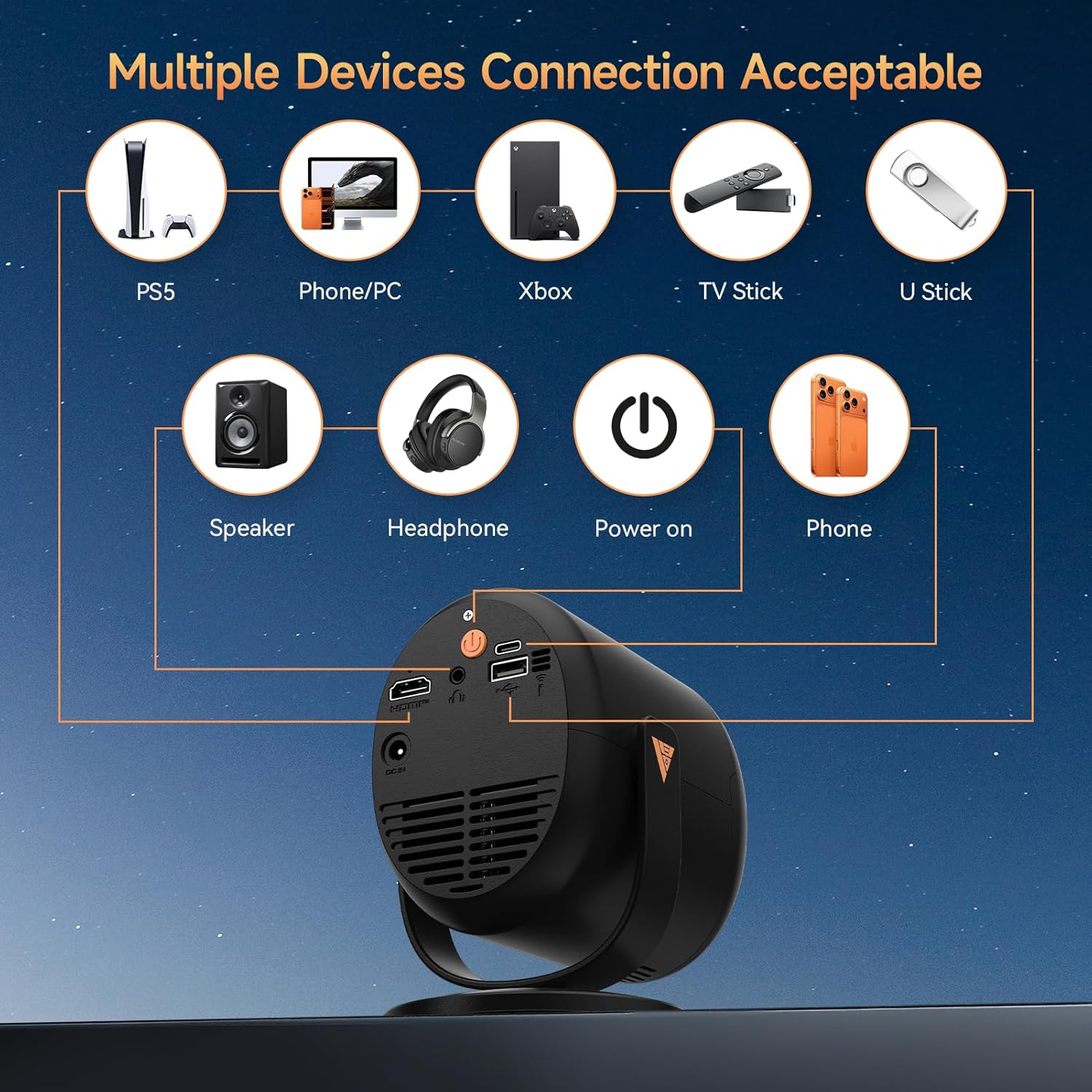
Figure 3: Available ports and compatible devices.
4. Настройка
4.1 Першапачатковае ўключэнне
- Connect the provided power adapter to the projector's DC In port and then to a power outlet.
- Націсніце кнопку харчавання на праектары або пульце дыстанцыйнага кіравання, каб уключыць яго.
4.2 Размяшчэнне і праекцыя
Utilize the 180° adjustable stand to position the projector for optimal viewing. The projector can project images up to 180 inches. For the best projection experience, select a distance between 5ft to 10ft from the projection surface.

Figure 4: Flexible 180° projection angles.

Малюнак 5: Выпample of a large 180-inch display.
4.3 Фокус і карэкцыя трапецападобнага скажэння
The projector features automatic vertical keystone correction and motorized focus. Use the remote control to fine-tune the focus (F+ / F- buttons) for a clear image. The auto keystone feature will adjust the image shape to be rectangular.

Figure 6: Motorized focus and keystone adjustment via remote.
5. Інструкцыя па эксплуатацыі
5.1 Navigation and Streaming
Use the provided remote control to navigate the projector's interface. The projector comes with pre-installed streaming platforms like Netflix, Prime Video, and YouTube. You can also access the App Store to download additional applications.
5.2 Адлюстраванне экрана
The projector supports screen mirroring from iOS and Android devices:
- Бесправадное люстраное адлюстраванне: Connect your smartphone or tablet via WiFi 6 for a smooth audio and video experience.
- Wired Mirroring: Use a Type-C cable (not included) for one-touch mirroring with compatible devices.
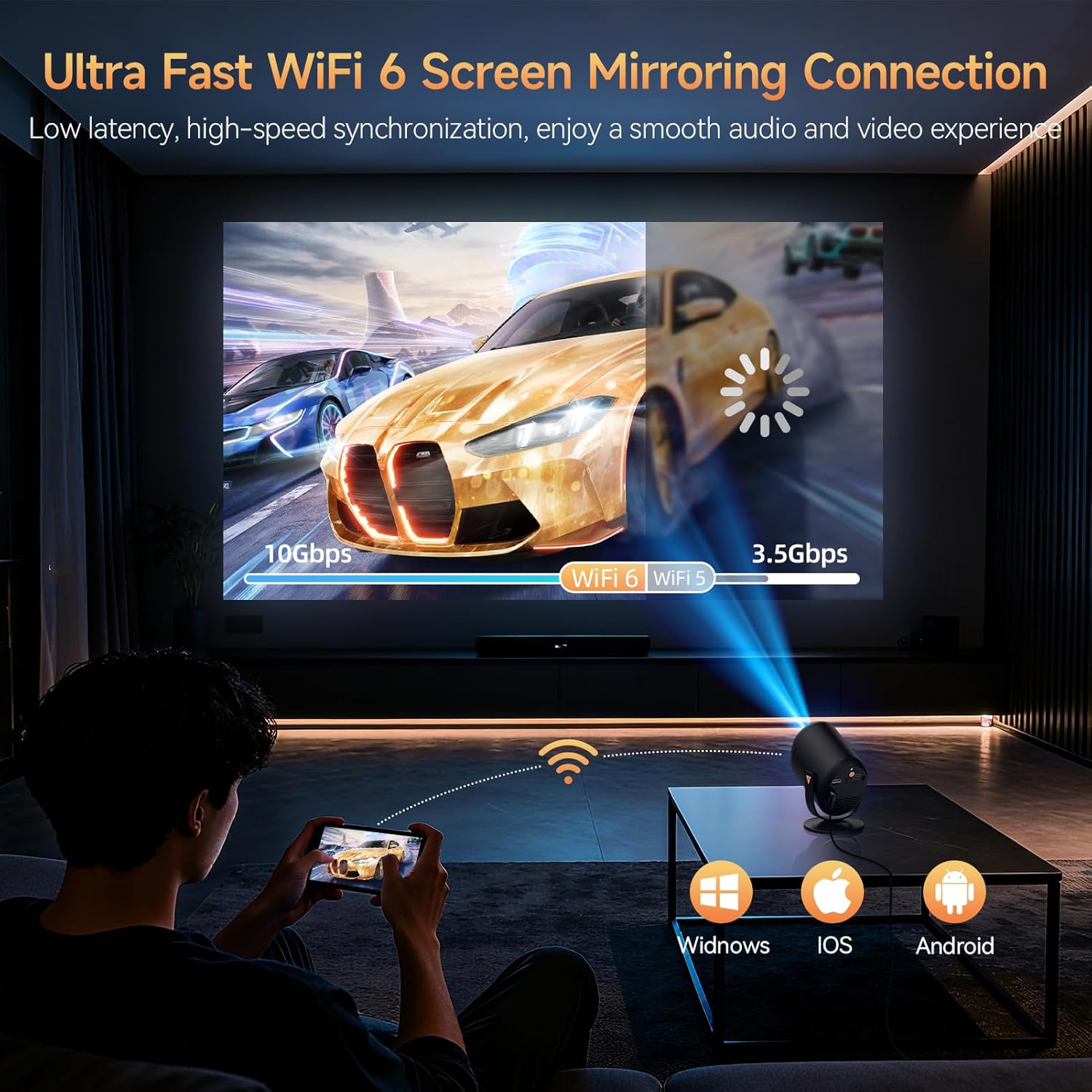
Figure 7: Ultra-fast WiFi 6 screen mirroring.
5.3 Падключэнне знешніх прылад
You can connect various devices to the projector:
- HDMI: For TV sticks (Fire TV Stick, Roku, Chromecast), laptops, and gaming consoles.
- USB: For U-sticks or other USB storage devices.
- Bluetooth 5.4: Для падлучэння знешніх дынамікаў або навушнікаў.
- 3.5 мм AUX: For wired audio output to speakers or headphones.
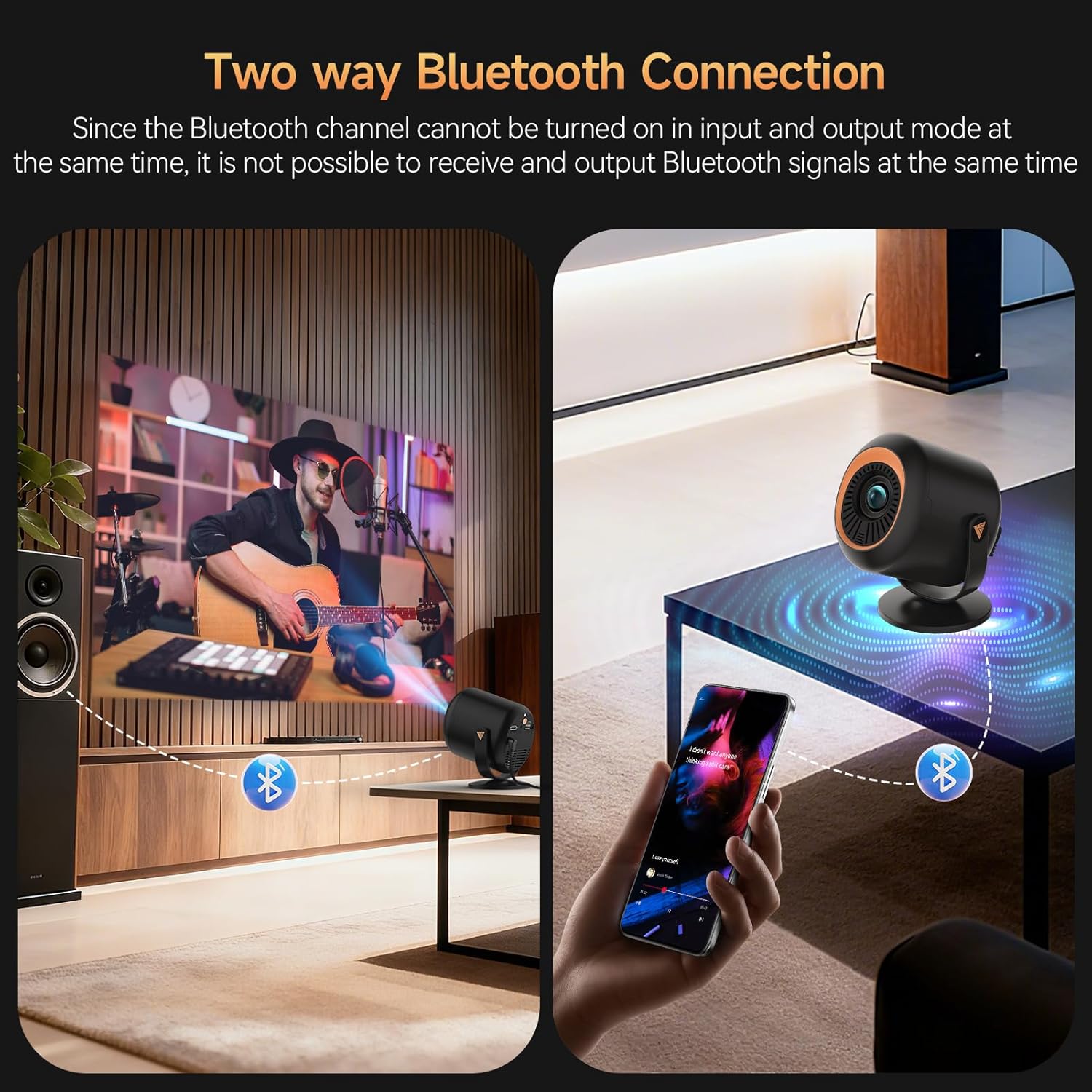
Figure 8: Two-way Bluetooth connection for audio.
Важная заўвага:
Due to content protection agreements (HDCP), screen mirroring may not display video or audio for certain apps like Amazon Prime Video, Hulu, or Netflix. For these apps, connect your streaming device (e.g., Fire TV Stick, Roku, Chromecast) directly to the projector via HDMI, or use an HDMI cable from your laptop/computer.
6. Налады
The projector offers a comprehensive settings menu to customize your viewing і аўдыё вопыт.
6.1 Налады выявы
Adjust visual parameters to your preference:
- Рэжым малюнка: Standard, Softness, Dynamic, Energy Saving, Vivid, User (customizable).
- Яркасць: Адрэгулюйце агульную яркасць выявы.
- Кантраст: Кантралюйце розніцу паміж светлымі і цёмнымі зонамі.
- Насычанасць: Адрэгулюйце інтэнсіўнасць колераў.
- Рэзкасць: Enhance edge definition.
- Каляровы тон: Modify the color balance.
- Каляровая тэмпература: Адрэгулюйце цяпло або халоднасць колераў.
- Рэжым аховы вачэй: Зніжае сіняе святло для камфорту viewінж.
6.2 Налады гуку
Customize audio output:
- Рэжым гуку: Standard, Music, Movie, News, Game, User (customizable).
- баланс: Adjust audio balance between left and right channels.
- Audio Output Devices: Select between auto (speaker) or other connected devices.
6.3 Налады сеткі
Manage your projector's connectivity:
- Wi-Fi: Connect to available Wi-Fi networks.
- Bluetooth: Пошук and connect to Bluetooth devices.
6.4 Lens Settings
Control projection display and adjustments:
- Кірунак праекцыі: Спераду, ззаду, столі спераду, столі ззаду.
- Налады аўтафокусу: Enable/disable automatic refocus when moved or power-on autofocus.
- Карэкцыя трапецеідальных скажэнняў: Auto Keystone Correction, 4-corner correction, Obstacle Recognition, Screen Recognition.
- Лічбавае павелічэнне: Адрэгулюйце памер праектаванага малюнка.
6.5 Параметры прылады
General device management:
- мова: Выберыце жаданую мову.
- Дата і час: Усталюйце бягучую дату і час.
- Клавіятура: Configure keyboard settings.
- Застаўка: Adjust screen saver options.
- Таймер сну: Усталюйце таймер для аўтаматычнага адключэння.
- Завадскія налады: Reset the projector to its original factory settings.
- Reset Projector/Restart Projector: Perform a soft or hard reset.
7. Тэхнічнае абслугоўванне
To ensure the longevity and optimal performance of your Vamvo Mini Projector, follow these maintenance guidelines:
- Ачыстка аб'ектыва: Gently wipe the projector lens with a soft, lint-free cloth. Avoid abrasive materials or harsh chemicals.
- Вентыляцыя: Ensure the projector's ventilation openings are clear and unobstructed to prevent overheating. Regularly clean dust from the vents using a soft brush or compressed air.
- захоўванне: Калі праектар не выкарыстоўваецца, захоўвайце яго ў прахалодным, сухім месцы, удалечыні ад прамых сонечных прамянёў і экстрэмальных тэмператур.
8. Выпраўленне непаладак
Калі ў вас узніклі праблемы з праектарам, звярніцеся да наступных распаўсюджаных праблем і рашэнняў:
- Няма сігналу:
- Ensure the HDMI cable is securely connected to both the projector and the source device.
- Verify that the correct input source (HDMI, USB, etc.) is selected on the projector.
- Check if the source device (laptop, TV stick) is powered on and outputting a signal.
- Fuzzy or Unclear Image:
- Adjust the focus using the F+ / F- buttons on the remote control.
- Ensure the projector lens is clean and free from dust or smudges.
- Check the projection distance and adjust if necessary to match the desired screen size.
- Няма гуку або нізкая гучнасць:
- Increase the volume on both the projector and the source device.
- Check if the projector is muted.
- Калі выкарыстоўваюцца знешнія дынамікі, пераканайцеся, што яны правільна падключаны і ўключаны.
- Screen Mirroring Issues (No Video/Audio):
- Some streaming apps (Netflix, Hulu, Prime Video) have HDCP content protection that prevents screen mirroring. Connect a streaming device directly via HDMI for these apps.
- Ensure your device and projector are connected to the same Wi-Fi network for wireless mirroring.
9. Тэхнічныя характарыстыкі
| Асаблівасць | Дэталь |
|---|---|
| Марка | Вамво |
| Вага прадмета | 2.61 фунта |
| Памеры ўпакоўкі | 11.57 х 7.91 х 5.08 цалі |
| Назва колеру | чарніла |
| Асаблівасці | Убудаваны дынамік |
| Рэкамендуемае выкарыстанне для прадукту | Gaming, Home Cinema |
| Тэхналогія падлучэння | HDMI |
| Дазвол дысплея | 1920 х 1080 |
10. Гарантыя і падтрымка
Your Vamvo Mini Projector comes with a warranty. Please refer to the included Warranty Card for detailed information regarding warranty coverage, terms, and conditions. For technical support or further assistance, please consult the contact information provided on your Warranty Card or visit the official Vamvo webсайт.