
Уводзіны
This manual provides detailed instructions for the safe installation, operation, and maintenance of your bimar Wi-Fi Ceiling Fan, Model 1 (Ø 132). Please read this manual thoroughly before using the product and retain it for future reference.
Прызначэнне: This high-performance ceiling fan is designed for ventilation in indoor domestic environments. Any other use is considered improper and potentially hazardous. The manufacturer cannot be held responsible for any damages resulting from improper use or repairs performed by unqualified personnel.
Важныя інструкцыі па бяспецы
Каб знізіць рызыку пажару, паражэння электрычным токам або траўміравання людзей, выконвайце наступнае:
- Перад устаноўкай вентылятара прачытайце ўсе інструкцыі.
- Устаноўка павінна выконвацца кваліфікаваным электрыкам у адпаведнасці з усімі мясцовымі і нацыянальнымі электрычнымі нормамі.
- Ensure the installation site can support the fan's weight (approximately 6.2 kg).
- Заўсёды адключайце харчаванне з дапамогай галоўнага выключальніка перад устаноўкай або абслугоўваннем.
- Не выкарыстоўвайце вентылятар з пашкоджаным шнуром харчавання або вілкай.
- Keep hands, hair, and clothing away from moving blades.
- Do not insert any objects into the fan blades while it is operating.
- Гэты прыбор не прызначаны для выкарыстання асобамі (уключаючы дзяцей) з абмежаванымі фізічнымі, сэнсарнымі або разумовымі здольнасцямі або з адсутнасцю вопыту і ведаў, за выключэннем выпадкаў, калі яны знаходзяцца пад наглядам або праінструктаваныя адносна выкарыстання прыбора асобай, адказнай за іх бяспеку.
- За дзецьмі трэба сачыць, каб яны не гулялі з прыборам.
Што ў скрынцы
Your bimar Wi-Fi Ceiling Fan package includes the following components:
- bimar Wi-Fi Ceiling Fan unit (with 3 blades)
- Пульт дыстанцыйнага кіравання
- Mounting hardware (screws, brackets, etc.)
- Інструкцыя па эксплуатацыі (гэты дакумент)

Image: The bimar Wi-Fi Ceiling Fan, featuring three light-colored wooden blades and a brushed metal motor housing and downrod.
Настройка і ўстаноўка
1. Устаноўка вентылятара
Настойліва рэкамендуецца прафесійная ўстаноўка кваліфікаваным электрыкам. Ensure the ceiling structure can safely support the fan's weight and that all wiring complies with local electrical codes.
- Падрыхтуйце месца мантажу: Turn off power at the circuit breaker. Securely attach the mounting bracket to a ceiling joist or a fan-rated outlet box.
- Збярыце паніжальную штангу і рухавік: Attach the downrod to the fan motor housing.
- Павесіць вентылятар: Асцярожна падніміце вентылятарны блок і павесьце яго на мантажны кранштэйн.
- Падключэнне вентылятара: Connect the electrical wires (live, neutral, ground) from the ceiling to the fan's wiring, following the wiring diagram provided in the separate installation guide (if applicable).
- Прымацуеце ляза: Securely fasten the three blades to the motor housing.
- Замацуеце навес: Raise the canopy to cover the wiring and mounting bracket, securing it in place.

Выява: Збоку view of the bimar ceiling fan, illustrating the angle of the light wood blades and the connection to the downrod.
2. Падключэнне да Wi-Fi і праграмы
The bimar Wi-Fi Ceiling Fan is compatible with the Bimar Live Smart app for advanced control and scheduling.
- Спампаваць прыкладанне: Пошук "Bimar Live Smart" in your smartphone's app store (iOS or Android) and install it.
- Стварыць уліковы запіс: Адкрыйце праграму і выконвайце інструкцыі на экране, каб стварыць новы ўліковы запіс карыстальніка, або ўвайдзіце ў сістэму, калі ў вас ужо ёсць уліковы запіс.
- Дадаць прыладу: Power on the ceiling fan. In the Bimar Live Smart app, tap "Add Device" or the "+" icon. Select "Ceiling Fan" or the appropriate device type.
- Падключыцеся да Wi-Fi: Follow the app's instructions to put the fan into pairing mode (usually by pressing a button on the fan or remote for a few seconds). Connect the fan to your home 2.4GHz Wi-Fi network.
- Name the Device: Once connected, you can name your fan for easy identification within the app.

Image: A modern living room featuring the bimar ceiling fan installed, with a smartphone displaying the Bimar Live Smart app interface, indicating Wi-Fi and voice control capabilities.
Інструкцыя па эксплуатацыі
Your bimar Wi-Fi Ceiling Fan offers multiple control options for convenience.
1. Аперацыя дыстанцыйнага кіравання
The included remote control allows direct access to all fan functions.
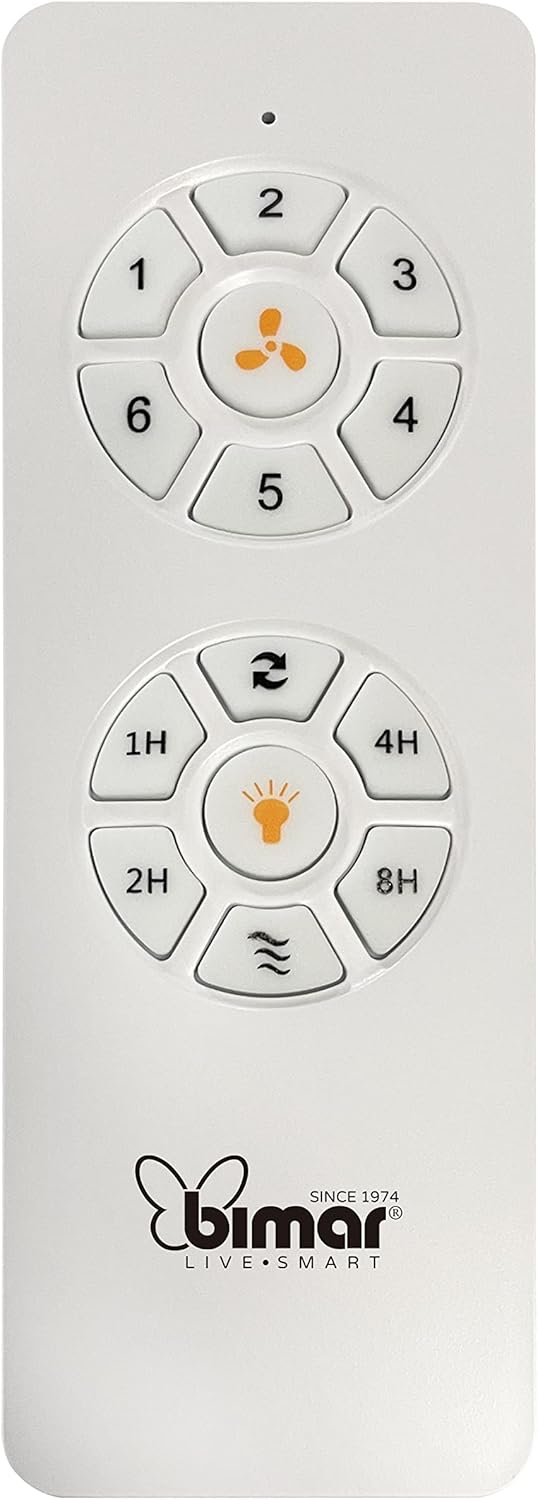
Image: The white remote control for the bimar ceiling fan, showing buttons for fan speed (1-6), fan on/off, timer (1H, 2H, 4H, 8H), mode selection, and reverse function.
- Уключэнне/выключэнне харчавання: Press the fan icon button to turn the fan on or off.
- Рэгуляванне хуткасці: Use buttons 1-6 to select one of the six available fan speeds.
- Функцыя таймера: Press 1H, 2H, 4H, or 8H to set the fan to automatically turn off after the selected duration.
- Выбар рэжыму: Use the mode button (often represented by waves or arrows) to cycle through Normal, Natural, Sleep, and Breeze modes.
- Рэжым лета/зімы: The reverse button (often two arrows forming a circle) changes the blade rotation direction.
2. App Control (Bimar Live Smart)
Once connected to the Bimar Live Smart app, you can access enhanced features:
- Выдаленая аперацыя: Control all fan functions from anywhere with an internet connection.
- Планаванне: Program daily and weekly on/off times for automated operation.
- Таймер: Adjust the timer from 1 to 8 hours.
- Mode and Speed Selection: Easily switch between the 6 speeds and 4 operating modes.
3. Галасавое кіраванне
The bimar Wi-Fi Ceiling Fan is compatible with popular voice assistants like Amazon Alexa and Google Assistant. After connecting the fan to the Bimar Live Smart app, link your Bimar account to your voice assistant app (e.g., Alexa app or Google Home app).
Exampгаласавыя каманды:
- «Алекса, уключы вентылятар на столі».
- «Гэй, Google, усталюй хуткасць вентылятара на столі на 3».
- "Alexa, turn off the ceiling fan in 1 hour."
4. Operating Modes and Speeds
- 6 Ventilation Speeds: Adjust the airflow intensity to your preference.
- Звычайны рэжым: Consistent airflow at the selected speed.
- Натуральны рэжым: Імітуе натуральны ветрык, змяняючы хуткасць вентылятара.
- Рэжым сну: Працуе на меншай, ціхай хуткасці для бесперашкоднага адпачынку.
- Рэжым ветрыку: Provides a gentle, intermittent airflow.
5. Summer/Winter Function
The reversible blade function allows for year-round use:
- Летні рэжым (кручэнне супраць гадзіннікавай стрэлкі): Стварае паток паветра ўніз, ствараючы прахалодны ветрык.
- Зімовы рэжым (паварот па гадзіннікавай стрэлцы): Creates an upward airflow, circulating warm air trapped near the ceiling, improving heating efficiency.

Image: A diagram illustrating the airflow patterns for summer (indirect ventilation, pushing air upwards) and winter (direct ventilation, pulling air downwards) modes of a ceiling fan.
Тэхнічнае абслугоўванне
Рэгулярнае тэхнічнае абслугоўванне забяспечвае аптымальную прадукцыйнасць і даўгавечнасць вашага потолочного вентылятара.
- Уборка: Before cleaning, ensure the fan is turned off and power is disconnected at the circuit breaker. Use a soft, damp cloth to wipe down the blades and motor housing. Do not use abrasive cleaners or solvents.
- Праверка ляза: Periodically check the blades for any signs of damage or warping. Ensure all blade screws are tight.
- Змазка рухавіка: The fan's DC motor is designed for maintenance-free operation and does not require lubrication.
- Зацягніце зашпількі: Over time, some fasteners may become loose. Check and tighten all screws and connections annually.

Выява: буйны план view of the bimar ceiling fan's brushed metal motor housing and the attachment points for the light wood blades, highlighting areas for cleaning and inspection.
Ліквідацыю непаладак
| праблема | Магчымая прычына | Рашэнне |
|---|---|---|
| Вентылятар не запускаецца | No power supply; Remote control battery low; Incorrect wiring. | Check circuit breaker and wall switch. Replace remote batteries. Verify wiring connections (consult electrician). |
| Веер хістаецца | Loose blades or mounting hardware; Unbalanced blades. | Ensure all blade screws and mounting screws are tight. Use a balancing kit (not included) if necessary. |
| Пульт дыстанцыйнага кіравання не працуе | Low battery; Obstruction between remote and receiver; Remote not paired. | Replace remote batteries. Ensure clear line of sight. Refer to pairing instructions in the full manual. |
| Праблемы з падключэннем да Wi-Fi | Няправільны пароль Wi-Fi; маршрутызатар занадта далёка; выбрана сетка 5 ГГц. | Verify Wi-Fi password. Move router closer or use a Wi-Fi extender. Ensure you are connecting to a 2.4GHz network. Reset fan and re-attempt pairing. |
| Шумны вентылятар | Loose screws; Blades hitting an obstruction; Motor issue. | Check and tighten all screws. Ensure nothing is obstructing the blades. If noise persists, contact customer support. |
Тэхнічныя характарыстыкі
| Асаблівасць | Дэталь |
|---|---|
| Марка | бімар |
| Нумар мадэлі | 1 |
| Памеры прадукту | 132 х 132 х 27.5 см (дыяметр х дыяметр х вышыня) |
| Вага | 6.2 кг |
| Колькасць лязоў | 3 |
| Матэрыял | Вуд |
| Колер | Black (Note: Blades are light wood finish as shown in images) |
| Тып рухавіка | DC (Brushless, energy-saving) |
| Энергаспажыванне | 35 Вт |
| Метады кантролю | Remote Control, Bimar Live Smart App, Voice Control (Amazon Alexa, Google Assistant) |
| Хуткасці вентылятара | 6 |
| Рэжымы працы | Normal, Natural, Sleep, Breeze |
| Таймер | Ад 1 да 8 гадзін |
| Дадатковыя магчымасці | Silent operation, Summer/Winter mode (reversible blades) |
| Крыніца харчавання | Электрычны |
| Тып ўстаноўкі | Потолочное мацаванне |

Image: The three light wood fan blades, detached and laid flat, showcasinіх дызайн і тэкстуру.


Выява: Два views of the bimar ceiling fan, illustrating different downrod lengths: one with a 25 cm downrod and another with a 13 cm downrod, affecting the overall height of the fan.
Гарантыя і падтрымка
For warranty information, technical support, or service inquiries, please refer to the warranty card included with your product or visit the official bimar webсайт. Захоўвайце пацвярджэнне пакупкі для прэтэнзій па гарантыі.
вытворца: Bimar S.r.l.
Кантакты: Калі ласка, наведайце the bimar store on Amazon or the official bimar webсайт для кантактных дадзеных.