
Уводзіны
Thank you for choosing the TESSAN TS-TPM06-C Surge Protector Power Strip. This device is designed to provide convenient power distribution and surge protection for your electronic devices. It features 6 AC outlets, 2 USB-A ports, and 1 USB-C port, all connected via a 15-foot flat plug extension cord. This manual provides essential information for safe and effective use.
Асаблівасці прадукту
- 15-Foot Flat Extension Cord: Provides extended reach and a low-profile plug for tight spaces.
- 6 шырока размешчаных разетак пераменнага току: Дазваляе выкарыстоўваць больш магутныя адаптары харчавання, не блакуючы суседнія разеткі.
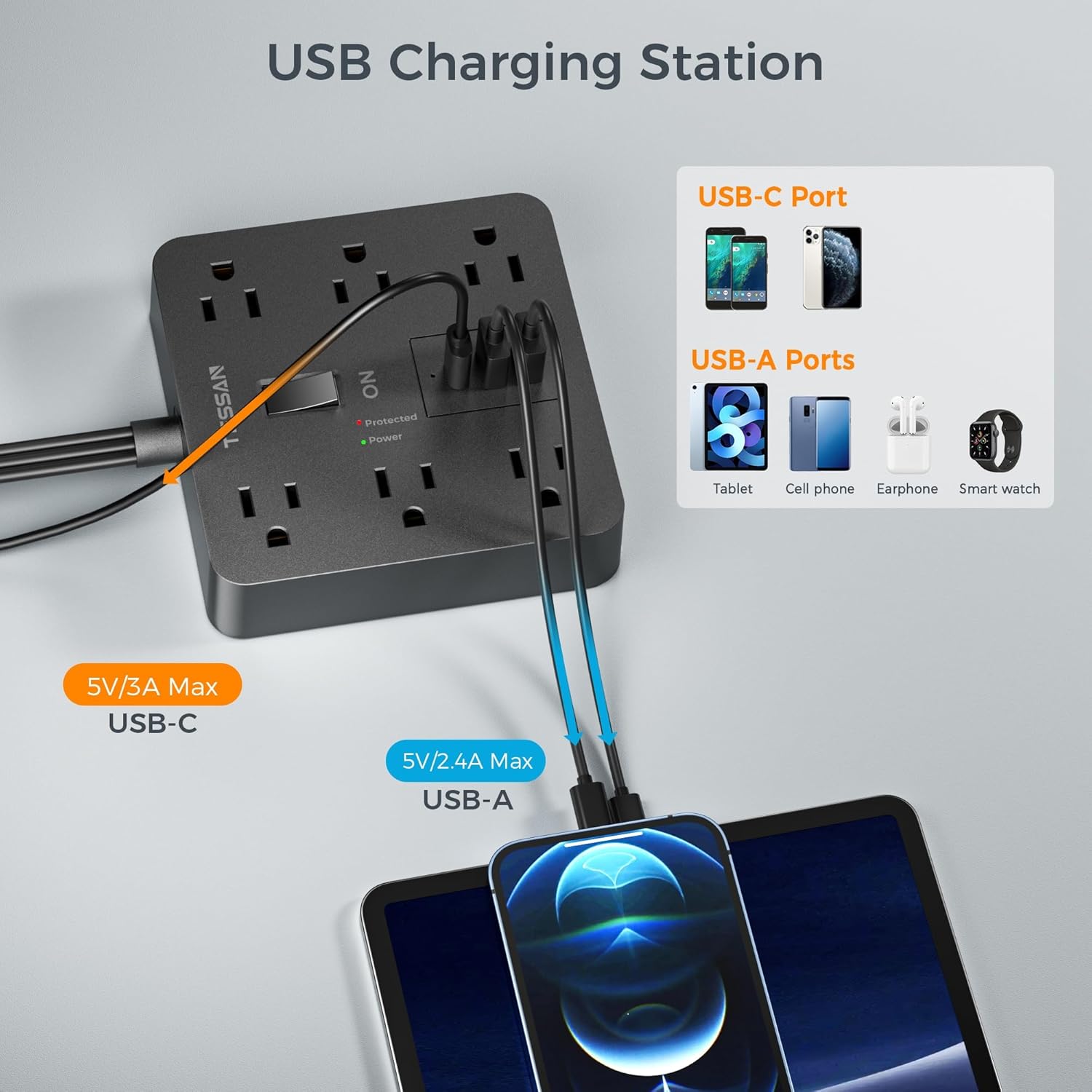
- 3 порта USB для зарадкі: Includes 2 USB-A (2.4A Max) and 1 USB-C (3A Max) for versatile device charging.
- 1700J Surge Protection: Safeguards your electronics from voltagе скокі і ўсплёскі.
- Інтэграваны аўтаматычны выключальнік: Automatically trips to prevent overload when power exceeds 1625W.
- Перамыкач уключэння/выключэння: Conveniently controls power to all connected devices.
- Гумовыя ножкі супраць слізгацення: Забяспечвае ўстойлівасць на розных паверхнях.
Настройка
Follow these steps to set up your TESSAN Surge Protector Power Strip:
- Распакуйце прыладу: Асцярожна дастаньце падаўжальнік з упакоўкі.
- Position the Power Strip: Place the power strip on a stable, dry surface. The non-slip rubber feet on the bottom will help keep it in place.
- Connect to a Wall Outlet: Plug the 15-foot flat plug extension cord into a standard 3-prong 125V AC wall outlet. The flat, right-angle design allows furniture to be placed closer to the wall.
- Уключэнне: Press the ON/OFF switch to the 'ON' position. The 'Power' indicator light should illuminate, confirming the unit is receiving power. The 'Protected' indicator light should also be on, indicating active surge protection.


Інструкцыя па эксплуатацыі
Utilize the various ports to power and charge your devices:
- Разеткі пераменнага току: Plug your electronic devices into the 6 widely spaced AC outlets. The wide spacing is designed to accommodate bulky power adapters without obstructing other outlets.
- Порты USB-A: Connect your USB-A compatible devices (e.g., smartphones, tablets, earphones) to the two USB-A ports for charging. Each port provides up to 2.4A.
- Порт USB-C: Use the USB-C port for faster charging of compatible devices. This port provides up to 3A.
- Кантроль харчавання: Use the master ON/OFF switch to easily turn all connected devices on or off simultaneously.


Тэхнічнае абслугоўванне
To ensure the longevity and safe operation of your power strip:
- Уборка: Disconnect the power strip from the wall outlet before cleaning. Use a dry, soft cloth to wipe the surface. Do not use liquid cleaners or immerse the unit in water.
- захоўванне: When not in use, store the power strip in a cool, dry place away from direct sunlight and moisture.
- агляд: Periodically inspect the cord and plug for any signs of damage. If damaged, discontinue use and replace the unit.
- Пазбягайце перагрузкі: Do not exceed the maximum power rating of 1625W. Overloading can cause the circuit breaker to trip and may damage the unit or connected devices.
Ліквідацыю непаладак
If you encounter issues with your TESSAN Surge Protector Power Strip, refer to the following:
- Няма сілкавання прылад:
- Ensure the power strip's ON/OFF switch is in the 'ON' position.
- Check if the power strip is securely plugged into a functioning wall outlet.
- Verify that the 'Power' indicator light is illuminated. If not, try a different wall outlet.
- Індыкатар «Абаронены» не гарыць:
- If the 'Protected' indicator light is off, the surge protection feature may have been compromised due to a significant power surge. The power strip will continue to function as a power distributor, but without surge protection. It is recommended to replace the unit for continued protection.
- Спрацаваў аўтаматычны выключальнік:
- If the power strip suddenly loses power, the integrated circuit breaker may have tripped due to an overload. Disconnect some devices, then press the reset button (usually located near the ON/OFF switch) to restore power.
- Парты USB не зараджаюцца:
- Ensure the power strip is powered on.
- Check the USB cable for damage and ensure it is properly connected to both the device and the power strip.
- Паспрабуйце іншы USB-порт або кабель.
Тэхнічныя характарыстыкі
| Асаблівасць | Спецыфікацыя |
|---|---|
| Марка | ТЭСАН |
| Нумар мадэлі | TS-TPM06-C |
| Агульныя разеткі | 6 разеткі пераменнага току |
| Усяго партоў USB | 3 (2 USB-A, 1 USB-C) |
| Выхад USB-A | 2.4A Max per port |
| Выхад USB-C | 3A Макс |
| тtage | 125 вольт |
| Максімальны ток | 15 Amps |
| Рэйтынг абароны ад перанапружання | 1700 джоўляў |
| Даўжыня шнура | 15 футаў |
| Тып штэкера | Type B - 3 pin (North American), Flat Plug |
| Матэрыял | Полікарбанат |
| Памеры (Д х Ш) | 4.65"Д х 4.65"Ш |
Гарантыя і падтрымка
TESSAN products are designed for reliability and performance. For warranty information or technical support, please refer to the product packaging or contact TESSAN customer service directly. Keep your purchase receipt for warranty claims.