
Ctronics CTIPC-600C-P4
Ctronics CTIPC-600C-P4 Outdoor Security Camera System
Кіраўніцтва карыстальніка
1. Уводзіны
This manual provides detailed instructions for the installation, operation, and maintenance of your Ctronics CTIPC-600C-P4 Outdoor Security Camera System. Please read this manual thoroughly before using the product to ensure proper functionality and safety. Keep this manual for future reference.
2. Інфармацыя па бяспецы
Каб пазбегнуць пашкоджання вырабу або траўмаў сабе ці іншым людзям, выконвайце наступныя меры бяспекі:
- Пераканайцеся, што аб'ём блока харчаванняtage is compatible with the camera's requirements.
- Не падвяргайце камеру ўздзеянню экстрэмальных тэмператур, вільготнасці або агрэсіўнага асяроддзя.
- Avoid direct exposure of the camera lens to strong light sources, as this may damage the sensor.
- Не спрабуйце разбіраць або мадыфікаваць камеру. Звяртайцеся па ўсё абслугоўванне да кваліфікаванага персаналу.
- Трымайце камеру і яе аксэсуары ў месцах, недаступных для дзяцей.
- Install the camera securely to prevent it from falling.
3. Змесціва ўпакоўкі
Праверце наяўнасць усіх прадметаў у вашай упакоўцы. Калі якія-небудзь прадметы адсутнічаюць або пашкоджаныя, звярніцеся ў службу падтрымкі кліентаў.
Відэа: This video demonstrates the unboxing and shows the package contents for the Ctronics 600C 4-pack dome WiFi camera system.
- 4 x Ctronics CTIPC-600C-P4 Security Cameras
- 4 х адаптары сілкавання
- 4 х мантажныя пласціны
- 4 x Mounting Screw Kits (screws and wall plugs)
- 1 х Кіраўніцтва карыстальніка
- 1 х Кіраўніцтва па ўстаноўцы
4. Прадукт скончыўсяview
The Ctronics CTIPC-600C-P4 is a 1080P WiFi outdoor security camera designed for comprehensive surveillance. It features pan and tilt capabilities, color night vision, human detection with auto-tracking, and two-way audio.
Асноўныя характарыстыкі:
- Раздзяленне 1080P Full HD: Забяспечвае выразнае і падрабязнае відэа footage.
- Паварот на 350° і нахіл на 90°: Allows for wide area coverage and remote adjustment of the viewкут нахілу.
- 65FT Color Night Vision: Offers clear, full-color surveillance even in low-light conditions up to 20 meters.
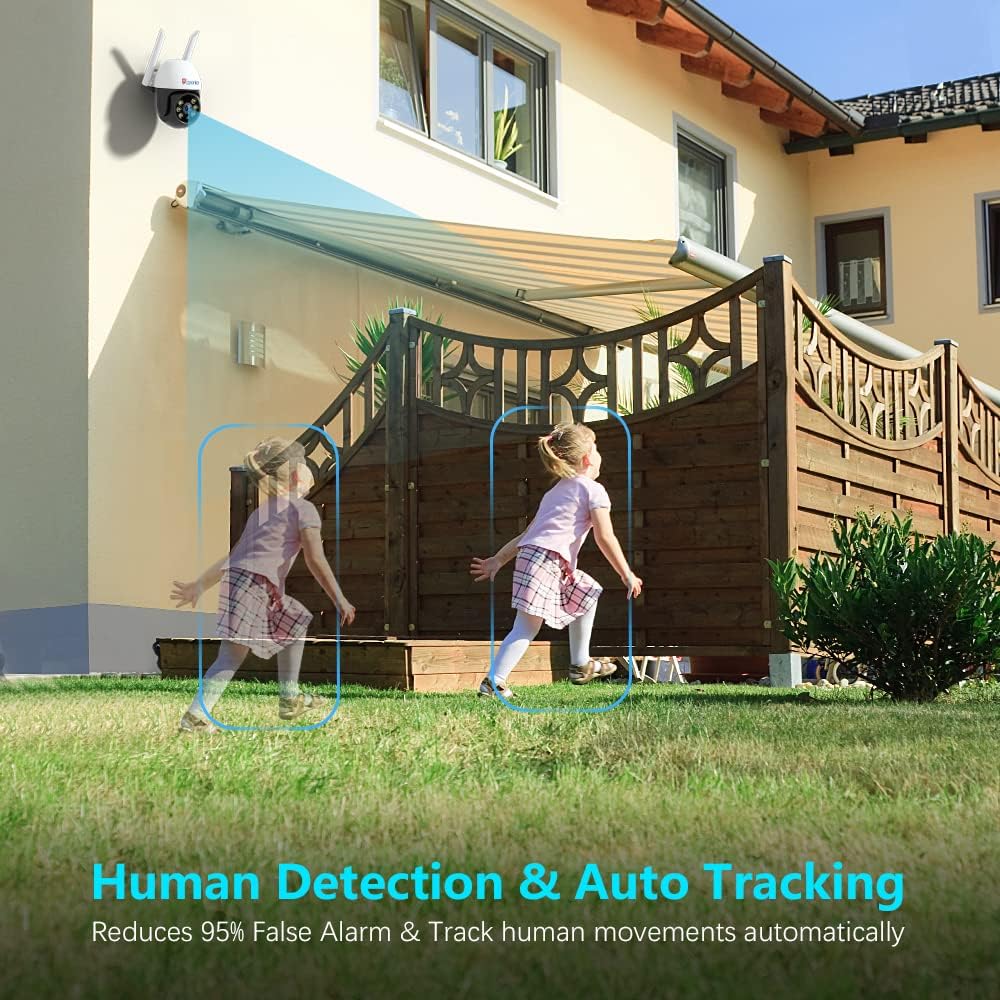
- Выяўленне чалавека і аўтаматычнае адсочванне: Intelligently identifies human shapes and automatically tracks their movement, reducing false alarms.
- Двухбаковы аўдыё: Убудаваны мікрафон і дынамік дазваляюць падтрымліваць сувязь у рэжыме рэальнага часу.
- Воданепранікальнасць IP66: Распрацаваны, каб вытрымліваць розныя ўмовы надвор'я на вуліцы.
- Памяць SD-карты: Supports local storage of recordings (SD card not included).
- Шырокая сумяшчальнасць: Works with iOS, Android, Mac OS, and Windows via dedicated applications.
Кампаненты камеры:


5. Настройка
Follow these steps to set up your Ctronics security camera:
5.1 Initial Power-On and SD Card Installation
- Connect the camera to the power adapter and plug it into an electrical outlet. The camera will perform a self-test, indicated by movement and a voice prompt.
- If you plan to use local storage, insert a Micro SD card (up to 128GB, Class 10 or higher recommended) into the SD card slot. The slot is typically located under a protective cover on the camera body. Ensure the camera is powered off before inserting or removing the SD card.
5.2 Усталёўка праграмы і падключэнне да Wi-Fi
The camera connects to your home Wi-Fi network (2.4 GHz only) via the Ctronics app. Ensure your mobile device is connected to a 2.4 GHz Wi-Fi network during setup.
Відэа: This video provides step-by-step instructions for connecting your Ctronics 600C camera to your WiFi network using the mobile application.
- Download the 'Ctronics' app from your mobile device's app store (iOS or Android).
- Зарэгіструйце ўліковы запіс і ўвайдзіце ў сістэму.
- Tap 'Add Camera' or the '+' icon in the app.
- Select 'Wireless Installation' or 'Add Camera by QR Code Scan' based on the app's prompts.
- Follow the on-screen instructions to connect the camera to your Wi-Fi network. This typically involves connecting your phone to the camera's temporary Wi-Fi hotspot, then selecting your home Wi-Fi network and entering its password.
- Once connected, the camera will confirm with a voice prompt, and its status in the app will change to 'Online'.
5.3 Мантаж камеры
- Choose a suitable outdoor location for mounting, ensuring good Wi-Fi signal strength and a clear view вобласці, якую вы хочаце кантраляваць.
- Use the provided mounting plate as a template to mark drill holes on the wall or ceiling.
- Прасвідруйце адтуліны і ўстаўце дзюбелі ў сцяну.
- Secure the mounting plate using the provided screws.
- Attach the camera to the mounting plate, ensuring it is firmly locked in place.
6. Аперацыя
After successful setup, you can access and control your camera via the Ctronics app.
6.1 У прамым эфіры View і кіраванне панарамаваннем/нахілам
- Open the Ctronics app and select your camera from the device list.
- The live video feed will appear. Use the on-screen joystick or swipe gestures to pan (rotate horizontally up to 350°) and tilt (rotate vertically up to 90°) the camera.
6.2 Двухбаковае аўдыё
- У прамым эфіры view інтэрфейс, націсніце значок мікрафона, каб гаварыць праз дынамік камеры.
- Націсніце на значок дынаміка, каб праслухаць гук з мікрафона камеры.
6.3 Рэжымы начнога бачання
The camera offers different night vision modes:
- Normal (Infrared): Black and white video using infrared LEDs.
- колер: Full-color video using built-in spotlights.
- Аўто: Automatically switches between Normal and Color based on ambient light and detected motion.
You can switch between these modes in the app's video settings or directly from the live view інтэрфейс.
6.4 Human Detection and Auto Tracking
- Enable Human Detection and Auto Tracking in the camera's settings within the app.
- When a human shape is detected, the camera will automatically track its movement and send real-time notifications to your mobile device.
- You can configure alarm settings, including audio and light alarms, to deter intruders.
Відэа: This video highlights the key features of the Ctronics 600C outdoor IP camera, including 1080P resolution, pan/tilt, night vision, human detection, auto tracking, and two-way audio.
7. Тэхнічнае абслугоўванне
Regular maintenance ensures optimal performance and longevity of your camera system.
7.1 Ачыстка
- Gently wipe the camera lens with a soft, clean cloth to remove dust or smudges. Do not use harsh chemicals or abrasive materials.
- Ачысціце корпус камеры ад рэкламыamp тканіна па меры неабходнасці.
7.2 Абнаўленне прашыўкі
Periodically check the Ctronics app for available firmware updates. Keeping your camera's firmware up-to-date ensures improved performance, new features, and security enhancements.
7.3 Экалагічныя меркаванні
While the camera is IP66 waterproof, avoid prolonged exposure to extreme weather conditions if possible. Ensure proper drainage around the camera's mounting location.
8. Выпраўленне непаладак
Калі ў вас узніклі праблемы з камерай, звярніцеся да наступных распаўсюджаных праблем і іх рашэнняў:
| праблема | Магчымая прычына | Рашэнне |
|---|---|---|
| Камера афлайн у дадатку | No power, weak Wi-Fi signal, incorrect Wi-Fi password. | Check power connection. Move camera closer to router or use a Wi-Fi extender. Re-enter Wi-Fi password in app settings. Reset camera and reconfigure. |
| Няма запісу на SD-карту | SD card full, faulty, or not formatted. Recording schedule not set. | Check SD card status in app. Format or replace SD card. Ensure recording schedule is enabled. |
| Дрэнная якасць відэа | Weak Wi-Fi signal, dirty lens. | Improve Wi-Fi signal. Clean the camera lens. |
| Ілжывая трывога | Motion sensitivity too high, environmental factors (e.g., moving branches). | Adjust motion detection sensitivity in app settings. Configure detection zones to exclude irrelevant areas. |
| Двухбаковы аўдыё не працуе | Microphone/speaker disabled, volume too low. | Check audio settings in the app. Ensure microphone and speaker icons are enabled and volume is adjusted. |
If the problem persists, please contact Ctronics customer support for further assistance.
9. Тэхнічныя характарыстыкі
Below are the technical specifications for the Ctronics CTIPC-600C-P4 Outdoor Security Camera System:
| Асаблівасць | Дэталь |
|---|---|
| Нумар мадэлі | CTIPC-600C-P4 |
| Дазвол відэазахопу | 1080p (1920 x 1080 пікселяў) |
| Пратакол злучэння | Wi-Fi (толькі 2.4 ГГц) |
| Дыяпазон павароту/нахілу | Панарамаванне 350°, нахіл 90° |
| Начное бачанне | 65FT Color Night Vision (Infrared and Spotlight) |
| Выяўленне чалавека | Yes, with Auto Tracking |
| Аўдыё | Двухбаковае аўдыё |
| Рэйтынг воданепранікальнасці | IP66 |
| Захоўванне | Карта памяці Micro SD (да 128 ГБ, не ўваходзіць у камплект) |
| Электразабеспячэнне | 5V DC, 1A (via USB power cable and adapter) |
| Працоўная тэмпература | -10°C да 60°C (ад 14°F да 131°F) |
| Сумяшчальныя прылады | Desktop, Smartphone (iOS, Android, Mac OS, Windows) |
| Памеры прадмета | 6.69 x 8.27 x 9.06 цалі (на адну камеру) |
10. Гарантыя і падтрымка
Ctronics products are designed for reliability and performance. For information regarding warranty coverage, please refer to the warranty card included in your package or visit the official Ctronics webсайт.
If you require technical assistance, troubleshooting, or have any questions about your product, please contact Ctronics customer support. Contact details can typically be found on the Ctronics webсайце або ва ўпакоўцы прадукту.
Please have your model number (CTIPC-600C-P4) and purchase information ready when contacting support.