
SteelSeries 61631
SteelSeries Arctis Nova 3 Multi-Platform Gaming Headset
Кіраўніцтва па эксплуатацыі
1. Уводзіны
This manual provides comprehensive instructions for the setup, operation, maintenance, and troubleshooting of your SteelSeries Arctis Nova 3 Multi-Platform Gaming Headset. Please read this manual thoroughly before using the product to ensure optimal performance and longevity.
The Arctis Nova 3 headset features the custom-designed Nova Acoustic System with High Fidelity Drivers, 360° Spatial Audio, and a 10-band Parametric EQ. It includes an AI-powered noise-cancelling ClearCast Gen 2 microphone and dynamic RGB lighting. Designed for multi-platform compatibility, it connects via USB-C to PC, PlayStation, Xbox Series X|S, Switch, and mobile devices.
2. Прадукт скончыўсяview
2.1 Змест пакета
- SteelSeries Arctis Nova 3 Gaming Headset
- Кабель USB-C да USB-C
- Кабель-адаптар USB-C да USB-A
- Аўдыёкабель USB-C да 3.5 мм
- Дакументацыя (гэтае кіраўніцтва)
2.2 Кампаненты гарнітуры
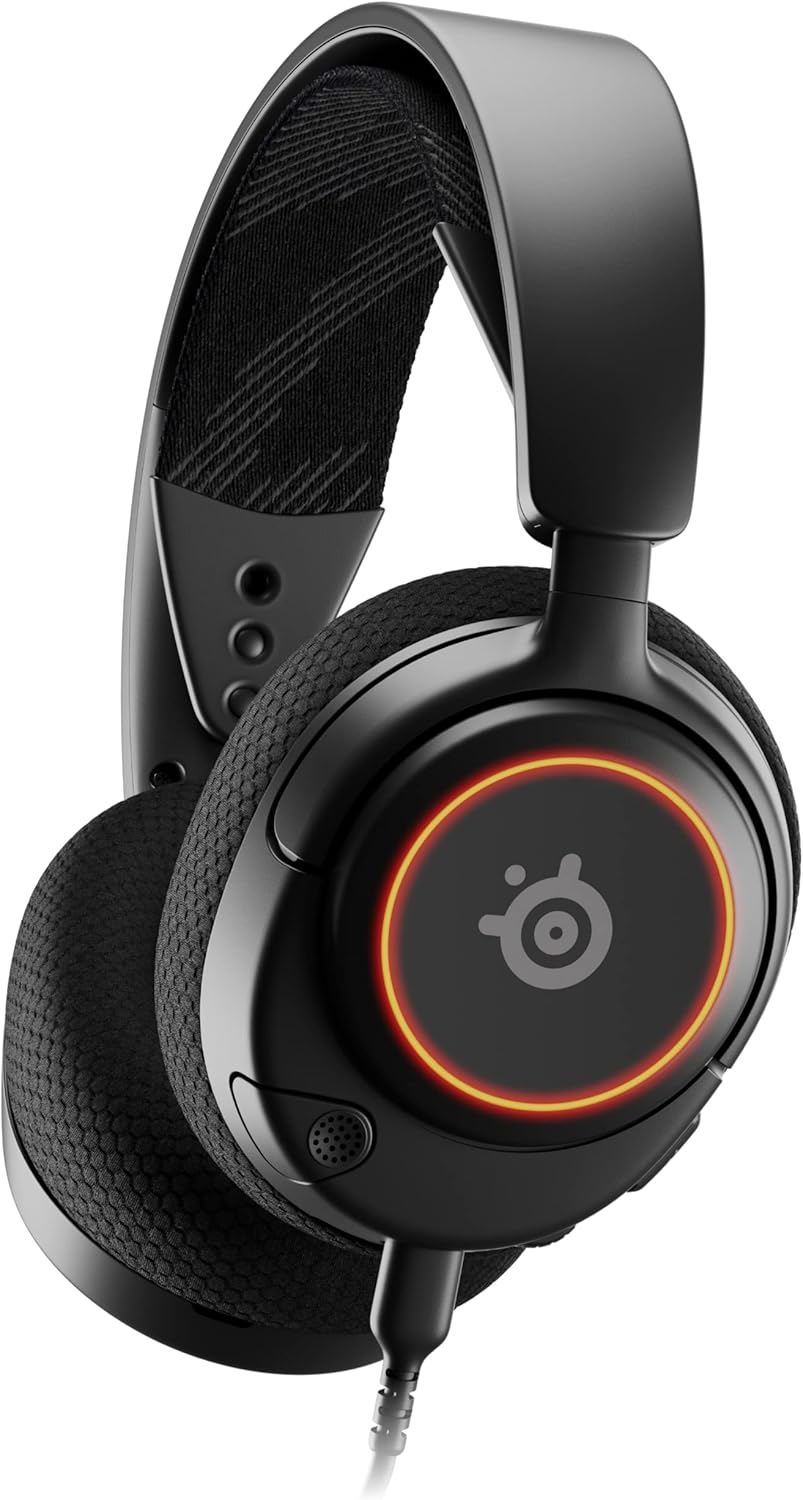
Малюнак 1: Фронт view of the Arctis Nova 3 headset.

Малюнак 2: Key features of the Arctis Nova 3, including ComfortMAX System, 360° Spatial Audio, Dual-Zone RGB, Nova Acoustic System, ClearCast Gen 2 AI-Powered Noise-Cancelling Mic, and Multi-Platform Support.
- ComfortMAX System: Features height-adjusting, rotating earcups with AirWeave Memory Foam cushions and a stretchy band for comfortable wear.
- ClearCast Gen 2 Mic: AI-powered noise-cancelling microphone, fully retractable into the earcup.
- Dual-Zone RGB Lighting: Customizable 16.8 million color options on the earcups.
- Nova Acoustic System: Custom-designed with High Fidelity Drivers for superior sound.
- элементы кіравання: Volume wheel and microphone mute switch located on the earcup.
- Connectivity Port: USB-C port for various cable connections.
3. Настройка
3.1 Падключэнне гарнітуры
The Arctis Nova 3 offers versatile connectivity options:
- Падключэнне USB-C: Use the provided USB-C to USB-C cable to connect directly to devices with a USB-C port (e.g., PC, PlayStation 5, Nintendo Switch, mobile devices).
- Падключэнне USB-A: For devices with only USB-A ports, use the USB-C to USB-A adapter cable. Connect the USB-C end to the headset and the USB-A end to your device.
- 3.5 мм аўдыёзлучэнне: For devices requiring a 3.5mm audio jack (e.g., Xbox controllers, older consoles, some mobile devices), use the USB-C to 3.5mm audio cable. Connect the USB-C end to the headset and the 3.5mm jack to your device.
Відэа 1: Прадукт скончаныview demonstrating various connectivity options and features of the Arctis Nova 3 headset.
Відэа 2: 360 градусаў view of the Arctis Nova 3 Black headset, showcasinяго дызайн і асаблівасці з усіх бакоў.
3.2 Рэгуляванне пасадкі
The ComfortMAX System allows for personalized fit:
- Рэгуляванне павязкі на галаву: The elastic suspension band can be adjusted to different lengths using the three holes on each side of the headband, ensuring a comfortable fit that distributes weight evenly.
- Earcup Rotation: The earcups can rotate 90 degrees, allowing the headset to lay flat for storage or comfortable resting around the neck.

Малюнак 3: The adjustable headband and rotating earcups of the Arctis Nova 3 for a personalized and comfortable fit.

Малюнак 4: The super lightweight design (253g) of the Arctis Nova 3 with memory foam earcup cushions for extended comfort.
4. Інструкцыя па эксплуатацыі
4.1 Элементы кіравання гукам
- Кола гучнасці: Rotate the wheel on the left earcup up or down to adjust the headset's audio volume.
- Пераключальнік адключэння мікрафона: Slide the switch on the left earcup to mute or unmute the ClearCast Gen 2 microphone. An orange indicator will be visible when muted.
4.2 Выкарыстанне мікрафона
- Падоўжыць/Уцягнуць: The ClearCast Gen 2 microphone is fully retractable. Gently pull it out from the left earcup for use and push it back in for storage.
- пазіцыянаванне: Position the microphone approximately 1-2 inches from your mouth for optimal voice clarity.

Малюнак 5: The ClearCast Gen 2 mic, which silences background noise and fully retracts into the earcup.
4.3 RGB Lighting Customization (PC Only)
Dynamic RGB lighting can be customized via the SteelSeries Engine software on PC. This allows for 16.8 million color options and reactive lighting effects.

Малюнак 6: Customizable PrismSync RGB lighting with 16.8 million colors on the Arctis Nova 3 headset.
5. Тэхнічнае абслугоўванне
- Уборка: Для чысткі гарнітуры выкарыстоўвайце мяккую сухую тканіну. Пазбягайце выкарыстання абразіўных ачышчальнікаў або растваральнікаў.
- захоўванне: Захоўвайце гарнітуру ў прахалодным, сухім месцы, удалечыні ад прамых сонечных прамянёў і экстрэмальных тэмператур.
- Сыход за кабелем: Пазбягайце рэзкіх выгібаў або празмернага нацягвання кабеляў, каб пазбегнуць пашкоджанняў.
6. Выпраўленне непаладак
| праблема | Магчымая прычына | Рашэнне |
|---|---|---|
| Няма гуку з гарнітуры | Incorrect connection, low volume, muted device. | Ensure cables are securely connected. Check headset volume wheel and device audio settings. Confirm device is not muted. |
| Не працуе мікрафон | Microphone muted, incorrect input device selected, mic not extended. | Check microphone mute switch (orange indicator means muted). Ensure microphone is fully extended. Verify correct input device is selected in your system's sound settings. |
| RGB lighting not working (PC) | Software issue, incorrect USB connection. | Ensure SteelSeries Engine software is installed and updated. Confirm headset is connected via USB-C or USB-A (RGB not supported via 3.5mm). |
| Дыскамфорт падчас выкарыстання | Няправільная пасадка. | Adjust the elastic headband and earcup positions for optimal comfort. |
7. Тэхнічныя характарыстыкі
| Асаблівасць | Дэталь |
|---|---|
| Назва мадэлі | SteelSeries Arctis Nova 3 Multi-Platform Gaming Headset |
| Нумар мадэлі | 61631 |
| Тэхналогія падлучэння | USB-C (includes USB-A and 3.5mm adapters) |
| Тып аўдыё драйвера | Dynamic Driver (Nova Acoustic System) |
| АЧХ | 20-22000 Гц |
| Імпеданс | 36 Ом |
| Мікрафон | ClearCast Gen 2 AI-Powered Noise-Cancelling, Retractable |
| Прасторавае аўдыё | 360° прасторавы гук (сумяшчальны з Tempest 3D Audio для PS5 / Microsoft Spatial Sound) |
| Вага | 8.3 унцый (прыблізна 235 г) |
| Памеры (ДхШхВ) | 7.32 х 6.82 х 3.47 цалі |
| Матэрыял | Foam, Aluminum |
| RGB асвятленне | Dynamic 16.8 million color options (PrismSync RGB) |
| Сумяшчальныя прылады | PC, PlayStation 5|4, Xbox Series X|S, Switch, Mobile |
8. Гарантыя і падтрымка
Каб атрымаць інфармацыю аб гарантыі і тэхнічнай падтрымцы, наведайце афіцыйны сайт SteelSeries. webсайт або звярніцеся ў службу падтрымкі кліентаў. Захоўвайце пацвярджэнне пакупкі для прэтэнзій па гарантыі.
Афіцыйны SteelSeries Webсайт: Крама SteelSeries на Amazon