
Mesqool MQL-CR1019
Mesqool Digital Alarm Clock User Manual
Model: MQL-CR1019
Прадукт скончаныview
The Mesqool Digital Alarm Clock is a versatile device designed to enhance your living space with its multi-functional display and convenient features. It provides accurate time, date, temperature, and humidity readings, along with dual alarm capabilities and charging ports for your electronic devices.

Figure 1: Mesqool Digital Alarm Clock with charging capabilities.
Што ў скрынцы
- Драўляны лічбавы будзільнік
- US AC Power Adapter
- Кабель для зарадкі
- Папяровы дапаможнік

Малюнак 2: Камплектацыя.
Асноўныя характарыстыкі
- Вялікі дысплей: An 8.7-inch screen clearly displays time, date, and day of the week.
- Маніторынг тэмпературы і вільготнасці: Assists in monitoring indoor environment conditions.
- Loud Alarm with Snooze: Adjustable alarm volume from 65dB to 120dB with a 9-minute snooze function.
- Некалькі налад сігналізацыі: Four alarm modes available: Every day, Weekend, Weekdays, or One Time Alarm. Supports dual alarm settings.
- Парты зарадкі USB і Type-C: Equipped with both USB and Type-C ports to charge two electronic devices simultaneously.
- 5 Levels Dimmer: Easily adjust display brightness with five levels to suit various lighting conditions.
- Стыльны дызайн: Features a wood grain pattern and metal buttons for a modern aesthetic.
- Power Cord Operated with Battery Backup: Primarily AC powered, with 2x AAA batteries (not included) for memory backup during power outagэс.
Відэа 1: Скончанаview of Mesqool Digital Alarm Clock features, including dual alarm, adjustable brightness, charging ports, and environmental monitoring.
Настройка
1. Падключэнне сілкавання
Connect the provided AC power adapter to the clock's power input port and plug it into a standard wall outlet. The clock is primarily AC powered.

Figure 3: Power connection and battery backup.
2. Устаноўка рэзервовага акумулятара
For memory backup during power outages, install 2x AAA batteries (not included) into the battery compartment located at the back of the clock. This ensures that time and alarm settings are retained.
Інструкцыя па эксплуатацыі
1. Устаноўка часу і даты
- Націсніце ДАТА button to cycle through date display modes (e.g., MM-DD-YYYY).
- Націсніце TIME 12/24H кнопка для пераключэння паміж 12-гадзінным і 24-гадзінным фарматамі часу.
- Каб усталяваць час, націсніце і ўтрымлівайце TIME 12/24H button until the hour digits flash. Use the +HOUR і -МІН кнопкі для налады гадзіны і хвіліны. Націсніце АДРЫМІЦЬ/ОК для пацверджання кожнай налады.
- To set the date, press and hold the ДАТА button until the year digits flash. Use the +HOUR і -МІН buttons to adjust the year, month, and day. Press АДРЫМІЦЬ/ОК для пацверджання кожнай налады.

Figure 4: Multiple display styles and unit switching.
2. Налада сігналізацыі
The clock supports dual alarms (ALM1 and ALM2).
- Націсніце 1 ALM or 2 ALM button to select the alarm you wish to set.
- Press and hold the selected alarm button (e.g., 1 ALM) until the alarm time flashes. Use +HOUR і -МІН каб усталяваць патрэбны час будзільніка. Націсніце АДРЫМІЦЬ/ОК каб пацвердзіць.
- After setting the time, the alarm mode will flash. Use +HOUR or -МІН to select one of the four alarm modes:
- пн-нд: Сігналізацыя гучыць кожны дзень.
- пн-пт: Alarm sounds on weekdays only.
- СБ-НД: Alarm sounds on weekends only.
- Аднойчы: Alarm sounds once.
- Каб уключыць/выключыць будзільнік, коратка націсніце адпаведную кнопку 1 ALM or 2 ALM кнопка. На дысплеі з'явіцца/знікне значок сігналу трывогі.

Figure 5: Dual alarm settings and modes.
3. Adjusting Brightness (Dimmer)
Націсніце ДЫММЕР button to cycle through 5 levels of display brightness. Select the level that best suits your environment and preference.

Figure 6: Display brightness adjustment.
4. Рэгуляванне гучнасці будзільніка
Націсніце VOL DST button to adjust the alarm volume. The volume can be set between 65dB and 120dB across 5 levels.

Figure 7: Alarm volume adjustment and snooze button.
5. Функцыя паўтору будзільніка
Калі гучыць будзільнік, націсніце вялікую кнопку АДРЫМІЦЬ/ОК button on top of the clock to activate the snooze function. The alarm will pause for 9 minutes and then sound again.
6. Адлюстраванне тэмпературы і вільготнасці
The clock displays indoor temperature and humidity. Press the °F/°C button to switch between Fahrenheit and Celsius temperature units.
7. Зарадка электронных прылад
Utilize the USB and Type-C charging ports located at the back of the clock to charge your smartphones, tablets, or other compatible electronic devices.

Figure 8: USB and Type-C charging ports in use.
Тэхнічнае абслугоўванне
- Працірайце гадзіннік мяккай сухой тканінай. Не выкарыстоўвайце абразіўныя ачышчальнікі або растваральнікі.
- Пазбягайце ўздзеяння на гадзіннік экстрэмальных тэмператур, прамых сонечных прамянёў або высокай вільготнасці.
- Ensure proper ventilation around the clock, especially if using the charging ports for extended periods.
Ліквідацыю непаладак
| праблема | Магчымая прычына | Рашэнне |
|---|---|---|
| Дысплей пусты або цьмяны. | Няма электрычнасці, электрычнасць адключанаtage, or brightness set too low. | Check power adapter connection. Ensure batteries are installed for backup. Press the ДЫММЕР кнопку для павелічэння яркасці. |
| Сігналізацыя не гучыць. | Alarm is off, volume is too low, or incorrect alarm mode. | Ensure the alarm is activated (icon visible). Increase alarm volume using VOL DST. Verify the alarm mode (Mon-Sun, Mon-Fri, etc.) is correctly set. |
| Час/дата няправільныя. | Not set correctly or power interruption without battery backup. | Follow the "Setting Time and Date" instructions to reset. Install fresh AAA batteries for backup. |
| Devices not charging. | Incorrect cable, device not compatible, or clock not powered. | Ensure correct USB/Type-C cable is used. Verify the clock is powered on. Check device compatibility. |
Тэхнічныя характарыстыкі
- Марка: Мескул
- Нумар мадэлі: MQL-CR1019
- Тып дысплея: Лічбавы
- Памеры прадукту: 8.07"Ш х 3.62"В
- Крыніца харчавання: Электрычны шнур (адаптар пераменнага току ў камплекце)
- Рэзервовае капіраванне батарэі: 2 х ААА батарэі (не ўключаны)
- Гучнасць будзільніка: 65dB - 120dB (5 levels)
- Яркасць дысплея: 5 ўзроўню рэгуляваных
- Парты для зарадкі: 1 x USB, 1 x Type-C
- матэрыял: Plastic (wood grain finish)
- Асаблівасці: Calendar Display, Temperature Display, Humidity Display, Dual Alarm, Large Screen Display, Snooze
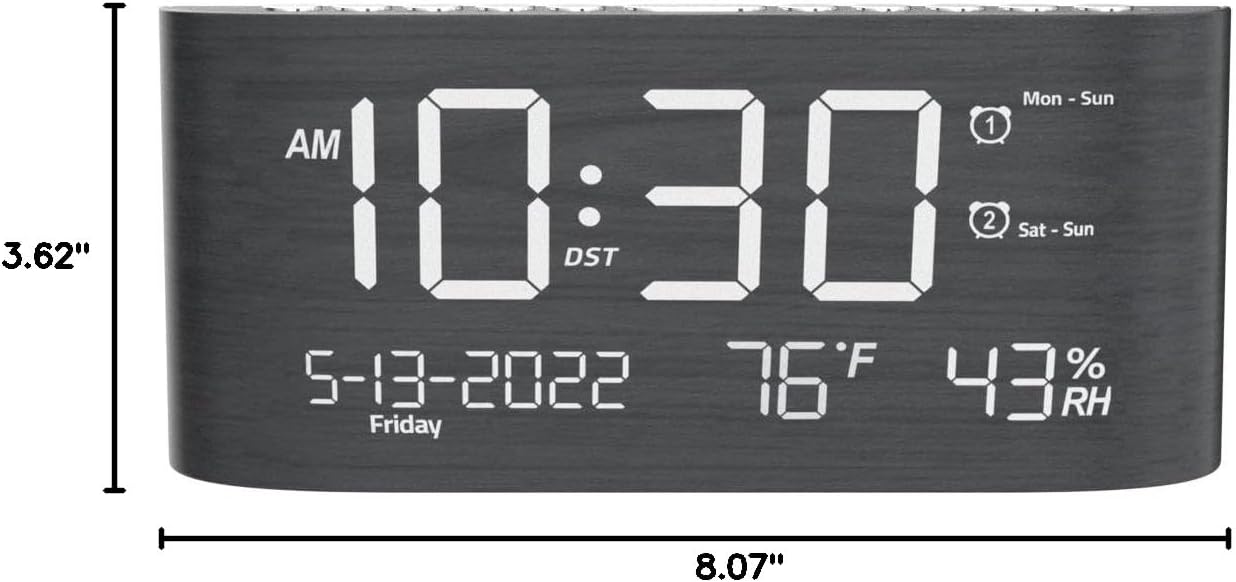
Малюнак 9: Памеры вырабу.
Гарантыя і падтрымка
This Mesqool product comes with a 2 Years Exchange Warranty. For any support inquiries, troubleshooting assistance, or warranty claims, please refer to the official Mesqool webсайт або звярніцеся непасрэдна ў службу падтрымкі кліентаў.
Электронная версія гэтага кіраўніцтва карыстальніка даступная для запампоўкі: Спампаваць кіраўніцтва карыстальніка (PDF)
Ask a question about this manual
Ask about setup, troubleshooting, compatibility, parts, safety, or missing instructions. Manuals+ will review the question and use this page’s manual context to help answer it.