
1. Уводзіны
The Deity TC-1 is a compact and versatile wireless timecode box designed for professional audio and video synchronization. It integrates advanced features such as Bluetooth 5.0, a 2.4G radio ecosystem, and app control, offering precise timecode accuracy and flexible workflow integration. This manual provides detailed instructions for setting up, operating, maintaining, and troubleshooting your TC-1 unit.
2. Інфармацыя па бяспецы
- Не падвяргайце прыладу ўздзеянню вады або празмернай вільготнасці.
- Пазбягайце экстрэмальных тэмператур. Эксплуатуйце і захоўвайце прыладу ў рэкамендаваных умовах навакольнага асяроддзя.
- Не спрабуйце разбіраць або мадыфікаваць прыладу. Рамонт павінен выконвацца толькі ўпаўнаважаным персаналам.
- Use only the specified charging cable and power source to prevent damage or fire.
- Трымайце прыладу далей ад моцных магнітных палёў.
3. Змесціва ўпакоўкі
Verify that all items are present in your Deity TC-1 package:
- 1x Deity TC-1 Wireless Timecode Box
- 1x Locking to Unlocking TRS Audio Spring Cable
- 1x Removable Cold Shoe Holder
- 1x кабель для зарадкі Type-C
- 1x USB-C to USB-A Firmware Upgrade Adapter
- 2x Female Buckle Velcro

Image: Deity TC-1 Wireless Timecode Box with all included accessories, including cables, cold shoe mount, and Velcro.
4. Прадукт скончыўсяview
The Deity TC-1 features a compact design with an intuitive OLED display and on-board controls for easy operation.

Выява: спераду view of the Deity TC-1, highlighting its 1-inch OLED display showing timecode, battery status, and connection indicators.

Выява: Збоку view of the Deity TC-1, showing the control wheel for menu navigation and the power/menu button.

Выява: Ніжняя частка view of the Deity TC-1, illustrating the attachment point for the removable cold shoe holder.
5. Настройка
5.1 Зарадка прылады
The TC-1 is powered by an internal Lithium Ion battery. To charge, connect the included USB-C charging cable to the USB-C port on the device and a compatible USB power source. A full charge takes approximately 2 hours and provides up to 28 hours of battery life.
5.2 Варыянты мантажу
The TC-1 offers flexible mounting solutions:
- Мацаванне халоднага башмака: Attach the removable cold shoe holder to the bottom of the TC-1 and slide it onto a camera's cold shoe or hot shoe mount.
- ліпучкі: Use the included female buckle Velcro pieces to secure the TC-1 to various surfaces or equipment.

Image: Deity TC-1 unit shown with the removable cold shoe mount attached to its base.
5.3 Першапачатковае ўключэнне
To power on the TC-1, press and hold the power button located on the side of the unit. The OLED display will illuminate, showing the current timecode and device status. To power off, press and hold the power button again until the display turns off.
6. Інструкцыя па эксплуатацыі
6.1 Timecode Synchronization
The TC-1 offers multiple methods for timecode synchronization:
- Bluetooth 5.0: Connect the TC-1 to your smartphone via Bluetooth for wireless jamming and control using the Sidus Audio mobile app. The Bluetooth range is up to 250 feet.
- 2.4G Radio: Utilize the proprietary 8-channel 2.4G radio ecosystem to wirelessly sync multiple TC-1 units together. This method also offers a maximum range of 250 feet.
- Hardwire Jam: Use the 3.5mm timecode port to hardwire jam timecode from another device or to jam other devices from the TC-1.
- Internal Generation: The TC-1 can also internally generate timecode, functioning as a master clock for your setup.

Image: A smartphone screen showing the Sidus Audio app interface, used for controlling and syncing the Deity TC-1.
6.2 Supported Timecode Formats
The Deity TC-1 supports all standard SMPTE Timecode Formats, ensuring compatibility with a wide range of professional equipment.
6.3 Timecode Accuracy
The TC-1 boasts high timecode accuracy of 0.5ppm, resulting in a minimal drift of only 1 frame every 72 hours. This ensures reliable and consistent synchronization over extended periods.
6.4 Падключэнне да прылад
Use the locking 3.5mm timecode port to connect the TC-1 to cameras, audio recorders, and other timecode-enabled devices. The included Locking to Unlocking TRS Audio Spring Cable facilitates these connections.
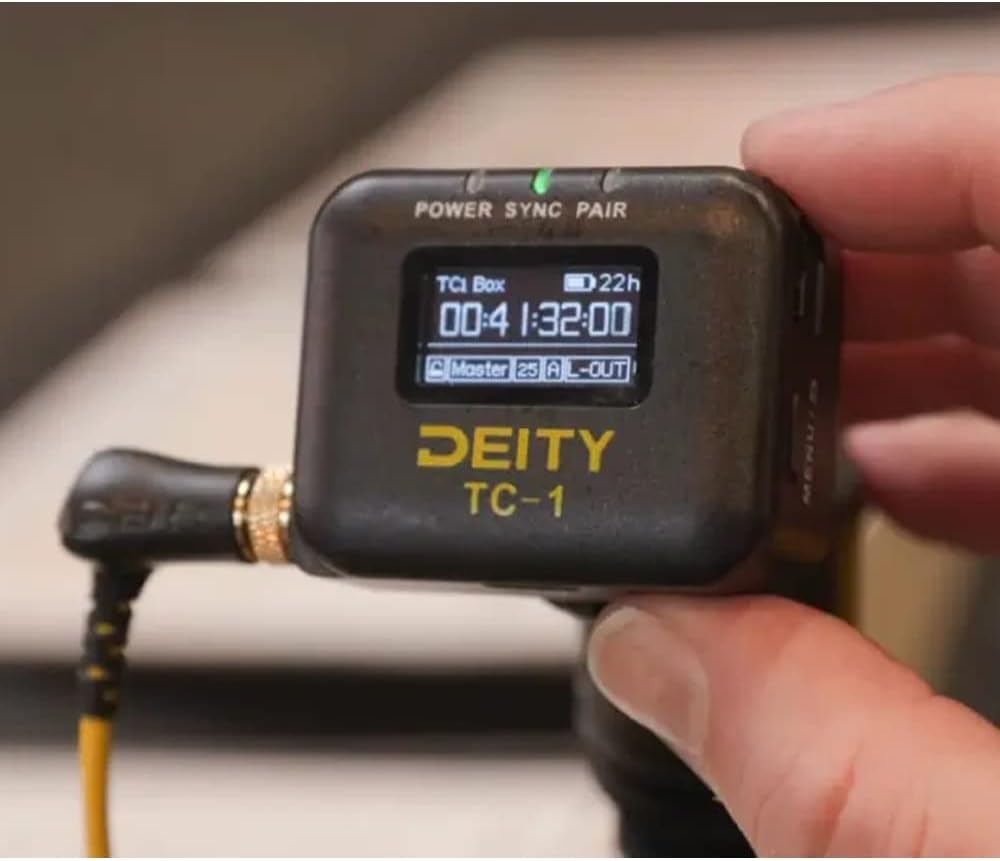
Image: The Deity TC-1 connected to a professional camera setup, demonstrating its integration into a production workflow.
7. Тэхнічнае абслугоўванне
- Уборка: Для чысткі вонкавага боку прылады выкарыстоўвайце мяккую сухую тканіну. Не выкарыстоўвайце вадкія ачышчальнікі або растваральнікі.
- захоўванне: Store the TC-1 in a cool, dry place away from direct sunlight and extreme temperatures when not in use.
- Сыход за батарэяй: Для аптымальнага тэрміну службы акумулятара пазбягайце частай поўнай разрадкі. Пры працяглым захоўванні зараджайце акумулятар прыкладна да 50% кожныя некалькі месяцаў.
8. Выпраўленне непаладак
- Прылада не ўключаецца: Ensure the battery is charged. Connect the USB-C cable to a power source and try again.
- Timecode not syncing: Check all cable connections. Ensure both the TC-1 and the receiving device are set to the correct timecode format and frame rate. Verify that Bluetooth or 2.4G radio connections are active and within range.
- Дысплей не працуе: If the device powers on but the display is blank, try restarting the unit. If the issue persists, contact Deity support.
- Праблемы з падключэннем да праграмы: Ensure Bluetooth is enabled on your mobile device. Restart the Sidus Audio app and the TC-1.
9. Тэхнічныя характарыстыкі
| Асаблівасць | Спецыфікацыя |
|---|---|
| Нумар мадэлі | TC-1 |
| Timecode Port | Locking 3.5mm |
| Версія Bluetooth | 5.0 |
| Bluetooth Max Range | 250 футаў |
| радыёчастотныя | 2.4G |
| Радыёканалы | 8 |
| Дакладнасць таймкода | 0.5 частак на хвіліну |
| Frame Drift | 1 Frame Every 72 Hours |
| Дысплей | 1" OLED |
| Порт для зарадкі | USB-C |
| Час зарадкі | 2 гадзіны (прыблізна) |
| Тэрмін службы батарэі | Да 28 гадзін |
| Вага прадмета | 9.2 унцый (0.26 кг) |
| Памеры ўпакоўкі | 5.59 х 5.04 х 1.73 цалі |
10. Гарантыя і падтрымка
For detailed warranty information and technical support, please refer to the official Deity website or contact Deity customer service directly. Keep your purchase receipt as proof of purchase for any warranty claims.
Deity Contact Information: Калі ласка, наведайце www.deitymic.com каб атрымаць найноўшыя рэсурсы падтрымкі і кантактную інфармацыю.


