
White Shark Apache 2
White Shark Apache 2 Gaming Keyboard and Mouse Combo User Manual
1. Уводзіны
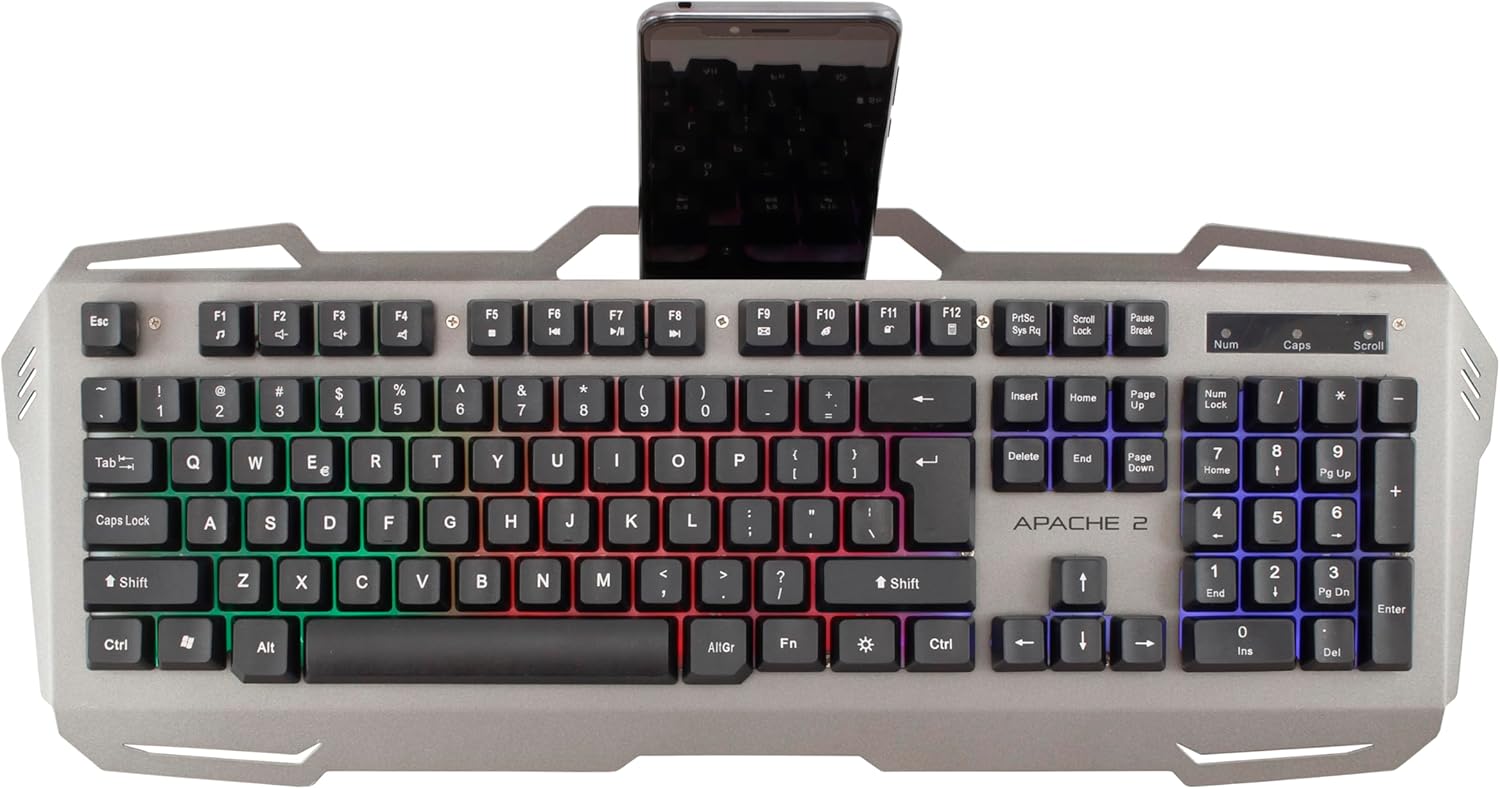
The White Shark Apache 2 Gaming Combo provides a full-size gaming keyboard and a 6-button optical gaming mouse. Designed for PC use, this combo features a durable metal base, vibrant rainbow LED backlighting, and anti-ghosting functionality on 19 keys for enhanced gaming performance. The mouse offers high precision with up to 3200 DPI, ensuring responsive and accurate control.
Малюнак 1: Спераду view of the White Shark Apache 2 gaming keyboard and mouse combo.
2. Змесціва ўпакоўкі
Калі ласка, пераканайцеся, што ўсе прадметы прысутнічаюць у пасылцы:
- 1x White Shark Apache 2 Gaming Keyboard
- 1x White Shark Apache 2 Gaming Mouse
- 1x Кіраўніцтва карыстальніка (гэты дакумент)
3. Інструкцыі па ўсталёўцы
Follow these steps to connect your White Shark Apache 2 Gaming Combo:
- Падключэнне клавіятуры: Locate an available USB 2.0 port on your computer. Insert the USB connector from the White Shark Apache 2 keyboard into the port.
- Падключыце мыш: Locate another available USB 2.0 port on your computer. Insert the USB connector from the White Shark Apache 2 mouse into the port.
- Аўтаматычнае распазнаванне: Your operating system (Windows XP/VISTA/7/8/10 or MacOS) should automatically detect and install the necessary drivers for both devices. No additional software installation is typically required.

Figure 2: The White Shark Apache 2 keyboard and mouse connected via USB.
4. Інструкцыя па эксплуатацыі
4.1 Функцыі клавіятуры
- Кіраванне падсветкай святлодыёдаў: The keyboard features a rainbow LED backlight. Use the Fn + Scroll Lock keys to cycle through different lighting modes. Use Fn + Page Up to increase backlight brightness and Fn + Page Down каб паменшыць яркасць.
- Anti-Ghosting: The keyboard supports anti-ghosting on 19 keys, ensuring that multiple simultaneous key presses are registered accurately, which is crucial for gaming.
- Integrated Smartphone Holder: The keyboard includes a built-in slot at the top for holding a smartphone, providing convenient access during use.

Figure 3: White Shark Apache 2 keyboard featuring an integrated smartphone holder.
4.2 Функцыі мышы
- Рэгуляванне DPI: The optical mouse features a 3200 DPI sensor. A dedicated button located behind the scroll wheel allows you to cycle through different DPI settings to adjust cursor sensitivity to your preference.
- 6 Кнопкі: The mouse is equipped with 6 buttons, including left-click, right-click, scroll wheel, DPI adjustment, and two side buttons, providing versatile control for gaming and general use.
- Хуткасць галасавання: The mouse operates with a polling rate of up to 125 Hz, ensuring a responsive and lag-free experience.

Figure 4: Close-up of the keyboard's LED backlight and the mouse's DPI button.
5. Тэхнічнае абслугоўванне
Proper maintenance ensures the longevity and optimal performance of your gaming combo:
- Уборка: Use a soft, dry cloth to gently wipe the surfaces of the keyboard and mouse. For stubborn dirt, a slightly damp можна выкарыстоўваць тканіну, але сачыце за тым, каб вадкасць не патрапіла ўнутр прылад.
- Пазбягайце хімічных рэчываў: Do not use harsh chemicals, abrasive cleaners, or solvents, as these can damage the finish and internal components.
- захоўванне: Store the devices in a clean, dry environment, away from direct sunlight, extreme temperatures, and excessive dust or moisture.
6. Выпраўленне непаладак
Калі ў вас узнікнуць праблемы, звярніцеся да наступных распаўсюджаных рашэнняў:
- Прылада не распазнана:
- Ensure the USB cables are securely connected to your computer's USB ports.
- Try connecting the devices to different USB ports.
- Перазагрузіце кампутар.
- Keyboard LEDs Not Working:
- Check if the backlight is turned off or set to minimum brightness using the Fn + старонка ўверх/уніз ключы.
- Пераканайцеся, што клавіятура правільна падключана.
- Mouse Cursor Erratic or Unresponsive:
- Працярыце аптычны датчык на ніжняй частцы мышы мяккай сухой тканінай.
- Ensure the mouse pad or surface is clean, uniform, and suitable for optical mice.
- Паспрабуйце падключыць мыш да іншага порта USB.
- Specific Keys Not Responding:
- Пераканайцеся, што клавіятура правільна падключана.
- Test the keys in different applications to rule out software issues.
- Калі праблема не знікне, звярніцеся ў службу падтрымкі.
7. Тэхнічныя характарыстыкі
| Асаблівасць | Дэталь |
|---|---|
| Тып прадукту | Камбінацыя гульнявой клавіятуры і мышы |
| Марка | Белая акула |
| мадэль | Apache 2 |
| Сувязь | USB 2.0 |
| Раскладка клавіятуры | QWERTY, 104 keys |
| Клавіятура Anti-ghosting | 19 ключоў |
| Падсвятленне клавіятуры | Rainbow LED, adjustable intensity |
| Keyboard Lifespan | Да 5 мільёнаў націсканняў клавіш |
| Mouse Sensor Type | Аптычны |
| Мыш DPI | Да 3200 DPI |
| Кнопкі мышкі | 6 |
| Частата апытання мышы | Да 125 Гц |
| Mouse Lifespan | Да 3 мільёнаў клікаў |
| Даўжыня кабеля | 150 см |
| Сумяшчальныя аперацыйныя сістэмы | Windows XP/VISTA/7/8/10, MacOS |
| Матэрыял клавіятуры | Металічная аснова |
8. Інфармацыя аб гарантыі
White Shark products typically come with a limited manufacturer's warranty. For detailed warranty terms, conditions, and duration, please refer to the warranty card included with your product or visit the official White Shark webсайт. Захоўвайце пацвярджэнне пакупкі для любых гарантыйных прэтэнзій.
9. Падтрымка кліентаў
For technical assistance, troubleshooting beyond the scope of this manual, or warranty claims, please contact White Shark customer support. Contact details, including phone numbers, email addresses, or support portals, can usually be found on the product packaging or the official White Shark webсайт.