
Уводзіны
The TechniSat DIGITRADIO 602 is a versatile music system designed for comprehensive audio entertainment. It features DAB+ digital radio, FM radio, and access to over 40,000 Internet radio stations via integrated Wi-Fi. The system includes a CD player, Bluetooth audio streaming, Spotify Connect, and a USB port for MP3 playback and device charging. For enhanced convenience, it offers wireless charging for compatible smartphones and can be controlled via dedicated mobile applications. The audio output is delivered through two 20-watt speakers and an integrated 30-watt subwoofer, providing a powerful and nuanced sound experience.
Настройка
1. Распакаванне і размяшчэнне
Carefully remove the DIGITRADIO 602 from its packaging. Place the unit on a stable, flat surface, ensuring adequate ventilation around the device. Avoid placing it near heat sources or in direct sunlight.
2. Падключэнне сілкавання
Connect the provided power adapter to the DC IN port on the rear of the unit. Plug the other end into a suitable wall outlet. The unit will power on or enter standby mode.
3. Connecting Antenna
Attach the detachable DAB+/FM telescopic antenna to the F-socket on the rear panel. Extend the antenna fully for optimal reception of DAB+ and FM radio signals. For external antenna connection, use the dedicated F-socket.

Тыл view of the DIGITRADIO 602, highlighting the headphone jack (3.5mm), analog audio input (AUX IN), connection for external antenna (F-socket), and the detachable DAB+/FM telescopic antenna.
4. Падключэнне да сеткі (Wi-Fi)
Upon first power-on, the device will guide you through the initial setup, including connecting to your Wi-Fi network. Select your network from the list and enter the password using the unit's controls. A stable Wi-Fi connection is required for Internet radio and Spotify Connect functionality.
Інструкцыя па эксплуатацыі
1. Асноўныя элементы кіравання
Use the front panel buttons and rotary knobs to navigate menus, adjust volume, select modes, and control playback. The OLED display provides visual feedback for all operations.
2. Radio Modes (DAB+, FM, Internet Radio)
Press the 'MODE' button to switch between DAB+, FM, and Internet Radio. In DAB+ and FM modes, perform a scan to find available stations. For Internet Radio, browse by genre, location, or search for specific stations. Save your favorite stations as presets for quick access.

The DIGITRADIO 602 supports radio reception via DAB+, Internet, and FM, offering a wide variety of programs in digital quality.
3. Прайграванне кампакт-дыска
Insert an audio CD or an MP3 CD into the slot-in CD player. The unit will automatically detect and begin playback. Use the playback controls (Play/Pause, Skip, Stop) on the front panel or remote control.

The integrated CD player with MP3 function allows you to play your favorite CDs directly on the device.
4. Струменевая перадача аўдыё праз Bluetooth
Select Bluetooth mode on the DIGITRADIO 602. Enable Bluetooth on your mobile device and search for 'DIGITRADIO 602' to pair. Once connected, you can stream audio wirelessly from your device to the radio.

Enjoy wireless music through Bluetooth audio streaming and Spotify Connect, controlled from your smartphone.
5. Spotify Connect
Ensure your DIGITRADIO 602 is connected to the same Wi-Fi network as your smartphone or tablet running the Spotify app. Open the Spotify app, play a song, and select the DIGITRADIO 602 as the playback device from the 'Devices Available' menu.
6. Прайграванне і зарадка праз USB
Устаўце USB-назапашвальнік, які змяшчае MP3-файл files into the USB port on the front panel. Select USB mode to browse and play your music. The USB port also functions as a charging port for mobile devices (5V/1.0A).
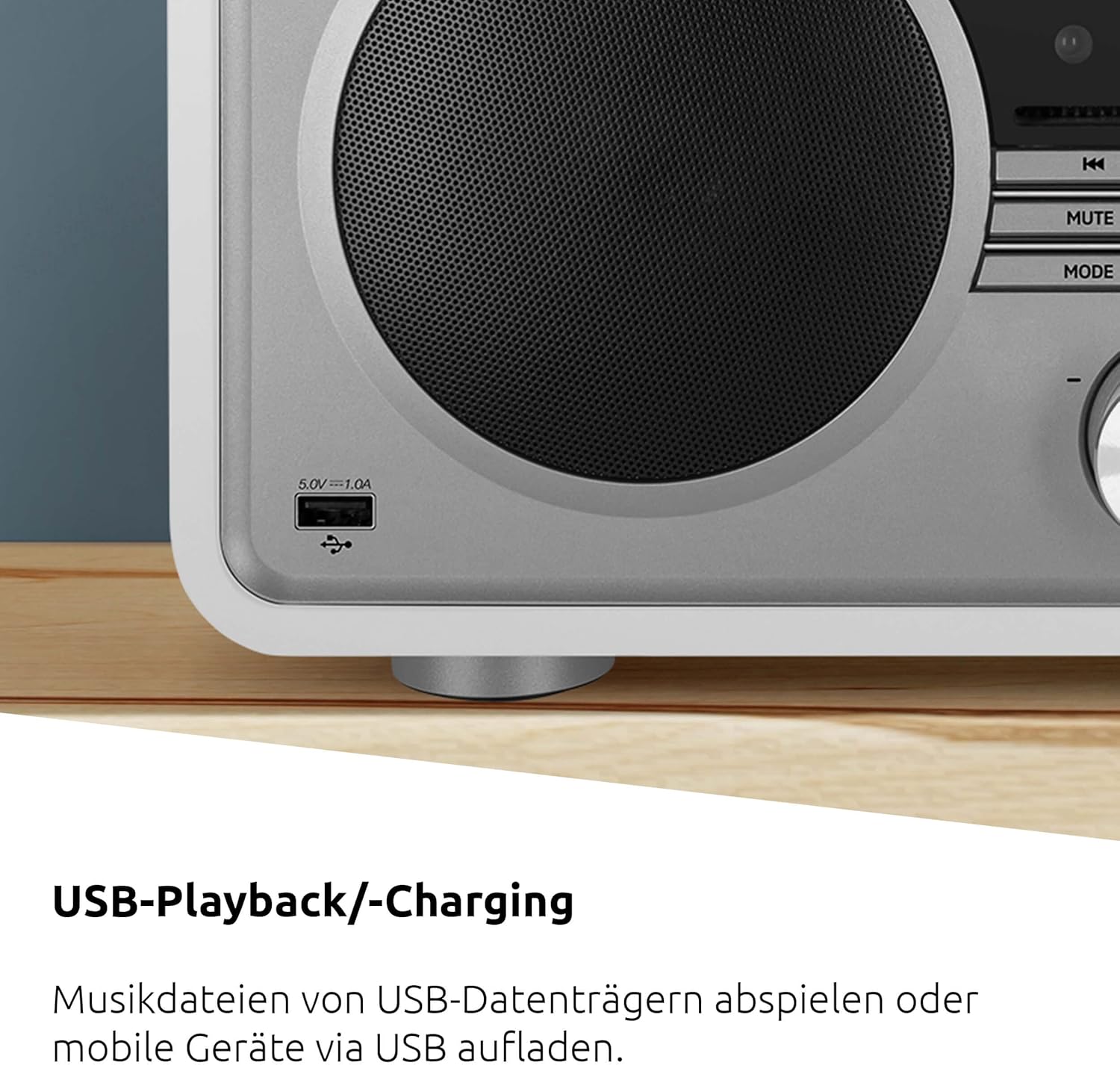
The USB port allows for playing music files from USB storage devices and charging mobile devices.
7. Увод AUX
Connect an external audio source (e.g., an MP3 player) to the AUX IN port on the rear panel using a 3.5mm audio cable. Select AUX mode on the radio to play audio from the connected device.
8. Выхад для навушнікаў
For private listening, connect headphones to the 3.5mm headphone jack on the rear panel. The main speakers will be muted automatically.
9. Будзільнік і таймер сну
Access the alarm settings through the menu to set up one or more alarms with your preferred sound source (radio, buzzer). The sleep timer allows you to set a duration after which the radio will automatically turn off.
10. Налады гуку (эквалайзер)
The DIGITRADIO 602 features a 2.1 sound system with two 20W stereo speakers and a 30W subwoofer. Adjust the sound profile using the built-in equalizer settings to suit your preferences.

The 2.1 sound system, featuring two 20W stereo speakers and a 30W subwoofer, delivers excellent sound quality with customizable equalizer settings.
11. Бесправадная зарадка
Place your Qi-compatible smartphone on the wireless charging pad located on the top surface of the DIGITRADIO 602. Ensure the phone is centered on the pad for efficient charging. The charging function works even when the radio is in standby mode.

Wireless charging is available for compatible smartphones that support the Qi charging standard.
12. Кіраванне праграмамі
Download the UNDOK or OKTIV app from your smartphone's app store. Connect your smartphone to the same Wi-Fi network as the DIGITRADIO 602. The app allows for remote control of various functions, including mode selection, station tuning, and volume adjustment.
Тэхнічнае абслугоўванне
1. Ачыстка прылады
To clean the exterior of the DIGITRADIO 602, use a soft, dry, lint-free cloth. Do not use abrasive cleaners, waxes, or solvents as they may damage the finish. Ensure the unit is unplugged before cleaning.
2. CD Player Care
Handle CDs by their edges to avoid fingerprints and scratches. If a CD is dirty, wipe it gently with a soft, dry cloth from the center outwards. Do not use damaged or irregularly shaped CDs, as they may harm the CD mechanism.
Ліквідацыю непаладак
| праблема | Магчымая прычына | Рашэнне |
|---|---|---|
| Няма ўлады | Сеткавы кабель не падключаны; разетка няспраўная. | Пераканайцеся, што кабель харчавання надзейна падключаны. Паспрабуйце іншую разетку. |
| Няма гуку | Volume too low; Mute function active; headphones connected. | Increase volume. Deactivate Mute. Disconnect headphones. |
| Дрэнны прыём радыё | Антэна не выцягнута; слабы сігнал. | Fully extend the telescopic antenna. Reposition the unit or antenna for better signal. |
| Праблемы з падключэннем да Wi-Fi | Incorrect password; router issues; out of range. | Verify Wi-Fi password. Restart your router. Move the unit closer to the router. |
| Праблемы спалучэння Bluetooth | Device not in pairing mode; already connected to another device. | Ensure the radio is in Bluetooth pairing mode. Disconnect from other devices. |
| CD playback errors | Dirty or scratched CD; incorrect disc type. | Clean the CD. Try a different CD. Ensure it's an audio CD or MP3 CD. |
| Бесправадная зарадка не працуе | Smartphone not Qi-compatible; phone not correctly placed. | Check if your smartphone supports Qi wireless charging. Reposition the phone on the charging pad. |
Тэхнічныя характарыстыкі
- Марка: TechniSat
- Нумар мадэлі: 0001/3987
- колер: Нейтральны (белы)
- Тэхналогія падключэння: Дапаможны, Bluetooth, USB, Wi-Fi
- Тэхналогія цюнэра: FM, DAB+, Інтэрнэт-радыё
- Падтрымліваюцца дыяпазоны радыё: DAB+, FM, інтэрнэт-радыё
- Аўдыявыхад: 2 x 20W Stereo Speakers, 1 x 30W Downfire Subwoofer
- Асаблівасці: DAB+ Digital Radio, Wireless Charging for Smartphones, FM Radio (with RDS and PLL), Internet Radio, Large OLED Display, Audio Streaming (Spotify & Bluetooth), CD Player with MP3 Playback, USB Port (Charging & MP3 Playback), App Control (UNDOK/OKTIV)
- Агульная колькасць партоў USB: 1
- Сумяшчальныя прылады: Headphones, Smartphone
- Крыніца харчавання: Правадная электрычная
- Памеры прадукту (ДxШxВ): 40 см х 21.5 см х 17 см

Product dimensions: 40 cm (Length) x 17 cm (Height) x 21.5 cm (Depth).
Інфармацыя аб гарантыі
The TechniSat DIGITRADIO 602 comes with a 2-гадовая гарантыя вытворцы. Please retain your proof of purchase for warranty claims. The warranty covers defects in materials and workmanship under normal use. It does not cover damage caused by misuse, accidents, unauthorized modifications, or normal wear and tear.
Падтрымка
For further assistance, technical support, or service inquiries regarding your TechniSat DIGITRADIO 602, please refer to the complete user manual included with your product or visit the official TechniSat website. You may also contact TechniSat customer service directly for specialized support.