
1. Уводзіны
Thank you for choosing the GEEZER 2.4GHz Wireless Keyboard and Mouse Combo. This product is designed to provide a comfortable and efficient typing and navigation experience with its retro-inspired design and wireless convenience. This manual will guide you through the setup, operation, and maintenance of your new device.
2. Прадукт скончыўсяview
The GEEZER Wireless Keyboard and Mouse Combo features a unique design with detachable keycaps and a quiet mouse, offering broad compatibility with various operating systems.
2.1 Кампаненты
- Бесправадная клавіятура
- Бесправадная мыш
- 2-in-1 Nano USB Receiver
- AA & AAA Batteries (pre-installed or included)
- Шчотка для чысткі
2.2 Асноўныя магчымасці
- Бесправадная тэхналогія 2.4 ГГц: Provides a stable connection with a working range of up to 35 feet.
- Retro Round & Detachable Keycaps: Easy to clean and offers a unique typing feel.
- Ціхая праца: Bottom sealing film technology for the keyboard and silent mouse clicks.
- Эрганамічны дызайн: Inclination angle for comfortable typing and reduced wrist pressure.
- Доўгі тэрмін службы батарэі: Automatic sleep mode extends battery life up to 12 months.
- Шырокая сумяшчальнасць: Compatible with Windows 10/8/7/XP/Vista, PC, Mac, Desktop, Laptop, Notebook, Chrome-Book, Smart TVs, and more.

Image 2.1: The GEEZER 2.4GHz Wireless Keyboard and Mouse Combo in Pink, showcasing its design and included USB receiver.

Малюнак 2.2: Падрабязны view of the keyboard and mouse highlighting the cat-themed design, including paw prints, cat ears, and whiskers.
3. Інструкцыі па ўсталёўцы
Follow these steps to set up your GEEZER Wireless Keyboard and Mouse Combo:
- Усталюйце батарэі:
- Знайдзіце адсекі для батарэек на ніжняй частцы клавіятуры і мышы.
- Insert the provided AA battery into the keyboard and AAA batteries into the mouse, ensuring correct polarity.
- Знайдзіце USB-прыёмнік: The 2-in-1 Nano USB receiver is typically stored in a compartment on the underside of the mouse for safekeeping. Gently remove it.
- Падключэнне прыёмніка: Plug the Nano USB receiver into an available USB 2.0 port on your computer, PC, laptop, or compatible device.
- Уключаныя прылады: Turn on the keyboard and mouse using their respective ON/OFF switches, usually located on the underside.
- Аўтаматычнае падключэнне: The keyboard and mouse should automatically connect to your device. No additional software or drivers are typically required for basic functionality.

Image 3.1: Illustration of the 2-in-1 Nano USB receiver being plugged into a laptop, enabling wireless connection for both keyboard and mouse.
4. Інструкцыя па эксплуатацыі
4.1 Выкарыстанне клавіятуры
- Увод: The keyboard features a standard QWERTY layout with 84 keys. The retro round keycaps provide a distinct tactile experience.
- Мультымедыйныя гарачыя клавішы: Use the function (Fn) key in combination with the F1-F12 keys for multimedia controls such as volume, playback, and web browser shortcuts. Refer to the keycap legends for specific functions.

Image 4.1: The keyboard layout, indicating the location and function of the 13 multimedia hotkeys (F1-F12 and Esc).
4.2 Выкарыстанне мышы
- Навігацыя: The mouse provides precise and quiet cursor control.
- кнопкі: Standard left-click, right-click, and scroll wheel functionality.
4.3 Рэжым энергазберажэння
Both the keyboard and mouse are equipped with an automatic sleep function. If idle for approximately 5 minutes, they will enter sleep mode to conserve battery. To wake them up, simply click any button on either device.
5. Тэхнічнае абслугоўванне і догляд
Proper maintenance ensures the longevity and optimal performance of your wireless combo.
- Чыстка клавіш: The individual keycaps are detachable. You can carefully remove them for thorough cleaning. They can be washed with water. Use the provided brush to remove dust and debris from between the keys. Ensure keycaps are completely dry before reattaching.
- Генеральная ўборка: Wipe the surfaces of the keyboard and mouse with a soft, damp тканіна. Пазбягайце выкарыстання агрэсіўных хімікатаў або абразіўных матэрыялаў.
- Замена батарэі: When performance degrades, replace the batteries. The keyboard uses one AA battery, and the mouse uses two AAA batteries.
- захоўванне: When not in use for extended periods, turn off both devices using their ON/OFF switches to further conserve battery life. Store the USB receiver in the mouse's compartment.

Image 5.1: Illustration demonstrating the detachable nature of the keycaps, allowing for easy cleaning and maintenance.
6. Выпраўленне непаладак
If you encounter issues with your GEEZER Wireless Keyboard and Mouse Combo, refer to the following common solutions:
| праблема | Магчымае рашэнне |
|---|---|
| Клавіятура/мыш не рэагуе |
|
| Mouse disconnects intermittently |
|
| Клавішы заліпаюць або не рэагуюць |
|
7. Тэхнічныя характарыстыкі
| Асаблівасць | Дэталь |
|---|---|
| Нумар мадэлі | Кот001 |
| Сувязь | Бесправадная сувязь 2.4 ГГц (USB-прыёмнік) |
| Памеры клавіятуры | 13.54 х 5.91 х 1.06 цалі |
| Вага прадмета | 1.1 pounds (Keyboard & Mouse combined) |
| Акумулятар клавіятуры | 1 батарэя AA (у камплекце) |
| Акумулятар мышкі | 2 х ААА батарэек (у камплекце) |
| Сумяшчальныя прылады | Windows 10/8/7/XP/Vista, Android, Linux, iMac, PC, Desktop, Laptop, Notebook, Chrome-Book, Smart TVs |
| Асаблівасць | Ergonomic Design, Detachable Keycaps |
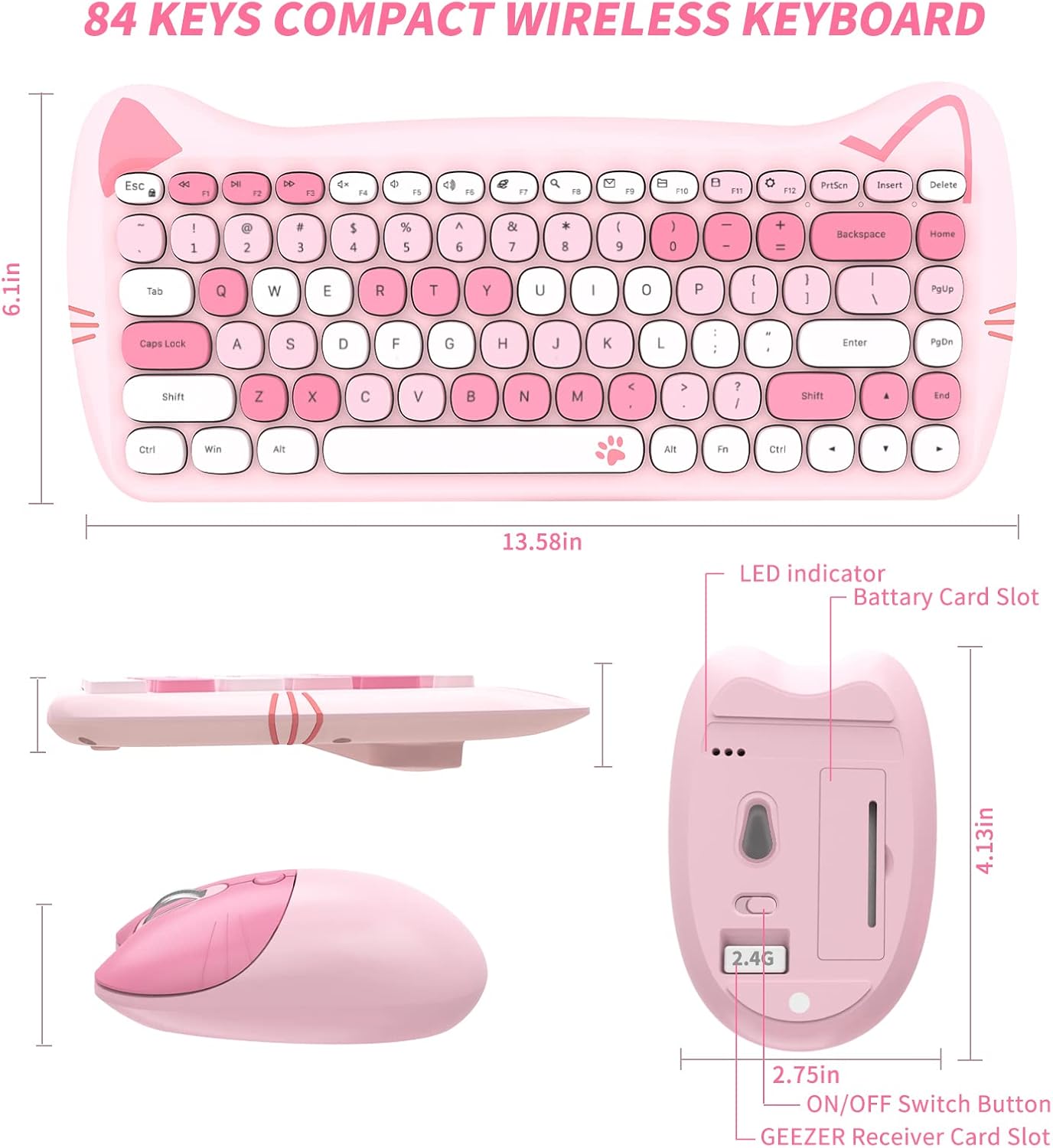
Image 7.1: Technical diagram illustrating the dimensions of the GEEZER wireless keyboard and mouse.
8. Гарантыя і падтрымка
This product comes with a standard manufacturer's warranty. For specific warranty details, please refer to the product packaging or contact GEEZER customer support. If you require further assistance or have questions not covered in this manual, please reach out to the seller or manufacturer's support channels.