
Hiearcool UCN3610
Hiearcool UCN3610 USB C Hub 8-in-1 Instruction Manual
Model: UCN3610
1. Уводзіны
The Hiearcool UCN3610 USB C Hub is a versatile 8-in-1 multi-port adapter designed to expand the connectivity of your USB-C enabled devices. This hub provides essential ports for display, networking, data transfer, and power delivery, enhancing your productivity and entertainment experience.

Выява 1.1: Канецview of the Hiearcool UCN3610 USB C Hub and its connectivity options.
2. Асаблівасці прадукту
The Hiearcool UCN3610 hub integrates eight essential ports into a compact design:
- 1 x 4K HDMI Port: Supports video output up to 4K resolution at 60Hz, ideal for external monitors, TVs, or projectors.
- 1 x Gigabit Ethernet Port: Provides a stable and fast wired network connection (10/100/1000 Mbps).
- 1 x 100W Power Delivery (PD) Port: Allows for high-speed charging of your host device while using other hub functions.
- 3 парты USB 3.0: Offers data transfer speeds up to 5 Gbps for connecting peripherals like keyboards, mice, and external drives.
- 1 x SD Card Slot: Supports SD, SDHC, SDXC cards with transfer speeds up to 104 Mbps.
- 1 x TF (Micro SD) Card Slot: Supports Micro SD, Micro SDHC, Micro SDXC cards with transfer speeds up to 104 Mbps.

Малюнак 2.1: Падрабязны view of the hub's ports, including HDMI, PD, USB 3.0, Ethernet, SD, and TF slots.

Image 2.2: Port specifications and capabilities of the Hiearcool UCN3610 hub.
3. Кіраўніцтва па наладцы
Follow these steps to set up your Hiearcool UCN3610 USB C Hub:
- Падключэнне да хост-прылады: Plug the USB-C connector cable of the Hiearcool hub into an available USB-C port on your laptop, tablet, or smartphone. Ensure your device's USB-C port supports data transfer and display output (DisplayPort Alternate Mode) for full functionality.
- Падключэнне да сілкавання (неабавязкова, але рэкамендуецца): For stable operation and to charge your host device, connect your original USB-C power adapter to the 100W PD port on the hub.
- Падключэнне перыферыйных прылад:
- HDMI-дысплей: Connect an HDMI cable from your monitor/TV to the HDMI port on the hub.
- Сетка Ethernet: Connect an Ethernet cable from your router/modem to the Ethernet port on the hub.
- USB прылады: Plug USB peripherals (e.g., mouse, keyboard, USB flash drive) into the USB 3.0 ports.
- Карты памяці: Insert SD or TF cards into their respective slots.
- Ўстаноўка драйвера: The hub is generally plug-and-play and does not require additional drivers for most operating systems. If any issues arise, ensure your device's operating system is up to date.
4. Інструкцыя па эксплуатацыі
4.1. HDMI Display Output
Connect an HDMI-enabled display to the hub's HDMI port. Your host device should automatically detect the external display. You can configure display settings (e.g., mirror, extend, resolution) through your operating system's display settings. The hub supports resolutions up to 4K at 60Hz.

Image 4.1: Demonstrating 4K 60Hz display output from a laptop through the hub to an external monitor.
4.2. Падключэнне Ethernet
Plug an Ethernet cable into the hub's RJ45 port. The hub will provide a stable wired network connection to your host device, offering speeds of 10/100/1000 Mbps. This is an alternative to Wi-Fi, providing a more reliable and often faster internet connection.
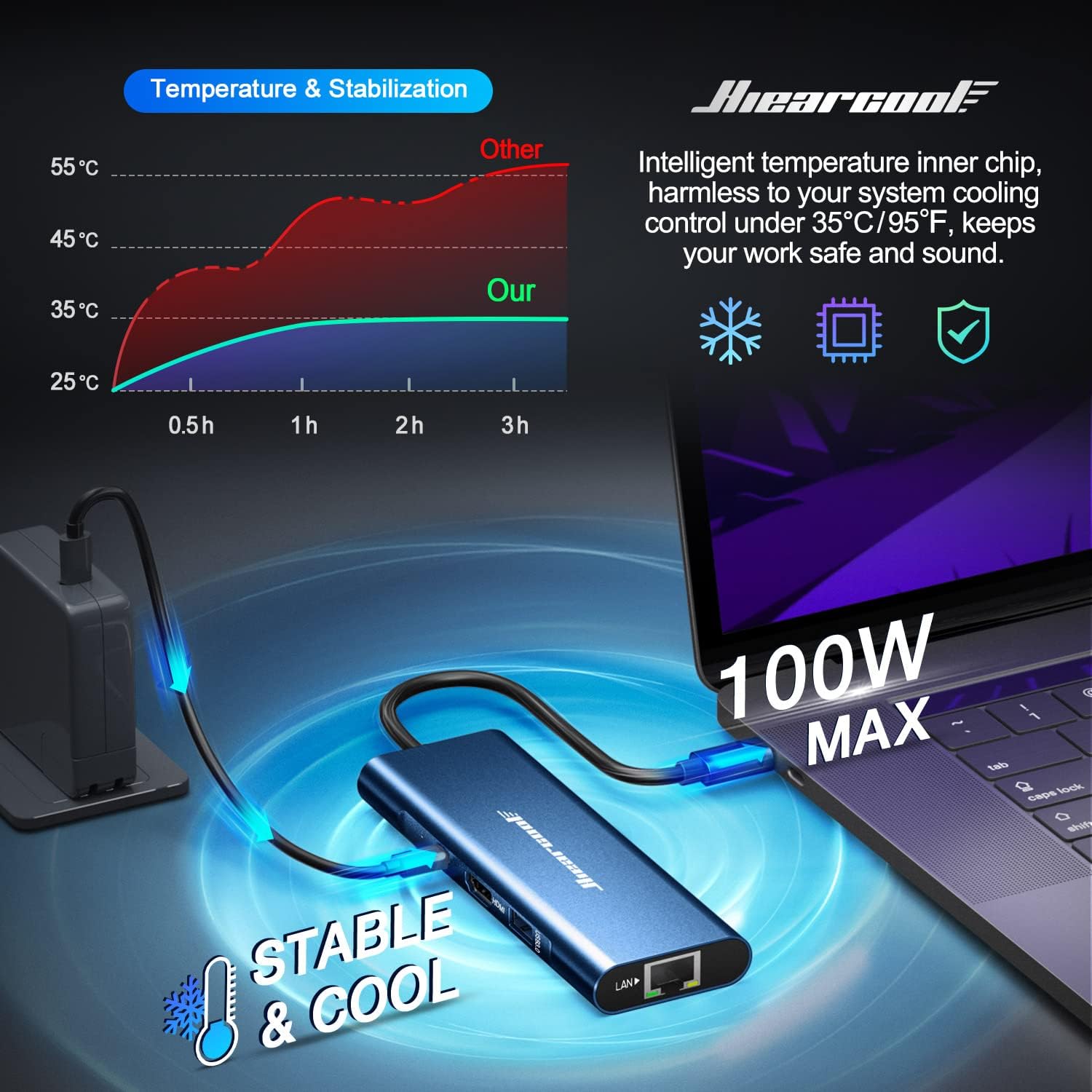
Image 4.2: The Ethernet port on the hub, ready for a wired network connection.
4.3. Перадача дадзеных праз USB 3.0
The three USB 3.0 ports support data transfer speeds up to 5 Gbps. Connect USB flash drives, external hard drives, keyboards, mice, or other USB peripherals. These ports are backward compatible with USB 2.0 devices.
4.4. Прылада для чытання карт SD/TF
Insert your SD or TF (Micro SD) memory cards into the corresponding slots. The hub supports simultaneous reading and writing to both card types, with speeds up to 104 Mbps. Note: Some systems may only allow one card to be active at a time.
4.5. Power Delivery (PD) Charging
Connect your device's original USB-C power adapter to the hub's 100W PD port. This allows your host device to receive power through the hub, ensuring it remains charged while you use other connected peripherals. The hub itself requires a small amount of power to operate.
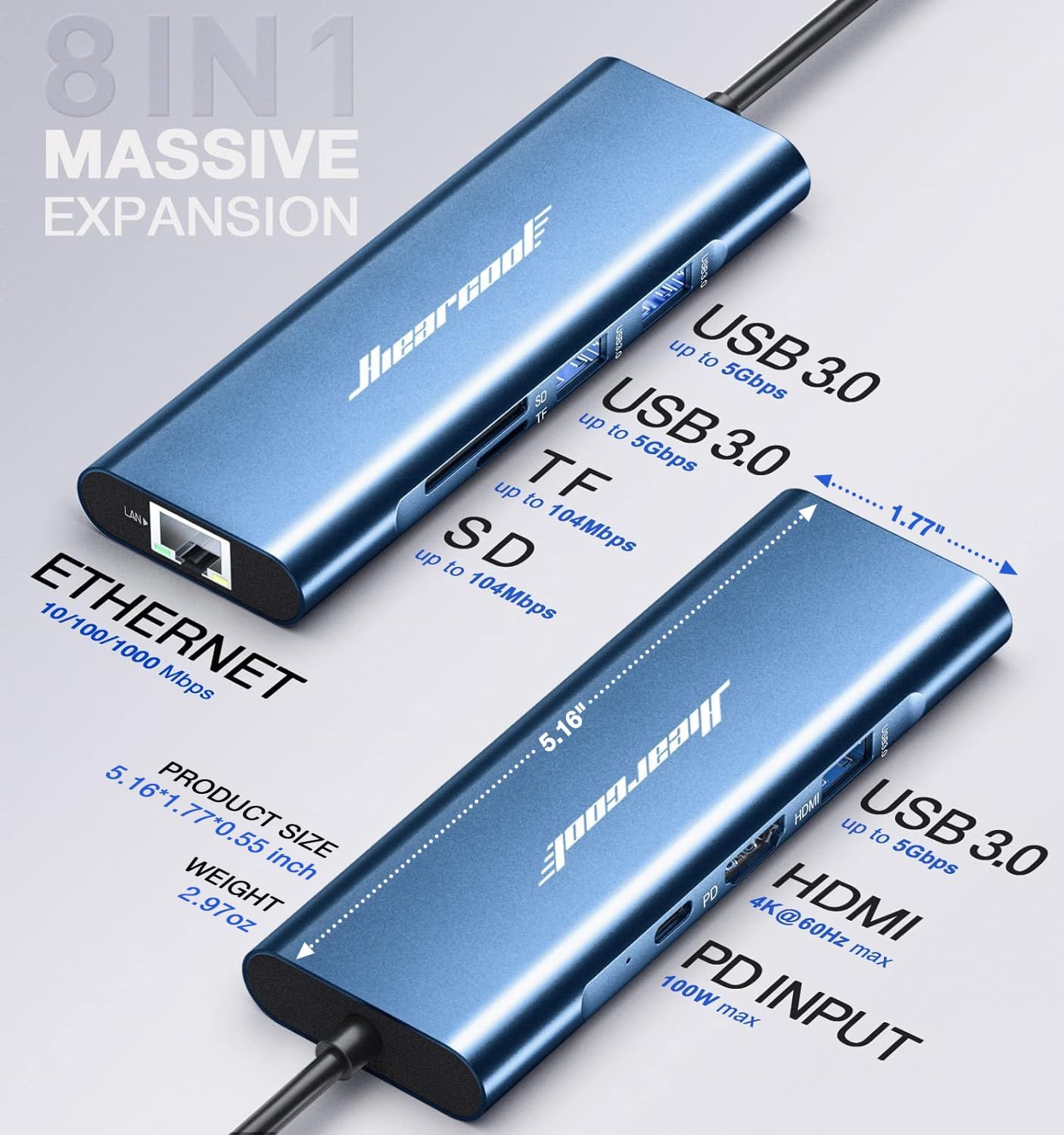
Image 4.3: The hub facilitating 100W power delivery to a connected laptop.
4.6. Сцэнарыі выкарыстання
The Hiearcool UCN3610 hub is suitable for various applications:
- Work & Productivity: Connect to an external monitor, wired network, and multiple USB peripherals for an extended workstation.
- адукацыя: Facilitate presentations by connecting to projectors or external displays, and use USB ports for input devices.
- забавы: Stream 4K video to a large screen or projector, and connect external storage for media playback.
- Гульні: Connect to a high-refresh-rate monitor and wired peripherals for an enhanced gaming experience.

Image 4.4: The hub in a work environment, expanding a laptop's display and connectivity.

Image 4.5: The hub used for gaming, connecting a laptop to a monitor and peripherals.

Image 4.6: The hub enabling media projection from a laptop for entertainment.
5. Сумяшчальнасць
The Hiearcool UCN3610 USB C Hub is designed for broad compatibility with devices featuring a USB-C port that supports DisplayPort Alternate Mode (DP Alt Mode) and Power Delivery. This includes Thunderbolt 3/4, USB-C 3.1 Gen 2, and USB-C 3.1 Gen 1 with DisplayPort support.
5.1. Compatible Systems & Devices (Partial List)
- Аперацыйныя сістэмы: Mac OS, Windows, iPad OS, Chrome OS, Android, Ubuntu.
- Ноўтбукі: MacBook Pro, MacBook Air (M1, M2, M3), Dell Laptops, HP Laptops, Lenovo Laptops, ASUS Laptops, Chromebooks.
- Таблеткі: iPad Pro, iPad Air, iPad Mini, Galaxy Tab, Surface Pro.
- Іншыя прылады: Steam Deck, Type C Smartphones (e.g., iPhone 15 series, Samsung S22, OnePlus 11), iMac.

Image 5.1: A visual representation of compatible systems and devices.
5.2. Важная заўвага адносна сумяшчальнасці
Ensure that your laptop is equipped with Thunderbolt 3, USB-C 3.1 Gen 2, or USB-C 3.1 Gen 1 (with DisplayPort support) to enable multiple-display functionality before making a purchase. Ports that only support data transfer or charging will not output video.

Image 5.2: Visual guide for identifying compatible and incompatible USB-C ports on host devices.
5.3. Incompatible List (Partial List)
Some devices or specific models may not be fully compatible or support all features. Please refer to your device's specifications or contact Hiearcool support if unsure.

Image 5.3: Partial list of incompatible Dell, Lenovo, and HP models.

Image 5.4: Partial list of incompatible ASUS, Microsoft, MSI, Mac, Google, and Kindle devices.
6. Тэхнічнае абслугоўванне
To ensure the longevity and optimal performance of your Hiearcool UCN3610 USB C Hub:
- Уборка: Use a soft, dry cloth to clean the hub. Avoid liquid cleaners or abrasive materials.
- захоўванне: Захоўвайце канцэнтратар у прахалодным, сухім месцы, удалечыні ад прамых сонечных прамянёў і экстрэмальных тэмператур.
- Апрацоўка: Avoid dropping the hub or subjecting it to strong impacts. Do not bend the integrated USB-C cable excessively.
- тэмпература: The hub is designed with an advanced GL823K chip for cooler operation. While it manages heat effectively, avoid covering it during use to allow for proper ventilation.
7. Выпраўленне непаладак
If you encounter issues with your Hiearcool UCN3610 USB C Hub, consider the following:
- Няма вываду на дысплей:
- Пераканайцеся, што порт USB-C вашай прылады падтрымлівае альтэрнатыўны рэжым DisplayPort.
- Праверце падключэнне кабеля HDMI паміж канцэнтратарам і маніторам.
- Пераканайцеся, што крыніца ўваходнага сігналу манітора правільна настроена на HDMI.
- Паспрабуйце перазагрузіць галоўную прыладу.
- Няма падключэння да сеткі:
- Пераканайцеся, што кабель Ethernet надзейна падключаны як да канцэнтратара, так і да маршрутызатара/мадэма.
- Check your network settings on your host device.
- Confirm your router/modem is functioning correctly.
- USB-прылады не распазнаюцца:
- Пераканайцеся, што USB-прылада правільна ўстаўлена ў порт USB 3.0 канцэнтратара.
- Паспрабуйце падключыць USB-прыладу непасрэдна да галоўнай прылады, каб пераканацца, што яна працуе.
- Some high-power USB devices may require the hub to be connected to a power source via the PD port.
- Павольная перадача дадзеных:
- Пераканайцеся, што вы выкарыстоўваеце прылады і кабелі, сумяшчальныя з USB 3.0, для аптымальнай хуткасці.
- Avoid connecting multiple high-bandwidth devices simultaneously if performance drops.
- Праблемы з зарадкай:
- Ensure your original USB-C power adapter is connected to the hub's PD port.
- Verify your host device supports USB-C Power Delivery.
- The hub itself consumes a small amount of power; the actual power delivered to your device will be slightly less than the input.
- Перагрэў хаба: The hub is designed for stable temperature control. If it feels excessively hot, disconnect it immediately and contact support.
8. Тэхнічныя характарыстыкі
| Асаблівасць | Спецыфікацыя |
|---|---|
| Нумар мадэлі | UCN3610 |
| Памеры прадукту | 5.16 х 1.77 х 0.55 цалі |
| Вага прадмета | 3.04 унцыі |
| Выхад HDMI | 4K пры 60 Гц |
| Порт Ethernet | 10/100/1000 Mbps Gigabit Ethernet |
| Парты USB 3.0 | 3 ports, up to 5 Gbps data transfer |
| Пастаўка энергіі (PD) | Up to 100W (input) |
| SD/TF Card Slots | Up to 104 Mbps transfer speed |
| Абсталяванне інтэрфейсу | Ethernet, HDMI, USB 3.0, USB Type C |
| Колер | Поўнач блакітная |

Image 8.1: Physical dimensions and port layout of the hub.
9. Гарантыя і падтрымка
Hiearcool is committed to providing quality products and customer satisfaction.
- Гарантыя: This product comes with a two-year product care warranty.
- Падтрымка кліентаў: Hiearcool offers 24/7 customer support. For assistance, please contact us via email at Hiearcool@outlook.com.
- Гарантыя якасці: The product is SGS Certified and UL Approved, ensuring compliance with quality standards and rigorous inspection.
- Transparency Program: This product is protected by the Transparency program, allowing you to verify its authenticity by scanning the Transparency code with the Transparency app.

Image 9.1: SGS Certification details.

Image 9.2: Support and quality commitments.

Image 9.3: UL Approval details.

Image 9.4: Transparency Program information.
Ask a question about this manual
Ask about setup, troubleshooting, compatibility, parts, safety, or missing instructions. Manuals+ will review the question and use this page’s manual context to help answer it.