
Maxxima MEW-DM680
Maxxima Digital Dimmer Wall Light Switch User Manual
Мадэль: MEW-DM680
1. Уводзіны
Прадукт скончаныview
The Maxxima 3-Way/Single Pole Digital Dimmer Wall Light Switch is designed to provide versatile lighting control for your home or commercial space. It features a button-controlled dimmer with green LED indicator lights to display brightness levels. This switch is compatible with incandescent, halogen, and dimmable LED/CFL bulbs, offering a flexible solution for various lighting needs.
- Універсальная сумяшчальнасць: Supports both 3-way and single-pole wiring configurations.
- Індыкатары яркасці: Green LED lights clearly show the current dimming level.
- Высокая ёмістасць: Handles up to 600W for incandescent/halogen and 150W for dimmable LED/CFL.
- Не патрабуецца нулявы провад: Simplifies installation in many existing setups.
- Дакладны кантроль: Independent on/off button and dedicated dimming buttons for fine-tuning light levels.
- Рэгуляваная адчувальнасць: Trim buttons allow for fine-tuning compatibility with various LED lamps.
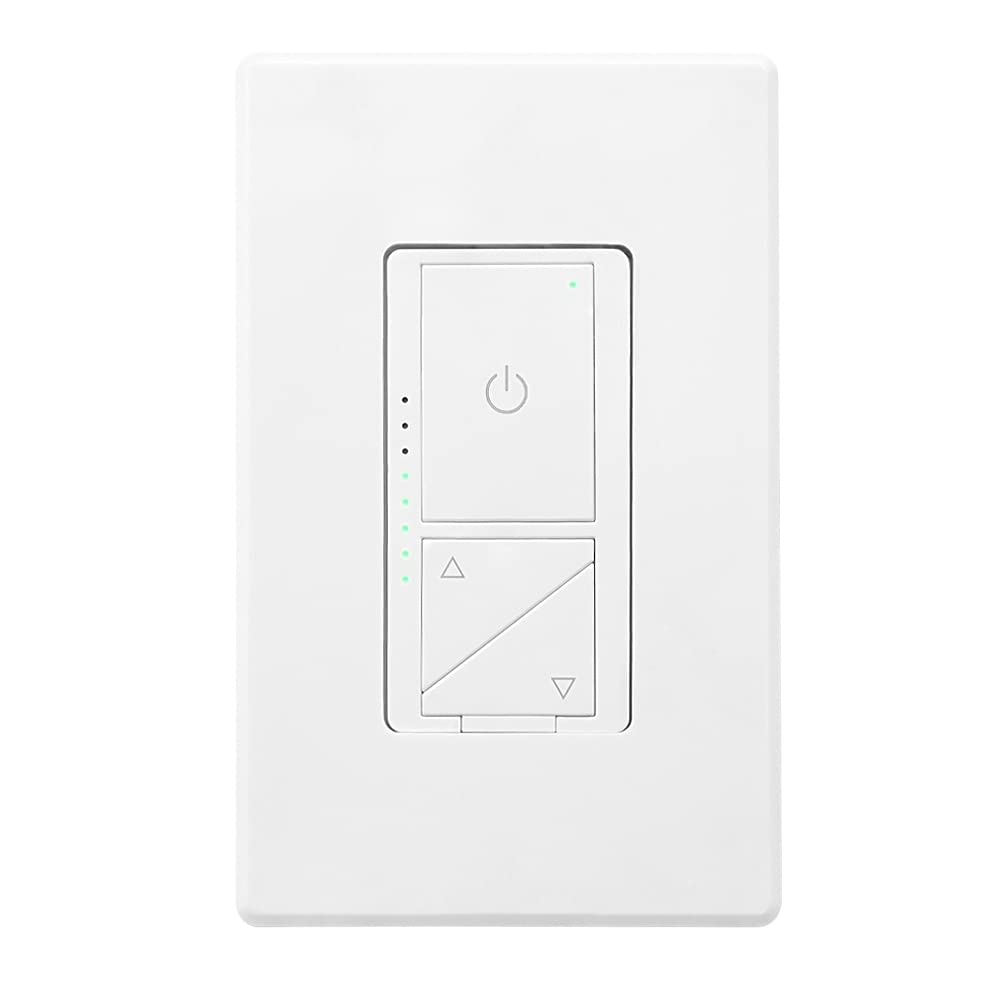
Малюнак 1: Спераду view of the Maxxima Digital Dimmer Wall Light Switch.
2. Настройка і ўстаноўка
Перш чым пачаць
ПАПЯРЭДЖАННЕ: Каб пазбегнуць пажару, удару токам або смерці, адключыце электрычнасць з дапамогай аўтаматычнага выключальніка або засцерагальніка і праверце, ці адключана электрычнасць, перад падключэннем электраправодкі. Устаноўку павінен выконваць кваліфікаваны электрык або чалавек, які добра разумее электрычную праводку.
- Ensure the power is OFF at the circuit breaker before beginning installation.
- This dimmer is designed for use with 120VAC, 60Hz.
- Do NOT use with non-dimmable lighting or ceiling fans.
Неабходныя інструменты
- Адвёртка (крыжовая і плоская)
- Сродкі для зачысткі правадоў
- Электрычная стужка
- тtagэлектронны тэстар
Электрасхема
The Maxxima Digital Dimmer is compatible with both single-pole and 3-way wiring configurations. Refer to the detailed wiring instructions provided in the official installation manual for specific diagrams. The switch operates at 120VAC and does not require a neutral wire.

Малюнак 2: Назад view of the dimmer switch with wiring details.
Этапы ўстаноўкі
- Выключыць харчаванне: Знайдзіце аўтаматычны выключальнік, які кіруе месцазнаходжаннем выключальніка, і выключыце яго. Праверце, ці адключана харчаванне, выкарыстоўваючы гучнасць.tagэлектронны тэстар.
- Зняць стары перамыкач: Carefully remove the existing wall plate and switch from the wall box. Disconnect the wires.
- Wire the New Dimmer: Connect the wires from the wall box to the dimmer switch according to the wiring diagram in the full manual. Ensure all connections are secure.
- Устанавіце диммер: Gently push the wired dimmer into the wall box. Secure it with the provided screws.
- Прымацаваць насценную пласціну: Snap the screwless wall plate onto the dimmer for a clean finish.
- Аднавіць сілу: Зноў уключыце харчаванне з дапамогай аўтаматычнага выключальніка.

Figure 3: Maxxima Digital Dimmer Switch installed on a wall.
3. Аперацыя
Асноўныя элементы кіравання
The Maxxima Digital Dimmer features intuitive controls for easy light management:
- Кнопка ўключэння/выключэння: The large button with the power symbol (⏻) at the top controls the main power to the lights. Press once to turn lights ON or OFF.
- Dimming Buttons: The two triangular buttons below the power button control the brightness. The top triangle increases brightness, and the bottom triangle decreases brightness.
Figure 4: Controls of the Maxxima Digital Dimmer Switch.
Рэгуляванне яркасці
Каб наладзіць узровень яркасці:
- Бесперапыннае зацямненне: Press and hold the up (▲) or down (▼) arrow button to smoothly increase or decrease the light intensity. Release the button when the desired brightness is reached.
- Preset Levels: Short-click the up (▲) or down (▼) arrow button to cycle through preset brightness levels.
- Светавыя індыкатары: The green LED lights on the left side of the switch illuminate to indicate the current brightness level. More lights mean brighter illumination.
Рэгуляванне адчувальнасці
For optimal performance with various LED lamps, the dimmer includes sensitivity adjustment trim buttons located below the cover plate. These allow you to fine-tune the dimmer's response to prevent flickering or ensure proper dimming range.

Figure 5: Trim buttons for sensitivity adjustment located under the cover plate.
4. Тэхнічнае абслугоўванне
The Maxxima Digital Dimmer Wall Light Switch requires minimal maintenance. Follow these guidelines to ensure its longevity and proper function:
- Уборка: To clean the switch and wall plate, gently wipe with a soft, damp cloth. Do NOT use abrasive cleaners, solvents, or chemical sprays, as these can damage the finish or internal components.
- агляд: Periodically inspect the switch for any signs of damage, loose connections, or unusual operation. If any issues are observed, turn off power at the circuit breaker and consult a qualified electrician.
- Няма частак, якія абслугоўваюцца карыстальнікам: There are no user-serviceable parts inside the dimmer. Do not attempt to open or repair the unit yourself.
5. Выпраўленне непаладак
If you experience issues with your Maxxima Digital Dimmer, refer to the table below for common problems and their solutions.
| праблема | Магчымая прычына | Рашэнне |
|---|---|---|
| Фары не ўключаюцься. | No power to the switch; Loose wiring connection; Burnt-out bulb. | Check circuit breaker; Verify wiring connections are secure; Replace bulb. |
| Фары не цьмянеюць і не мігцяць. | Non-dimmable bulbs; Incompatible LED/CFL bulbs; Sensitivity not adjusted. | Ensure dimmable bulbs are used; Adjust sensitivity using trim buttons (refer to Section 3); Try different brand/type of dimmable LED/CFL. |
| Дымер цёплы навобмацак. | Normal operation; Overload. | Slight warmth is normal. If excessively hot, turn off power and check total wattage of connected bulbs. Do not exceed maximum capacity. |
| LED indicator lights are not working. | Унутраная няспраўнасць. | Contact Maxxima customer support for assistance. |
If the problem persists after attempting these solutions, please contact Maxxima customer support or a qualified electrician.
6. Тэхнічныя характарыстыкі
| Спецыфікацыя | Дэталь |
|---|---|
| Нумар мадэлі | MEW-DM680 |
| Памеры прадукту | 1.74” W x 4.14” L x 1.28” D (4 x 2 x 1 inches) |
| Вага | 5.29 унцыі |
| Уваходны кнtage | 120VAC, 60Hz |
| Max. Incandescent/Halogen Load | 600 Вт |
| Max. Dimmable LED/CFL Load | 150 Вт |
| Тып праводкі | Аднаполюсны або трохпалосны |
| Неабходны нейтральны провад | няма |
| Рэжым працы | Дапаможнік |
| Сертыфікаты | ETL уключаны ў спіс |
| Аксэсуары ў камплекце | Насценная пласціна без шруб |
7. Гарантыя і падтрымка
Інфармацыя аб гарантыі
The Maxxima Digital Dimmer Wall Light Switch (Model: MEW-DM680) comes with a Гарантыя 2 год from the date of purchase. This warranty covers defects in materials and workmanship under normal use. It does not cover damage resulting from improper installation, misuse, abuse, or unauthorized modifications.
Падтрымка кліентаў
For technical assistance, troubleshooting, or warranty claims, please contact Maxxima customer support:
- Webсайт: Наведайце афіцыйны сайт Maxxima webсайт з рэсурсамі падтрымкі і кантактнай інфармацыяй.
- электронная пошта: Refer to your product packaging or the Maxxima webсайт для электроннай пошты службы падтрымкі кліентаў.
- тэлефон: Refer to your product packaging or the Maxxima webсайт з нумарам тэлефона службы падтрымкі кліентаў.
Вы таксама можаце знайсці афіцыйнае кіраўніцтва па ўсталёўцы (PDF) для гэтага прадукта тут.