
1. Прадукт скончыўсяview
The GOWENIC X58 Gaming Motherboard is designed for desktop computers, featuring an LGA 1366 CPU socket and support for DDR3 memory. This motherboard provides essential connectivity and performance for various computing needs.

Малюнак 1.1: Зверху ўніз view of the GOWENIC X58 Gaming Motherboard.
Асноўныя характарыстыкі:
- Падтрымка працэсара: LGA 1366 socket, compatible with Xeon series and Intel i7 quad-core/six-core CPUs.
- Памяць: 2 DDR3 DIMM slots, supporting DDR3 1866, 1600, 1333MHz memory, including ECC memory.
- Дызайн харчавання: All solid capacitor design with enhanced 5+1 phase power supply for stable performance.
- захоўванне: Multiple SATA ports for storage devices.
- Падключэнне: USB 2.0 ports, network card interface, and audio ports.
- Пашырэнне: PCIe graphics card slot and PCIe 1X slot.
2. Настройка і ўстаноўка
This section provides instructions for installing the GOWENIC X58 Gaming Motherboard and its components. Ensure your system is powered off and unplugged before beginning installation.
2.1 Усталёўка працэсара
Carefully align your LGA 1366 CPU with the socket on the motherboard. Ensure the CPU is correctly oriented before gently placing it into the socket. Close the retention arm to secure the CPU.

Figure 2.1: Close-up of the LGA 1366 CPU socket on the motherboard.
2.2 Устаноўка памяці
Locate the two DDR3 DIMM slots. Open the clips on both ends of the memory slot. Align the notch on the DDR3 memory module with the key in the slot, then press down firmly on both ends of the module until the clips snap into place. Note that common memory and ECC server memory cannot be mixed simultaneously.
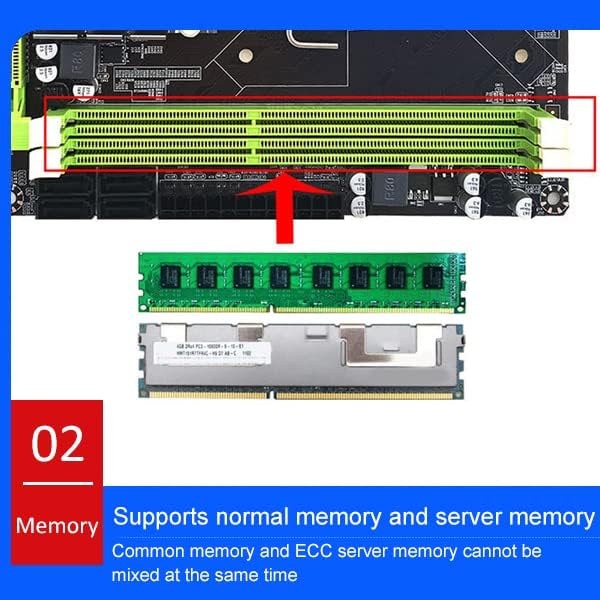
Figure 2.2: Illustration of DDR3 memory module installation into the motherboard slots.
2.3 Падключэнне сілкавання
Connect the 24-pin ATX main power connector from your power supply unit (PSU) to the corresponding port on the motherboard. Also, connect the 8-pin CPU power connector to the motherboard's CPU power interface.
2.4 Усталёўка платы захоўвання дадзеных і пашырэння
Connect your SATA storage devices (hard drives, SSDs) to the available SATA ports on the motherboard. Install your graphics card into the PCIe graphics card slot and any other expansion cards into the PCIe 1X slot as needed.
2.5 Падключэнні пярэдняй панэлі і ўваходных/выхадных раздымаў
Connect the front panel headers (power switch, reset switch, power LED, HDD LED) to the designated pins on the motherboard. Refer to the motherboard layout diagram for correct pin assignments. Connect USB, audio, and network cables to the appropriate I/O ports.

Figure 2.3: Detailed layout of the motherboard with labeled interfaces including CPU power, LGA1366, DDR3, main power, SATA, PCIe slots, USB, and audio ports.

Figure 2.4: Diagram illustrating the front panel wiring connections (RESET SW, POWER SW, +POWER LED-, +H.D.D LED-).

Figure 2.5: Rear I/O ports including PS/2, USB, network card, and audio jacks.
3. Інструкцыя па эксплуатацыі
Once all components are correctly installed and connected, you can power on your system. The motherboard supports Windows 10. Ensure all necessary drivers for your components are installed for optimal performance.
3.1 Пачатковая загрузка
- After connecting all peripherals and power, press the power button on your computer case.
- The system should initiate the boot process. You may need to enter the BIOS/UEFI setup to configure boot order or other settings.
- Install your operating system (e.g., Windows 10) if not already present.
3.2 Ўстаноўка драйвера
For full functionality, install the latest drivers for the chipset, network, audio, and any other integrated components. These are typically provided on a support CD or available for download from the manufacturer's webсайт.
4. Тэхнічнае абслугоўванне
Proper maintenance can extend the lifespan of your motherboard and ensure stable operation.
- Выдаленне пылу: Рэгулярна чысціце мацярынскую плату і іншыя ўнутраныя кампаненты ад пылу з дапамогай сціснутага паветра. Перад чысткай пераканайцеся, што сістэма выключана і адключана ад сеткі.
- Маніторынг тэмпературы: Monitor system temperatures to prevent overheating, especially for the CPU and chipset. Ensure adequate airflow within the computer case.
- Абнаўленні BIOS: Periodically check for BIOS updates from the manufacturer. Only update the BIOS if necessary and follow the instructions carefully to avoid system instability.
5. Выпраўленне непаладак
Калі ў вас узніклі праблемы з матчынай платай, разгледзьце наступныя асноўныя дзеянні па ліквідацыі непаладак:
- Няма харчавання: Ensure all power cables (24-pin ATX, 8-pin CPU) are securely connected. Verify the power supply unit is functioning correctly.
- Няма дысплея: Check that the graphics card is properly seated in its slot and connected to the power supply (if required). Ensure the monitor cable is securely connected to the graphics card and monitor.
- Нестабільнасць/збоі сістэмы: Verify that RAM modules are correctly installed and compatible. Test memory modules individually if possible. Check CPU and GPU temperatures.
- Кампанент не выяўлены: Ensure the component (e.g., hard drive, expansion card) is properly connected and seated. Check BIOS settings to confirm it is enabled.
- Скід BIOS: If system settings become problematic, you can reset the BIOS to default settings. This usually involves removing the CMOS battery for a few minutes or using a dedicated jumper on the motherboard.
6. Тэхнічныя характарыстыкі
Below are the detailed specifications for the GOWENIC X58 Gaming Motherboard.

Figure 6.1: Motherboard dimensions: Approximately 21.6 cm x 18.4 cm (8.5 in x 7.2 in).
| Асаблівасць | Спецыфікацыя |
|---|---|
| Марка | ГАВЕНІК |
| Назва мадэлі | GOWENIC90cqbiusxe7119 |
| Гняздо працэсара | LGA 1366 |
| Сумяшчальныя працэсары | Intel X58, Core i7, Xeon series |
| Тып чыпсэта | Intel X58 Express |
| Тэхналогія аператыўнай памяці | DDR3 |
| Тактавая частата памяці | 1333 MHz (Supports 1866, 1600, 1333MHz) |
| Даступныя слоты памяці | 2 |
| Ёмістасць памяці (макс.) | 16 ГБ |
| Асноўны тып раздыма харчавання | 24-кантактны |
| CPU Power Connector Type | 8-кантактны |
| Інтэрфейс відэакарты | Integrated (and PCIe slot for discrete GPU) |
| Total PCIe Ports | 1 (PCIe graphics slot) + 1 (PCIe 1X) |
| Агульная колькасць партоў SATA | 1 (System Bus Standard Supported: SATA 2) |
| Усяго партоў USB | 8 (USB 2.0) |
| Тып раздыма S/PDIF | Аптычны |
| Платформа | Windows 10 |
| Памеры матчынай платы | Approx. 21.6 x 18.4 cm / 8.5 x 7.2 in |
7. Гарантыя і падтрымка
For warranty information and technical support, please refer to the documentation included with your purchase or visit the official GOWENIC webсайт. Захоўвайце пацвярджэнне пакупкі для прэтэнзій па гарантыі.
- Гарантыйны тэрмін: Please check your product packaging or the GOWENIC official webсайт для атрымання канкрэтных гарантыйных умоў.
- Тэхнічная падтрымка: Contact GOWENIC customer service for assistance with product issues or technical inquiries.
- Інтэрнэт-рэсурсы: Additional drivers, FAQs, and support documents may be available on the GOWENIC support page.