
1. Уводзіны
Thank you for choosing the COMAOGO T002-W Mini Projector. This manual provides essential information for setting up, operating, and maintaining your projector to ensure optimal performance and longevity. The T002-W is a versatile projector featuring 9500 Lumens brightness, 1080P support, 5G WiFi, and Bluetooth 5.1 connectivity, designed for an immersive viewвопыт да 220 цаляў.
2. Змесціва ўпакоўкі
Калі ласка, праверце ўпакоўку на наяўнасць наступных прадметаў:
- 1 x COMAOGO T002-W Mini Projector
- 1 х пульт дыстанцыйнага кіравання
- 1 х кабель харчавання
- 1 х кабель HDMI
- 1 х AV-кабель
- 1 х Кіраўніцтва карыстальніка
3. Прадукт скончыўсяview
Азнаёмцеся з кампанентамі і інтэрфейсамі праектара.

Image: COMAOGO T002-W Projector with 5G and 2.4G WiFi capabilities, showing wireless screen synchronization with a tablet and smartphone.
The projector features various ports for connectivity, including HDMI, USB, VGA, AV, and a TF card slot, along with a 3.5mm audio output. It also supports dual-band 5G and 2.4G WiFi for stable wireless connections and Bluetooth 5.1 for audio devices.

Image: COMAOGO T002-W Projector connected to various devices including a laptop, game console, and streaming stick, highlighting its multiple input ports (AV, HDMI, USB, TF, VGA).
4. Настройка
4.1 Размяшчэнне
Position the projector on a stable, flat surface or mount it on a tripod. Ensure there are no obstructions to the ventilation vents. For optimal viewing, the projection distance should be between 1.5 meters and 5.5 meters, yielding a screen size from 45 inches to 220 inches.
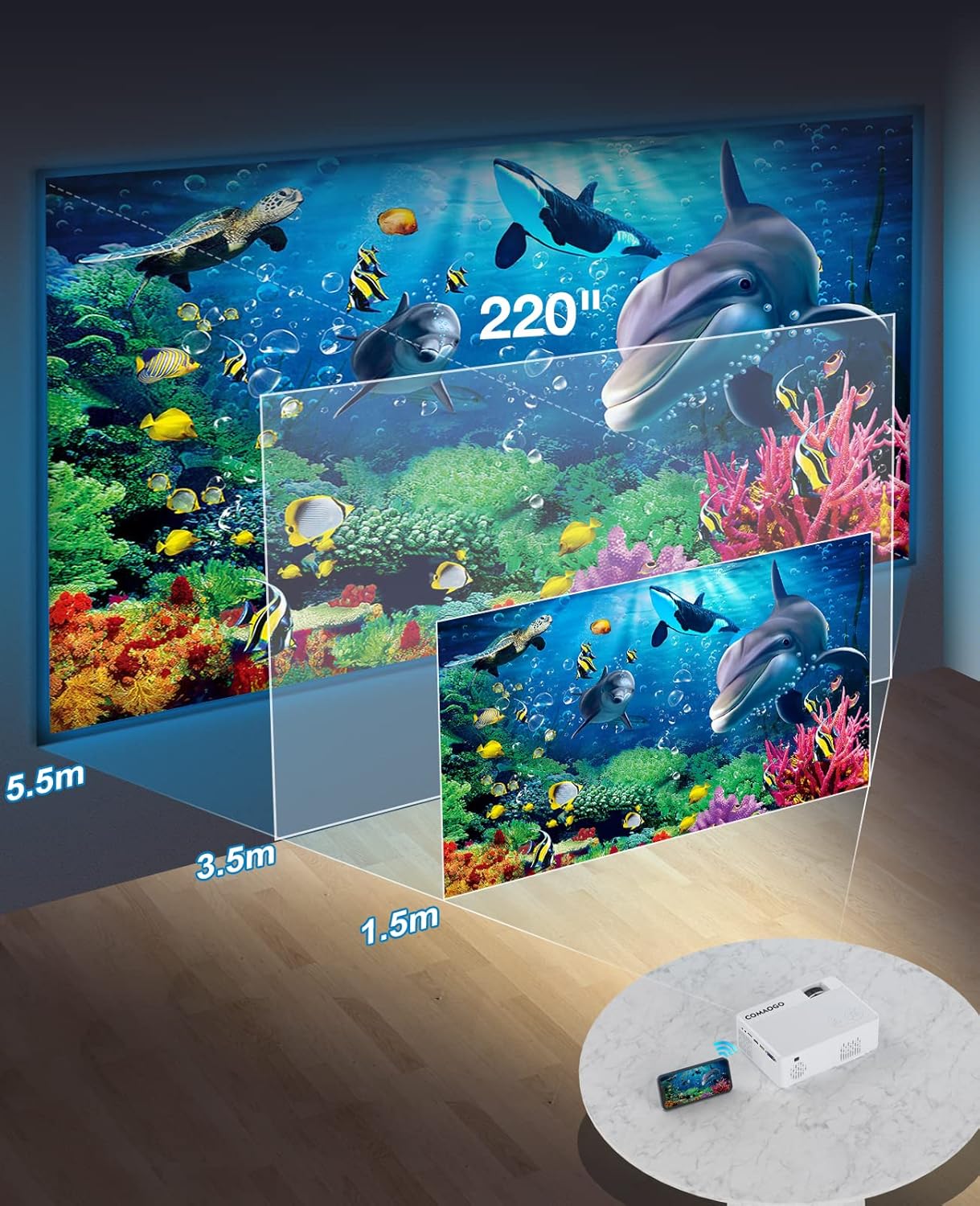
Image: Diagram illustrating the projection distances (1.5m to 5.5m) and corresponding screen sizes (45 to 220 inches) for the COMAOGO T002-W Projector.
4.2 Падключэнне харчавання
Connect the power cable to the projector's power input and then plug it into a power outlet (AC 220V).
4.3 Фокус і карэкцыя трапецападобнага скажэння
To achieve a clear and rectangular image:
- Рэгуляванне фокусу: Rotate the focus ring on the projector lens until the image appears sharp.
- Карэкцыя трапецеідальных скажэнняў: Adjust the keystone correction dial (if available, or via menu settings) to correct trapezoidal distortion, ensuring the image is rectangular. The projector supports ±15° keystone correction.

Image: Illustration of keystone correction and focus adjustment for the COMAOGO T002-W Projector, showing how to achieve a clear, rectangular image.
5. Інструкцыя па эксплуатацыі
5.1 Уключэнне/выключэнне сілкавання
- Уключэнне: Націсніце кнопку харчавання на праектары або пульце дыстанцыйнага кіравання.
- Выключэнне: Зноў націсніце кнопку харчавання, каб выключыць праектар.
5.2 Выбар крыніцы ўваходнага сігналу
Use the "Source" button on the remote control or the projector's control panel to select the desired input source (e.g., HDMI, USB, VGA, AV).
5.3 Бесправадное падключэнне (Wi-Fi)
The projector supports dual-band 5G and 2.4G WiFi for stable screen mirroring.
- Navigate to the WiFi settings on the projector's menu.
- Select your desired WiFi network (5G for faster, more stable connection; 2.4G for longer range and better penetration).
- Увядзіце пароль для падлучэння.
- For screen mirroring, select the appropriate option (e.g., "iOS Cast" or "Android Cast") on the projector and follow the on-screen instructions to connect your smartphone or tablet.
5.4 Злучэнне Bluetooth
Connect external Bluetooth audio devices like speakers or headphones.

Image: COMAOGO T002-W Projector demonstrating Bluetooth 5.1 connection with a speaker and headphones.
- Перайдзіце ў налады Bluetooth у меню праектара.
- Пераканайцеся, што ваша прылада Bluetooth знаходзіцца ў рэжыме спалучэння.
- Выберыце прыладу са спісу для спалучэння.
- Note: The projector's Bluetooth function is for connecting output devices (speakers, headphones) only.
5.5 Правадныя падключэнні
Connect various devices using the available ports:
- HDMI: Connect laptops, PCs, game consoles (Xbox), TV sticks (Roku, Chromecast), DVD players.
- USB: Прайграванне медыя fileнепасрэдна з USB-назапашвальнікаў.
- VGA: Падключыце старыя кампутары або ноўтбукі.
- АВ: Connect legacy video devices.
- TF карта: Insert a TF card to play media files.
- Important: Copyright-protected content from services like Netflix or Disney+ is not directly supported via screen mirroring. For these services, use an HDMI connection with a compatible adapter (e.g., Lightning Digital AV Adapter for iOS devices) or a streaming stick.
6. Тэхнічнае абслугоўванне
6.1 Ачыстка аб'ектыва
Use a soft, lint-free cloth or lens cleaning paper to gently wipe the projector lens. Avoid using abrasive materials or harsh chemicals that could damage the lens coating.
6.2 Сістэма астуджэння
The projector features an updated cooling system designed to reduce noise and maintain optimal operating temperature. Ensure the ventilation vents are clear of dust and obstructions to prevent overheating. Regular cleaning of the vents with a soft brush or compressed air is recommended.
7. Выпраўленне непаладак
Калі ў вас узніклі праблемы з праектарам, звярніцеся да наступных распаўсюджаных рашэнняў:
- Няма малюнка:
- Праверце падключэнне да сілкавання і пераканайцеся, што праектар уключаны.
- Verify the input source selection matches your connected device.
- Ensure all cables (HDMI, VGA, etc.) are securely connected.
- Adjust focus and keystone correction.
- Няма гуку:
- Adjust the projector's volume.
- Калі выкарыстоўваюцца знешнія дынамікі, пераканайцеся, што яны правільна падключаны і ўключаны.
- Check Bluetooth connection for external audio devices.
- Ensure the audio output from your source device is enabled.
- WiFi/Screen Mirroring Issues:
- Ensure both the projector and your device are connected to the same WiFi network.
- Check for strong WiFi signal.
- Restart both the projector and your source device.
- For Android devices, ensure "Wireless Projection" or "Screen Mirroring" is enabled. For iOS, use "Screen Mirroring" from Control Center.
- Выява размытая:
- Адрэгулюйце кольца факусоўкі на аб'ектыве.
- Пераканайцеся, што адлегласць праекцыі знаходзіцца ў рэкамендаваным дыяпазоне.
- Выява мае трапецападобную форму:
- Adjust the keystone correction dial or setting.
For further assistance or software updates, please contact COMAOGO customer support.
8. Тэхнічныя характарыстыкі
| Асаблівасць | Спецыфікацыя |
|---|---|
| Марка | КОМАГО |
| мадэль | Т002-Вт |
| Яркасць | 9500 люмен (220 ANSI) |
| Каэфіцыент кантраснасці | 6000:1 |
| Роднае дазвол | 1280 х 720 |
| Падтрымліваецца дазвол | 1080P |
| Памер праекцыі | 45" - 220" |
| Адлегласць праекцыі | 1.5 м - 5.5 м |
| Карэкцыя Keystone | ±15° |
| Падключэнне да Wi-Fi | Dual-band (5G + 2.4G) |
| Bluetooth | Bluetooth 5.1 |
| Абсталяванне інтэрфейсу | 3.5mm Audio, TF Card, USB 2.0, VGA, HDMI |
| Убудаваны дынамік | так |
| Узровень шуму | 45 дэцыбел |
| Энергаспажыванне | 48 ват |
| Памеры | 20.32 х 15.24 х 7.62 см |
| Вага | 1 кілаграм |
9. Афіцыйнае відэа прадукту
Watch this video for a visual guide on the COMAOGO T002-W Mini Projector's features and operation.
Video: An official product video demonstrating the features and usage of the COMAOGO T002-W Mini Projector, including connectivity and display capabilities.
10. Гарантыя і падтрымка
The COMAOGO T002-W Mini Projector comes with a standard manufacturer's warranty. For warranty claims, technical support, or inquiries regarding software updates, please contact COMAOGO customer service through the retailer where you purchased the product or visit the official COMAOGO webсайт.
SOFTWARE UPDATES can be provided; please contact us if needed.