
Уводзіны
This manual provides detailed instructions for the setup, operation, and maintenance of your Amazon Basics Projection Alarm Clock. Please read this manual thoroughly before using the product to ensure proper function and to prevent damage.

Image: The Amazon Basics Projection Alarm Clock, showing its digital display and projection lens.
Інструкцыі па тэхніцы бяспекі
- Не падвяргайце прыладу ўздзеянню экстрэмальных тэмператур, прамых сонечных прамянёў, пылу або вільготнасці.
- Пераканайцеся, што адаптар сілкавання сумяшчальны з вашай мясцовай электрасеткай.
- Трымайце прыладу далей ад вады або іншых вадкасцей.
- Не спрабуйце разбіраць або мадыфікаваць прыладу. Гэта прывядзе да анулявання гарантыі.
- Clean the unit only with a soft, dry cloth. Do not use liquid cleaners.
- Утылізуйце батарэі належным чынам у адпаведнасці з мясцовымі правіламі.
Змест пакета
- Amazon Basics Projection Alarm Clock
- Адаптар пераменнага току
- Кіраўніцтва карыстальніка
Асаблівасці прадукту
- Projection of time onto a wall or ceiling.
- FM Radio with automatic/manual scan and up to 15 preset stations.
- USB port for charging mobile phones or tablets.
- 7-inch high-definition LED display with adjustable brightness.
- Dual alarms for separate wake-up times.
- Snooze function with adjustable duration (2 to 60 minutes).
- Sleep timer for automatic radio shut-off (5 to 90 minutes).
- DST button for Daylight Saving Time adjustment.
- Battery backup (requires 2 AAA batteries, not included) to maintain time settings during power outagэс.

Выява: Зверхуview of key features including sleep timer, radio presets, and snooze function.
Элементы кіравання і дысплей
Familiarize yourself with the buttons and ports on your alarm clock for optimal use.

Выява: Збоку view illustrating the location of controls, USB charging port, and projection lens.
- Кнопка ўстаноўкі часу: Выкарыстоўваецца для ўстаноўкі бягучага часу.
- Кнопкі сігналізацыі 1/2: Used to set and activate Alarm 1 and Alarm 2.
- Кнопка паўтору/зацямнення гуку: Activates snooze during an alarm; adjusts display brightness when not alarming.
- Radio/Sleep Button: Turns FM radio on/off; sets sleep timer.
- Volume/Tune Dial: Adjusts radio volume and tunes FM frequencies.
- Projection On/Off/Flip Button: Controls the projection feature and flips the projected time.
- Projection Focus Wheel: Adjusts the clarity of the projected time.
- Projection Angle Adjuster: Changes the angle of the projected time.
- Порт для зарадкі USB: Для зарадкі знешніх прылад.
- DST Button: Toggles Daylight Saving Time.
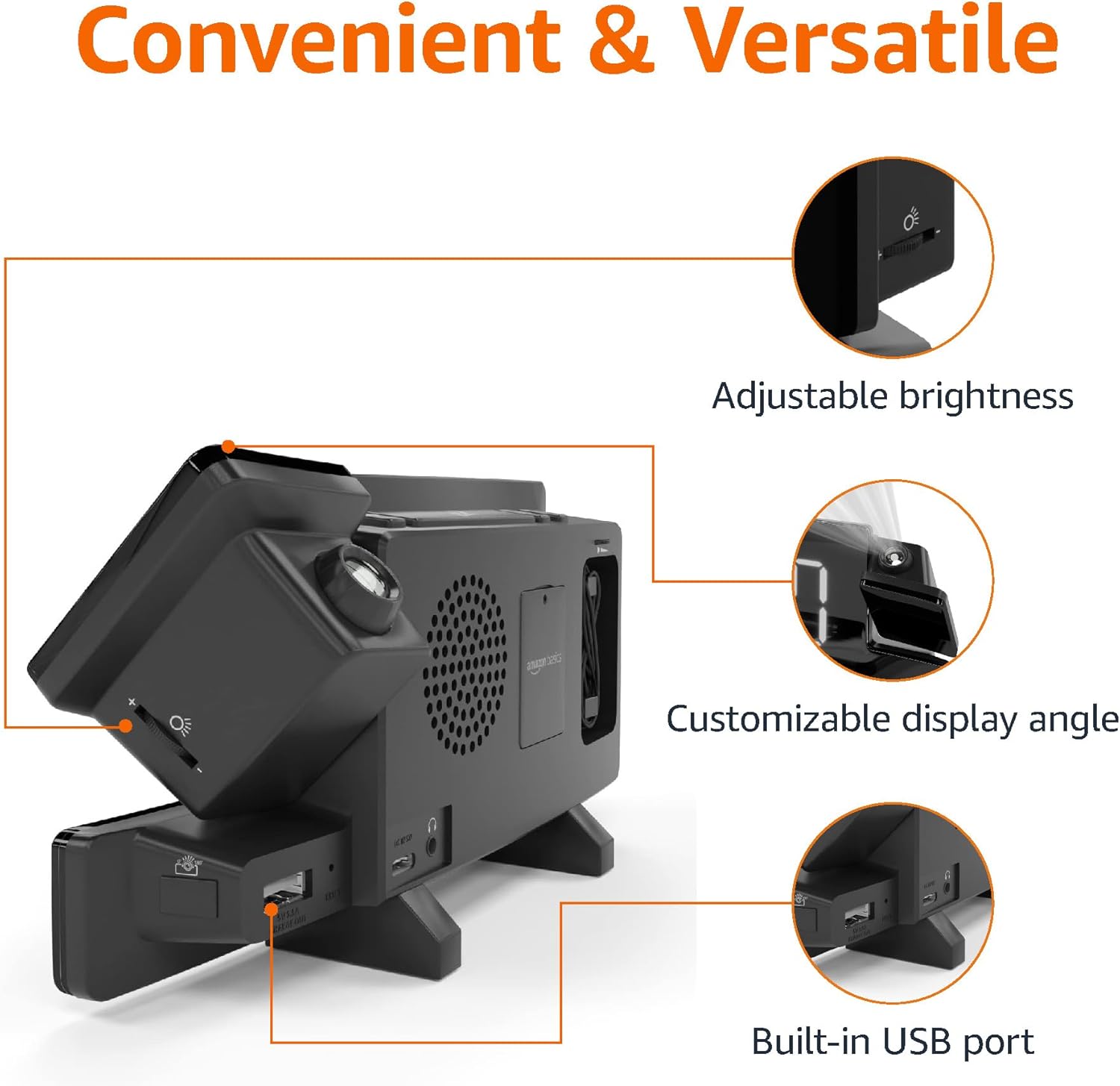
Image: Diagram highlighting the adjustable brightness, customizable projection angle, and USB charging port.
Настройка
1. Падключэнне сілкавання
Connect the AC power adapter to the DC IN port on the back of the alarm clock and plug it into a standard wall outlet. The display will light up.
2. Устаноўка рэзервовага акумулятара
For battery backup, open the battery compartment on the bottom of the unit. Insert 2 AAA batteries (not included), ensuring correct polarity (+/-). Close the compartment. The battery backup maintains time settings during power outages but does not power the display or alarm functions.
3. Пачатковая ўстаноўка часу
- Націсніце і ўтрымлівайце Усталяваны час кнопка. Лічбы гадзін будуць міргаць.
- Выкарыстоўвайце Volume/Tune Dial наладзіць гадзіну. Прэса Усталяваны час яшчэ раз для пацверджання.
- Лічбы хвілін будуць міргаць. Выкарыстоўвайце Volume/Tune Dial каб наладзіць хвіліны. Прэса Усталяваны час яшчэ раз для пацверджання.
- The time format (12H/24H) will flash. Use the Volume/Tune Dial to select your preferred format. Press Усталяваны час каб пацвердзіць і выйсці з рэжыму налады часу.
4. Пераход на летні час (DST)
Націсніце летні час button to toggle Daylight Saving Time on or off. The DST indicator will appear or disappear on the display.
Інструкцыя па эксплуатацыі
1. Налада будзільнікаў (Будзільнік 1 і Будзільнік 2)
- Націсніце і ўтрымлівайце Трывога 1 or Трывога 2 кнопка. Лічбы гадзін будзільніка будуць міргаць.
- Выкарыстоўвайце Volume/Tune Dial to adjust the alarm hour. Press the respective Сігналізацыя кнопку яшчэ раз для пацверджання.
- The alarm minute digits will flash. Use the Volume/Tune Dial to adjust the alarm minutes. Press the respective Сігналізацыя кнопку яшчэ раз для пацверджання.
- The alarm source (FM radio or buzzer) will flash. Use the Volume/Tune Dial to select your preference. Press the respective Сігналізацыя кнопку для пацверджання і актывацыі будзільніка. На дысплеі з'явіцца значок будзільніка.
- To deactivate an alarm, press the respective Сігналізацыя адзін раз націсніце кнопку. Значок будзільніка знікне.
2. Using Snooze
Калі гучыць будзільнік, націсніце кнопку Адкласці/зацямніць button to temporarily silence the alarm. The alarm will sound again after the set snooze duration. The default snooze duration is 9 minutes. To adjust the snooze duration, press and hold the Адкласці/зацямніць кнопку, затым выкарыстоўвайце Volume/Tune Dial to select a duration between 2 and 60 minutes. Press Адкласці/зацямніць яшчэ раз для пацверджання.
3. Работа FM-радыё
- Уключыць/выключыць: Націсніце Radio/Sleep button to turn the FM radio on or off.
- Наладзьце станцыі: Выкарыстоўвайце Volume/Tune Dial to manually tune to a desired FM frequency.
- Аўтаматычнае сканаванне: Націсніце і ўтрымлівайце Radio/Sleep button to automatically scan and save available FM stations as presets.
- Выберыце налады: Once stations are saved, short press the Radio/Sleep button to cycle through the preset stations.
- Наладзіць гучнасць: Павярнуць Volume/Tune Dial каб рэгуляваць гучнасць радыё.
4. Таймер сну
While the FM radio is playing, press the Radio/Sleep button repeatedly to set the sleep timer. Options typically range from 5 to 90 minutes. The radio will automatically turn off after the selected duration.
5. Projection Feature

Image: The alarm clock projecting the time onto a bedroom ceiling.
- Актываваць/дэактываваць: Націсніце Projection On/Off/Flip button to turn the time projection on or off.
- Наладзіць кут: Manually adjust the projection arm to direct the time onto your desired surface (wall or ceiling).
- Фокус: Павярнуць Projection Focus Wheel to achieve a clear image.
- Адкідны дысплей: Націсніце Projection On/Off/Flip button repeatedly to rotate the projected time 180 degrees, ensuring correct orientation.

Image: The alarm clock on a nightstand, projecting the time onto a wall, demonstrating its use in a bedroom setting.
6. USB-зарадка
Connect your mobile phone or tablet's USB charging cable to the USB-порт для зарадкі on the back of the alarm clock. The device will begin charging. This port is for charging only and does not support data transfer.
7. Рэгуляванне яркасці дысплея
Націсніце Адкласці/зацямніць button (when no alarm is sounding) to cycle through different brightness levels for the main LED display.
Тэхнічнае абслугоўванне
1. Уборка
Wipe the unit with a soft, dry, lint-free cloth. Do not use abrasive cleaners, waxes, or solvents as they may damage the surface.
2. Замена батарэі
If the battery backup is not functioning correctly (e.g., time resets after a power outage), replace the 2 AAA batteries in the battery compartment, ensuring correct polarity.
Ліквідацыю непаладак
| праблема | Магчымая прычына | Рашэнне |
|---|---|---|
| Дысплей пусты. | Няма падключэння да сілкавання. | Пераканайцеся, што адаптар пераменнага току надзейна падключаны да прылады і да спраўнай разеткі. |
| Сігналізацыя не гучыць. | Сігналізацыя не ўключана або гучнасць занадта нізкая. | Check if the alarm icon is visible on the display. Re-set the alarm if necessary. Increase radio volume if FM is selected as alarm source. |
| Прагназаваны час размыты. | Projection focus is not adjusted. | Павярнуць Projection Focus Wheel пакуль малюнак не стане ясным. |
| Projected time is not visible. | Projection is off or room is too bright. | Націсніце Projection On/Off/Flip button to activate. The projection is best viewed in a dark room. |
| Дрэнны прыём радыё. | Пазіцыя антэны або перашкоды. | Adjust the position of the FM antenna wire. Move the unit away from other electronic devices that may cause interference. |
| Зарадка праз USB не працуе. | Праблема з кабелем або несумяшчальнасць прылад. | Ensure the USB cable is functional and properly connected. Try a different cable or device. |
Тэхнічныя характарыстыкі
- мадэль: MET8831-ЗША
- Спажываная магутнасць: Адаптар пераменнага току (у камплекце)
- Рэзервовае капіраванне батарэі: 2 х ААА батарэі (не ўключаны)
- Дысплей: 7-цалевы святлодыёд
- Радыёчастота: FM
- Выхад USB: 5V, 1A (for charging)
- Памеры (Д х Ш х У): 7.1 х 1.6 х 3.7 цалі (18.03 х 4.06 х 9.4 см)
- Вага: Прыкладна 0.59 фунта (267.62 г)

Image: Product dimensions for the Amazon Basics Projection Alarm Clock.
Інфармацыя аб гарантыі
This product is covered by the Amazon Basics warranty. For detailed information regarding warranty terms and conditions, please refer to the official Amazon Basics webсайт або звярніцеся ў службу падтрымкі кліентаў.
Падтрымка кліентаў
For further assistance, troubleshooting, or product inquiries, please contact Amazon Basics customer support through the Amazon website or your purchase platform. Have your product model number (MET8831-US) and purchase details ready.