
Inrico B01
Inrico B01 Wireless Bluetooth Speaker Microphone User Manual
Мадэль: B01
1. Уводзіны
The Inrico B01 Wireless Bluetooth Speaker Microphone is designed to enhance communication for users of Android and iOS smart devices. This device pairs easily via Bluetooth 4.2 and offers features such as Push-to-Talk (PTT) and volume control, making it ideal for use with applications like Zello and RealPTT. Full functionality may vary depending on the specific application and its support for external devices.
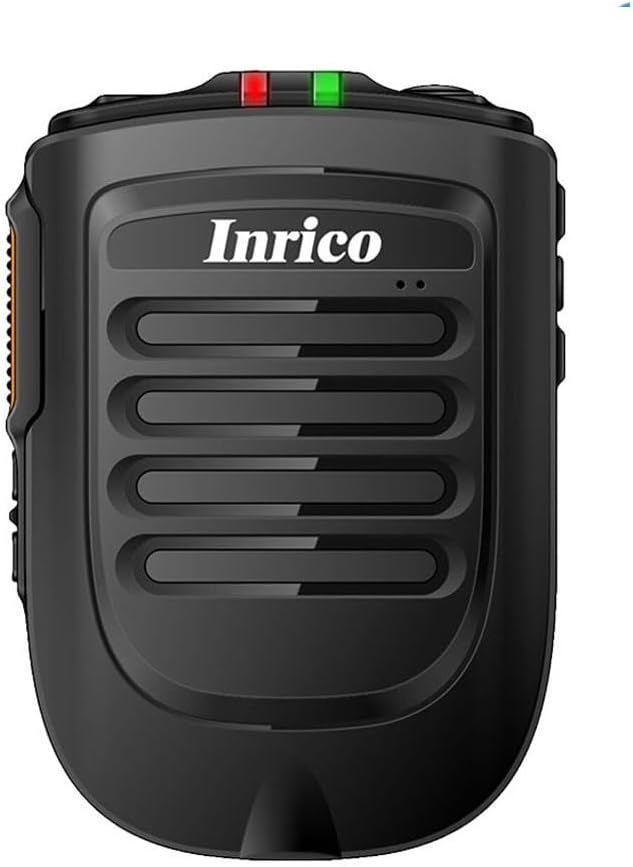
Малюнак 1: Спераду view of the Inrico B01 Wireless Bluetooth Speaker Microphone. This image shows the sleek black design with the Inrico logo and speaker grille.
2. Асаблівасці прадукту
- Embedded PTT and Volume Control Buttons: Designed for easy access and operation, compatible with applications like Zello and other popular communication platforms.
- Гняздо для навушнікаў 3.5 мм: Allows for connection of external listen-only earpieces for private audio.
- Святлодыёдны індыкатар: A discreet LED on the top of the speaker provides visual status in various environments.
- Сумяшчальнасць прыкладанняў: Works effectively with Zello and RealPTT. Note that some features may not be fully supported by other applications.
- Desktop Charger Compatibility: Designed to be compatible with the B01 Desktop Charger (sold separately).
- Уключаныя кампаненты: Comes with a Micro USB Cable for charging.
3. Змесціва ўпакоўкі
Пасля адкрыцця ўпакоўкі пераканайцеся, што ў камплекце ёсць усе наступныя прадметы:
- Inrico B01 Wireless Bluetooth Speaker Microphone
- USB зарадная прылада
- USB-кабель для даных
- Інструкцыя па эксплуатацыі (гэты дакумент)
- Заціск для рамяня
- Lithium Ion Battery (pre-installed or separate)
4. Схема і элементы кіравання прыладай
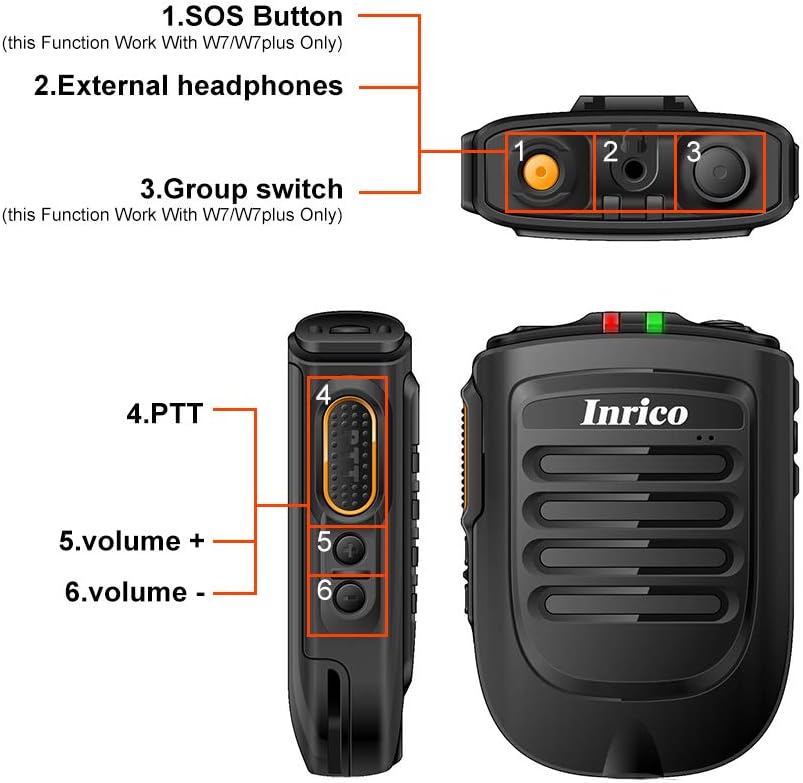
Figure 2: Detailed diagram illustrating the various buttons and ports on the Inrico B01.
- 1. SOS Button: (Functionality may depend on application and device compatibility, e.g., W7/W7plus).
- 2. External Headphones Jack: 3.5mm port for connecting an external earpiece.
- 3. Group Switch: (Functionality may depend on application and device compatibility, e.g., W7/W7plus).
- 4. PTT (Push-to-Talk) Button: Main communication button.
- 5. Volume + Button: Павялічвае гучнасць гуку.
- 6. Volume - Button: Памяншае гучнасць гуку.
5. Настройка
5.1 Зарадка прылады
Before initial use, fully charge the Inrico B01. Connect the provided USB data cable to the device's charging port and the other end to a USB charger or a computer's USB port. The LED indicator will show charging status (refer to LED indicator section for details).

Figure 3: Illustration of the Inrico B01's 2000mAh battery capacity and estimated usage times. The image shows battery level indicators and approximate talking, PTT, and standby times.
| Метрыка | Прыблізны час |
|---|---|
| Час размовы | ≈14 гадзіны |
| PTT time | ≈14 гадзіны |
| Час чакання | >90 гадзін |
5.2 Спалучэнне па Bluetooth
- Ensure the Inrico B01 is powered on and in pairing mode (refer to device's LED indicator for pairing status, usually a blinking blue light).
- On your smartphone (Android or iOS), navigate to the Bluetooth settings.
- Пошук available devices. The Inrico B01 should appear in the list (e.g., "Inrico B01" or similar).
- Select the Inrico B01 to initiate pairing. If prompted for a passcode, enter "0000" (four zeros).
- Once paired, the LED indicator on the B01 will change to a solid blue light, indicating a successful connection.
6. Інструкцыя па эксплуатацыі
6.1 Using Push-to-Talk (PTT)
After successfully pairing the device with your smartphone and configuring it within your chosen communication application (e.g., Zello, RealPTT):
- Open your communication application on your smartphone.
- To transmit, press and hold the PTT button (labeled '4' in Figure 2) on the Inrico B01. Speak clearly into the microphone.
- Release the PTT button to stop transmitting and listen for replies.
6.2 Рэгуляванне гучнасці
Use the Volume + (labeled '5' in Figure 2) and Volume - (labeled '6' in Figure 2) buttons on the side of the device to adjust the speaker's output volume.
6.3 Using the Earphone Jack
For private listening, connect a 3.5mm listen-only earpiece to the external headphones jack (labeled '2' in Figure 2) on the top of the device. Audio will be routed to the earpiece instead of the internal speaker.
6.4 Статус святлодыёднага індыкатара
- Сіні святлодыёд міргае: Device is in pairing mode or waiting for connection.
- Сіні святлодыёд пастаянна свеціцца: Device is successfully connected via Bluetooth.
- Red LED Solid: Прылада зараджаецца.
- Зялёны святлодыёд гарыць: Прылада цалкам зараджана.
- Чырвоны святлодыёд міргае: Папярэджанне аб нізкім узроўні батарэі.
7. Тэхнічнае абслугоўванне
- Уборка: Працірайце прыладу мяккай сухой тканінай. Не выкарыстоўвайце агрэсіўныя хімікаты або абразіўныя ачышчальнікі.
- захоўванне: Захоўвайце прыладу ў прахалодным, сухім месцы, удалечыні ад прамых сонечных прамянёў і экстрэмальных тэмператур.
- Сыход за батарэяй: Каб падоўжыць тэрмін службы батарэі, пазбягайце частай поўнай разрадкі батарэі. Рэгулярна зараджайце прыладу, нават калі яна не выкарыстоўваецца працяглы час.
- Воданепранікальнасць: Гэта прылада не воданепранікальная. Пазбягайце кантакту з вадой або празмернай вільгаццю.

Figure 4: Image showing the metal sheet on the battery cover, designed for compatibility with magnetic car holders. This feature allows for convenient mounting in vehicles.
8. Выпраўленне непаладак
| праблема | Магчымая прычына | Рашэнне |
|---|---|---|
| Прылада не ўключаецца. | Нізкі зарад батарэі або яе адсутнасць. | Charge the device fully using the provided USB cable and charger. |
| Немагчыма спалучыць са смартфонам. | Bluetooth is off on smartphone; device not in pairing mode; too far from smartphone. | Ensure Bluetooth is enabled on your phone. Put the B01 into pairing mode. Keep devices within 10 meters. Try restarting both devices. |
| Няма гуку з дынаміка/навушнікаў. | Volume too low; device not connected; application not configured correctly. | Increase volume. Verify Bluetooth connection. Check audio settings within your communication application. |
| Кнопка PTT не працуе. | Application not running or not configured to recognize the PTT button. | Ensure your communication application is active and properly configured to use the external PTT button. Some applications may require specific settings. |
9. Тэхнічныя характарыстыкі

Figure 5: Physical dimensions and weight of the Inrico B01. The image provides measurements in both millimeters and feet, and weight in grams and ounces.
| Параметр | Каштоўнасць |
|---|---|
| Марка | Ірыка |
| Назва мадэлі | B01 |
| Версія Bluetooth | 4.2 |
| Пратакол Bluetooth | HFP / HSP / A2DP / AVRCP / SPP |
| Далёкасць перадачы | 10м |
| Магутнасць перадачы | КЛАС2, 4dbm |
| Адчувальнасць | 80dBm < 0.1%BER |
| Прадукцыйнасць аўдыё | SBC Decode |
| Audio to Noise Ratio | ≥75 дБ |
| Магутнасць дынаміка | 1W/8R (116dB) |
| Святлодыёдны індыкатар | Blue/Green LED Indicator |
| Раз'ём для навушнікаў | 3.5 мм |
| Ёмістасць батарэі | 2000mA @ 3.7V (Lithium Ion) |
| Памеры (Д*Ш*У) | 90 x 63 x 25.6 мм (прыбл. 3.54 x 2.48 x 1.01 цалі) |
| Вага прадмета | 8.8 унцыі (прыблізна 249 грамаў) |
| Сумяшчальныя прылады | Smartphone (Android and iOS) |
| UPC | 785582409181 |

Figure 6: The Inrico B01 is compatible with various mobile radios, such as the TM-7 7plus, expanding its utility beyond just smartphones.
10. Гарантыя і падтрымка
For warranty information and technical support, please refer to the official Inrico website or contact your point of purchase. Keep your purchase receipt as proof of purchase for warranty claims.
Для атрымання дадатковай дапамогі вы таксама можаце звярнуцца да старонка прадукту на Amazon.
Ask a question about this manual
Ask about setup, troubleshooting, compatibility, parts, safety, or missing instructions. Manuals+ will review the question and use this page’s manual context to help answer it.