
FLAMMA FX200
Інструкцыя па эксплуатацыі гітарнага працэсара з некалькімі эфектамі FLAMMA FX200
Мадэль: FX200
1. Уводзіны
This manual provides detailed instructions for the operation and maintenance of your FLAMMA FX200 Multi Effects Guitar Processor. Please read this manual thoroughly to ensure proper usage and to maximize the potential of your device.
The FLAMMA FX200 is a versatile multi-effects processor designed for guitarists, featuring a 5-inch LCD touch screen, extensive input/output options, and a wide array of effects, amplifier models, and cabinet simulations.
2. Тэхніка бяспекі
- Не падвяргайце прыладу ўздзеянню дажджу, вільгаці або экстрэмальных тэмператур.
- Пазбягайце размяшчэння прылады побач з крыніцамі цяпла або пад прамымі сонечнымі прамянямі.
- Выкарыстоўвайце толькі пазначаны адаптар сілкавання.
- Не спрабуйце разбіраць або мадыфікаваць прыладу. Звяртайцеся да кваліфікаванага персаналу па любыя паслугі па абслугоўванні.
- Захоўваць у месцах, недаступных дзецям.
3. Змесціва ўпакоўкі
Праверце наяўнасць усіх прадметаў у камплекце:
- FLAMMA FX200 Multi Effects Guitar Processor
- Адаптар сілкавання
- USB-кабель C
- Кіраўніцтва карыстальніка (гэты дакумент)

Figure 3.1: Contents of the FLAMMA FX200 package.
4. Прылада скончанаview
4.1 Пярэдняя панэль
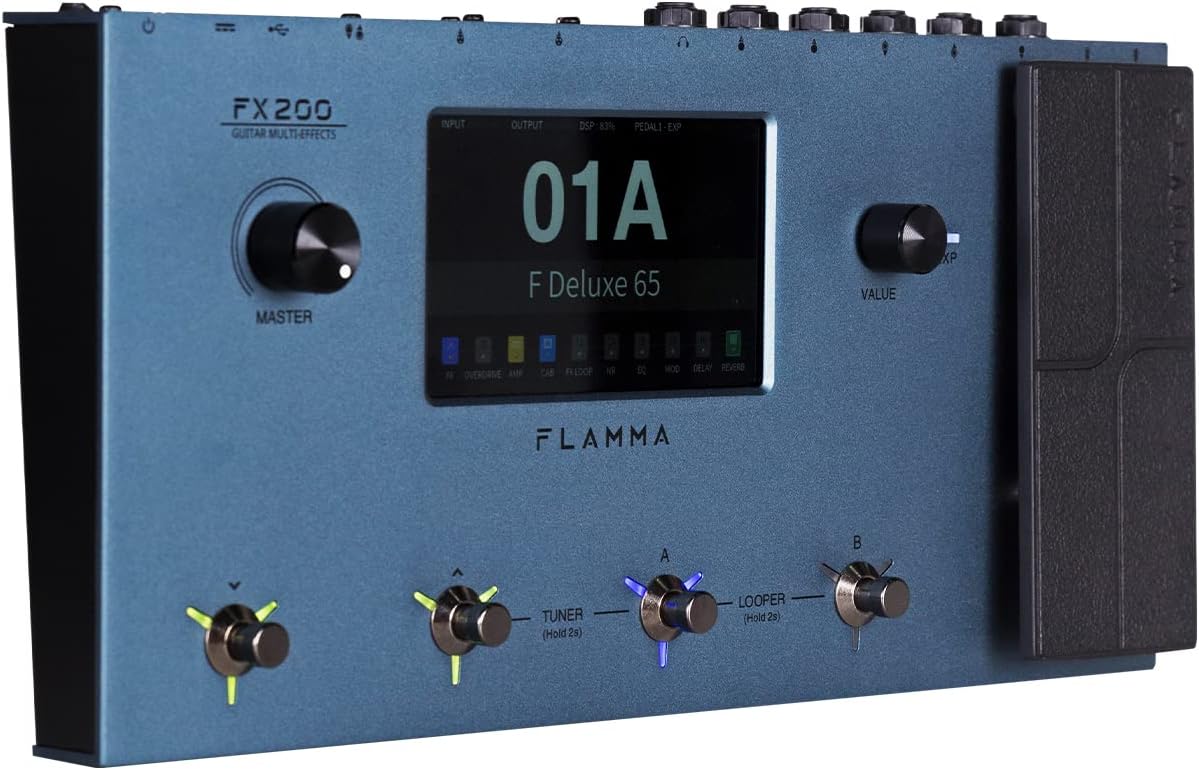
Figure 4.1: Front Panel Layout of the FX200.
- Галоўная ручка: Рэгулюе агульную гучнасць выхаднога гуку.
- ВК-сэнсарны экран: 5-inch display for navigation, parameter editing, and preset management.
- Value Knob: Used for data entry and parameter adjustments.
- Footswitches (A, B, C, D): Control presets, effects, looper, and tuner functions.
- Педаль экспрэсіі: Assignable for real-time control of various effects parameters.
4.2 Rear Panel (I/O)

Figure 4.2: Rear Panel Input/Output Connections.
- AUX IN: 3.5mm stereo input for external audio devices.
- EXP2: External expression pedal input.
- УХОД: 1/4-inch mono input for guitar.
- SEND/RETURN: Stereo FX Loop for integrating external effects pedals.
- OUTPUT (L/MONO, R): 1/4-inch stereo outputs to ampлифиер або міксер.
- ТЭЛЕФОНЫ: 3.5 мм стэрэаўыход для навушнікаў.
- GND/LIFT: Перамыкач зазямлення для ліквідацыі гулу.
- XLR OUT (L, R): Balanced XLR stereo outputs for direct connection to PA systems or audio interfaces.
- MIDI-ўваход/выхад: 5-pin MIDI connectors for external MIDI control.
- USB DC IN: USB-C port for power and connection to a computer.
- Выключальнік сілкавання: Уключае/выключае прыладу.
5. Настройка
5.1 Першапачатковае ўключэнне
- Connect the provided power adapter to the USB DC IN port on the rear panel.
- Падключыце адаптар сілкавання да адпаведнай разеткі пераменнага току.
- Flip the Power Switch to the ON position. The unit will power on and display the startup screen.
5.2 Connecting Your Guitar and Ampзадымнік
- Падключыце гітару да УВОД jack using a standard 1/4-inch instrument cable.
- Падключыце ВЫХАД L/MONO jack to your guitar amplifier's input using a 1/4-inch instrument cable. For stereo output, connect the ВЫХОД R jack to a second amplifier or mixer input.
- Alternatively, for direct recording or PA system connection, use XLR cables from the XLR OUT L і XLR OUT R ports to your audio interface or mixer.
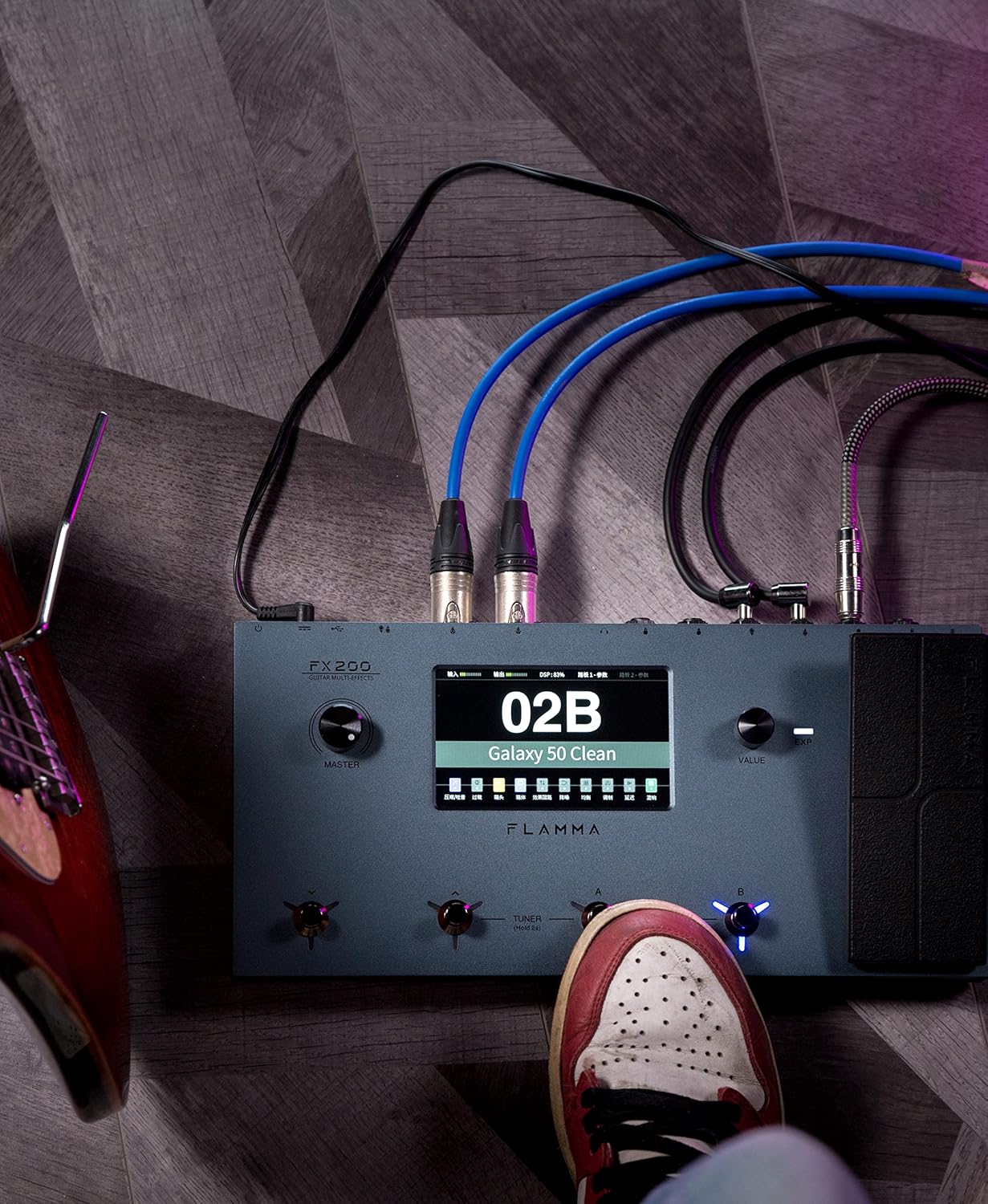
Figure 5.1: Typical connection setup for the FX200.
5.3 Падключэнне да кампутара
The FX200 can be connected to a computer for editing presets, firmware updates, and USB audio recording.
- Download the specialized editing software from the official FLAMMA webсайт.
- Connect the FX200 to your computer using the provided USB-C cable.
- Launch the editing software. The software will detect the FX200, allowing you to manage presets, effects, and perform firmware updates.

Figure 5.2: FX200 connected to a computer for software editing.
6. Інструкцыя па эксплуатацыі
6.1 Навігацыя па сэнсарным экране
The 5-inch LCD touch screen is the primary interface for controlling the FX200. Tap icons and parameters to select them, and use the Value Knob to adjust values.

Малюнак 6.1: Узаемадзеянне з інтэрфейсам сэнсарнага экрана.
6.2 Упраўленне папярэднімі наладамі
The FX200 features 200 editable user preset slots. Presets can be selected using the footswitches or by navigating the touch screen.
- Выбар прэсетаў: In Play mode, press footswitches A or B to cycle through presets within a bank. Press footswitches C or D to change banks.
- Рэдагаванне пресетов: Tap on an effect module icon on the touch screen to access its parameters. Adjust settings using the Value Knob.
- Захаванне налад: After editing, tap the 'Save' icon on the touch screen and follow the prompts to store your changes to a user preset slot.
6.3 Effect Modules and Chain
The FX200 includes 10 effect modules with over 160 different effect types, 58 preamp models, and 30 cabinet simulations. The effects chain can be customized.
- Module Order: Drag and drop effect module icons on the touch screen to change their order in the signal chain.
- Activating/Deactivating Modules: Tap an effect module icon to toggle it on or off within a preset.
- Third-Party IRs: The unit supports third-party impulse response files (up to 1024 sampling points) with 50 empty slots for custom cabinet simulations. Use the editing software to load IRs.

Figure 6.2: Customizable effects chain on the FX200.
6.4 Лупер і драм-машына
The FX200 includes an integrated 52-second looper and 80 drum machine variations with 10 metronome styles.
- Лупер: Access the looper function via a dedicated footswitch or the touch screen. Record, overdub, play, and stop loops.
- Драм-машына: Select drum patterns and metronome styles from the touch screen interface. Adjust tempo and volume.
6.5 USB Audio Recording
The FX200 supports USB audio recording, allowing you to record directly to your computer.
- Connect the FX200 to your computer via USB-C.
- Select the FX200 as your audio input device in your Digital Audio Workstation (DAW) software.
- Adjust input levels on both the FX200 and your DAW for optimal recording.
7. Тэхнічнае абслугоўванне
- Уборка: Для чысткі прылады выкарыстоўвайце мяккую сухую тканіну. Не выкарыстоўвайце абразіўныя ачышчальнікі або растваральнікі.
- захоўванне: When not in use for extended periods, store the unit in a dry, cool place away from direct sunlight.
- Абнаўленні прашыўкі: Regularly check the FLAMMA website for firmware updates to ensure optimal performance and access to new features. Updates are performed via the USB-C connection and editing software.
8. Выпраўленне непаладак
| праблема | Магчымая прычына | Рашэнне |
|---|---|---|
| Няма ўлады | Адаптар сілкавання не падключаны або няспраўны; выключаны выключальнік сілкавання. | Пераканайцеся, што адаптар сілкавання надзейна падключаны да спраўнай разеткі. Праверце выключальнік сілкавання. |
| Няма выхаду гуку | Incorrect cable connections; Master volume too low; Amplifier off; Effect module bypassed. | Verify all audio cables are correctly connected. Increase Master volume. Check amplifier power. Ensure desired effect modules are active. |
| Humming or noise | Ground loop; Faulty cables; Interference. | Engage the GND/LIFT switch. Try different cables. Ensure power supply is stable and away from other electronics. |
| Сэнсарны экран не рэагуе | Часовы збой праграмнага забеспячэння. | Restart the unit by cycling the power switch. If the issue persists, contact customer support. |
| Немагчыма падключыцца да кампутара | USB-C cable issue; Driver not installed; Software not running. | Ensure USB-C cable is functional. Install necessary drivers. Launch the FLAMMA editing software. |
9. Тэхнічныя характарыстыкі
| Асаблівасць | Дэталь |
|---|---|
| Дысплей | 5-цалевы сэнсарны ВК-экран |
| Модулі эфектаў | 10 modules, 160+ effect types |
| прэamp Мадэлі | 58 |
| Cabinet Simulations | 30 (IR-based, 1024pts), 50 user IR slots |
| Карыстальніцкія пресеты | 200 рэдагуемых слотаў |
| Лупер | 52 секунд |
| Барабанная машына | 80 variations, 10 metronome styles |
| Сувязь | AUX IN, EXP2, INPUT, SEND/RETURN, OUTPUT (L/MONO, R), PHONES, XLR OUT (L, R), MIDI IN/OUT, USB-C |
| USB Audio Recording | Падтрымліваецца |
| Памеры (Д х Ш х У) | 13.5 х 6.6 х 2 цалі (34.3 х 16.8 х 5.1 см) |
| Вага | 3.9 фунта (1.77 кг) |
| Электразабеспячэнне | 9V DC (via USB-C) |
| Матэрыял корпуса | Метал |
10. Гарантыя і падтрымка
FLAMMA products are covered by a limited warranty. For detailed warranty information, product registration, and technical support, please visit the official FLAMMA webсайт або звярніцеся ў службу падтрымкі кліентаў.
Official FLAMMA Webсайт: www.flamma.com
For any issues not covered in this manual, please refer to the online resources or contact FLAMMA customer support directly.