
Уводзіны
Welcome to the user manual for your Lecoo DS152 Boombox RGB Portable Bluetooth Speaker. This speaker combines powerful audio performance with dynamic RGB lighting and versatile connectivity options. This manual provides essential information for setting up, operating, and maintaining your device to ensure optimal performance and longevity.
Змест пакета
- 1x Lecoo DS152 Boombox RGB Portable Bluetooth Speaker
- 1x кабель Type-C
- 1x дапаможны кабель
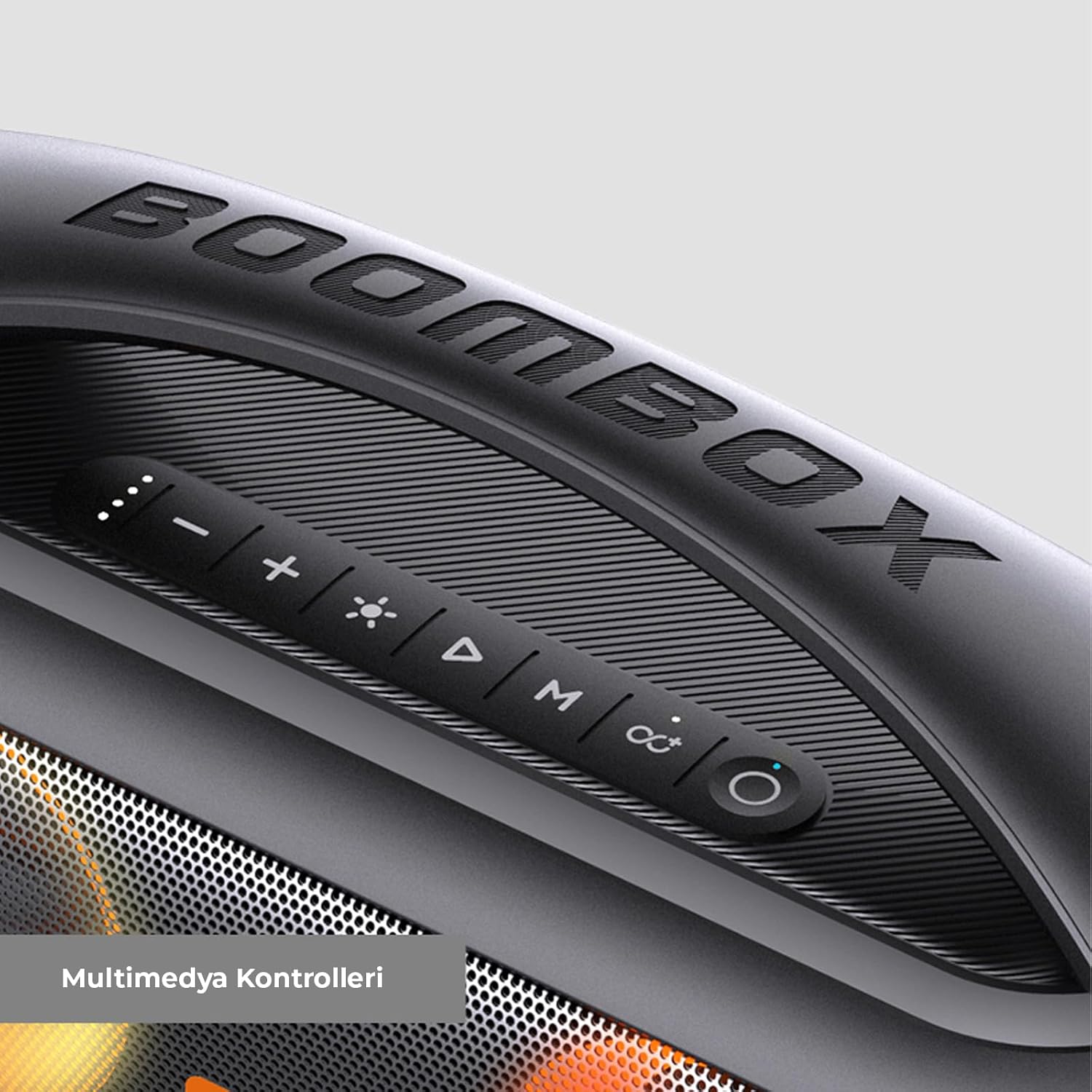
Image: The Lecoo DS152 speaker shown in its retail packaging, indicating the included Type-C charging cable and Aux cable.
Прадукт скончаныview
The Lecoo DS152 features a robust design with integrated controls and dynamic RGB lighting. It is engineered with dual subwoofers and a tweeter for balanced and powerful sound output.

Выява: Выбухнула view of the Lecoo DS152 speaker, highlighting its internal components including two 3-inch subwoofers and a 2-inch tweeter for comprehensive sound.

Image: A close-up of the multimedia control panel located on the top surface of the Lecoo DS152 speaker, showing buttons for volume, playback, mode, and RGB lighting.
Настройка
Зарадка дынаміка
Before initial use, ensure the speaker is fully charged to maximize battery life and performance.
- Падключыце кабель Type-C з камплекта да зараднага порта на дынаміку.
- Connect the other end of the Type-C cable to a compatible USB power adapter (5V 1A or 5V 2A, not included).
- The charging indicator light will illuminate, signifying that charging is in progress.
- Charging time is approximately 4.5 hours with a 5V 1A adapter or 4 hours with a 5V 2A adapter.
- The indicator light will change or turn off once the battery is fully charged.
Уключэнне/выключэнне
To power the speaker on or off, press and hold the power button located on the control panel for a few seconds until you hear an audible prompt or see the indicator light change.
Інструкцыя па эксплуатацыі
Спалучэнне Bluetooth
- Turn on the speaker. It will automatically enter Bluetooth pairing mode, indicated by a flashing light.
- На вашай прыладзе (смартфоне, планшэце, ноўтбуку) уключыце Bluetooth і знайдзіце даступныя прылады.
- Select "Lecoo DS152" from the list of detected devices.
- Пасля паспяховага спалучэння дынамік выдасць гук пацверджання, а індыкатар пачне гарэць пастаянна.
- The effective Bluetooth range is approximately 10 meters (33 feet).
AUX рэжым
To connect an audio source using the AUX cable:
- Connect one end of the provided 3.5mm AUX cable to the AUX input port on the speaker.
- Падключыце другі канец да аўдыёвыхаду вашай знешняй прылады.
- The speaker may automatically switch to AUX mode, or you may need to press the 'M' (Mode) button on the speaker to select AUX input.
Функцыя TWS (сапраўдная бесправадная стэрэа)
The TWS function allows you to pair two DS152 speakers together for a synchronized stereo sound experience.
- Ensure both DS152 speakers are powered on and are not currently connected to any Bluetooth device.
- On one of the speakers, press and hold the TWS button (often indicated by an infinity symbol or two interlocking circles) until you hear an audible prompt.
- The speakers will automatically search for and pair with each other. A confirmation sound will indicate successful TWS pairing.
- Once TWS paired, connect your primary device via Bluetooth to the first speaker. Both speakers will now play audio in stereo.
Кіраванне RGB асвятленнем
The speaker features dynamic RGB lighting to enhance your listening experience.
- Press the light button (often indicated by a sun or lightbulb icon) on the control panel to cycle through different RGB lighting modes.
- There are three distinct lighting modes available.

Image: The Lecoo DS152 speaker displaying its vibrant and active RGB lighting effects on the speaker grilles.

Выява: Падрабязны view of the RGB lighting on the Lecoo DS152 speaker's grille, showcasing the color transitions.
Функцыя Power Bank
The Lecoo DS152 can also function as a power bank to charge other devices.
- Connect your smart device's charging cable to the USB output port on the speaker.
- Унутраны акумулятар дынаміка ёмістасцю 3000 мАг пачне зараджаць падлучаную прыладу.
- Note that utilizing the power bank function will consume the speaker's battery and may reduce its audio playback time.
Тэхнічнае абслугоўванне
Уборка
To clean the speaker, gently wipe its surfaces with a soft, dry cloth. Avoid using abrasive cleaners, solvents, or harsh chemicals, as these can damage the finish and internal components.
Воданепранікальнасць
The Lecoo DS152 speaker is rated IPX5 water-resistant. This means it is protected against splashes and light rain. Не апускайце дынамік у ваду. For optimal protection against moisture, ensure all port covers are securely closed before exposing the speaker to any wet conditions.

Image: The Lecoo DS152 speaker shown with water splashing on its surface, illustrating its IPX5 water resistance capabilities.
Захоўванне
When not in use for extended periods, store the speaker in a cool, dry place. Keep it away from direct sunlight, extreme temperatures, and high humidity to prevent damage.
Ліквідацыю непаладак
Няма сілы
- Ensure the speaker's battery is charged. Connect it to a power source using the provided Type-C cable.
- Press and hold the power button for a few seconds to attempt to turn it on.
Немагчыма падключыць прыладу праз Bluetooth
- Ensure the speaker is in Bluetooth pairing mode (indicated by a flashing light).
- Verify that Bluetooth is enabled on your source device.
- Move the speaker closer to your device, ensuring they are within the 10-meter effective range.
- Try turning off and then restarting both the speaker and your device's Bluetooth function.
- If issues persist, clear the Bluetooth pairing list on your device and attempt to pair again.
Без гуку
- Праверце ўзровень гучнасці як на дынаміку, так і на падлучанай прыладзе.
- Ensure the speaker is correctly paired via Bluetooth or properly connected via the AUX cable.
- If using AUX, confirm the cable is fully inserted into both devices and the correct input mode is selected on the speaker.
Дрэнная якасць гуку
- Move the speaker closer to your Bluetooth device to minimize potential interference.
- Ensure there are no significant physical obstructions between the speaker and your device.
- Try playing a different audio source or file to rule out issues with the content.
Памылка спалучэння TWS
- Ensure both DS152 speakers are powered on and are not connected to any other Bluetooth device.
- Repeat the TWS pairing steps carefully, ensuring the TWS button is pressed on only one speaker initially.
- Verify that both speakers are the same model (DS152) for TWS compatibility.
Тэхнічныя характарыстыкі
| Асаблівасць | Спецыфікацыя |
|---|---|
| мадэль | DS152 |
| Версія Bluetooth | 5.1 |
| Выходная магутнасць RMS | 18 Вт |
| Пікавая выхадная магутнасць | 36 Вт |
| Ёмістасць батарэі | 3.7 В, 3000 XNUMX мАг |
| Час зарадкі | 4.5 hours (5V 1A), 4 hours (5V 2A) |
| Час прайгравання | 2.5 hours (100% volume), 4.5 hours (50% volume) |
| Дыяпазон частот | 70 Гц-16 кГц |
| Эфектыўная дыстанцыя | 10 метраў |
| Воданепранікальнасць | IPX5 |
| Памер прадукту | 350 х 138 х 183 мм |
| Вага | 2.27 кг |
| Памер сабвуфера | 3 цалі * 2 |
| Памер твітара | 2 цалі * 1 |
Інфармацыя аб гарантыі
This product is covered by a manufacturer's warranty. Please refer to the warranty card included in your product packaging or visit the official Lecoo website for detailed information regarding warranty terms, conditions, and duration. It is recommended to retain your purchase receipt as proof of purchase for any warranty claims.
Падтрымка кліентаў
For further assistance, technical support, or service inquiries regarding your Lecoo DS152 speaker, please contact Lecoo customer support. You can typically find contact information on the official Lecoo webна сайце або ў дакументацыі, якая пастаўляецца з вашым прадуктам.