
Baseus Bowie WM02
Baseus Bowie WM02 TWS Bluetooth Earbuds
Кіраўніцтва карыстальніка
Уводзіны
Thank you for choosing the Baseus Bowie WM02 TWS Bluetooth Earbuds. These ultra-compact and lightweight earbuds are designed for comfortable, long-term wear, offering a seamless audio experience with advanced Bluetooth 5.3 technology and an impressive 25-hour battery life (with charging case). This manual will guide you through the setup, operation, and maintenance of your new earbuds.

Image: Baseus Bowie WM02 TWS Bluetooth Earbuds in white, with their charging case.
Настройка
1. Распакоўка і кампаненты
Before first use, please ensure all components are present in the package:
- Baseus Bowie WM02 TWS Earbuds
- Чахол для зарадкі
- Зарадны кабель USB-C
- Некалькі памераў вушных насадак (S, M, L)
- Кіраўніцтва карыстальніка
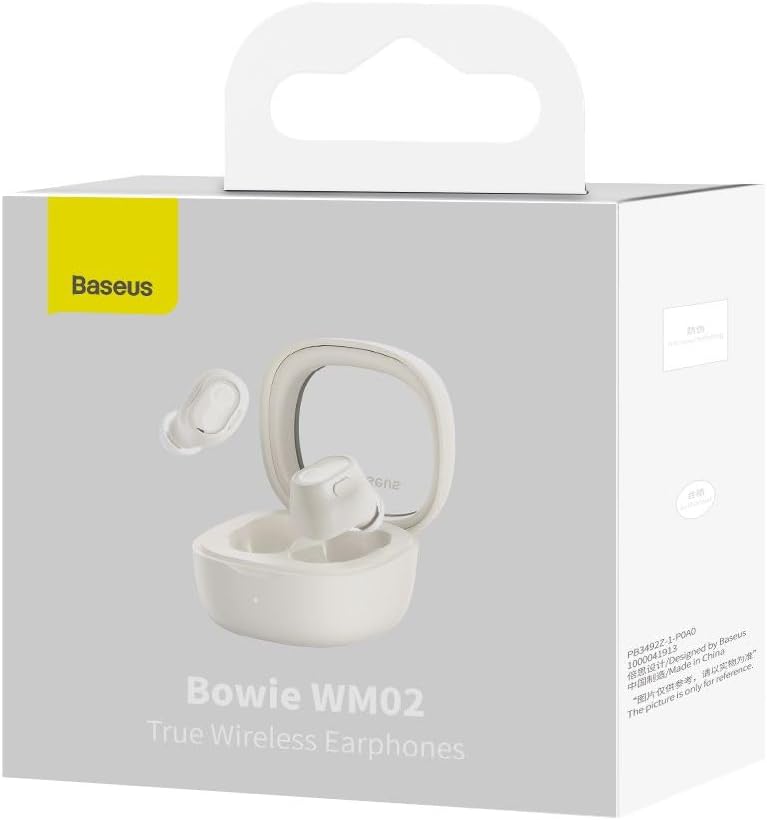
Image: The Baseus Bowie WM02 earbuds, charging case, USB-C cable, and ear tips laid out with the product packaging.
2. Зарадка навушнікаў і чахла
For optimal performance, fully charge the earbuds and charging case before first use.
- Змесціце навушнікі ў зарадны чахол. Пераканайцеся, што яны правільна ўсталяваны ў адпаведныя гнязда.
- Падключыце зарадны кабель USB-C да порта зарадкі на корпусе, а другі канец — да крыніцы харчавання USB (напрыклад, камп'ютара, адаптара для насценных прылад).
- The indicator light on the charging case will show the charging status. Once fully charged, the light will typically turn solid or turn off.
A 10-minute quick charge provides approximately 2 hours of listening time, and a full charge offers up to 5 hours of continuous use, extending to 25 hours with the charging case.

Image: Graphic illustrating the 25-hour battery life of the Baseus Bowie WM02 earbuds and charging case.
3. Спарванне Bluetooth
Выканайце наступныя дзеянні, каб падключыць навушнікі да прылады з падтрымкай Bluetooth:
- Адкрыйце зарадны кейс. Навушнікі аўтаматычна пяройдуць у рэжым спалучэння (індыкатары будуць міргаць).
- На вашай прыладзе (смартфоне, планшэце, ноўтбуку) перайдзіце ў налады Bluetooth і ўключыце Bluetooth.
- Пошук available devices and select "Baseus Bowie WM02" from the list.
- Once connected, the earbud indicator lights will typically turn off or show a steady light.
Навушнікі маюць Bluetooth 5.3 для стабільнага і эфектыўнага злучэння.

Image: A visual representation of the Wireless 5.3 chip, highlighting fast and smooth connection.
4. Baseus App Integration
Enhance your experience by downloading the official Baseus app. The app allows you to:
- Знайдзіце свае навушнікі-ўкладышы.
- Check real-time battery levels.
- Наладзьце сэнсарнае кіраванне.
- Access additional features and updates.

Image: Screenshot of the Baseus app interface, demonstrating features like earbud location and battery status.
Інструкцыя па эксплуатацыі
1. Нашэнне навушнікаў-ўкладышаў
The Baseus Bowie WM02 earbuds are designed for a comfortable and secure fit, even for smaller ears. They weigh only 3.8g per earbud and have a 108-degree elevation angle for ergonomic wear.
- Выбірайце амбушюры, якія забяспечваюць найлепшае прыляганне і камфорт для вашых вушэй.
- Акуратна ўстаўце кожны навушнік у слыхавы праход і злёгку павярніце, каб зафіксаваць яго.

Image: A woman demonstrating the comfortable and seamless fit of the Baseus Bowie WM02 earbuds.
2. Сэнсарныя элементы кіравання
The earbuds feature intuitive touch controls. You can customize these controls via the Baseus app.
| Дзеянне | Кантроль |
|---|---|
| Прайграванне/Паўза | Адзін націск на любы навушнік |
| Наступны трэк | Двойчы націсніце правы навушнік |
| Папярэдні трэк | Двойчы націсніце левы навушнік |
| Адказаць/завяршыць выклік | Адзін націск на любы навушнік |
| Адхіліць выклік | Доўгі націск на любы навушнік |
| Актывуйце галасавой памочнік | Тройчы націсніце на любы навушнік |
| Уключыць/выключыць рэжым нізкай затрымкі (гульнявы рэжым) | Long press on either earbud (check app for specific gesture) |
3. Уключэнне/выключэнне харчавання
- Уключэнне: Адкрыйце зарадны кейс, і навушнікі аўтаматычна ўключацца і падключаюцца да апошняй спалучанай прылады.
- Выключэнне: Змясціце навушнікі назад у зарадны футляр і зачыніце вечка. Яны аўтаматычна адключацца і выключацца.
4. Гульнявы рэжым (нізкая затрымка)
The Bowie WM02 features a 60ms low-latency mode, ideal for gaming, ensuring instant response and synchronized audio. Activate this mode via the touch controls or the Baseus app for an immersive gaming experience.
Тэхнічнае абслугоўванне
1. Уборка
Рэгулярная ўборка дапамагае падтрымліваць якасць гуку і гігіену.
- Выкарыстоўвайце мяккую, сухую тканіну без ворса, каб праціраць навушнікі і зарадны футляр.
- For ear tips, remove them and clean with mild soap and water, then dry thoroughly before reattaching.
- Акуратна ачысціце зарадныя кантакты на навушніках і чахле сухім ватным тампонам.
- Avoid using abrasive cleaners, alcohol, or solvents.
2. Захоўванне
Калі навушнікі не выкарыстоўваюцца, захоўвайце іх у зарадным футляры, каб абараніць ад пылу і пашкоджанняў.
3. Сыход за батарэяй
- Пазбягайце ўздзеяння экстрэмальных тэмператур (высокіх або нізкіх) на навушнікі і чахол.
- Do not leave the battery completely drained for extended periods. Charge them regularly.
Ліквідацыю непаладак
If you encounter any issues with your Baseus Bowie WM02 earbuds, please refer to the following common solutions:
| праблема | Магчымае рашэнне |
|---|---|
| Навушнікі не спалучаюцца | Пераканайцеся, што навушнікі зараджаныя. Выключыце і ўключыце Bluetooth на прыладзе. Забудзьцеся пра прыладу ў наладах Bluetooth і зноў падключыце яе. |
| Ніякага гуку з аднаго навушніка | Check battery level of both earbuds. Place both earbuds back in the case, close the lid, then open again. Re-pair if necessary. |
| Праблемы з зарадкай | Пераканайцеся, што кабель для зарадкі надзейна падключаны. Паспрабуйце іншы порт USB або зарадную прыладу. Ачысціце кантакты для зарадкі на навушніках і чахле. |
| Нізкая гучнасць або дрэнная якасць гуку | Adjust volume on your device. Ensure ear tips provide a good seal. Clean earbud mesh to remove debris. |
| Сэнсарныя элементы кіравання не рэагуюць | Ensure your fingers are clean and dry. Try resetting the earbuds (refer to Baseus app or online support for specific reset instructions). |
If the problem persists, please contact Baseus customer support.
Тэхнічныя характарыстыкі
| Асаблівасць | Дэталь |
|---|---|
| Назва мадэлі | Боўі WM02 |
| Нумар мадэлі вытворцы | NGTW180002 |
| Тэхналогія падлучэння | Бесправадная сувязь (Bluetooth) |
| Тэхналогія бесправадной сувязі | Bluetooth 5.3 |
| Форм-фактар навушнікаў-ўкладышаў | Укладышы |
| Кантроль шуму | Няма |
| Вага прадукту | 60 грам |
| Дыяпазон частот | 20 Гц - 20 000 Гц |
| Імпеданс | 140 Ом |
| Сярэдні тэрмін службы батарэі (навушнікі) | 5 гадзін |
| Агульны тэрмін службы батарэі (з чахлом) | Да 25 гадзін |
| Час зарадкі | Прыблізна 1.5 гадзіны (для поўнай зарадкі) |
| Порт для зарадкі | USB Type-C |
| Асаблівасці | Fast Charging, Low Latency Mode (60ms) |
| Сумяшчальныя прылады | Bluetooth-enabled devices such as smartphones, tablets, laptops, and desktop computers. |
Гарантыя і падтрымка
Інфармацыя аб гарантыі
The Baseus Bowie WM02 TWS Bluetooth Earbuds come with a 12-month manufacturer's warranty from the official Baseus Brazil store. Please retain your proof of purchase for warranty claims.
Падтрымка кліентаў
For further assistance, technical support, or warranty inquiries, please contact Baseus customer support through the official Baseus website or the Baseus app. You can also visit the Крама Baseus на Amazon для атрымання дадатковай інфармацыі.
Ask a question about this manual
Ask about setup, troubleshooting, compatibility, parts, safety, or missing instructions. Manuals+ will review the question and use this page’s manual context to help answer it.