
1. Уводзіны
Thank you for choosing the Smartwares FSM-12601 Wi-Fi Smoke Detector. This device is designed to provide early warning of smoke and fire, enhancing the safety of your home. Featuring a photoelectric sensor, it offers high sensitivity to detect slow-smoldering fires while minimizing false alarms. With Wi-Fi connectivity, you can receive real-time alerts on your smartphone via the Connected at Home or Smartlife app.

Image: The Smartwares FSM-12601 Wi-Fi Smoke Detector in a home setting.
2. Важная інфармацыя па бяспецы
- Перад устаноўкай і выкарыстаннем уважліва прачытайце ўсе інструкцыі.
- This smoke detector is designed for residential use.
- Do not paint the smoke detector. Paint can clog the sensing chambers and prevent the alarm from functioning correctly.
- Do not install in areas with high humidity, excessive dust, or near cooking fumes.
- Regularly test the smoke detector as described in this manual.
- У выпадку трывогі неадкладна пакіньце памяшканне і выклічце хуткую дапамогу.
3. Змесціва ўпакоўкі
Пераканайцеся, што ўсе прадметы прысутнічаюць у пасылцы:
- Smartwares FSM-12601 Wi-Fi Smoke Detector
- Мантажны кранштэйн
- Батарэя CR123A
- Мантажныя шрубы і дюбелі
- Кіраўніцтва карыстальніка
4. Прадукт скончыўсяview
The Smartwares FSM-12601 features a compact design with a central test/mute button and an integrated LED indicator.

Выява: спераду view of the smoke detector highlighting the Test/Mute button.
- Test/Mute Button: Press to test the alarm or silence a false alarm.
- Святлодыёдны індыкатар: Provides visual status of the device (e.g., normal operation, alarm, low battery, pairing mode).
- Дакладчык: Emits the 85 dB alarm sound.

Image: Dimensions and key features of the smoke detector.
5. Настройка і ўстаноўка
5.1 Устаноўка батарэі
- Акуратна павярніце заднюю крышку датчыка дыму супраць гадзіннікавай стрэлкі, каб адкрыць яе.
- Insert the provided CR123A battery, ensuring correct polarity (+/-).
- Close the back cover by twisting it clockwise until it clicks into place.
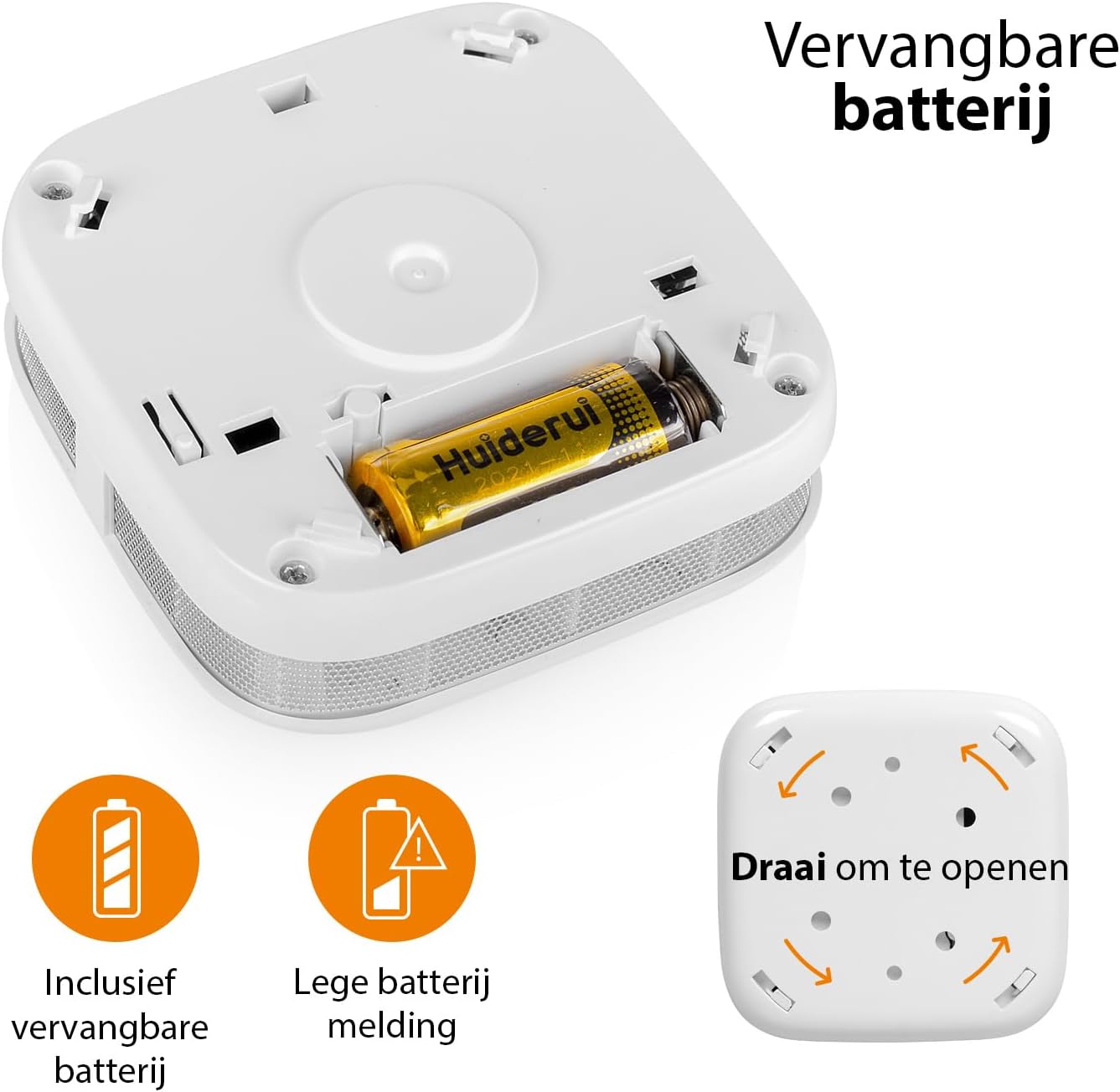
Image: Battery compartment and instructions to open the device.
5.2 Месца мацавання
For optimal performance, install the smoke detector on the ceiling in the center of a room or hallway. If ceiling mounting is not possible, install it on a wall, at least 10-30 cm (4-12 inches) from the ceiling. Avoid corners. Install at least one smoke detector on each floor of your home, including basements and attics.
- Avoid installing near windows, doors, or ventilation openings where drafts might interfere with smoke detection.
- Keep away from cooking appliances, fireplaces, and areas with high humidity like bathrooms.
5.3 Фізічная ўстаноўка
- Выберыце падыходнае месца для мацавання.
- Use the mounting bracket as a template to mark the drill holes on the ceiling or wall.
- Прасвідруйце адтуліны і ўстаўце дзюбелі.
- Прымацуйце мантажны кранштэйн з дапамогай шруб, якія ўваходзяць у камплект.
- Align the smoke detector with the mounting bracket and twist it clockwise until it locks securely into place.
5.4 App Connection (Wi-Fi Pairing)
To enable Wi-Fi features and receive smartphone notifications, connect your smoke detector to the Smartwares "Connected at Home" or "Smartlife" app.
- Download the "Connected at Home" or "Smartlife" app from your smartphone's app store (available for iOS and Android).
- Зарэгіструйцеся альбо ўвайдзіце ў свой рахунак.
- Long press the Test/Mute button on the smoke detector until the red LED indicator starts flashing. This indicates pairing mode.
- Follow the on-screen instructions within the app to add the smoke detector to your Wi-Fi network.
- Once successfully paired, the LED indicator will stop flashing and remain off, or indicate normal operation as per app instructions.

Image: Steps for connecting the smoke detector to the app.

Image: Benefits of connecting the smoke detector to the app.
6. Інструкцыя па эксплуатацыі
6.1 Нармальная праца
Once installed and connected, the smoke detector is in normal operating mode. The LED indicator will flash briefly every 40-60 seconds to confirm it is functioning correctly.
6.2 Testing the Smoke Detector
It is recommended to test your smoke detector weekly to ensure proper functionality.
- Press and hold the Test/Mute button for a few seconds.
- The alarm will sound loudly (85 dB), and the LED indicator will flash rapidly.
- Адпусціце кнопку. Сігнал павінен спыніцца.
- Калі сігнал трывогі не гучыць, звярніцеся да раздзела «Ліквідацыя непаладак».
6.3 Mute Function (Hush Mode)
In case of a non-emergency alarm (e.g., cooking fumes), you can temporarily silence the alarm.
- Press the Test/Mute button briefly during an alarm.
- The alarm will silence for approximately 10 minutes. The LED will continue to flash every few seconds to indicate it is in hush mode.
- After 10 minutes, if smoke is still present, the alarm will reactivate.
- If the smoke has cleared, the detector will return to normal operation.
6.4 Статус святлодыёднага індыкатара
- Flashes every 40-60 seconds: Нармальная праца.
- Flashes rapidly with alarm sound: Выяўлены дым.
- Flashes every few seconds (no alarm): Hush mode active.
- Flashes every 32 seconds (with chirp): Low battery warning. Replace battery immediately.
- Flashes rapidly (during setup): Рэжым спалучэння.
7. Тэхнічнае абслугоўванне
7.1 Замена батарэі
The smoke detector operates on a CR123A battery with an approximate lifespan of one year. When the battery is low, the device will chirp every 32 seconds, and the LED will flash.
- Twist the smoke detector counter-clockwise to remove it from its mounting bracket.
- Open the back cover by twisting it counter-clockwise.
- Remove the old CR123A battery and dispose of it according to local regulations.
- Устаўце новую батарэйку CR123A, выконваючы правільную палярнасць.
- Close the back cover and reattach the detector to its mounting bracket.
- Test the smoke detector immediately after replacing the battery.
7.2 Cleaning the Smoke Detector
Dust and debris can affect the performance of your smoke detector. Clean it at least once a month.
- Remove the smoke detector from its mounting bracket.
- Use a soft brush or a vacuum cleaner with a soft brush attachment to gently clean the exterior casing and the openings around the sensor.
- Do not use water, cleaning solvents, or harsh chemicals.
- Reattach the detector and test it.
8. Выпраўленне непаладак
| праблема | Магчымая прычына | Рашэнне |
|---|---|---|
| Падчас тэсту сігналізацыя не гучыць. | Dead or low battery; incorrect battery installation; faulty unit. | Replace battery; check battery polarity; if problem persists, contact support. |
| Частыя ілжывыя трывогі. | Detector is too close to cooking fumes, steam, or high humidity; excessive dust. | Relocate detector further from sources of false alarms; clean the detector. |
| Цвыркаючы гук кожныя 32 секунд. | Папярэджанне аб нізкім узроўні батарэі. | Неадкладна заменіце батарэйку CR123A. |
| Cannot connect to Wi-Fi app. | Incorrect Wi-Fi password; detector too far from router; incorrect pairing procedure; app issues. | Ensure correct Wi-Fi password; move detector closer to router; repeat pairing steps carefully; check app for updates or known issues. |
| Няма апавяшчэнняў на смартфоне. | App notifications disabled; detector disconnected from Wi-Fi; app not running in background. | Check app notification settings; verify detector's Wi-Fi connection; ensure app is allowed to run in background. |
9. Тэхнічныя характарыстыкі
| Нумар мадэлі | ФСМ-12601 |
| Тып датчыка | Фотаэлектрычная |
| Гучнасць будзільніка | 85 дБ на адлегласці 3 метраў |
| Крыніца харчавання | 1x CR123A Lithium battery (included) |
| Тэрмін службы батарэі | Прыкладна 1 год |
| Сувязь | Wi-Fi (2.4 ГГц) |
| Працоўная вільготнасць | Да 95% без кандэнсацыі |
| Памеры (Д х Ш х У) | 7.6 х 7.6 х 2.8 см |
| Вага | 84 грамаў |
| Матэрыял | АБС-пластык |
10. Інфармацыя аб утылізацыі
Do not dispose of the device or batteries with household waste. Electronic waste and batteries should be collected separately for environmentally sound disposal. Use the return and collection systems available in your country.
11. Гарантыя і падтрымка
Smartwares products come with a standard manufacturer's warranty. For detailed warranty terms, technical support, or service inquiries, please refer to the contact information provided on the Smartwares website or the original purchase documentation.