
Andoer e417fe28-cba1-49bd-8acb-ddcd73b41592
Andoer 4K Digital Video Camera User Manual
Model: e417fe28-cba1-49bd-8acb-ddcd73b41592
1. Уводзіны
This user manual provides detailed instructions for operating your Andoer 4K Digital Video Camera. Please read this manual thoroughly before using the camera to ensure proper operation and to maximize its performance. Keep this manual for future reference.
1.1 Змест пакета
Пасля адкрыцця ўпакоўкі пераканайцеся, што ўсе пералічаныя ніжэй прадметы наяўныя і знаходзяцца ў добрым стане:
- 1 x Andoer 4K Digital Video Camera
- 2 x NP-40 Li-ion Battery (one pre-installed)
- 1 х USB-кабель
- 1 х відэакабель
- 1 х пульт дыстанцыйнага кіравання
- 1 х Сумка для камеры
- 1 х Кіраўніцтва карыстальніка (на англійскай мове)

Image: The Andoer 4K Digital Video Camera, remote control, and two NP-40 Li-ion batteries, illustrating the main components included in the package.
2. Асаблівасці прадукту
The Andoer 4K Digital Video Camera is equipped with a range of features designed to enhance your video recording and photography experience:
- 4K Ultra HD Video Recording: Capture stunning videos at 4K/30fps and 2.7K/30fps resolutions.
- Захоп нерухомых малюнкаў 56 МП: Produce high-resolution photos up to 56 megapixels (interpolation).
- 3.0 Inch IPS Touchscreen: A rotatable 270° touchscreen for intuitive control and versatile viewныя вуглы.
- 18-кратны лічбавы зум: Bring distant subjects closer without compromising image quality.
- IR Начны бачанне: Record clear and natural footage in low-light or dark environments.
- Падключэнне Wi-Fi: Easily connect to your smartphone or tablet via the DV-CAM APP for remote control, live view, і file перадача.
- Face Detection & Anti-Shake: Enhance focus and stability for clearer shots.
- Падтрымка знешняга мікрафона: Hot shoe mount for connecting an external microphone for improved audio quality.
- Standard Tripod Mount: 1/4 inch thread for mounting on a tripod or other accessories.

Image: An infographic highlighting the camera's main features including 4K 56MP resolution, 18X Digital Zoom, Face Detection, Night Vision, Dual Outputs, Digital Anti-shake, IPS Touchscreen, WiFi Connection, and Built-in Microphone.
3. Пачатак працы
3.1 Усталёўка і зарадка акумулятара
The camera uses NP-40 Li-ion batteries. One battery is typically pre-installed. Ensure batteries are fully charged before first use.
- Адкрыйце вечка батарэйнага адсека, размешчанага ў ніжняй частцы камеры.
- Insert the NP-40 battery, ensuring the correct polarity.
- Надзейна зачыніце крышку батарэйнага адсека.
- To charge, connect the camera to a power source using the provided USB cable. The charging indicator light will illuminate.
- Зарадка завершана, калі індыкатар выключаецца.
3.2 Усталяванне SD-карты
The camera supports SD/SDHC cards up to 128GB (Class 6 or above recommended, not included).
- Знайдзіце слот для SD-карты, звычайна збоку або знізу камеры.
- Insert the SD card with the metal contacts facing the correct direction (refer to the diagram near the slot). Push until it clicks into place.
- Каб выняць, акуратна зноў націсніце на карту, пакуль яна не выскочыць.
4. Асноўная аперацыя
4.1 Уключэнне/выключэнне сілкавання
- Уключэнне: Open the LCD screen or press the Power button.
- Выключэнне: Close the LCD screen or press and hold the Power button.
4.2 Запіс відэа
- Уключыце камеру.
- Ensure the camera is in video recording mode (indicated by an icon on the screen). If not, use the Mode button to switch.
- Press the Record button (usually a red circle) to start recording.
- Каб спыніць запіс, націсніце кнопку Запіс яшчэ раз.
4.3 Фотаздымка
- Уключыце камеру.
- Пераканайцеся, што камера знаходзіцца ў рэжыме фота.
- Скампануйце кадр з дапамогай ВК-экрана.
- Press the Photo button (often a camera icon or shutter button) to take a picture.
4.4 Функцыя маштабавання
The camera features 18X digital zoom.
- Use the T (Telephoto) button to zoom in.
- Use the W (Wide) button to zoom out.

Image: A visual demonstration of the 18X digital zoom capability, showing how the camera can magnify distant subjects.
4.5 Прайграванне
- In standby mode, press the Playback button (often an arrow icon) to enter playback mode.
- Use the navigation buttons to browse through your recorded videos and photos.
- Press the OK button to play a video or view фота на ўвесь экран.
- Каб выйсці з рэжыму прайгравання, зноў націсніце кнопку прайгравання.
5. Пашыраныя функцыі
5.1 Падключэнне Wi-Fi
The camera supports WiFi connectivity for remote control and file transfer via the DV-CAM APP.
- Download and install the "DV-CAM" APP on your smartphone or tablet from your device's app store.
- On the camera, navigate to the WiFi settings and enable WiFi. The camera's WiFi network name (SSID) and password will be displayed.
- On your smartphone/tablet, go to WiFi settings and connect to the camera's WiFi network using the provided password.
- Open the DV-CAM APP. You can now view жывы footage, control recording, take photos, and download files directly to your mobile device.

Image: A visual representation of the camera's WiFi function, showing a smartphone connected to the camera to view жывы footage or transfer files.
5.2 ІЧ-начное бачанне
The IR Night Vision feature allows you to record in low-light conditions.
- To activate IR Night Vision, locate the IR button or setting in the camera menu.
- When activated, the camera will use infrared light to illuminate the scene, capturing clear black and white footage in darkness.

Image: A side-by-side comparison demonstrating the effectiveness of IR Night Vision, showing a scene in normal light versus the same scene captured in darkness using infrared.
5.3 3.0 Inch IPS Touchscreen
The 3.0-inch IPS touchscreen offers intuitive control and can be rotated 270 degrees for various shooting angles, including self-recording.
- Tap the screen to access menu options or focus.
- Swipe to navigate through playback or menu pages.
- Rotate the screen to face forward for vlogging or self-portraits.
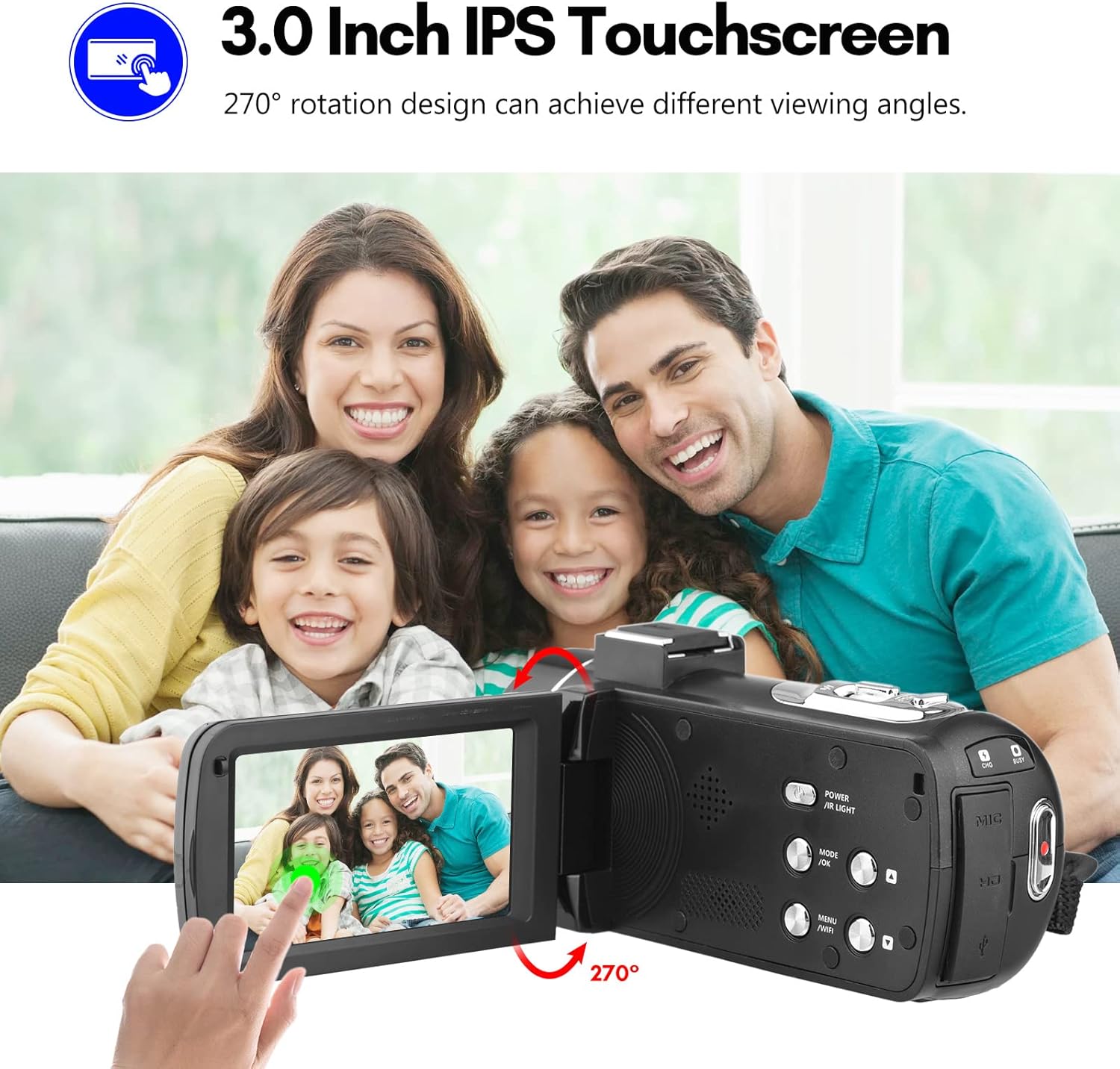
Image: The Andoer camera with its 3.0-inch IPS touchscreen rotated, demonstrating its 270-degree rotation capability for flexible viewзапіс і самастойны запіс.
5.4 Налады меню
Access the camera's menu to adjust various settings such as video resolution, photo resolution, white balance, exposure, self-timer, and auto power off.
- Націсніце кнопку MENU, каб увайсці ў меню налад.
- Use the navigation buttons or touchscreen to select options.
- Націсніце OK, каб пацвердзіць выбар.
- Націсніце MENU яшчэ раз, каб выйсці.
6. Сувязь
The camera offers multiple connectivity options for viewing and transferring your media.
6.1 Connecting to a TV (HD Multimedia Interface)
- Пераканайцеся, што камера выключана.
- Connect one end of the HD multimedia interface cable (not explicitly listed in package contents, but mentioned in description) to the camera's HD port and the other end to an HD input on your TV.
- Turn on the TV and select the correct HD input source.
- Turn on the camera. The camera's display will be mirrored on the TV screen, allowing you to view фота і відэа.
6.2 Connecting to a Computer (USB)
- Пераканайцеся, што камера выключана.
- Падключыце камеру да кампутара з дапамогай USB-кабеля, які ўваходзіць у камплект.
- Turn on the camera. It will typically enter "Mass Storage" or "PC Camera" mode. Select "Mass Storage" to access files.
- The camera will appear as a removable disk drive on your computer, allowing you to transfer files.

Image: An illustration detailing how to connect the Andoer camera to a television via HD multimedia interface and to a computer via USB for viewing and transferring media.
7. Тэхнічнае абслугоўванне
7.1 Чыстка камеры
- Выкарыстоўвайце мяккую, сухую тканіну для чысткі корпуса камеры.
- For the lens, use a specialized lens cleaning cloth and lens cleaning solution. Avoid touching the lens with your fingers.
- Do not use strong detergents or solvents, as they may damage the camera's finish.
7.2 Захоўванне
- Калі камера не выкарыстоўваецца працяглы час, выміце акумулятар з яе.
- Захоўвайце камеру ў прахалодным, сухім месцы, удалечыні ад прамых сонечных прамянёў і экстрэмальных тэмператур.
- Use the provided camera bag to protect it from dust and scratches.
8. Выпраўленне непаладак
| праблема | Магчымая прычына | Рашэнне |
|---|---|---|
| Камера не ўключаецца. | Батарэя разраджаная або няправільна ўстаўленая. | Зарадзіце акумулятар або ўстаўце яго правільна. |
| Немагчыма запісваць відэа/рабіць фота. | SD-карта запоўненая, заблакаваная або не ўстаўлена. | Выдаліць files, unlock the SD card, or insert an SD card. |
| Дрэнная якасць выявы/відэа. | Аб'ектыў брудны; недастатковае асвятленне; няправільныя налады. | Clean the lens; use IR Night Vision in low light; adjust resolution/exposure settings. |
| Праблемы з падключэннем да Wi-Fi. | Incorrect password; APP not installed; distance too far. | Verify password; install DV-CAM APP; move closer to camera. |
9. Тэхнічныя характарыстыкі
| Асаблівасць | Дэталь |
|---|---|
| Датчык выявы | CMOS |
| ISO | Аўто, 100, 200, 400, 800, 1600 |
| Захоўванне | SD/SDHC Card, max. 128GB (Class 6 or above) |
| Аб'ектыў | Fixed, f/2.6, f=7.0mm |
| Фокусная адлегласць | 0.5 м да бясконцасці |
| Экран | 3.0 Inch IPS Touchscreen (270° rotation) |
| Photo Format & Resolution | JPG, 56M/ 48M/ 30M/ 24M/ 20M/ 16M/ 12M/ 8M/ 5M |
| Video Format & Resolution | MP4, 4K/30fps, 2.7K/30fps, 1080P/60fps, 1080P/30fps, 720P/60fps, 720P/30fps |
| Лічбавы зум | 18X |
| ІЧ святло | <1.0 млн |
| Баланс белага | Auto/ Daylight/ Cloudy/ Tungsten/ Fluorescent |
| Уздзеянне | ± 3.0EV |
| Таймер аўтасэрвісу | OFF/2s/ 5s/ 10s |
| Аўтаматычнае адключэнне харчавання | OFF/ 1min/3min/ 5min/ 10min |
| Мікрафон | Built-in, supports external microphone |
| Электразабеспячэнне | 1 x NP-40 Li-ion Battery |
| Акумулятар пульта дыстанцыйнага кіравання | 2 х ААА батарэі (не ўключаны) |
| камера Памер | 12.6 х 5.8 х 5.9 см / 5 х 2.3 х 2.3 цалі |
| Вага камеры | 318 г / 11.2 унцый |
10. Гарантыя і падтрымка
For warranty information and technical support, please refer to the official Andoer webсайт або звярніцеся ў службу падтрымкі кліентаў. Захоўвайце чэк аб куплі як пацверджанне пакупкі.
You can visit the official Andoer store on Amazon for more information: Andoer Store
11. Інфармацыя па бяспецы
Калі ласка, выконвайце наступныя меры бяспекі, каб пазбегнуць траўмаў або пашкоджання прадукту:
- Do not expose the camera to extreme temperatures, direct sunlight, or high humidity.
- Трымайце камеру далей ад вады і іншых вадкасцей.
- Не спрабуйце разбіраць або мадыфікаваць камеру. Рамонт павінен выконвацца толькі аўтарызаваным сэрвісным персаналам.
- Keep plastic bags and packaging materials away from babies and children to avoid suffocation hazards.

Image: A multi-language warning label emphasizing the importance of keeping plastic bags away from children to prevent suffocation.
Ask a question about this manual
Ask about setup, troubleshooting, compatibility, parts, safety, or missing instructions. Manuals+ will review the question and use this page’s manual context to help answer it.