
Уводзіны
Дзякуй за пакупкуasing the RCA 32V-type FHD Tunerless Smart TV, model RCA-32D1. This television is designed for seamless access to online streaming content without the need for traditional terrestrial broadcast tuners. It features a Full HD display, built-in Wi-Fi, Chromecast functionality, and voice control for an enhanced viewing experience. This manual provides essential information for setting up, operating, maintaining, and troubleshooting your new TV.

Малюнак 1: Спераду view of the RCA 32V-type FHD Tunerless Smart TV.
Інфармацыя па бяспецы
Калі ласка, уважліва прачытайце ўсе інструкцыі па тэхніцы бяспекі перад выкарыстаннем прадукту. Захоўвайце гэтую інструкцыю для далейшага выкарыстання.
- Не падвяргайце тэлевізар уздзеянню дажджу або вільгаці, каб пазбегнуць пажару або паражэння электрычным токам.
- Забяспечце належную вентыляцыю. Не блакуйце вентыляцыйныя адтуліны.
- Выкарыстоўвайце толькі шнур сілкавання, які пастаўляецца з тэлевізарам.
- Не адчыняйце тэлевізарasing. Па ўсіх пытаннях тэхнічнага абслугоўвання звяртайцеся да кваліфікаванага персаналу.
- Трымайце батарэйкі ў месцах, недаступных для дзяцей. Утылізуйце выкарыстаныя батарэйкі адказна.
- Пазбягайце размяшчэння тэлевізара на няўстойлівых паверхнях.
Змест пакета
Праверце наяўнасць усіх прадметаў у камплекце:
- RCA 32V-type FHD Tunerless Smart TV Unit
- Пульт дыстанцыйнага кіравання
- Батарэі AAA (x2)
- Падстаўка для тэлевізара (аснова і шрубы)
- Сілавы кабель
- Кіраўніцтва карыстальніка (гэты дакумент)
Настройка
1. Фізічная ўстаноўка
Attach the TV stand or mount the TV to a wall. For wall mounting, ensure you use a VESA-compatible bracket (40 x 40mm) and appropriate screws (M6 10mm x 2 for upper two points, screws for lower two points are included with the TV). Always ensure the TV is securely mounted to prevent accidents.

Figure 2: TV dimensions and connection terminal layout.
2. Сувязі
Connect the power cable to the TV and then to a power outlet. This TV requires only a power connection and Wi-Fi for internet streaming.

Figure 3: Power and Wi-Fi connectivity for the tunerless TV.
Для знешніх прылад выкарыстоўвайце даступныя парты:
- Парты HDMI (3): Connect game consoles, Blu-ray players, or other HDMI-compatible devices.
- Парты USB 2.0 (x2): Падключыце USB-назапашвальнікі для прайгравання медыяфайлаў.
- Порт LAN: For wired internet connection (optional, Wi-Fi is also available).
- Аўдыявыхад: Для падлучэння знешніх аўдыёсістэм.

Figure 4: Connecting external devices via HDMI ports.
3. Пачатковае ўключэнне
After connecting the power, press the power button on the remote control. Follow the on-screen instructions to complete the initial setup, including connecting to your Wi-Fi network and logging into your Google account to access smart TV features.
Аперацыйная
1. Пульт дыстанцыйнага кіравання
The included remote control allows for easy navigation and features voice control capabilities. Dedicated buttons provide quick access to popular streaming services.
- Галасавое кіраванне: Press the voice assistant button and speak commands like "Play cat videos on YouTube" or "Increase volume."
- Спецыяльныя кнопкі праграмы: Quickly launch NETFLIX, YouTube, and Prime Video with a single press.
- Навігацыя: Выкарыстоўвайце джойсцікі і кнопку OK для навігацыі па меню і выбару опцый.
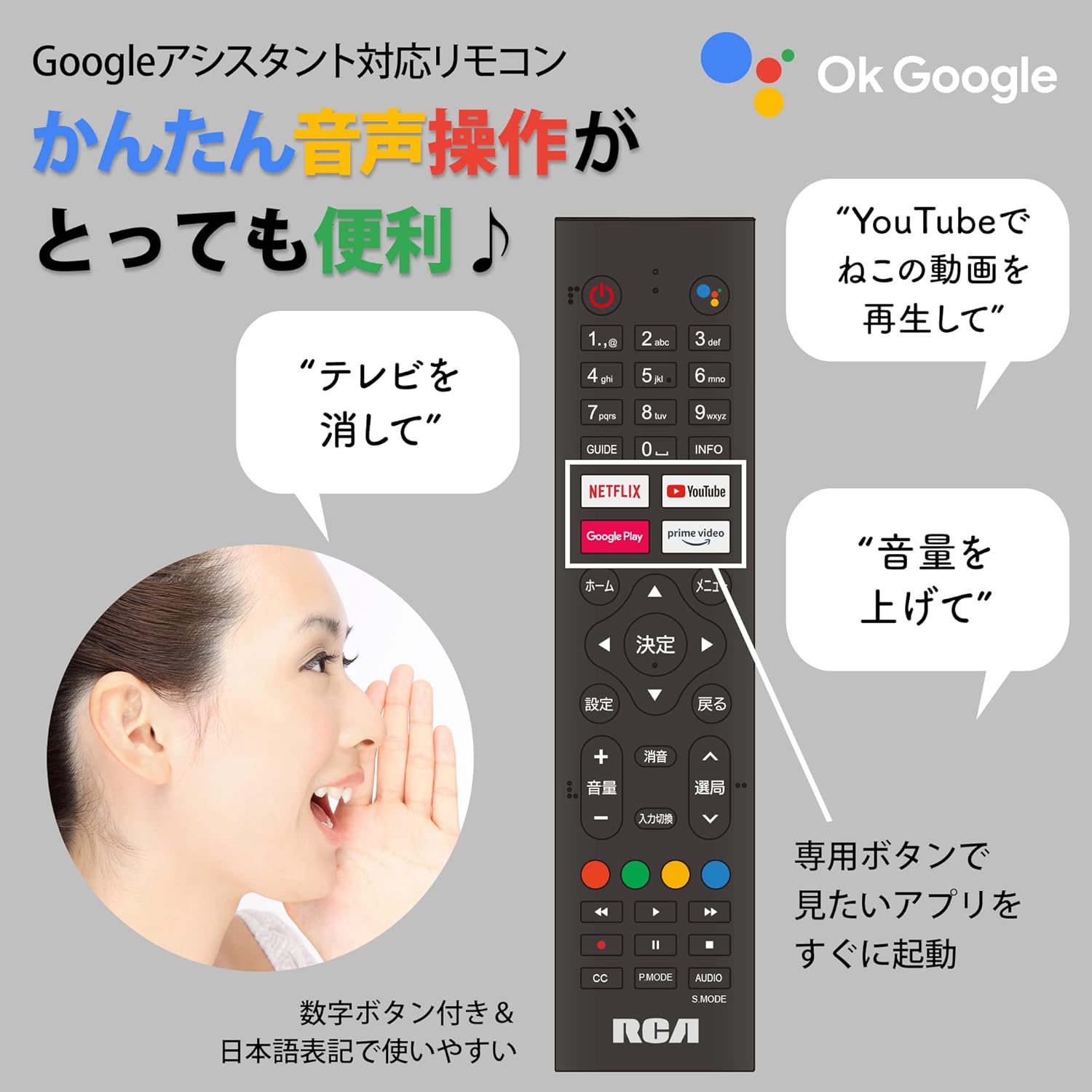
Figure 5: Remote control with voice command functionality and dedicated app buttons.
2. Функцыі Smart TV
This tunerless TV provides access to a wide range of online video distribution services and features:
- Сэрвісы струменевай перадачы: Enjoy content from NETFLIX, YouTube, Prime Video, Tver, U-NEXT, AbemaTV, and more.
- Убудаваны Chromecast: Cast content directly from your smartphone or tablet to the TV screen.
- АС Android: Access a variety of apps from the Google Play Store.

Figure 6: Using Chromecast to cast content from a smartphone to the TV.
Video 1: Demonstration of the Google TV interface and voice control for content discovery.
3. Асноўныя аперацыі
- Уключэнне/выключэнне харчавання: Націсніце кнопку харчавання на пульце.
- Рэгулятар гучнасці: Выкарыстоўвайце кнопкі павелічэння/памяншэння гучнасці на пульце дыстанцыйнага кіравання.
- Выбар уводу: Press the Input button to switch between HDMI and other connected sources.
Тэхнічнае абслугоўванне
1. Уборка
Каб ачысціць экран тэлевізара, акуратна працярыце яго мяккай тканінай без ворса. Для выдалення ўстойлівых плям злёгкуampen the cloth with water or a screen-cleaning solution. Do not spray liquid directly onto the screen. Clean the TV casinпрацярыце мяккай сухой тканінай.
2. Захоўванне
If storing the TV for an extended period, disconnect it from the power outlet and store it in a cool, dry place away from direct sunlight and extreme temperatures.
Ліквідацыю непаладак
Калі ў вас узніклі праблемы з тэлевізарам, звярніцеся да наступных распаўсюджаных праблем і іх рашэнняў:
| праблема | Рашэнне |
|---|---|
| Няма ўлады | Пераканайцеся, што кабель сілкавання надзейна падключаны як да тэлевізара, так і да разеткі. Паспрабуйце іншую разетку. |
| No picture/Sound but no picture | Праверце крыніцу ўваходнага сігналу. Пераканайцеся, што знешнія прылады ўключаны і падключаны правільна. |
| Пульт дыстанцыйнага кіравання не працуе | Замяніце батарэйкі. Пераканайцеся, што паміж пультам дыстанцыйнага кіравання і ІЧ-датчыкам тэлевізара няма перашкод. |
| Немагчыма падключыцца да Wi-Fi | Check your router and internet connection. Re-enter the Wi-Fi password. Move the TV closer to the router. |
| App is slow or freezes | Restart the TV. Clear the app's cache in the TV settings. Ensure your internet connection is stable. |
Калі праблема не знікне, звярніцеся ў службу падтрымкі кліентаў.
Тэхнічныя характарыстыкі
The following are the technical specifications for the RCA-32D1 Tunerless Smart TV:
| Асаблівасць | Дэталь |
|---|---|
| Нумар мадэлі | RCA-32D1 |
| Памер экрана | 31.5 inches (32V-type) |
| Тэхналогія адлюстравання | LCD, VA Panel, LED Backlight |
| дазвол | Full HD (1920 x 1080) |
| Частата абнаўлення | 60 Гц |
| Каэфіцыент кантраснасці | 3000:1 |
| Аперацыйная сістэма | Android |
| Сувязь | Wi-Fi, HDMI (x3), USB 2.0 (x2), LAN, Audio Output |
| Асаблівасці | Chromecast Built-in, Voice Control |
| Supported Streaming Services | Netflix, YouTube, Prime Video, Tver, U-NEXT, AbemaTV |
| Памеры прадукту (Д х Ш х У) | 16.1 х 73.1 х 47 см |
| Вага прадмета | 4.9 кг |
| Стандарт мацавання VESA | 40 х 40 мм |
| Батарэі ў камплекце | 2 батарэйкі ААА |

Figure 7: High-definition VA panel for vivid image quality.
Гарантыя і падтрымка
This product is covered by the manufacturer's warranty. Please refer to the warranty card included in your package for specific terms and conditions.
Падтрымка кліентаў
For technical assistance or inquiries, please contact the KEIYO Support Center:
- тэлефон: 050-8880-2812
- Гадзіны прыёму: Weekdays 10:00-12:00, 13:00-17:00 (Excluding summer holidays, year-end/New Year holidays, Golden Week, and public holidays).