
Уводзіны
The Docooler Bone Conduction Speaker is a compact, portable audio device designed to transform various surfaces into sound-producing diaphragms. Utilizing bone conduction technology, it offers a unique audio experience with enhanced bass and volume depending on the surface it is placed upon. This manual provides essential information for the safe and effective use of your speaker.
Інфармацыя па бяспецы
Калі ласка, прачытайце і выконвайце гэтыя рэкамендацыі па бяспецы, каб пазбегнуць пашкоджання прылады або траўмаў:
- Не падвяргайце дынамік уздзеянню экстрэмальных тэмператур або прамых сонечных прамянёў.
- Не кідайце прыладу і не падвяргайце яе моцным ударам.
- Keep the speaker away from water and liquids, as it is not waterproof.
- Не спрабуйце разбіраць, рамантаваць або мадыфікаваць прыладу. Гэта прывядзе да анулявання гарантыі.
- Выкарыстоўвайце толькі зарадны кабель, які ўваходзіць у камплект, і сумяшчальны адаптар сілкавання.
- Пазбягайце працяглага праслухоўвання на высокай гучнасці, каб пазбегнуць пашкоджання слыху.
Змест пакета
Праверце, ці ёсць усе прадметы ў вашай упакоўцы:
- Docooler Bone Conduction Speaker (1 unit)
- Зарадны кабель USB Type-C (1 шт.)
- Кіраўніцтва карыстальніка (гэты дакумент)
- Adhesive Pads / Suction Cup (for mounting)
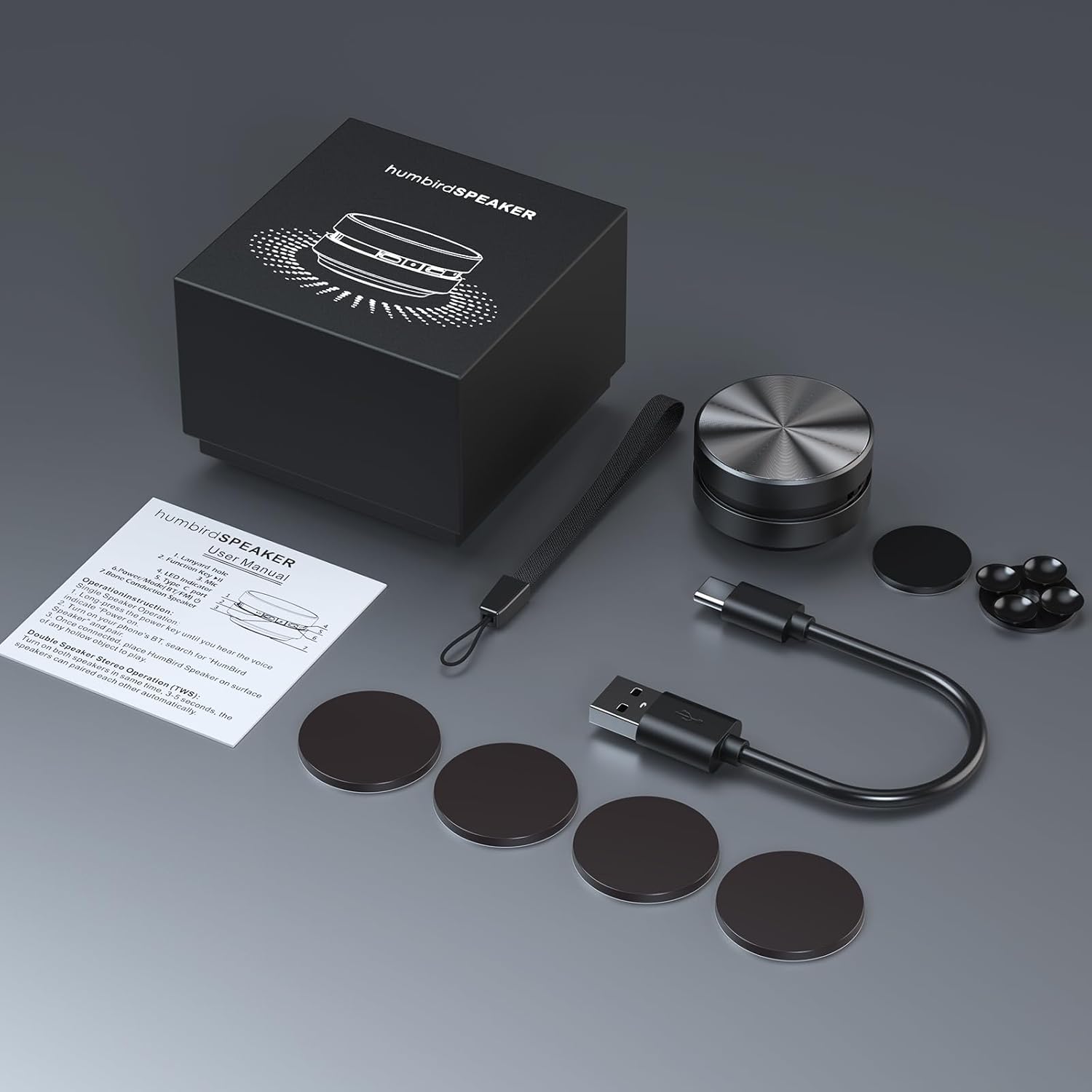
Image: Contents of the Docooler Bone Conduction Speaker package, showing the speaker, charging cable, and various adhesive pads for mounting.
Прадукт скончаныview
The Docooler Bone Conduction Speaker is a compact device with a minimalist design. It features a durable aluminum alloy casing and a Type-C charging port. The speaker utilizes Bluetooth 5.0 for wireless connectivity and supports True Wireless Stereo (TWS) pairing for an enhanced audio experience.

Выява: спераду view of the Docooler Bone Conduction Speaker, highlighting its key features such as Bone Conduction technology, Bluetooth 5.0, TWS, Type-C Charging Port, Fast Charge, and Aviation Aluminum Alloy construction.
Настройка
1. Зарадка дынаміка
- Падключыце кабель USB Type-C з камплекта да зараднага порта дынаміка.
- Падключыце другі канец кабеля да сумяшчальнай крыніцы харчавання USB (напрыклад, адаптара для сеткі, USB-порта кампутара).
- Індыкатар будзе паказваць стан зарадкі (падрабязную інфармацыю глядзіце ў раздзеле пра святлодыёдны індыкатар).
- Поўная зарадка звычайна займае каля 1-2 гадзін.
2. Спалучэнне Bluetooth (адзін дынамік)
- Press and hold the power button on the speaker until the indicator light flashes, indicating pairing mode.
- На вашым смартфоне або іншай прыладзе з падтрымкай Bluetooth уключыце Bluetooth і знайдзіце даступныя прылады.
- Select "Humbird Speaker" (or similar name) from the list of devices.
- Once connected, the indicator light will remain solid, and you will hear a confirmation tone.
3. True Wireless Stereo (TWS) Pairing (Two Speakers)
For a stereo sound experience, you can pair two Docooler Bone Conduction Speakers together:
- Пераканайцеся, што абодва дынамікі цалкам зараджаныя і выключаныя.
- Power on both speakers simultaneously. They will automatically attempt to pair with each other within 3-5 seconds.
- Once successfully paired, one speaker will act as the master (left channel) and the other as the slave (right channel). The indicator lights will reflect their connected status.
- Now, connect your smartphone or Bluetooth device to the master speaker as described in the "Bluetooth Pairing (Single Speaker)" section.

Image: Two Docooler Bone Conduction Speakers positioned for True Wireless Stereo (TWS) pairing, demonstrating their ability to create a wider soundstage.
Інструкцыя па эксплуатацыі
1. Уключэнне/выключэнне харчавання
- Уключэнне: Націсніце і ўтрымлівайце кнопку харчавання прыблізна 3 секунды.
- Выключэнне: Націсніце і ўтрымлівайце кнопку харчавання прыблізна 3 секунды.
2. Кіраванне прайграваннем
- Прайграванне/Паўза: Коратка націсніце кнопку харчавання адзін раз.
- Наступны трэк: Двойчы націсніце кнопку харчавання.
- Папярэдні трэк: Triple-press the power button.
3. Рэгуляванне гучнасці
Volume is primarily controlled via your connected Bluetooth device (smartphone, tablet, etc.). The speaker itself does not have dedicated volume buttons.
4. Using with Different Surfaces
The unique feature of this bone conduction speaker is its ability to use various surfaces as sound amplifiers. Experiment with different materials to discover unique sound profiles:
- Hollow Objects: Cardboard boxes, plastic containers, or hollow wooden surfaces often produce a fuller sound with enhanced bass.
- Шкляныя паверхні: Windows or glass tables can create a clear, crisp sound.
- Драўляныя паверхні: Desks, guitars, or wooden panels can offer a warm, resonant tone.
- Car Dashboards: Can provide an immersive in-car audio experience.
Use the included adhesive pads or suction cup to securely attach the speaker to your chosen surface. The sound quality will vary significantly based on the material, size, and hollowness of the surface.

Image: The bone conduction speaker demonstrated on different surfaces, including a guitar, a kitchen countertop, a mirror, and a car dashboard, illustrating its versatility in sound production.
Тэхнічнае абслугоўванне
To ensure the longevity and optimal performance of your Docooler Bone Conduction Speaker, follow these maintenance tips:
- Уборка: Wipe the speaker with a soft, dry cloth. Do not use abrasive cleaners, alcohol, or solvents.
- захоўванне: Захоўвайце дынамік у прахалодным, сухім месцы, удалечыні ад прамых сонечных прамянёў і экстрэмальных тэмператур, калі ён не выкарыстоўваецца.
- Сыход за батарэяй: For best battery life, avoid fully discharging the speaker frequently. Charge it regularly, even if not used for extended periods.
Ліквідацыю непаладак
| праблема | Магчымае рашэнне |
|---|---|
| Дынамік не ўключаецца. | Пераканайцеся, што дынамік цалкам зараджаны. Падключыце яго да крыніцы харчавання і паспрабуйце яшчэ раз. |
| Немагчыма падключыцца праз Bluetooth. | Make sure the speaker is in pairing mode (flashing indicator light). Turn off and on Bluetooth on your device. Ensure the speaker is within range (up to 10 meters). |
| Няма гуку або нізкі ўзровень гучнасці. | Increase the volume on your connected device. Ensure the speaker is placed on a suitable surface. Try a different surface. Check if the speaker is properly connected. |
| Памылка спалучэння TWS. | Ensure both speakers are powered off before attempting TWS pairing. Power them on simultaneously and wait for automatic pairing. Disconnect any existing Bluetooth connections before TWS pairing. |
| Якасць гуку дрэнная. | Experiment with different surfaces. Hollow and resonant surfaces generally yield better results. Ensure the speaker is securely attached to the surface. |
Тэхнічныя характарыстыкі
| Асаблівасць | Дэталь |
|---|---|
| Назва мадэлі | Дакладчык касцяной праводнасці |
| Нумар мадэлі | RM |
| Марка | Docooler |
| Матэрыял | Алюміній |
| Памеры прадукту | 2.76" Г x 2.76" Ш x 1.97" У |
| Вага прадмета | 4.6 унцыі (0.13 кілаграма) |
| Тэхналогія падлучэння | Bluetooth |
| Дыяпазон Bluetooth | 10 метраў |
| Рэжым выхаду гуку | Стэрэа (са спалучэннем TWS) |
| Максімальная выхадная магутнасць дынаміка | 3 ват |
| АЧХ | 20 кГц |
| Стаўленне сігнал / шум | 70 дБ |
| Крыніца харчавання | Харчаванне ад батарэі |
| Ёмістасць батарэі | 400 Міліamp Гадзіны |
| Метад кантролю | App (implied by product data, but primary control is physical buttons) |
| Воданепранікальны | ХЛУСНЯ |
Гарантыя і падтрымка
The Docooler Bone Conduction Speaker comes with a limited warranty. For specific warranty details, please refer to the documentation included with your purchase or contact Docooler customer service.
If you encounter any issues or have questions not covered in this manual, please contact Docooler customer support through their official channels. Contact information can typically be found on the product packaging or the official Docooler webсайт.