
1. Уводзіны
This manual provides detailed instructions for the installation, operation, and maintenance of your Spedal MINIEYE AC1 Dash Cam. Please read this manual thoroughly before using the device to ensure proper functionality and safety. The MINIEYE AC1 is designed to record your driving journey in high definition and offers advanced features for enhanced road safety.
2. Прадукт скончыўсяview
2.1 Асноўныя магчымасці
- 1944P Ultra Full HD Recording: Захоплівае выразнае відэаtage with a 140° wide-angle field of view.
- AI ADAS (Advanced Driver-Assistance System): Provides real-time alerts for collision avoidance.
- Убудаваны G-сенсор: Automatically detects sudden movements or impacts and locks footage.
- Кругласутачны маніторынг паркоўкі: Monitors your vehicle even when parked (requires hardwire kit, sold separately).
- Магутнае начное бачанне: Ensures clear recordings in low-light conditions.
- цыклічны запіс: Перазапісвае найстарэйшы footagе., калі карта памяці запоўнена, што забяспечвае бесперапынны запіс.
- Упраўленне APP: Manage settings, view фуtage, and download videos via a dedicated mobile application.
2.2 Змест пакета
Праверце, ці ёсць у вашай упакоўцы ўсе пералічаныя ніжэй прадметы:
- MINIEYE AC1 Dash Cam Unit
- Аўтамабільная зарадная прылада
- Сілавы кабель
- Кабельны манітор
- Host Base
- GPS модуль
- Электрастатычны стыкер
- Лам (для пракладкі кабеля)
- Пузырьковый ўзровень
- Free 32GB TF Card (MicroSD Card)
- Кіраўніцтва карыстальніка (гэты дакумент)
2.3 Кампаненты прылады
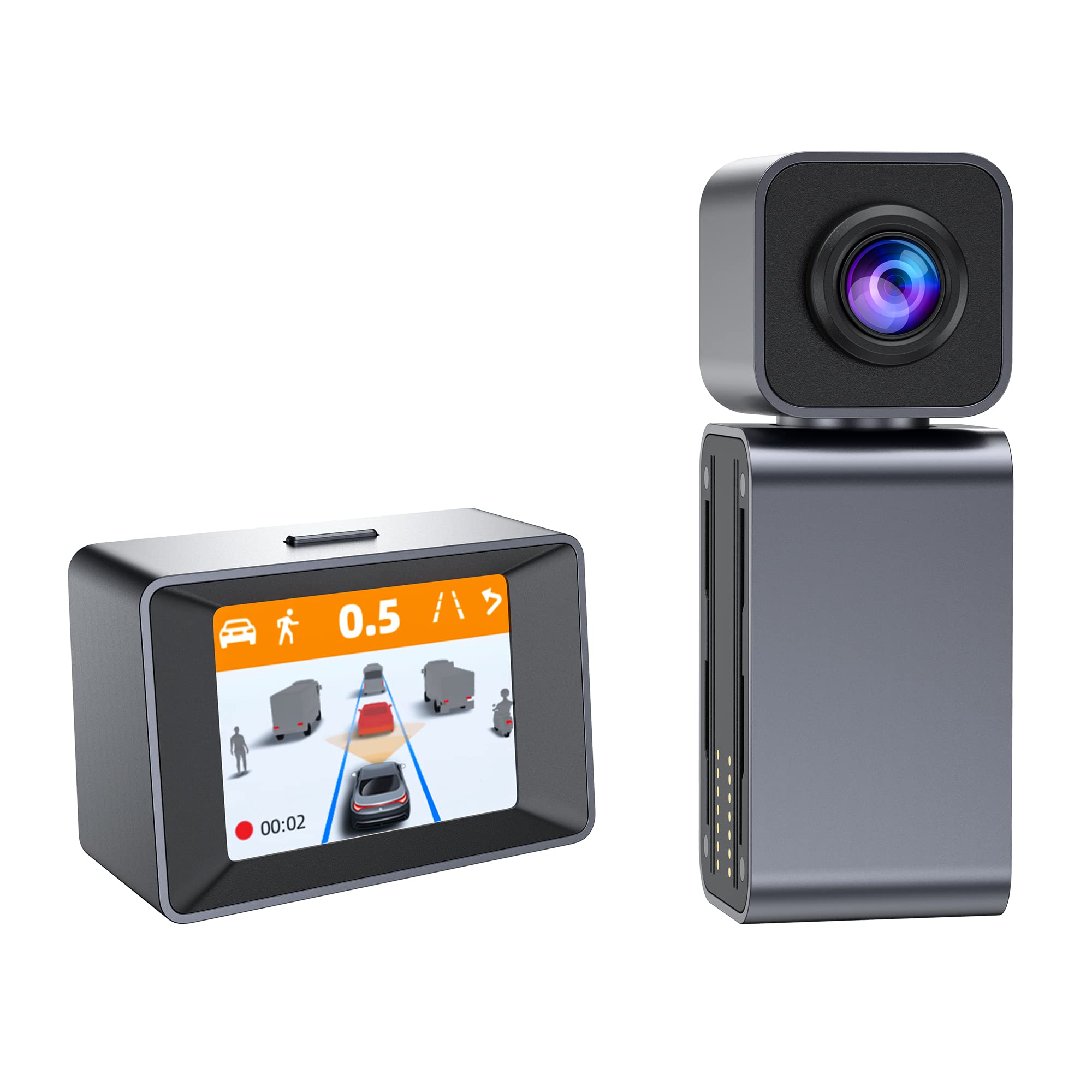
Image: The MINIEYE AC1 Dash Cam showing the main recording unit with its lens and the separate display unit. The display unit shows a simulated traffic scenario with distance warnings, illustrating the ADAS functionality.
3. Настройка
3.1 Ўстаноўка
- Падрыхтуйце лабавое шкло: Clean the area on your windshield where the dash cam will be mounted. Ensure it is free of dust and grease.
- Нанесці электрастатычную налепку: Apply the electrostatic sticker to the cleaned area. This helps in easy removal and prevents residue on the windshield.
- Attach Host Base: Secure the host base to the electrostatic sticker. Use the bubble level to ensure the base is level for optimal camera angle.
- Mount Dash Cam: Attach the MINIEYE AC1 Dash Cam unit to the host base.
- Устаўце карту TF: Insert the provided 32GB TF card into the designated slot on the dash cam. Ensure it is inserted correctly until it clicks into place.
- Падключыце харчаванне: Connect the power cable to the dash cam and route it along the windshield edge and dashboard using the crowbar to tuck it neatly. Plug the car charger into your vehicle's cigarette lighter socket.
- Connect Monitor (if applicable): If using an external monitor, connect it using the monitor cable.
- Падключэнне GPS-модуля: Attach the GPS module to the dash cam for location and speed data recording.
3.2 Пачатковае ўключэнне і налады
- Уключэнне: Start your vehicle. The dash cam will automatically power on and begin recording.
- Фармат карты TF: It is recommended to format the TF card upon first use and periodically thereafter to ensure optimal performance. This can usually be done through the device settings or the mobile app.
- Адрэгулюйце кут камеры: Adjust the camera lens to ensure it captures the road ahead clearly, covering the desired field of view.
3.3 App Control Setup
- Спампаваць прыкладанне: Пошук the "MINIEYE" in your smartphone's app store (iOS or Android) and install it.
- Падключыцеся да Wi-Fi: Enable Wi-Fi on your smartphone and connect to the dash cam's Wi-Fi network. The network name and password can typically be found in the dash cam's settings or manual.
- Спалучыць прыладу: Open the MINIEYE app and follow the on-screen instructions to pair your dash cam.
- Настройка налад: Use the app to adjust recording resolution, G-sensor sensitivity, parking monitoring settings, and other preferences.
4. Інструкцыя па эксплуатацыі
4.1 Асноўны запіс
Once powered on, the MINIEYE AC1 automatically begins continuous loop recording. Video files are saved in segments (e.g., 1, 3, or 5 minutes) to the TF card. When the card is full, the oldest unprotected files перазапісваюцца.
4.2 G-Sensor and Emergency Recording
The built-in G-Sensor detects sudden impacts or rapid acceleration/deceleration. When triggered, the current video segment is automatically locked and saved to a protected folder, preventing it from being overwritten by loop recording. The sensitivity of the G-Sensor can be adjusted via the mobile app.
4.3 Маніторынг паркоўкі
With the optional hardwire kit (not included), the dash cam can monitor your vehicle while parked. If an impact or motion is detected, the dash cam will automatically record a short video segment. Ensure this feature is enabled and configured in the app settings.
4.4 ADAS (Advanced Driver-Assistance System)
The AI ADAS features provide real-time alerts to enhance driving safety:
- Папярэджанне аб лабавым сутыкненні (FCW): Alerts you if you are approaching a vehicle ahead too quickly.
- Папярэджанне аб з'ездзе з паласы руху (LDW): Notifies you if your vehicle drifts out of its lane without signaling.
- Front Vehicle Start Alert: Informs you when the vehicle in front of you has started moving after a stop.
These alerts are typically visual on the display and/or audible. Calibration may be required for optimal ADAS performance.
4.5 Viewзагрузка і загрузка Footage
Фуtagможа быць viewed directly on the dash cam's display (if available) or more conveniently through the MINIEYE mobile application. Use the app to browse recorded videos, download important clips to your smartphone, or share them.
5. Тэхнічнае абслугоўванне
- Ачысціце аб'ектыў: Рэгулярна працірайце аб'ектыў камеры мяккай тканінай без ворса, каб забяспечыць выразную якасць відэа.
- Фармат карты TF: Format the TF card every 2-4 weeks to prevent data corruption and maintain optimal recording performance. Back up any important files перад фарматаваннем.
- Абнаўленні прашыўкі: Check the MINIEYE app or official website periodically for firmware updates. Keeping your dash cam's firmware updated ensures access to new features and performance improvements.
- захоўванне: Калі відэарэгістратар не выкарыстоўваецца працяглы час, захоўвайце яго ў прахалодным, сухім месцы, удалечыні ад прамых сонечных прамянёў.
6. Выпраўленне непаладак
- Відэарэгістратар не ўключаецца:
- Check the car charger connection and ensure the vehicle's cigarette lighter socket is functioning.
- Ensure the power cable is securely connected to the dash cam.
- Recording Issues (e.g., freezing, corrupted files):
- Адфарматаваць карту TF.
- Try a different high-speed (Class 10 or U1/U3) TF card.
- Ensure the TF card is not full of locked files.
- Праблемы з падключэннем праграмы:
- Пераканайцеся, што Wi-Fi відэарэгістратара ўключаны.
- Перазагрузіце відэарэгістратар і смартфон.
- Verify you are connecting to the correct Wi-Fi network and using the correct password.
- ADAS Alerts Not Functioning:
- Ensure ADAS features are enabled in the app settings.
- Perform ADAS calibration if available in the app.
- Пераканайцеся, што аб'ектыў камеры чысты і не засмечаны.
7. Тэхнічныя характарыстыкі
| Асаблівасць | Дэталь |
|---|---|
| Назва мадэлі | MINIEYE AC1 |
| Марка | Спедаль |
| Дазвол відэазахопу | 1944p |
| Сапраўдны кут View | 140 градусаў |
| Тэхналогія падлучэння | USB, Wireless (for App Control) |
| Метад кантролю | дадатак |
| Тып мацавання | Мацаванне ўсмоктвання |
| Тып абслугоўвання аўтамабіля | Аўтамабіль |
| Вытворца | Shenzhen Youjia Innov Tech Co., Ltd |
8. Гарантыя і падтрымка
For warranty information, technical support, or service inquiries, please refer to the warranty card included with your product or visit the official Spedal website. You may also contact Spedal customer service directly through the contact information provided on their website or within the MINIEYE mobile application.
Калі ласка, захавайце доказы пакупкі для прэтэнзій па гарантыі.