
1. Уводзіны
This manual provides essential information for setting up, operating, maintaining, and troubleshooting your Alienware X17 R2 Gaming Laptop. Please read this guide thoroughly to ensure optimal performance and longevity of your device.
The Alienware X17 R2 is designed for high-performance gaming and demanding tasks, featuring advanced cooling technologies, powerful processors, and dedicated graphics.
2. Прадукт скончыўсяview
The Alienware X17 R2 is engineered to deliver an immersive gaming experience in a thin 17-inch form factor. Key features include:
- Powerful Intel CPUs: Experience high-performance action across all your favorite games with 12th Gen Intel Core processors.
- Next-Gen GPUs: Game unrestrained with NVIDIA GeForce RTX 3070Ti graphics, Dynamic Boost 2.0, and Deep Learning Super Sampтэхналогія лінга.
- Patented Quad Cooling: An industry-first design uses four intelligently controlled and programmable fans to dissipate heat.
- Падоўжаны час прайгравання: Improve battery life with Advanced Optimus technology from NVIDIA—now available on all display options.
- Legend 2.0 Industrial Design: A fresh evolution in design with a high-endurance finish and customizable AlienFX lighting.

Малюнак 2.1: Спераду view of the Alienware X17 R2 Gaming Laptop displaying a game.
3. Настройка
3.1 Распакоўка і першапачатковы агляд
- Акуратна дастаньце ноўтбук і ўсе аксэсуары з упакоўкі.
- Праверце наяўнасць усіх прадметаў, пералічаных у раздзеле «Што ў скрынцы».
- Праверце ноўтбук на наяўнасць фізічных пашкоджанняў. Калі вы выявіце пашкоджанні, неадкладна звярніцеся да прадаўца.
3.2 Падключэнне сілкавання
- Connect the power adapter to the charging port located at the rear of the laptop.
- Падключыце шнур сілкавання да насценнай разеткі.
- The power indicator light will illuminate, indicating the laptop is receiving power.
3.3 Першая загрузка і ўстаноўка аперацыйнай сістэмы
- Press the Alienware head power button to turn on the laptop.
- Выконвайце інструкцыі на экране, каб завяршыць працэс налады Windows 11 Home. Гэта ўключае выбар рэгіёна, падключэнне да сеткі Wi-Fi і стварэнне ўліковага запісу карыстальніка.
- Дазвольце сістэме загрузіць і ўсталяваць усе неабходныя абнаўленні.
4. Кіраванне ноўтбукам
4.1 Клавіятура і сэнсарная панэль
The Alienware X17 R2 features a backlit keyboard and a responsive touchpad. The AlienFX lighting allows for customizable colors and effects across the keyboard and other zones.

Малюнак 4.1: падрабязна view падсветленай клавіятуры і сэнсарнай панэлі.
4.2 Дысплей і графіка
Enjoy stunning visuals on the 17.3-inch FHD display with a 480Hz refresh rate and 3ms response time. The NVIDIA GeForce RTX 3070Ti graphics card ensures smooth gameplay and high-fidelity rendering. The laptop supports Dolby Vision for optimized color profiles.
4.3 Аўдыё
Experience immersive 3D sound via Dolby Atmos, designed to deliver audio as studios intended.
4.4 Парты і падключэнне
The laptop offers a variety of ports for peripherals and external displays:

Малюнак 4.2: Задняя частка view illustrating the various connectivity ports.
- Порты USB 3.0: 3 ports for connecting various USB devices.
- Порты USB-C: For versatile connectivity, including Thunderbolt 4.
- HDMI 2.1: Supports up to 4K/120Hz output for external displays.
- Ethernet: Killer E3100 RJ45 Ethernet for stable wired network connections.
- Бесправадная сувязь: Killer Wi-Fi 6 (802.11ax) and Bluetooth for wireless connectivity.
5. Тэхнічнае абслугоўванне
5.1 Ачыстка
- Выкарыстоўвайце мяккую тканіну без ворса для чысткі экрана і вонкавых паверхняў.
- Пазбягайце выкарыстання агрэсіўных хімікатаў або абразіўных матэрыялаў.
- Рэгулярна чысціце вентыляцыйныя адтуліны астуджэння, каб прадухіліць назапашванне пылу, які можа паўплываць на прадукцыйнасць.
5.2 Абнаўленне праграмнага забеспячэння
Ensure your operating system and drivers are kept up-to-date. Windows Update will handle OS updates, and Alienware Command Center can assist with driver and firmware updates.
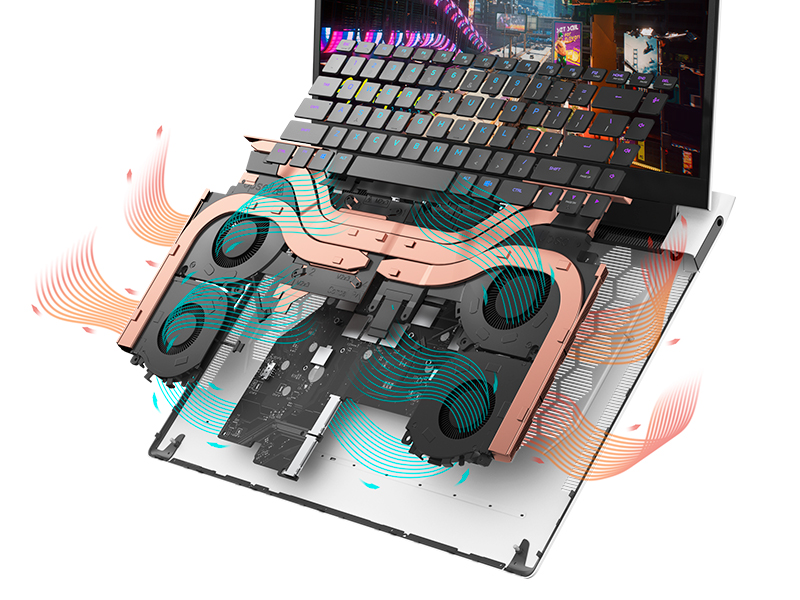
Figure 5.1: Alienware Command Center for system management.
6. Выпраўленне непаладак
If you encounter issues with your Alienware X17 R2, consider the following basic troubleshooting steps:
- Няма харчавання: Пераканайцеся, што адаптар сілкавання надзейна падключаны як да ноўтбука, так і да спраўнай разеткі. Праверце індыкатар сілкавання.
- Праблемы з адлюстраваннем: If the screen is black, try connecting an external monitor to verify if the issue is with the laptop's display or the graphics card. Update graphics drivers.
- Перагрэў: Ensure cooling vents are clear of obstructions. Use Alienware Command Center to monitor temperatures and adjust fan profiles.
- Запаволенне прадукцыйнасці: Закрыйце непатрэбныя праграмы. Праверце фонавыя працэсы, якія спажываюць шмат рэсурсаў працэсара або аператыўнай памяці. Пераканайцеся, што на цвёрдацельным дыску дастаткова вольнага месца.
- Праблемы з праграмным забеспячэннем: Restart the laptop. If issues persist, consider performing a system restore or reinstalling the problematic software.
7. Тэхнічныя характарыстыкі
| Асаблівасць | Спецыфікацыя |
|---|---|
| Памер экрана | 17.3 цалі |
| Дазвол экрана | 1920 x 1080 пікселяў (FHD) |
| Працэсар | Intel Core i9-12900H (3.8 GHz, 14 Cores) |
| АЗП | 16 ГБ DDR5 (4800 МГц) |
| Жорсткі дыск | 1 ТБ SSD (цвёрдацельны назапашвальнік) |
| Графічны супрацэсар | NVIDIA GeForce RTX 3070 Ti (8 GB GDDR6) |
| Аперацыйная сістэма | Windows 11 хатняя |
| Бесправадны тып | 802.11ax (Killer Wi-Fi 6), Bluetooth |
| Парты USB 3.0 | 3 |
| Вага прадмета | 6.82 фунта |
| Памеры прадукту | 11.79 х 15.72 х 0.58 цалі |
8. Што ў скрынцы
- Гульнявы ноўтбук Alienware X17 R2
- Адаптар сілкавання
- Шнур харчавання
- Дакументацыя
9. Афіцыйныя відэа пра прадукт
Alienware X17 R2 Gaming Laptop Overview
Відэа 9.1: Чыноўнік скончыўview of the Alienware X17 R2 Gaming Laptop, highlighting its design, cooling, and performance features.
About Alienware X17 R2 Gaming Laptop
Video 9.2: A detailed look at the Alienware X17 R2 Gaming Laptop, showcasing its features and design elements.
10. Гарантыя і падтрымка
Your Alienware X17 R2 Gaming Laptop comes with a standard manufacturer's warranty. For detailed warranty information, please refer to the documentation included with your product or visit the official Alienware support webсайт.
For technical support, driver downloads, and service requests, please visit the Alienware support portal. You can also find FAQs and community forums for additional assistance.