
Notável NT 2005
Notável Office NT 2005 L-Shaped Desk User Manual
1. Уводзіны і агляд прадуктуview
The Notável Office NT 2005 is an L-shaped corner desk designed for optimal space utilization in your office or home. This versatile workstation features two drawers equipped with smooth metal slides, a storage compartment with one door, and an additional cabinet with two doors and an internal shelf. Constructed from durable 15mm MDP (Medium Density Particleboard), this desk offers ample storage and a functional design suitable for various office setups. Its finished back allows for flexible placement, including use as a room divider.
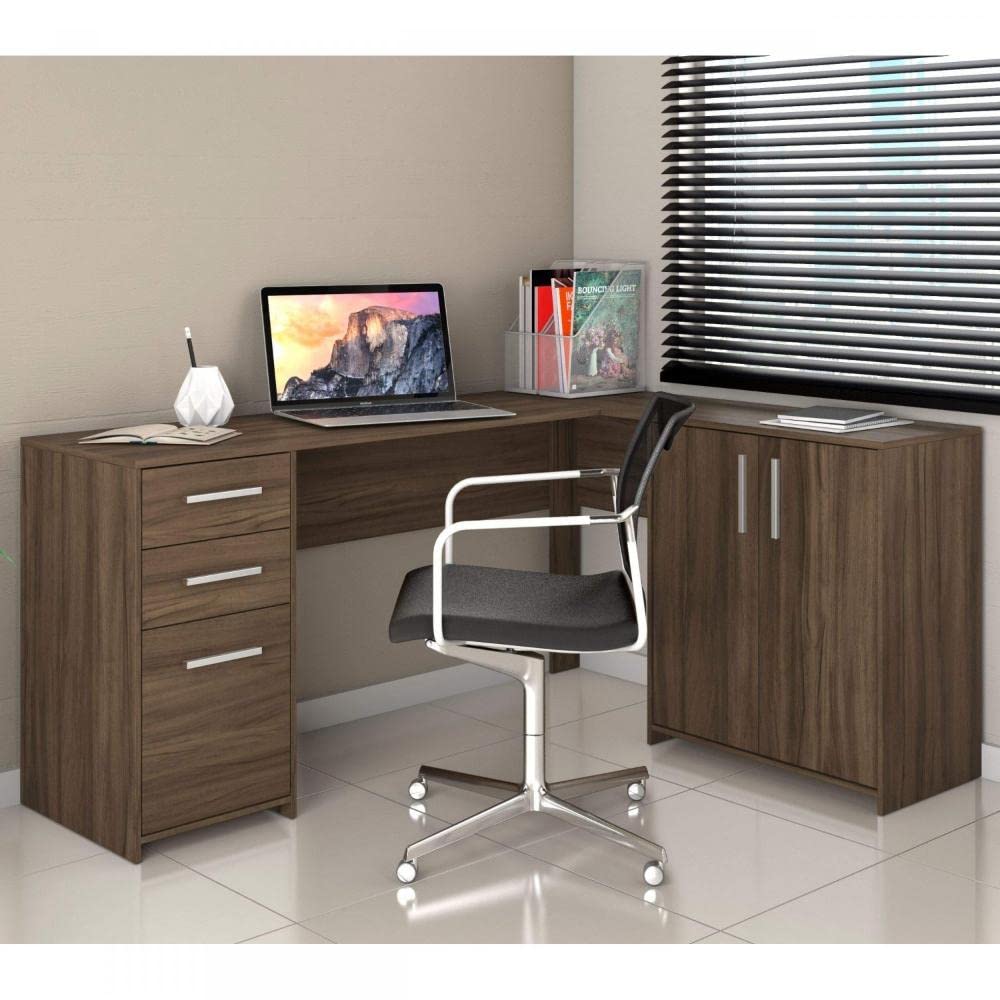
Image: Notável Office NT 2005 L-Shaped Desk, showcasinяго дызайн і функцыянальнасць.
2. Важная інфармацыя па бяспецы
Please read and follow all safety instructions carefully to ensure safe use and prevent damage to the product or injury.
- This desk can be used as a room divider. However, for stability and to prevent tipping, it is highly recommended to anchor the desk to a wall using appropriate hardware (not included).
- Do not place excessively heavy or large objects on top of the desk, especially near edges, to prevent imbalance and potential tipping.
- Ensure all assembly hardware is securely tightened before use. Periodically check and re-tighten fasteners as needed.
- Трымайце дробныя дэталі і зборачныя элементы ў месцах, недаступных для дзяцей, каб пазбегнуць небяспекі ўдушша.
- Avoid exposing the desk to excessive moisture or direct sunlight, which can cause material degradation or discoloration.
3. Змесціва ўпакоўкі і кампаненты
Перад пачаткам зборкі пераканайцеся, што ўсе пералічаныя ніжэй кампаненты ёсць у наяўнасці і не пашкоджаны. Калі якія-небудзь дэталі адсутнічаюць або пашкоджаныя, звярніцеся ў службу падтрымкі кліентаў.
- Desk panels (various sizes for top, sides, back, shelves)
- 2 Drawers with metal slides
- 3 дзверы
- 1 Internal shelf
- Aluminum handles for drawers and doors
- Мантажныя элементы (шрубы, дзюбелі, замкі-эксцэнтрыкі і г.д.)

Image: Key features of the desk, including metal slides, aluminum handles, and internal shelf.
4. Assembly and Setup Instructions
Assembly is required for this product. A detailed assembly manual with step-by-step instructions and diagrams is included in the product packaging. Please follow these instructions carefully. It is recommended to assemble the desk on a soft, clean surface to prevent scratches.
The Notável Office NT 2005 desk offers a dual assembly option, allowing you to configure the L-shape to best suit your space and preference. Refer to the included manual for specific instructions on both configurations.

Image: Dual assembly options for the L-shaped desk, showing different configurations.
Неабходныя інструменты (не ўваходзяць у камплект):
- Крыжовая адвёртка
- Малаток (для дзюбеляў)
- Вымяральная стужка
5. Інструкцыя па эксплуатацыі
The Notável Office NT 2005 desk is designed for general office and home use. Its drawers and doors provide convenient storage for documents, office supplies, and personal items.
- высоўныя скрыні: Pull the aluminum handles to open the drawers. The metal slides ensure smooth operation. Avoid overloading drawers to prevent damage to the slides.
- Дзверы: Use the aluminum handles to open and close the cabinet doors. The internal shelf in the larger cabinet can be used to organize items.
- Працоўная паверхня: The spacious L-shaped top provides ample room for computers, monitors, and other work essentials. Distribute weight evenly across the surface.
6. Догляд і абслугоўванне
Proper care will extend the life and appearance of your Notável Office NT 2005 desk.
- Уборка: Працярыце паверхні мяккай, damp cloth. For stubborn marks, use a mild soap solution and immediately dry with a clean cloth. Avoid abrasive cleaners, harsh chemicals, or solvents.
- Разлівы: Clean up spills immediately to prevent moisture absorption and damage to the MDP and lacquered finish.
- Цяпло і вільгаць: Use coasters under hot beverages and protective pads under items that might scratch or damage the surface. Avoid placing the desk in areas with extreme temperature fluctuations or high humidity.
- Абсталяванне: Перыядычна правярайце ўсе шрубы і крапежныя элементы, каб пераканацца, што яны зацягнуты. Па меры неабходнасці падцягвайце іх для падтрымання цэласнасці канструкцыі.
7. Выпраўленне непаладак
Калі ў вас узніклі праблемы са сталом, звярніцеся да наступных распаўсюджаных праблем і рашэнняў:
- Desk feels wobbly: Ensure all assembly screws and fasteners are securely tightened. Check that the desk is placed on a level surface. If not, use shims under the feet to stabilize it.
- Шуфляды не слізгаюць плаўна: Check that the metal slides are properly aligned and free from obstructions. Ensure the drawer is not overloaded.
- Misaligned panels or gaps after assembly: This can sometimes occur if holes are drilled incorrectly or if components are not fully seated during assembly. Carefully review the assembly manual to ensure all steps were followed correctly. Disassemble and reassemble the affected section if necessary.
- Desk does not support heavy weight: This desk is designed for typical office use. Avoid placing extremely heavy items on it. Distribute weight evenly. If you require a desk for very heavy loads, this model may not be suitable.
8. Тэхнічныя характарыстыкі прадукту
| Марка | Notável |
| мадэль | Office NT 2005 |
| Колер | Nogal Trend (Brown) |
| Матэрыял | MDP (15mm thick panels) |
| Тып аздаблення | Лакіраваная |
| Формаў-фактар | L-shaped / Corner Desk |
| Агульныя памеры (прыблізна) | 1569 мм (даўжыня) x 1224 мм (шырыня) x 739 мм (вышыня) |
| Колькасць скрынь | 2 |
| Колькасць дзвярэй | 3 |
| Колькасць паліц | 1 (унутраны) |
| Вага прадукту | 46 кг |
| Патрабуецца зборка | так |

Image: Detailed dimensions of the Notável Office NT 2005 L-Shaped Desk.

Image: The Nogal Trend color option.

Image: Desk height comparison with a person for scale.
9. Гарантыя і падтрымка кліентаў
For information regarding product warranty, please refer to the documentation included with your purchase or contact Notável customer service directly. Keep your proof of purchase for any warranty claims.
If you require assistance with assembly, have questions about product features, or need to report a missing/damaged part, please contact Notável customer support through their official webсайт або кантактную інфармацыю, указаную на ўпакоўцы прадукту.
Ask a question about this manual
Ask about setup, troubleshooting, compatibility, parts, safety, or missing instructions. Manuals+ will review the question and use this page’s manual context to help answer it.