
WGP WGP Smart Watch GTS2
WGP Smart Watch GTS2 User Manual
Model: GTS2 | Brand: WGP
Уводзіны
This manual provides detailed instructions for the setup, operation, maintenance, and troubleshooting of your WGP Smart Watch GTS2. Please read this manual carefully before using the device to ensure proper functionality and to maximize your user experience.

Выява: спераду view of the WGP Smart Watch GTS2, displaying various health and time metrics.
1. Настройка
1.1 Зарадка прылады
Before first use, fully charge your WGP Smart Watch GTS2. Connect the magnetic charging cable to the charging points on the back of the watch and plug the USB end into a compatible power adapter (not included) or a computer USB port. A full charge typically provides up to 12 days of battery life.
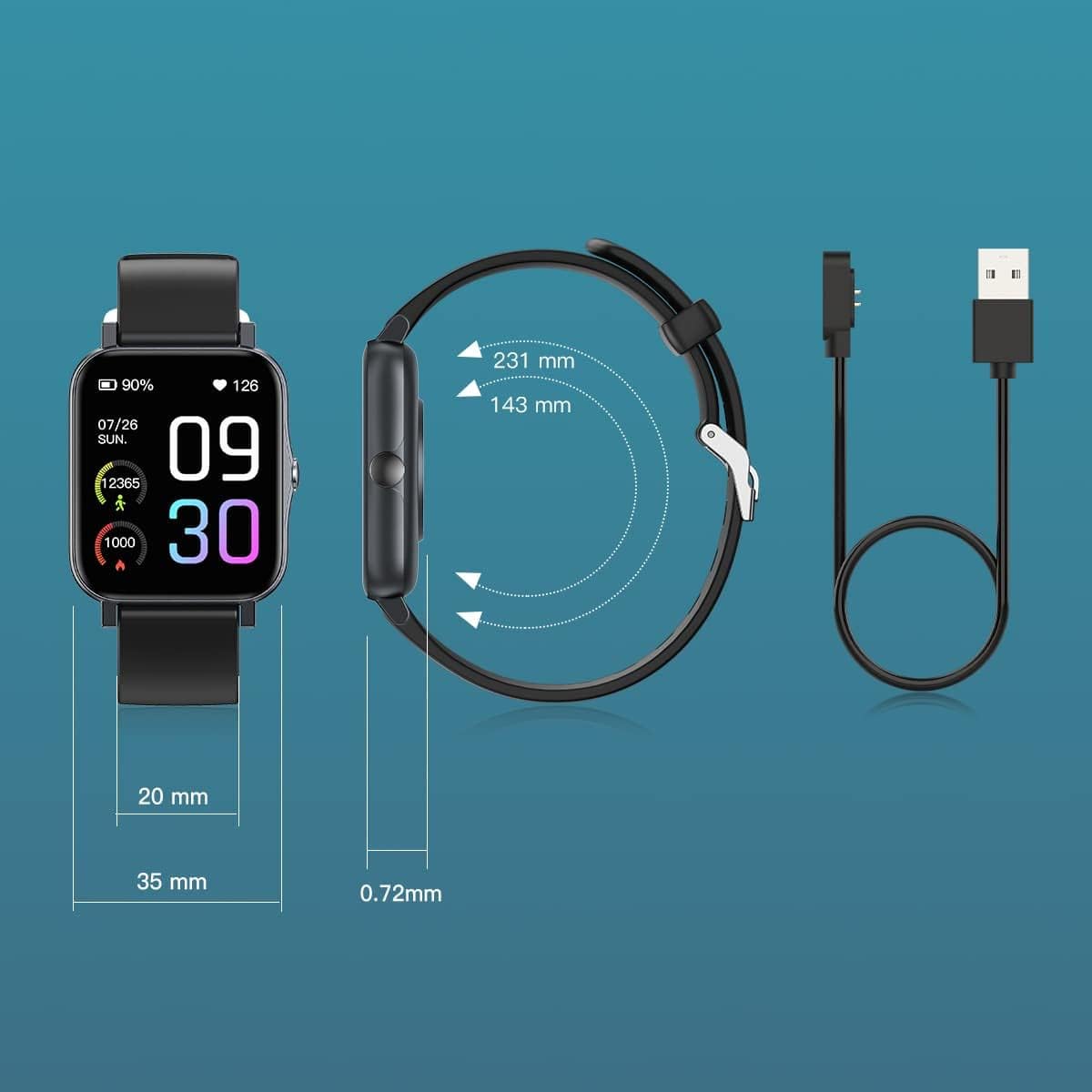
Image: Diagram illustrating the watch dimensions and the magnetic charging cable for power input.
1.2 Усталёўка і спалучэнне праграм
To unlock the full features of your smart watch, download the companion application. The recommended application is Runmifit, available on both Android and iOS app stores. Follow these steps:
- Scan the QR code provided in the watch's packaging or search for "Runmifit" in your device's app store.
- Усталюйце праграму на свой смартфон.
- Open the Runmifit app and follow the on-screen instructions to create an account or log in.
- Уключыце Bluetooth на вашым смартфоне.
- Within the app, navigate to the device pairing section and select "WGP Smart Watch GTS2" from the list of available devices.
- Пацвердзіце запыт на спалучэнне як на гадзінніку, так і на смартфоне.

Image: A smartphone screen showing a QR code for pairing the watch with the Runmifit application.
2. Кіраванне разумным гадзіннікам
2.1 Асноўная навігацыя
The WGP Smart Watch GTS2 features a 1.7-inch full-screen display. Navigate through menus and functions by swiping left, right, up, or down, and tap to select options. The side button typically serves as a power button or a back button, depending on the context.
2.2 спартыўных рэжымаў
The watch supports over 100 built-in sports modes, catering to various indoor and outdoor activities. To access sports modes:
- Swipe on the watch face to find the "Sports" or "Workout" icon.
- Націсніце, каб перайсці да выбару спартыўнага рэжыму.
- Scroll through the list and select your desired activity (e.g., running, cycling, football, basketball, hiking, yoga, climbing).
- Tap to start the activity tracking. The watch will record relevant data such as duration, calories burned, and heart rate.

Image: Visual representation of the 100+ sports modes supported by the watch.
2.3 Маніторынг здароўя
The WGP Smart Watch GTS2 is equipped with three professional sensors for comprehensive health monitoring, including heart rate, blood oxygen, and sleep tracking. Data can be viewed directly on the watch or in more detail within the Runmifit app.
- Маніторынг сардэчнага рытму: The watch continuously monitors your heart rate. Access the heart rate interface on the watch to view дадзеныя ў рэжыме рэальнага часу.
- Маніторынг кіслароду ў крыві: Вымерайце ўзровень насычэння крыві кіслародам.
- Маніторынг сну: Гадзіннік аўтаматычна адсочвае вашы рэжымы сну, у тым ліку глыбокі сон, лёгкі сон і час няспання.view your sleep quality in the app.


Image: Visuals demonstrating heart rate monitoring and an overview of the watch's health and fitness features.
2.4 Апавяшчэнні
Once paired with your smartphone, the watch can display call and message reminders, as well as notifications from various applications (e.g., text messages, emails, social media). Ensure notification permissions are enabled in both your phone's settings and the Runmifit app.

Image: The watch displaying incoming message notifications from a connected smartphone.
3. Тэхнічнае абслугоўванне
3.1 Ачыстка
Regularly clean your smart watch to ensure optimal performance and hygiene. Use a soft, lint-free cloth to wipe the screen and watch body. For stubborn dirt, slightly dampпрамыйце тканіну вадой. Пазбягайце выкарыстання агрэсіўных хімічных рэчываў або абразіўных матэрыялаў.
3.2 Воданепранікальнасць
The WGP Smart Watch GTS2 features IP68 waterproof rating, utilizing double-layer waterproof ring technology. This means you can wear it while washing hands or swimming in a pool. However, it is not suitable for hot showers, saunas, or diving. After exposure to water, especially saltwater, rinse the watch with fresh water and dry it thoroughly.

Image: The watch being splashed with water, illustrating its IP68 waterproof rating.
3.3 Захоўванне
When not in use for extended periods, store the watch in a cool, dry place away from direct sunlight and extreme temperatures. It is recommended to charge the watch periodically to maintain battery health.
4. Выпраўленне непаладак
If you encounter issues with your WGP Smart Watch GTS2, please refer to the following common solutions:
| праблема | Магчымае рашэнне |
|---|---|
| Гадзіннік не ўключаецца і не зараджаецца. | Пераканайцеся, што зарадны кабель надзейна падключаны як да гадзінніка, так і да крыніцы сілкавання. Паспрабуйце іншы порт USB або адаптар сілкавання. Дайце гадзінніку зарадзіцца не менш за 30 хвілін, перш чым спрабаваць уключыць яго. |
| Немагчыма спалучыць прыладу са смартфонам. | Make sure Bluetooth is enabled on your phone and the watch is within range. Restart both the watch and your phone. Ensure you are using the correct app (Runmifit). Forget the device in your phone's Bluetooth settings and try pairing again. |
| Inaccurate health readings (e.g., heart rate, blood pressure). | Ensure the watch is worn snugly on your wrist, about one finger's width above the wrist bone. Avoid excessive movement during measurements. Note that smart watch health data is for reference only and not intended for medical diagnosis. |
| Апавяшчэнні не з'яўляюцца. | Check notification permissions in your phone's settings for the Runmifit app. Also, verify notification settings within the Runmifit app itself. Ensure the app is running in the background. |
| Watch face/skin issues or inability to save multiple faces. | Ensure the Runmifit app is updated to the latest version. Some watch faces may require more memory or specific app versions. Try restarting the app and watch. |
5. Тэхнічныя характарыстыкі
| Асаблівасць | Дэталь |
|---|---|
| мадэль | WGP Smart Watch GTS2 |
| Памер дысплея | 1.7 цаляў (4.3 см) |
| Ёмістасць батарэі | Літый-іённы акумулятар ёмістасцю 230 мАг (у камплекце) |
| Тэрмін службы батарэі | Да 12 дзён (пры тыповым выкарыстанні) |
| Рэйтынг воданепранікальнасці | IP68 |
| Сувязь | Bluetooth |
| Датчыкі | Heart Rate Monitor, Blood Oxygen Monitor, Sleep Monitor, Activity Tracker |
| Спартыўныя рэжымы | 100+ рэжымаў |
| Сумяшчальнасць | Сістэмы Android і iOS |
| Вага прадмета | 3.52 унцыі (99.8 грам) |
| Памеры ўпакоўкі | 10.67 х 3.78 х 0.67 цалі (27.1 х 9.6 х 1.7 см) |
| Вытворца | WGP |
| Першая даступная дата | 31 жніўня 2022 г |
6. Гарантыя і падтрымка
For warranty information and customer support, please refer to the documentation included with your product packaging or contact the retailer from whom you purchased the WGP Smart Watch GTS2. Keep your proof of purchase for warranty claims.
Ask a question about this manual
Ask about setup, troubleshooting, compatibility, parts, safety, or missing instructions. Manuals+ will review the question and use this page’s manual context to help answer it.