
1. Прадукт скончыўсяview
The NexiGo PJ30 is a native 1080P LCD projector designed for both indoor and outdoor entertainment. It delivers crisp, clear images with 500 ANSI lumens brightness and supports Dolby Sound for an immersive audio experience. Equipped with 5G Wi-Fi and Bluetooth 5.1, it offers versatile connectivity options for various devices.
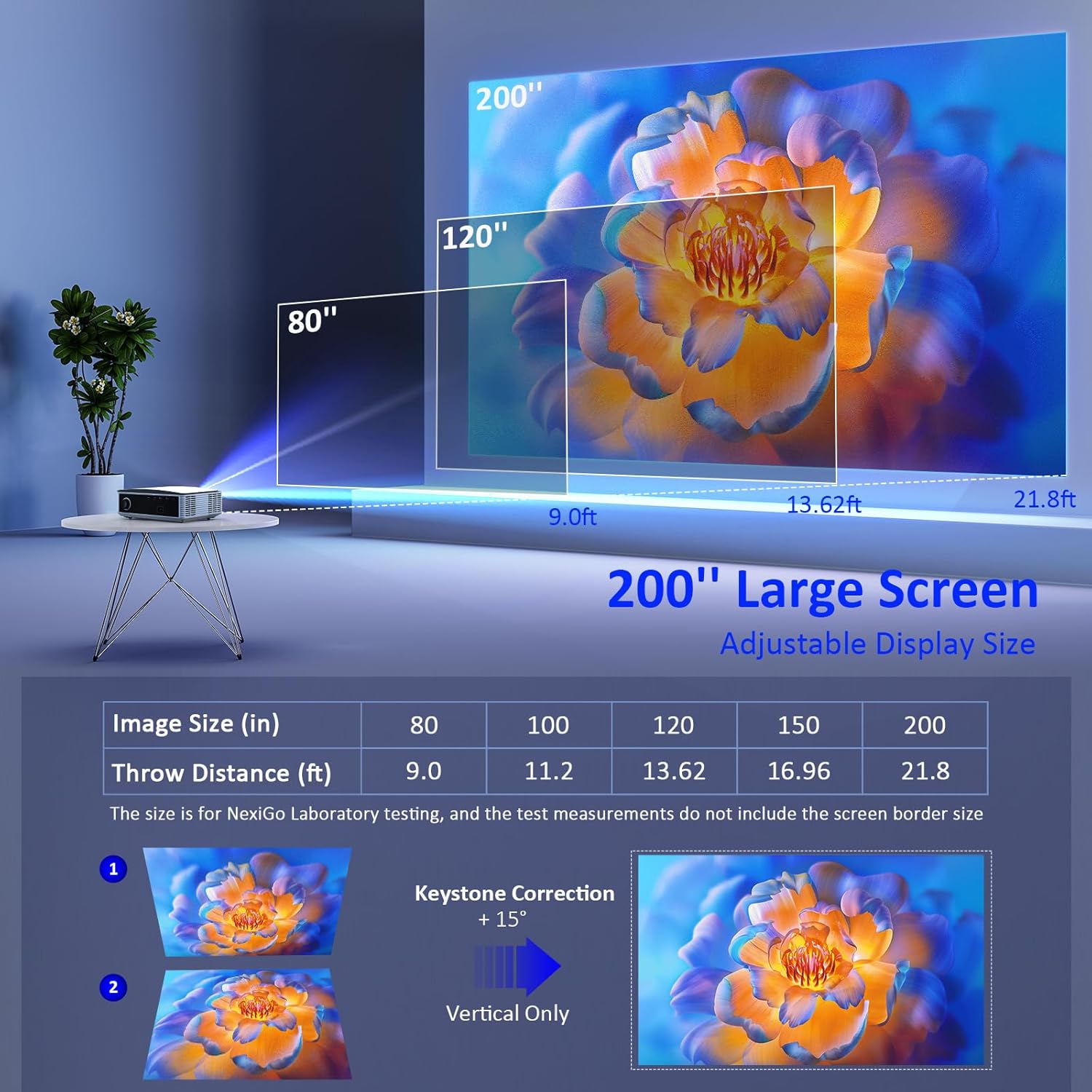
Image: The NexiGo PJ30 projector, a compact white device with a black lens, positioned to project an image.
Асноўныя характарыстыкі:
- Native 1080P Resolution & 500 ANSI Lumens: Provides high-resolution, bright, and clear images.
- Бесправадное адлюстраванне экрана: Supports 5G Wi-Fi for seamless mirroring from iOS, Android, and Windows devices.
- Dolby Sound & Bluetooth 5.1: Built-in speaker with lifelike Dolby sound and Bluetooth 5.1 for external audio devices.
- Шырокая сумяшчальнасць: Multiple ports including HDMI, USB, AV, and 3.5mm audio jack for various devices.
- Вялікі памер дысплея: Adjustable projection from 42" to 200" with a projection distance of 4.8ft to 21.8ft.
- Лічбавае павелічэнне: Easily adjust screen size with the remote control (available for local video via USB).
2. Што ў скрынцы
Upon unboxing your NexiGo PJ30 projector, ensure all the following items are present:
- Праектар NexiGo PJ30
- Remote Control (2 x AAA batteries not included)
- Сілавы кабель
- AV-кабель
- Кіраўніцтва карыстальніка
- Cleaning Kit (cloth and cotton swabs for lens/screen)
3. Настройка
Размяшчэнне і ўстаноўка
The NexiGo PJ30 offers flexible installation options to suit your environment:
- Настольнае мацаванне: Пастаўце праектар на плоскую паверхню.
- Потолочное мацаванне: Install the projector upside down on the ceiling (mounting hardware not included).
- Насценны мацаванне: Secure the projector to a wall shelf (shelf not included).

Image: Diagrams illustrating desktop, ceiling, and wall mounting options for the projector.
Падключэнне да сілкавання
- Падключыце кабель харчавання да ўваходнага порта харчавання праектара.
- Устаўце другі канец кабеля сілкавання ў разетку.
Адлегласць праекцыі і памер экрана
Adjust the distance between the projector and the screen to achieve your desired display size. The optimal projection distance ranges from 4.8ft to 21.8ft for screen sizes between 42" and 200".

Image: A diagram showing recommended throw distances for various screen sizes (80" at 9.0ft, 120" at 13.62ft, 200" at 21.8ft).
4. Інструкцыя па эксплуатацыі
Уключэнне/выключэнне харчавання
- Націсніце кнопку харчавання на праектары або пульце дыстанцыйнага кіравання, каб уключыць або выключыць прыладу.
Фокус і карэкцыя трапецеидальных искажений
- Паварочвайце кольца факусоўкі на аб'ектыве праектара, пакуль выява не стане выразнай.
- Use the keystone dial on the rear of the projector to correct any trapezoidal distortion of the image.
Выбар крыніцы ўводу
Праектар падтрымлівае некалькі крыніц уваходнага сігналу:
- HDMI: Connect devices like TV boxes, gaming consoles (PS5), laptops, or TV sticks via HDMI 1 or HDMI 2 ports.
- USB: Connect USB flash drives for direct media playback.
- АВ: Use the provided AV cable to connect older devices.
- Бесправадное адлюстраванне экрана: For iOS, Android, and Windows devices.

Image: The rear panel of the NexiGo PJ30 projector highlighting HDMI, USB, AV, and 3.5mm audio jack ports, with icons of compatible devices like iPhones, iPads, laptops, TV boxes, and USB drives.
Бесправадное адлюстраванне экрана
The PJ30 supports 5G Wi-Fi for wireless screen mirroring. Navigate to the 'MultiScreen' option in the input source menu.
- Для прылад iOS: Connect your iOS device and the projector to the same Wi-Fi network. Open Control Center on your iOS device, tap 'Screen Mirroring', and select the projector's name (e.g., NexiGo-PJ30-XXXX).
- For Android/Windows Devices: Ensure your device supports Miracast or Wi-Fi Display. Connect the projector to Wi-Fi. On your device, open display settings or screen mirroring and select the projector's name.
- Note: Due to copyright protection, streaming services like Netflix, Amazon Prime Video, and Hulu do not support screen mirroring.

Image: The NexiGo PJ30 projector displaying a racing game on a large screen, with icons for 5G WiFi and Bluetooth 5.1, and logos for iOS, Android, and Windows devices, indicating wireless screen mirroring capability.
Аўдыёзлучэнне Bluetooth
Падключыце знешнія дынамікі або навушнікі Bluetooth для палепшанага гукавога досведу.
- Go to 'Settings' on the projector's main menu and select 'Bluetooth'.
- Уключыце Bluetooth і знайдзіце даступныя прылады.
- Select your desired Bluetooth speaker or headphones from the list to pair.

Image: The NexiGo PJ30 projector on a coffee table, surrounded by sound waves, with headphones and a Bluetooth speaker, illustrating its immersive Dolby Audio capabilities.
Налады выявы
Access 'Settings' from the main menu to adjust various picture parameters:
- Рэжым праекцыі: Adjust based on projector orientation (Normal Front, Normal Back, Invert Front, Invert Back).
- Маштаб выявы: Scale the image up or down (e.g., 100% to 99%).
- Суадносіны бакоў: Choose between Auto, 4:3, or 16:9.
- Рэжым малюнка: Select predefined modes (Standard, Soft, Dynamic) or customize your own.
Лічбавы зум
Use the remote control to digitally zoom in or out on the projected image.
- Note: Digital zoom functionality is only available when playing local video content via a USB connection.

Image: A person using a remote control to adjust the digital zoom on a projected image of a dolphin, showing 0.5X and 2X zoom levels.
5. Асаблівасці
The NexiGo PJ30 projector is engineered to provide a versatile and high-quality viewвопыт:
- Высокая яркасць: With 500 ANSI lumens, the projector delivers bright images suitable for various lighting conditions.
- Доўгавечны святлодыёд Lamp: The energy-saving LED light bulb technology ensures a lifespan of up to 30,000 hours, equivalent to approximately 10 years with 8 hours of daily use.
- Універсальныя забавы: Ideal for home theater setups, gaming, outdoor movie nights, and presentations.

Image: A collage of four images depicting different uses for the NexiGo PJ30 projector: home theater, playing games, outdoor movie night, and as a holiday gift.
Афіцыйнае відэа пра прадукт
Video: An official product video from NexiGo USA showcasing the features and capabilities of the PJ30 Native 1080P Movie Projector, including its brightness, sound, and connectivity options.
6. Тэхнічнае абслугоўванне
Ачыстка пылавага фільтра
To maintain optimal performance and prolong the projector's life, regularly clean the dust filter.
- Locate the dust filter cover on the bottom of the projector.
- Gently press and slide out the dust filter.
- Clean the filter with a soft, dry cloth or a small brush to remove accumulated dust.
- Устаўце чысты фільтр назад у гняздо да шчоўкi.
- It is recommended to clean the dust filter monthly.

Выява: буйны план view of the NexiGo PJ30 projector showing the removable dust cover at the bottom, with text indicating the importance of regular cleaning.
Ачыстка аб'ектыва
Use a soft, lint-free cloth to gently wipe the projector lens. Avoid using abrasive cleaners or excessive force.
7. Выпраўленне непаладак
- Няма малюнка: Ensure the power cable is securely connected and the projector is turned on. Check the input source selection matches your connected device. Verify HDMI/AV cables are properly connected.
- Размытая выява: Adjust the focus ring on the lens. Ensure the projector is within the recommended projection distance. Use keystone correction to fix distorted images.
- Няма гуку: Check the volume settings on both the projector and your connected device. If using Bluetooth, ensure it's properly paired and connected. If using external speakers via 3.5mm jack, ensure the cable is fully inserted.
- Праблемы з люстраным адлюстраваннем экрана: Ensure both the projector and your device are connected to the same 5G Wi-Fi network. Some streaming apps do not support mirroring due to copyright.
- Перагрэў: Ensure the projector's vents are not blocked. Clean the dust filter regularly.
8. Тэхнічныя характарыстыкі
| Асаблівасць | Дэталь |
|---|---|
| Нумар мадэлі | PJ30 |
| Роднае дазвол | 1920 x 1080 (1080P) |
| Яркасць | 500 прасветаў ANSI |
| Тэхналогія падлучэння | 5G Wi-Fi, Bluetooth 5.1 |
| Памер дысплея | ад 42 да 200 цаляў |
| Адлегласць праекцыі | 4.8ft to 21.8ft |
| Падтрымка аўдыё | Dolby Sound, Built-in Speaker, 3.5mm Audio Jack |
| Уваходныя парты | 2x HDMI, 2x USB, AV, 3.5mm Audio Jack |
| Вага прадмета | 5.51 фунта |
| Памеры прадукту | 12.2 х 8.66 х 3.14 цалі |
9. Гарантыя і падтрымка
For warranty information and technical support, please refer to the official NexiGo website or contact their customer service directly. The product was first available on September 1, 2022.
Вытворца: Nexight INC