
Уводзіны
Thank you for choosing the Leipan DM9-7" Digital Microscope. This device is designed to provide a clear and magnified view of various objects, suitable for adults and children aged eight years and above. It features a 7-inch LCD screen, 12MP camera, 1080P video recording, and compatibility with Windows and Mac operating systems. Please read this manual carefully to ensure proper setup, operation, and maintenance of your microscope.
Змест пакета
Калі ласка, пераканайцеся, што ўсе кампаненты прысутнічаюць у вашай упакоўцы:
- Leipan DM9-7" Digital Microscope Unit
- Adjustable Stand with Base
- 5-цалевая падаўжальная трубка
- Правадной пульт дыстанцыйнага кіравання
- Кабель USB
- 32GB TF Card (pre-installed or separate)
- 12 падрыхтаваныя слайды
- Кіраўніцтва карыстальніка
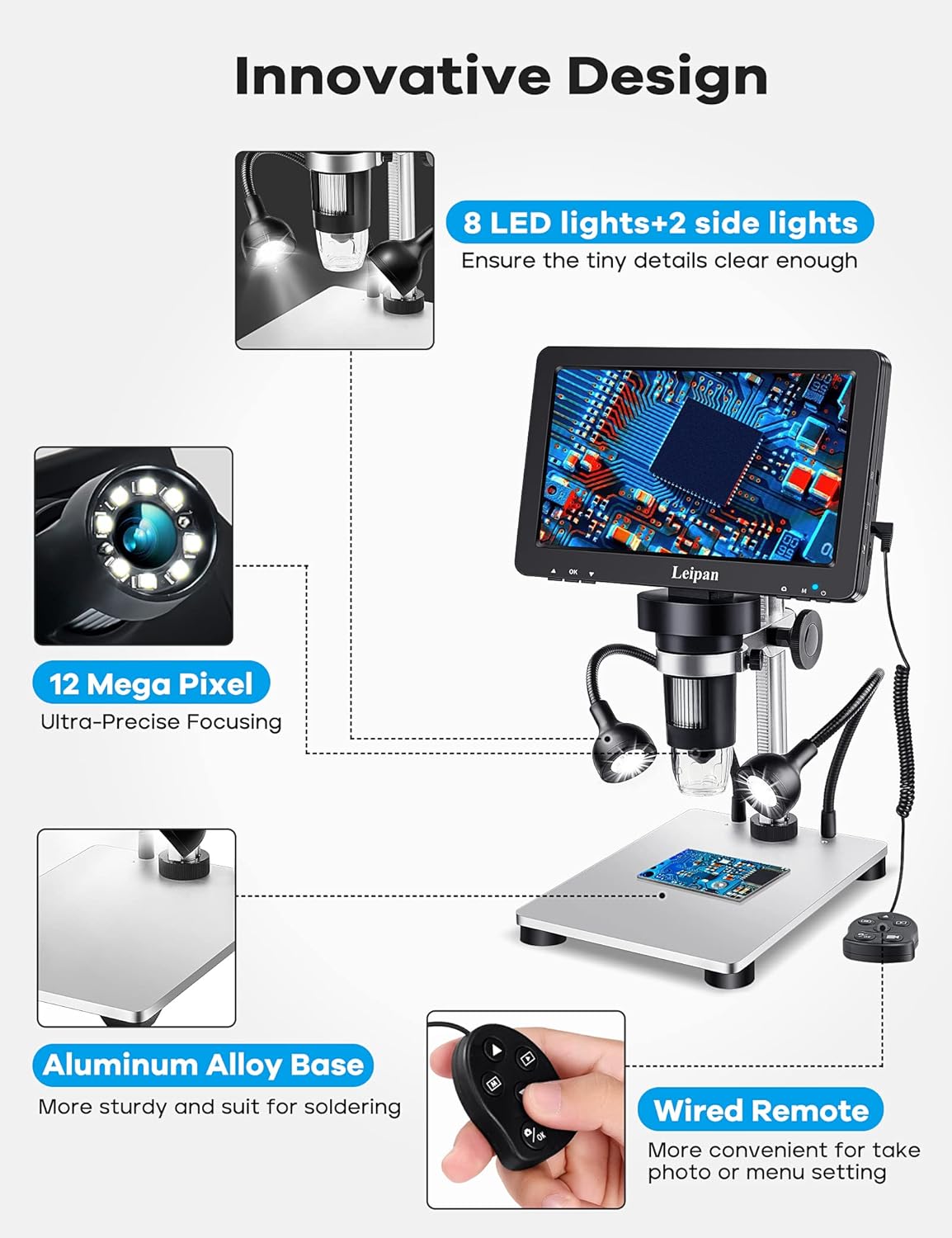
Выява: Зверхуview of the Leipan DM9-7" Digital Microscope components, highlighting the 7-inch screen, 12MP camera, aluminum alloy base, 8 main LED lights, 2 flexible side lights, and wired remote control.
Інструкцыя па наладзе
- Збярыце падстаўку: Attach the microscope unit to the adjustable stand and secure it to the aluminum alloy base. Ensure all connections are firm.
- Install Extension Tube (Optional): For a wider and higher field of view, especially for larger objects like entire coins, attach the 5-inch extension tube between the microscope lens and the stand.
- Падключэнне габарытных агнёў: Plug the two flexible side lights into their designated ports on the microscope unit. These lights provide additional illumination for detailed observation.
- Устаўце карту TF: If not already installed, insert the provided 32GB TF card into the TF card slot on the microscope unit. This card is essential for storing photos and videos.
- Першапачатковая зарадка: Connect the microscope to a power source (e.g., computer USB port, phone charger, power bank) using the USB cable. The micro end connects to the DC5V interface on the right side of the microscope screen. Allow the device to fully charge before first use.

Image: Comparison of the microscope's view with and without the 5-inch extension tube, demonstrating how the tube provides a wider and higher field of view for objects like coins.
Charging the Microscope
To charge your Leipan DM9-7" Digital Microscope, connect the USB cable to a power source. When powering on the microscope while connected, you will be presented with three options: Mass Storage, PC Camera, and Charging mode. Select "Charging mode" using the remote control to ensure proper charging. You can also use a phone charger, power bank, or wall socket for charging.
Video: This video demonstrates how to charge the Leipan DM9-7" Digital Microscope, including connecting the USB cable to a computer and selecting the 'Charging mode' option on the microscope screen.
Інструкцыя па эксплуатацыі
- Уключэнне/выключэнне харчавання: Press and hold the power button on the microscope unit to turn it on or off.
- Наладзіць павелічэнне: The microscope offers continuous 10X-1200X magnification. Adjust the focus wheel to change the magnification level and bring the object into clear view. Note that actual magnification may vary based on screen size and distance from the object.
- Факусоўка: Rotate the focus knob to achieve a sharp image on the 7-inch LCD screen.
- Паварот экрана: The 7-inch HD screen is rotatable up to 90 degrees, allowing you to adjust it for comfortable viewдля памяншэння напружання вачэй і шыі.
- Адрэгуляваць асвятленне: The microscope features eight adjustable LED illuminators around the lens and two flexible side lights. Adjust the brightness and position of the side lights to ensure all parts of your object are clearly illuminated.

Image: Illustrates the different magnification levels (10X, 100X, 500X, 1200X) achievable with the Leipan DM9-7" Digital Microscope, showing detailed views of a butterfly wing.
Здымка фатаграфій і запіс відэа
The Leipan DM9-7" Digital Microscope can capture 12MP (4023*3024) photos and record 1080FHD (1920*1080 30 fps) videos. You can use either the button on the main unit or the wired remote control. Using the wired remote is recommended to minimize camera shake and achieve clearer results.

Image: Demonstrates the photo and video recording capabilities of the microscope, showing a magnified bee and beetle, with icons indicating photo capture and video recording to the included 32GB Micro SD card.
Connecting to a Computer (PC Camera Mode)
Для большага viewing experience and easier data sharing/analysis, connect your microscope to a Windows or Mac computer. Simply plug the USB cable into both the microscope and your computer. No additional software download is required. For Windows 10, use the default "Windows Camera" application. For iMac/MacBook, use "Photo Booth."
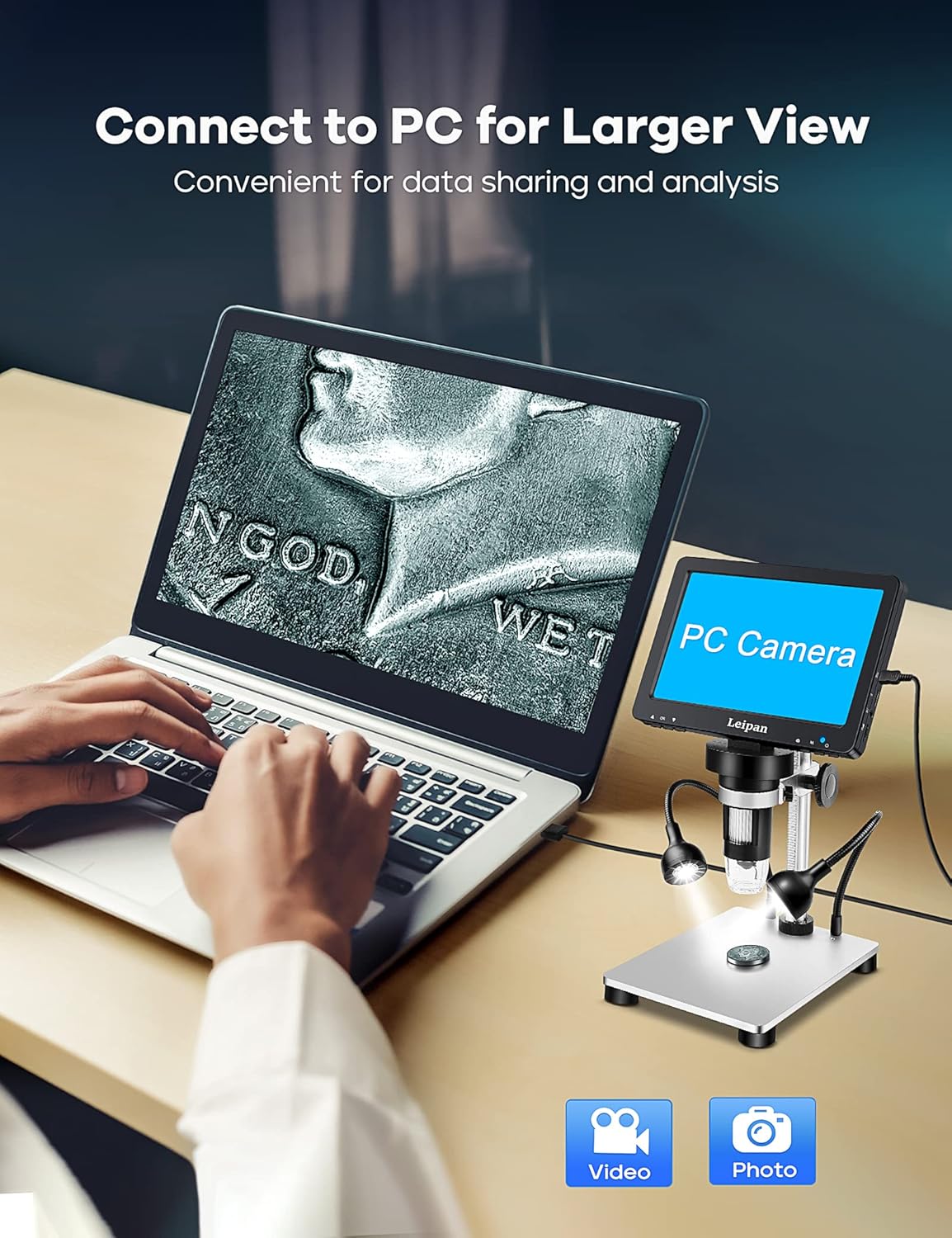
Image: Shows the Leipan DM9-7" Digital Microscope connected to a laptop, with the laptop screen displaying the microscope's live feed in 'PC Camera' mode, illustrating convenient data sharing and analysis.
Video: This video explains how to connect the Leipan DM9-7" Digital Microscope to a computer and use it as a PC camera for a larger view.
Тэхнічнае абслугоўванне
- Уборка: Use a soft, lint-free cloth to clean the screen and lens. For stubborn smudges, a small amount of lens cleaning solution can be applied to the cloth (not directly to the lens).
- захоўванне: Store the microscope in a dry, dust-free environment when not in use. Avoid extreme temperatures.
- Сыход за батарэяй: Каб падоўжыць тэрмін службы батарэі, пазбягайце частай поўнай разрадкі. Рэгулярна зараджайце прыладу, нават калі яна не выкарыстоўваецца пастаянна.
Ліквідацыю непаладак
| праблема | Магчымая прычына | Рашэнне |
|---|---|---|
| Microscope does not power on. | Нізкі ўзровень зарада батарэі або не падключаны кабель харчавання. | Charge the microscope using the provided USB cable. Ensure the power button is pressed and held. |
| Выява размытая. | Out of focus or incorrect working distance. | Adjust the focus knob. Ensure the object is within the microscope's working distance. Clean the lens if necessary. |
| Немагчыма падключыцца да ПК. | Incorrect mode selected or cable issue. | Ensure "PC Camera" mode is selected on the microscope. Try a different USB port or cable. Verify your computer's camera application is open. |
| Side lights not working. | Not connected or turned off. | Ensure side lights are securely plugged in. Check the light control on the wired remote or microscope unit. |
Тэхнічныя характарыстыкі
| Асаблівасць | Дэталь |
|---|---|
| Нумар мадэлі | DM9-LP12 |
| Памер экрана | 7 цаляў |
| Павелічэнне | 10X-1200X (continuous) |
| Дазвол камеры | 12MP (4023*3024) |
| Дазвол відэа | 1080FHD (1920*1080 30 fps) |
| Тып крыніцы святла | LED (8 main, 2 flexible side lights) |
| Захоўванне | 32GB TF Card included |
| Сувязь | USB (Windows/Mac Compatible) |
| Крыніца харчавання | Харчаванне ад батарэі (3.7 вольт) |
| Памеры прадукту | 7.1 см Д х 4.49 см Ш х 5.5 см В |
| Вага прадмета | 1.2 кілаграма |
| Колер | Серабро |
Інфармацыя аб гарантыі
This Leipan product is covered by a manufacturer's warranty. Please refer to the product packaging or contact Leipan customer support for specific warranty terms and conditions. Keep your purchase receipt as proof of purchase for any warranty claims.
Падтрымка кліентаў
If you encounter any issues or have questions regarding your Leipan DM9-7" Digital Microscope that are not addressed in this manual, please contact Leipan customer support. Contact information can typically be found on the product packaging, the official Leipan webсайце або праз вашага прадаўца.