
1. Уводзіны
Thank you for choosing the YENKEE YMS 3030BK RGB Gaming Mouse Ultra Light Shotgun. This manual provides detailed instructions for setting up, operating, and maintaining your new gaming mouse. Please read this manual carefully before use to ensure optimal performance and longevity of your device.
The YENKEE YMS 3030BK RGB Gaming Mouse features an ergonomic design for comfortable use. Its unique ultra-light perforated construction promotes airflow, helping to keep your palm cool during extended use. Equipped with an accurate IC 6651 sensor, it offers precise tracking with a resolution of up to 6400 DPI, and includes customizable RGB backlighting.
2. Змесціва ўпакоўкі
Калі ласка, праверце ўпакоўку на наяўнасць наступных прадметаў:
- 1 x YENKEE YMS 3030BK RGB Gaming Mouse Ultra Light Shotgun
- Кіраўніцтва карыстальніка (гэты дакумент)
3. Прадукт скончыўсяview
3.1 Асноўныя магчымасці
- Unique ultra-light perforated construction for improved airflow
- Ergonomic design for comfortable grip and to prevent palm sweat
- Customizable RGB backlight
- Accurate IC 6651 sensor with up to 6400 DPI resolution
- Wired USB connectivity
3.2 Кампаненты мышы
The YMS 3030BK mouse typically includes the following components:
- Кнопка левай кнопкі
- Пстрыкніце правай кнопкай мышы
- Кола пракруткі / сярэдняя кнопка
- DPI Adjustment Button (usually located behind the scroll wheel)
- Forward/Backward Side Buttons (typically on the left side)
- Optical Sensor (on the underside)
- Кабель USB
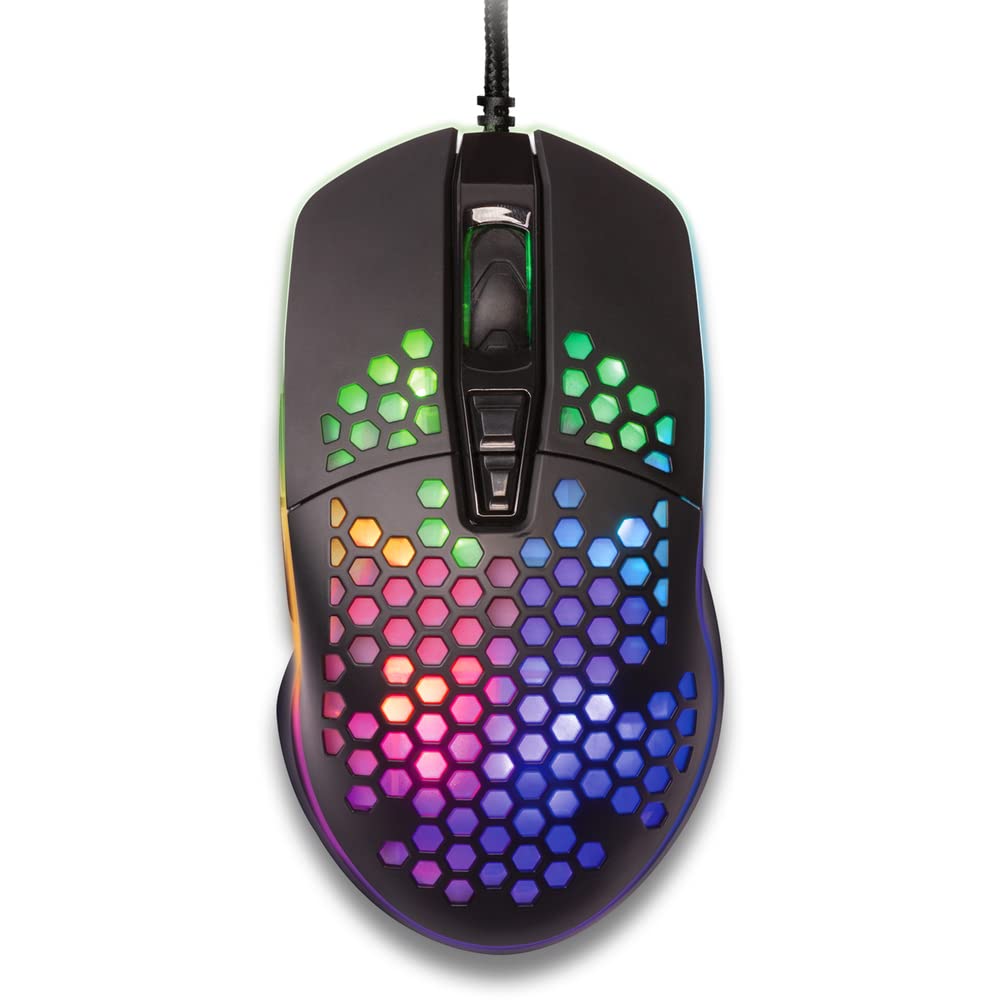
Малюнак 1: Зверху ўніз view of the YENKEE YMS 3030BK RGB Gaming Mouse, highlighting its ultra-light perforated design and ergonomic contours.
4. Настройка
Follow these steps to set up your YENKEE YMS 3030BK gaming mouse:
- Падключыце мыш: Падключыце раз'ём USB мышы да вольнага порта USB на вашым кампутары.
- Ўстаноўка драйвера: Your operating system (Windows 7, 8, Vista, XP) should automatically detect and install the necessary drivers. No additional software installation is typically required for basic functionality.
- Дадатковае праграмнае забеспячэнне: For advanced customization of RGB lighting and button assignments, please visit the official YENKEE website to check for any dedicated software for the YMS 3030BK model.
5. Інструкцыя па эксплуатацыі
5.1 Асноўныя аперацыі
- Пстрычка левай кнопкай мышы: Першаснае дзеянне, выбар.
- Пстрыкніце правай кнопкай мышы: Кантэкстнае меню, другаснае дзеянне.
- Кола пракруткі: Scroll up/down, middle click for specific functions (e.g., opening links in new tabs).
- Бакавыя кнопкі: Default functions are typically 'Forward' and 'Backward' in web браўзэры або file explorers. These can often be customized via software.
5.2 Рэгуляванне DPI
The YMS 3030BK mouse features an IC 6651 sensor with a maximum resolution of 6400 DPI. You can adjust the DPI (Dots Per Inch) sensitivity on-the-fly using the dedicated DPI button, usually located behind the scroll wheel. Pressing this button will cycle through preset DPI levels, indicated by changes in the mouse's RGB lighting color or pattern. Refer to the optional software for precise DPI level configuration and customization.
5.3 Налада RGB-падсветкі
The RGB backlight of your mouse can be customized to match your preferences. While some mice offer onboard controls for basic lighting effects, full customization of colors, patterns, and brightness is typically achieved through the dedicated YENKEE software (if available). Please download and install the software from the official YENKEE website for advanced lighting options.
6. Тэхнічнае абслугоўванне
To ensure the longevity and optimal performance of your gaming mouse, follow these maintenance guidelines:
- Уборка: Use a soft, dry cloth to wipe the surface of the mouse. For perforated areas, a soft brush or compressed air can help remove dust. Avoid using harsh chemicals or abrasive materials.
- Ачыстка датчыка: Occasionally clean the optical sensor on the underside of the mouse with a cotton swab lightly dampened with isopropyl alcohol. Ensure it is completely dry before use.
- Сыход за кабелем: Пазбягайце рэзкіх выгібаў або празмернага нацягвання USB-кабеля, каб пазбегнуць пашкоджанняў.
- захоўванне: Захоўвайце мыш у чыстым, сухім месцы, калі яна не выкарыстоўваецца.
7. Выпраўленне непаладак
If you encounter issues with your YENKEE YMS 3030BK mouse, refer to the table below for common problems and solutions:
| праблема | Магчымая прычына | Рашэнне |
|---|---|---|
| Мышка не рэагуе | Слабае падключэнне USB, няспраўны порт USB, праблема з драйверам. | Ensure USB cable is securely plugged in. Try a different USB port. Restart your computer. Check Device Manager for driver status. |
| Рух курсора няўстойлівы або скачковы | Брудны аптычны датчык, непрыдатная паверхня кілімка для мышы. | Clean the optical sensor. Use a clean, uniform mouse pad. |
| Рэгуляванне DPI не працуе | Канфлікт праграмнага забеспячэння, няспраўнасць кнопак. | Ensure no conflicting software is running. If using custom software, check its settings. |
| RGB-падсветка не працуе або завісла | Праблема з праграмным забеспячэннем, праблема з харчаваннем. | Check the YENKEE software settings. Unplug and replug the mouse. Restart your computer. |
8. Тэхнічныя характарыстыкі
| Асаблівасць | Дэталь |
|---|---|
| Марка | ЙЕНКІ |
| Нумар мадэлі | YMS 3030BK |
| Тэхналогія падлучэння | USB (правадны электрычны) |
| Тэхналогія выяўлення руху | Optical (IC 6651 Sensor) |
| Макс. DPI | 6400 DPI |
| Асаблівасці | Ergonomic Design, Lightweight, Perforated Construction, RGB Backlight |
| Колер | Чорны |
| Вага прадмета | 4.2 унцыі (прыблізна 119 грамаў) |
| Памеры прадукту (ДxШxВ) | 5.43 х 2.44 х 9.06 цалі (прыблізна 13.8 х 6.2 х 23 см) |
| Апаратная платформа | Гульнявая |
| Сумяшчальнасць аперацыйнай сістэмы | Windows 7, Windows 8, Windows Vista, Windows XP |
9. Гарантыя і падтрымка
Інфармацыя аб гарантыі: For detailed warranty terms and conditions, please refer to the warranty card included with your product or visit the official YENKEE website. Warranty periods may vary by region and retailer.
Падтрымка кліентаў: If you require technical assistance or have questions regarding your YENKEE YMS 3030BK gaming mouse, please contact your retailer or visit the support section of the official YENKEE webсайт для кантактнай інфармацыі і часта задаваных пытанняў.