
Уводзіны
This manual provides instructions for the setup, operation, and maintenance of your Xidehuy MP3 Player. Please read this manual thoroughly before using the device to ensure proper function and longevity.
Важная заўвага: This MP3 player does not support iTunes synchronization and is not an Apple iPod device.
Змест пакета
Праверце наяўнасць усіх прадметаў у камплекце:
- 1 x Xidehuy MP3/MP4 Player
- 1 x 32GB Memory Card (pre-installed or separate)
- 1 x HiFi Bass Earphone
- 1 х USB-кабель
- 1 х Кіраўніцтва карыстальніка (гэты дакумент)
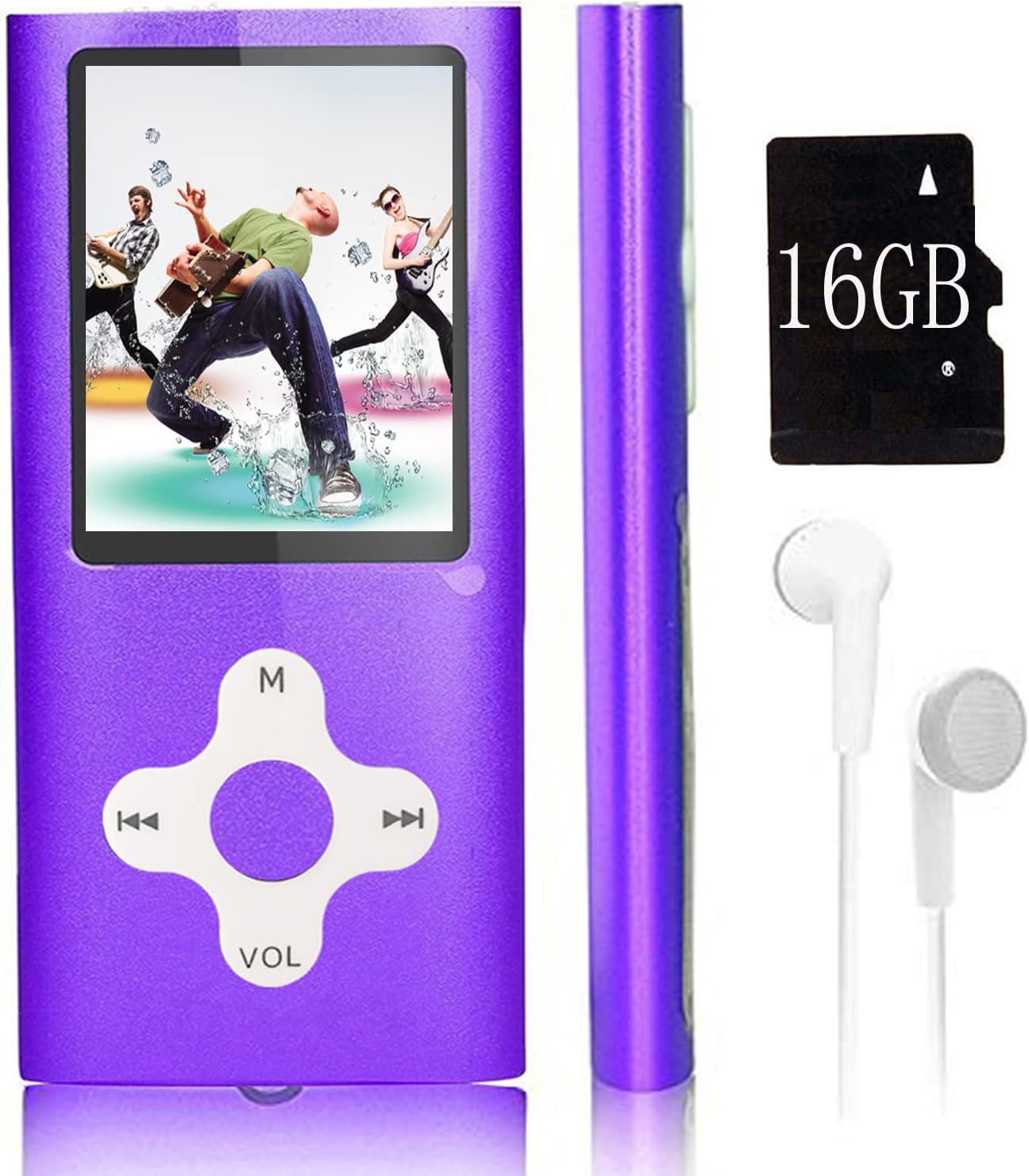
Image: The Xidehuy MP3 Player in violet, shown with a memory card (note: product includes 32GB, image shows 16GB) and white earphones. The player features a 1.8-inch LCD screen and circular navigation buttons.
Прадукт скончаныview
Элементы кіравання і парты
The MP3 player features a 1.8-inch LCD screen and a circular control pad. The control pad typically includes:
- M (Menu/Mode): Accesses menus or changes modes.
- Play/Pause/Confirm: Central button for playback control and selection.
- Папярэдняя/перамотка: Navigates to the previous track or rewinds.
- Далей/перамотка наперад: Navigates to the next track or fast forwards.
- VOL (аб'ём): Рэгулюе ўзровень гучнасці.
Side ports typically include a Mini USB port for charging and data transfer, and a 3.5mm audio jack for earphones.
Настройка
1. Зарадка прылады
- Connect the provided USB cable to the MP3 player's Mini USB port.
- Connect the other end of the USB cable to a computer's USB port or a compatible USB wall adapter (not included).
- The device will begin charging. It is recommended to turn on the player before charging.
- Поўная зарадка звычайна займае прыблізна 1 гадзіну.
2. Падключэнне да камп'ютара і перадача Files
- Ensure the MP3 player is powered on.
- Падключыце MP3-плэер да кампутара з дапамогай кабеля USB.
- The player will appear as an external storage device (e.g., a removable disk) on your computer.
- Open the device folder. You can drag and drop music files (MP3), video files (AMV), photo files (JPEG), or e-book files (TXT) directly into the player's storage.
- Аднойчы fileперадаюцца, бяспечна выміце прыладу з кампутара, перш чым адключаць кабель USB.
Інструкцыя па эксплуатацыі
Уключэнне/выключэнне харчавання
- To power on, press and hold the Power button (usually on the side or top) until the screen illuminates.
- Каб выключыць прыладу, націсніце і ўтрымлівайце кнопку харчавання, пакуль прылада не выключыцца.
Блакіроўка/разблакіроўка экрана
- Press the dedicated lock/unlock button (if available) or a specific combination (refer to on-screen prompts) to lock or unlock the screen and controls.
Базавая навігацыя
- Use the directional buttons on the control pad to navigate through menus.
- Press the central Play/Pause/Confirm button to select an option.
- Press the 'M' (Menu) button to go back to the previous menu or access main menu options.
Прайграванне музыкі
- У галоўным меню абярыце «Музыка».
- Праглядзіце сваю музыку files або папкі.
- Выберыце песню, каб пачаць прайграванне.
- Use the Play/Pause button to pause or resume.
- Выкарыстоўвайце кнопкі «Папярэдні/Наступны», каб пераключаць трэкі.
- Adjust volume using the VOL buttons.
- Playback modes include Normal, Repeat Once, Repeat All, and Random. These can usually be accessed via the 'M' button during playback.
Прайграванне відэа
The player supports AMV video format.
- У галоўным меню абярыце «Відэа».
- Browse and select an AMV video file гуляць.
- Use the control buttons for playback control.
FM-радыё
- Ensure earphones are connected as they act as the antenna.
- У галоўным меню абярыце «FM-радыё».
- Use the menu options to auto-scan for stations or manually tune.
Запіс голасу
- From the main menu, select "Voice Record".
- Press the Play/Pause button to start recording.
- Press it again to stop and save the recording.
Чытач электронных кніг
The player supports TXT format e-books.
- From the main menu, select "E-Book".
- Browse and select a TXT file чытаць.
- Use the directional buttons to scroll through pages.
Фота Viewer
The player supports JPEG format photos.
- From the main menu, select "Photo Viewer".
- Browse and select a JPEG image to view.
- Use the directional buttons to navigate between images.
Тэхнічнае абслугоўванне
- Трымайце прыладу сухім. Вільгаць можа пашкодзіць унутраныя схемы.
- Avoid extreme temperatures. High temperatures can shorten the life of electronic devices.
- Не кідайце і не падвяргайце прыладу моцным ударам.
- Clean the screen and body with a soft, dry cloth. Do not use harsh chemicals or cleaning solvents.
- Захоўвайце прыладу ў чыстым, чыстам асяроддзі без пылу, калі яна не выкарыстоўваецца.
Ліквідацыю непаладак
| праблема | Рашэнне |
|---|---|
| Прылада не ўключаецца. | Пераканайцеся, што прылада цалкам зараджана. Падключыце яе да крыніцы харчавання і паспрабуйце яшчэ раз. |
| Немагчыма перадаць files да прылады. | Verify the USB cable is securely connected. Ensure the device is recognized by the computer. Try a different USB port or cable. |
| Music/Video files do not play. | Праверце, калі file format is supported (MP3 for music, AMV for video). Ensure files не пашкоджаны. |
| FM-радыё не працуе. | Ensure earphones are properly plugged in, as they function as the antenna. |
| Экран не рэагуе або завісае. | Perform a soft reset by pressing and holding the Power button for 10-15 seconds until the device restarts. If a reset button is available (small pinhole), use a thin object to press it. |
Тэхнічныя характарыстыкі
- Памер экрана: 1.8 inches High Resolution Real Color LCD
- Унутраная памяць: 32 GB (with included memory card)
- Пашыраная памяць: Supports up to 64 GB MicroSD card
- акумулятар: Убудаваны літый-іённы акумулятар
- Час зарадкі: Прыкладна 1 гадзіна
- Час прайгравання: Прыкладна 5-7 гадзін
- Падтрымліваюцца аўдыяфарматы: MP3, FLAC
- Падтрымліваюцца фарматы відэа: AMV
- Падтрымліваемыя фарматы фатаграфій: JPEG
- Supported E-Book Formats: TXT
- Падключэнне: Mini USB 2.0
- Асаблівасці: FM Radio, Voice Recorder, E-Book Reader, Photo Viewer
- Мовы: Simplified Chinese, English, Traditional Chinese, Japanese, Korean, Italian, etc.
- Памеры: 10.49 х 5.41 х 3.71 см
- Вага: Approximately 68 g (package not included)
Гарантыя і падтрымка
This Xidehuy MP3 Player comes with a One Year Manufacturer's Warranty з дня пакупкі.
For any concerns regarding after-sale support, technical assistance, or warranty claims, please contact Xidehuy customer service through your purchase platform or the contact information provided with your product documentation.