
Уводзіны
This manual provides detailed instructions for the CHONCHOW Pink Gaming Keyboard and Mouse Combo, Model 1920. Please read this guide thoroughly before using your new peripheral set to ensure optimal performance and longevity. This combo is designed for gaming and general computer use across various platforms.
Змест пакета
- 1 x CHONCHOW Pink Gaming Keyboard
- 1 x CHONCHOW Pink Gaming Mouse
- 1 х Кіраўніцтва карыстальніка (гэты дакумент)
Тэхнічныя характарыстыкі
| Асаблівасць | Дэталь |
|---|---|
| Памеры ўпакоўкі | 17.72 х 8.27 х 2.01 цалі |
| Вага прадмета | 1.94 фунта |
| Тэхналогія падлучэння | USB |
| Асаблівасці | Backlit, Ergonomic |
| Сумяшчальныя прылады | Gaming Console, Laptop, PS4, PS5, Personal Computer, Xbox |
| Колер | Pink Keyboard and Mouse |
Інструкцыя па наладзе
Падключэнне клавіятуры і мышы
- Locate an available USB port on your computer or gaming console (PC, Laptop, PS4, PS5, Xbox).
- Plug the USB connector of the CHONCHOW Pink Gaming Keyboard into the USB port.
- Plug the USB connector of the CHONCHOW Pink Gaming Mouse into another available USB port.
- The devices are plug-and-play and should be automatically recognized by your system. No additional drivers are typically required.

Operating Instructions - Keyboard
Кіраванне святлодыёднай падсветкай
- Змена рэжымаў падсветкі: Націсніце FN key + the Электрычная лямпачка key (usually located near the right Ctrl key) to cycle through 3 dynamic backlight modes. The modes typically include color transitions like Blue→Red→Green, Cyan→Purple→Yellow, and Green→Blue→Red.
- Breathing Light Mode ON/OFF: Прэса FN + Электрычная лямпачка key to toggle the breathing effect on or off.
- Рэгуляванне яркасці: Прэса FN + Старонка ўверх (PGUP) to increase brightness. Press FN + Старонка ўніз (PGDN) каб паменшыць яркасць.
- Light Speed Adjustment: Прэса FN + Мінус (-) to decrease light speed. Press FN + Плюс (+) каб павялічыць хуткасць святла.

Мультымедыйныя функцыянальныя клавішы
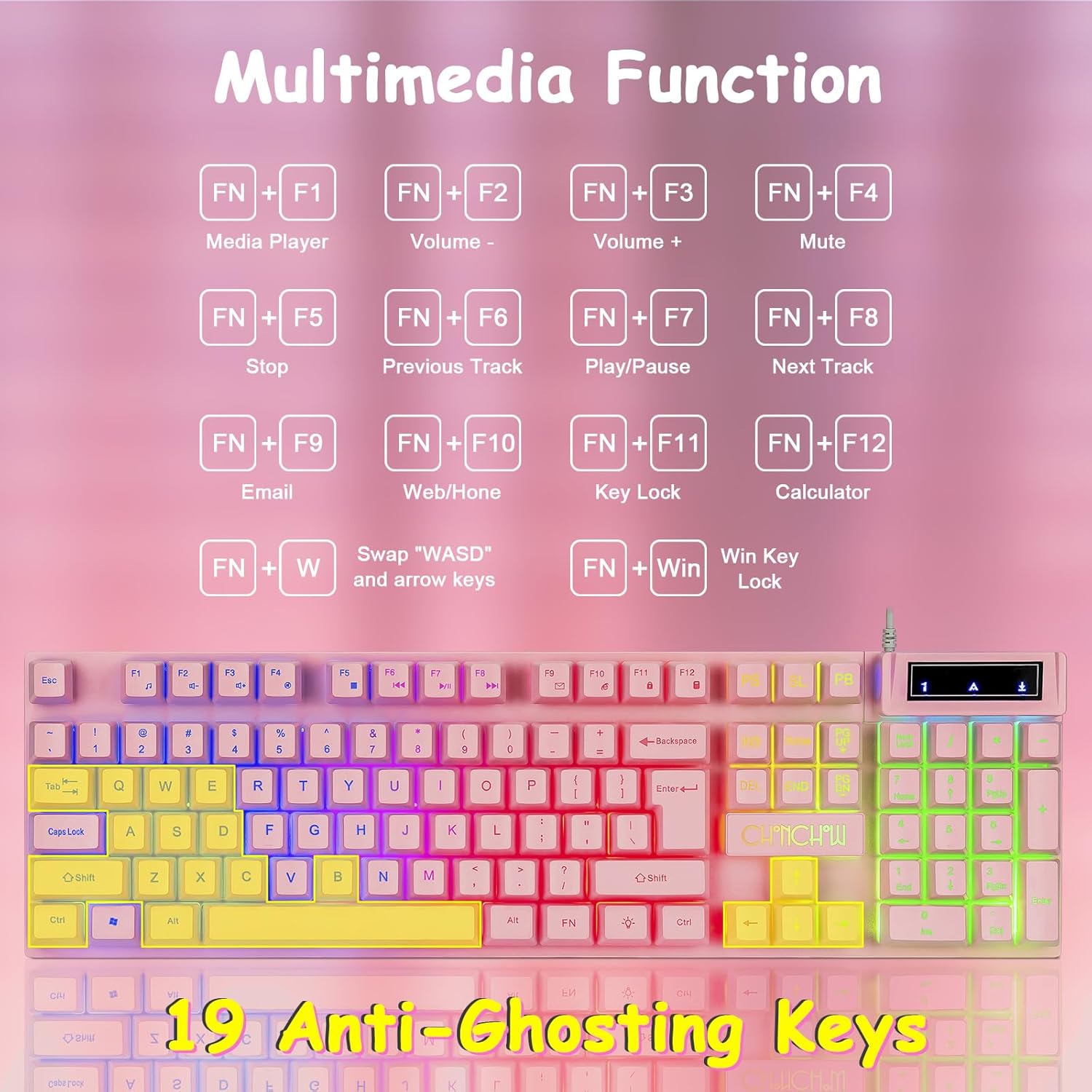
The keyboard features 12 multimedia shortcut keys accessible by pressing the FN клавіша ў спалучэнні з клавішамі F1-F12:
- FN+F1: Медыяплэер
- FN+F2: Памяншэнне гучнасці
- FN+F3: Павялічыць гучнасць
- FN+F4: Адключыць гук
- FN+F5: Стоп
- FN+F6: Папярэдні трэк
- FN+F7: Прайграванне/Паўза
- FN+F8: Наступны трэк
- FN+F9: Электронная пошта
- FN+F10: Web/Галоўная
- FN+F11: Блакаванне ключа
- FN+F12: Калькулятар
Special Gaming Functions
- WASD/Arrow Key Switching: Прэса FN + W to swap the functionality of the WASD keys with the arrow keys. Repeat to revert.
- Блакаванне клавіш Windows: Прэса FN + Win to lock the Windows key, preventing accidental presses during gameplay. Repeat to unlock.
- Anti-Ghosting: The keyboard supports 19-key anti-ghosting, ensuring multiple simultaneous key presses are registered accurately.

Operating Instructions - Mouse
Рэгуляванне DPI
The mouse features 4 adjustable DPI settings for precision control:
- Націсніце DPI+ button to increase DPI (1200 / 1800 / 2400 / 3600).
- Націсніце DPI- button to decrease DPI.
- The mouse's 7-color breathing LED effect will change to indicate the current DPI setting.

Mouse LED Control
- Turn ON/OFF LED: Доўгі націск DPI button (located below the scroll wheel) to toggle the mouse's LED lighting on or off.
Эрганоміка і дызайн
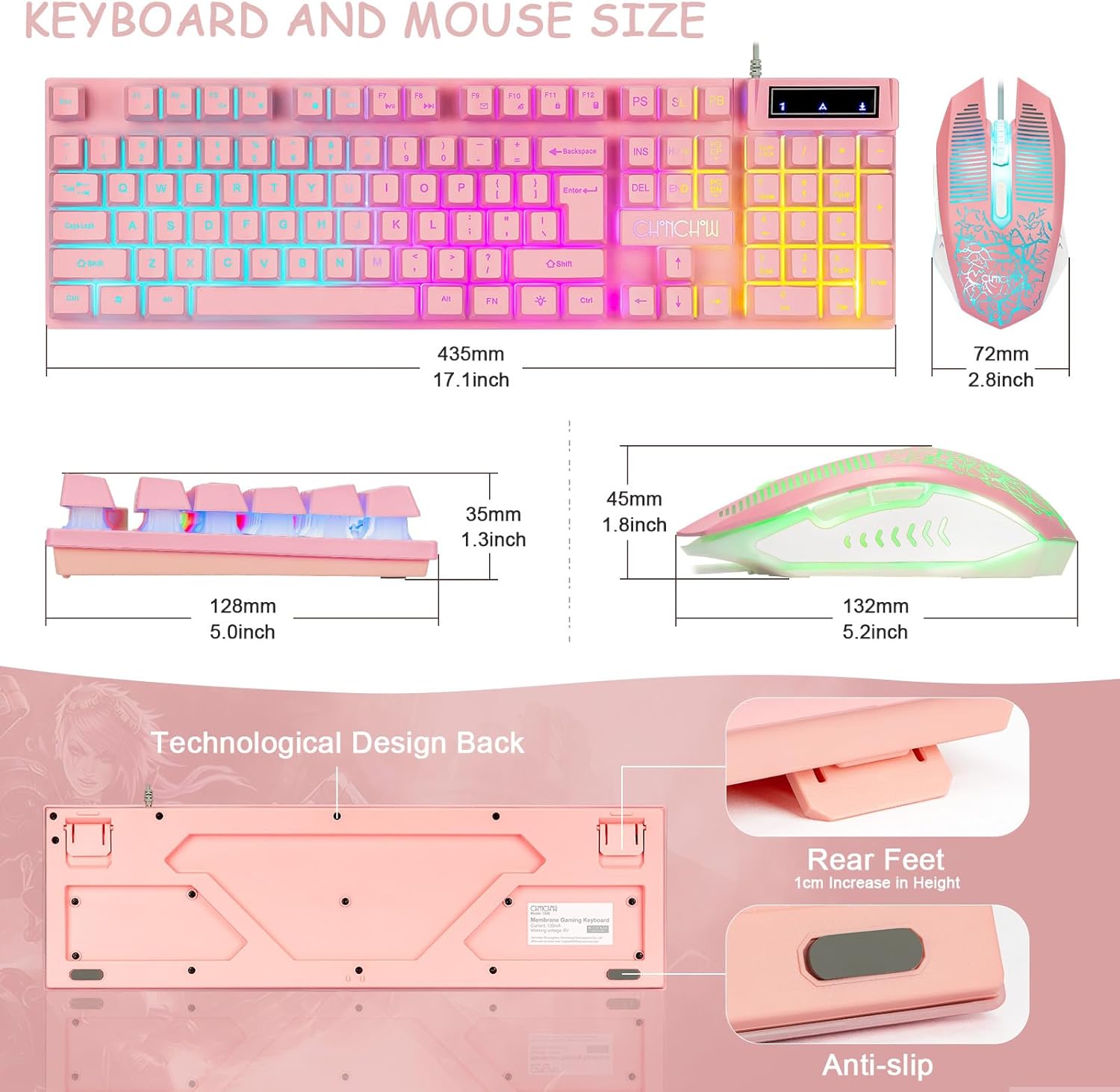
- Adjustable Keyboard Feet: The keyboard features adjustable feet (1cm height adjustment) to customize the typing angle for comfort.
- Выгнутыя каўпачкі клавіш: Designed for natural finger positioning and reduced fatigue during extended use.
- Mouse Grip: The ergonomic wired mouse includes a rubber grip base for enhanced control and comfort.
- Crater Structure Keys: The keyboard utilizes crater structure keys for faster response and improved keystroke feel.
Тэхнічнае абслугоўванне і догляд
- Уборка: Выкарыстоўвайце мяккую сухую тканіну для працірання клавіятуры і мышы. Для ўстойлівага бруду злёгкуamp можна выкарыстоўваць тканіну з мяккім мылам, сачыце за тым, каб вадкасць не патрапіла ўнутр прылады.
- Пазбягайце вадкасці: Do not expose the keyboard or mouse to excessive moisture or liquids.
- захоўванне: Захоўвайце прылады ў прахалодным, сухім месцы, удалечыні ад прамых сонечных прамянёў і экстрэмальных тэмператур.
- Кабельнае кіраванне: Пазбягайце рэзкіх выгібаў або празмернага нацягвання USB-кабеляў, каб пазбегнуць пашкоджанняў.
Ліквідацыю непаладак
| праблема | Рашэнне |
|---|---|
| Клавіятура/мыш не рэагуе. |
|
| LED lights are off or not changing. |
|
| Keys are sticking or not registering. |
|
| Mouse cursor movement is erratic or unresponsive. |
|
Гарантыя і падтрымка
For warranty information and technical support, please refer to the official CHONCHOW webсайт або звярніцеся непасрэдна ў службу падтрымкі кліентаў. Захоўвайце чэк аб куплі для прэтэнзій па гарантыі.
вытворца: ЧОНЧОУ
Нумар мадэлі: 1920
Дата першай даступнасці: 7 верасня 2022 г
Афіцыйныя відэа пра прадукт
An official product video demonstrating the CHONCHOW Pink Gaming Keyboard and Mouse Combo in use, highlighting its features for both gaming and work environments.
Афіцыйная відэапрэзентацыя прадуктуasing the aesthetic appeal and functionality of the CHONCHOW Pink Gaming Keyboard.