
UBeesize UB-ZD081BK
UBeesize 10-inch Ring Light with 62-inch Tripod User Manual
Model: UB-ZD081BK
1. Уводзіны
Thank you for choosing the UBeesize 10-inch Ring Light with 62-inch Tripod. This product is designed to provide optimal lighting for various applications, including photography, video recording, live streaming, and video conferencing. Its versatile design allows for use as a standalone ring light with a tripod or as a selfie stick. This manual provides detailed instructions for assembly, operation, maintenance, and troubleshooting to ensure you get the most out of your device.

Image: The UBeesize 10-inch Ring Light mounted on its extendable tripod, with a smartphone in the center and the Bluetooth remote control positioned to the right.
2. Змесціва ўпакоўкі
Калі ласка, праверце змесціва пакета пасля распакавання, каб пераканацца ў наяўнасці ўсіх кампанентаў:
- 1 x 10-inch LED Ring Light
- 1 x 62-inch Extendable Tripod Stand
- 1 х Рэгуляваны трымальнік для тэлефона
- 1 х бесправадны пульт дыстанцыйнага кіравання Bluetooth
- 1 x AC/DC Power Adapter (USB cable with wired control)

Image: A visual representation of the kit's components, including the USB plug, easy-to-use phone clip, wireless remote control, 240 light beads, 3 color temperature options, robust ABS plastic housing, improved light transmission, and high color rendering index.
3. Кіраўніцтва па наладцы
3.1 Зборка штатыва
- Unfold the tripod legs until they are fully extended and stable.
- Extend the telescopic sections of the tripod to your desired height. Secure each section by twisting the locking collars clockwise. The tripod can extend up to 62 inches (approximately 157.5 cm).

Image: A visual guide illustrating the extendable tripod stand, showing its compact size and various extended heights up to 63 inches.
3.2 Мацаванне кальцавой лямпы
- Locate the mounting screw on top of the tripod stand.
- Align the ring light's mounting hole with the tripod screw and gently twist the ring light clockwise until it is securely fastened.
3.3 Installing the Phone Holder
- Insert the phone holder into the cold shoe mount located in the center of the ring light.
- Tighten the locking knob on the phone holder to secure it in place.
- Adjust the phone holder's angle as needed. The holder supports smartphones with widths from 2.3 inches to 4.5 inches.

Image: Illustrations demonstrating the versatility of the tripod, showing its use with smartphones (up to 4.5 inches wide), the ring light itself, and various cameras.
3.4 Падключэнне харчавання
- Connect the USB cable from the ring light to the provided AC/DC power adapter.
- Plug the power adapter into a standard wall outlet. Alternatively, the USB cable can be connected to any compatible USB power source (e.g., power bank, computer USB port).
4. Інструкцыя па эксплуатацыі
4.1 Уключэнне/выключэнне
The ring light features a redesigned touch-pad control on the front for easy operation.
- To turn on the ring light, press the ВКЛ/ВЫКЛ button on the touch-pad.
- To turn off the ring light, press the ВКЛ/ВЫКЛ кнопку зноў.

Выява: Падрабязны view of the ring light's touch-pad, highlighting the ON/OFF button, brightness adjustment buttons (+/-), and light color selection button.
4.2 Рэгуляванне яркасці
The ring light offers 10 levels of brightness for each color mode.
- Націсніце Яркасць + кнопку, каб павялічыць інтэнсіўнасць святла.
- Націсніце Яркасць - кнопку, каб паменшыць інтэнсіўнасць святла.
4.3 Changing Light Color
The ring light provides three distinct light color modes: Warm White, Cool White, and White Light.
- Націсніце Светлы колер button to cycle through the available color temperatures.

Image: A series of portraits demonstrating the effect of different light color temperatures (3000K, 4500K, 6000K) and brightness levels (10% to 100%) on a subject's appearance.
4.4 Выкарыстанне пульта дыстанцыйнага кіравання Bluetooth
The wireless Bluetooth remote control allows for convenient remote operation, compatible with both iOS and Android phones.
- Пераканайцеся, што Bluetooth уключаны на вашым смартфоне.
- Turn on the Bluetooth remote control. It will enter pairing mode.
- On your smartphone, search for Bluetooth devices and select "UBeesize Remote" (or similar) to pair.
- Once paired, you can use the remote to trigger photos or start/stop video recording from a distance of up to 10 meters.
4.5 Using the Wired Control
The USB cable includes an inline wired control for quick adjustments.
- The wired control allows you to adjust brightness, switch light colors, and power the unit on/off.

Image: A detailed illustration of the upgraded phone clamp, showing its adjustable width from 2.3 to 4.5 inches. Also depicted are the USB plug with its inline wire control for brightness and color adjustments, and the wireless Bluetooth remote control for iOS and Android devices, with an operational range of up to 10 meters.
5. Recommended Usage Scenarios
The UBeesize Ring Light is highly versatile and suitable for a wide range of applications:
- Жывая трансляцыя: Provides consistent and flattering illumination for live broadcasts on various platforms.
- Фатаграфія: Ideal for portraits, product photography, and macro shots, eliminating harsh shadows.
- Запіс відэа: Ensures professional-quality lighting for vlogs, tutorials, and interviews.
- Відэаканферэнцыя: Enhances your appearance during online meetings, making you look clear and well-lit.
- Нанясенне макіяжу: Offers bright, even light for precise makeup application.
- падарожжа: The compact design allows for easy portability, making it perfect for on-the-go content creation.

Image: A collage of four scenarios demonstrating the ring light's utility: a photographer capturing food, a videographer filming, a content creator applying makeup, and a traveler using it outdoors.
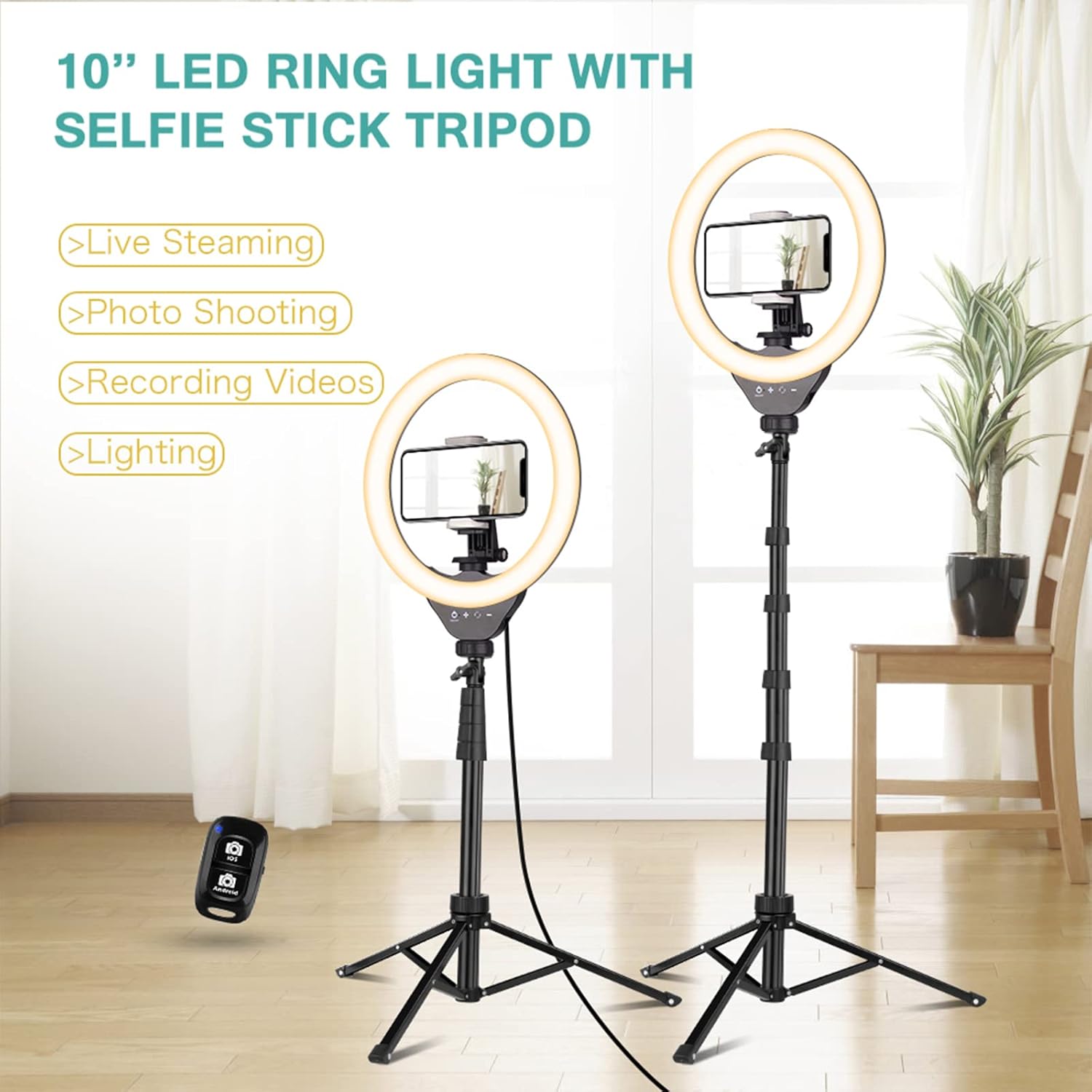
Image: Two UBeesize 10-inch LED ring lights with selfie stick tripods set up, one with a phone for live streaming/photo shooting and the other for general lighting, showcasinг іх універсальнасць.

Image: Two individuals engaged in a video conference, with the UBeesize ring light providing optimal illumination for their online communication.
6. Догляд і абслугоўванне
Proper care and maintenance will extend the lifespan of your UBeesize Ring Light.
- Уборка: Use a soft, dry cloth to wipe down the ring light and tripod. For stubborn marks, a slightly damp cloth can be used, but ensure the device is unplugged and completely dry before reconnecting power. Do not use abrasive cleaners or solvents.
- захоўванне: When not in use, collapse the tripod to its minimum height (20 inches) for easy storage. Store the device in a cool, dry place away from direct sunlight and extreme temperatures.
- Апрацоўка: Avoid dropping the device or subjecting it to strong impacts. Do not attempt to disassemble the ring light or tripod, as this may void the warranty and cause damage.
7. Выпраўленне непаладак
If you encounter any issues with your UBeesize Ring Light, please refer to the following common problems and solutions:
| праблема | Магчымая прычына | Рашэнне |
|---|---|---|
| Не ўключаецца лямпачка кальца. | Адсутнічае сілкаванне або дрэннае злучэнне. | Ensure the USB cable is securely connected to the power adapter and the adapter is plugged into a working outlet. Try a different USB port or power source. |
| Святло занадта цьмянае або занадта яркае. | Патрабуецца рэгуляванне ўзроўню яркасці. | Use the Brightness + or - buttons on the touch-pad or wired control to adjust the intensity. |
| Пульт дыстанцыйнага кіравання Bluetooth не спалучаецца. | Remote not in pairing mode or Bluetooth is off on phone. | Ensure Bluetooth is enabled on your phone. Turn the remote off and on again to re-enter pairing mode. Check your phone's Bluetooth settings to forget previous pairings if necessary. |
| Phone holder not secure. | Locking knob is loose or phone is too wide/narrow. | Tighten the locking knob on the phone holder. Ensure your phone's width is within the supported range (2.3" to 4.5"). |
If the problem persists after trying these solutions, please contact UBeesize customer support for further assistance.
8. Тэхнічныя характарыстыкі прадукту
| Асаблівасць | Спецыфікацыя |
|---|---|
| Марка | UBeesize |
| Нумар мадэлі | UB-ZD081BK |
| Памер кольцы святла | 10 цаляў (дыяметр) |
| Максімальная вышыня штатыва | 62 цалі (прыблізна 157.5 см) |
| Tripod Folded Length | 20 цалі (прыблізна 50.8 см) |
| Светлыя колеры | Warm White, Cool White, White Light |
| Узроўні яркасці | 10 levels per color mode (33 total options) |
| Метады кантролю | Touch-pad, Wired Control, Bluetooth Remote |
| Дыстанцыйнае кіраванне Bluetooth | Да 10 метраў |
| Сумяшчальнасць трымальніка для тэлефона | Smartphones 2.3" to 4.5" wide |
| Крыніца харчавання | USB Powered (AC/DC adapter included) |
| Памеры прадукту (Д х Ш х У) | 42.7 х 6 х 31.5 см (у ўпакоўцы) |
| Вага прадукту | 1.16 кілаграма |
| UPC | 840322301818 |
9. Гарантыя і падтрымка
UBeesize is committed to providing high-quality products and excellent customer service.
- Гарантыя: This product is covered by a 24-month replacement service from the date of purchase.
- Абслугоўванне кліентаў: We offer friendly lifetime customer service. If you have any questions, concerns, or require assistance with your UBeesize Ring Light, please do not hesitate to contact our support team. Refer to the product packaging or the UBeesize official webсайт для атрымання канкрэтнай кантактнай інфармацыі.
Ask a question about this manual
Ask about setup, troubleshooting, compatibility, parts, safety, or missing instructions. Manuals+ will review the question and use this page’s manual context to help answer it.