
1. Уводзіны
This user manual provides comprehensive instructions for the installation, operation, and maintenance of your Weiser SmartCode Keypad Electronic Deadbolt. This advanced keyless entry system offers enhanced security and convenience for your home.
The SmartCode deadbolt features a sleek design, a backlit keypad for visibility, and the ability to store up to 50 user codes. It operates on 4 AA batteries and includes SmartKey re-key technology for added security and flexibility.
2. Інфармацыя па бяспецы
Please read and understand all instructions before installing and using this product. Keep this manual for future reference.
- Do not attempt to disassemble or modify the lock. This may cause damage to the product and void the warranty.
- Use only the specified battery type (4 AA alkaline batteries). Do not mix old and new batteries or different types of batteries.
- Ensure proper polarity when inserting batteries.
- Keep all keys and user codes in a secure location.
- Avoid exposing the lock to extreme temperatures or direct moisture.
- Regularly check the lock's functionality and battery level.
3. Змесціва ўпакоўкі
Перад пачаткам усталёўкі пераканайцеся, што ўсе кампаненты наяўныя:

Image: Complete package contents of the Weiser SmartCode Keypad Electronic Deadbolt.
- Electronic Deadbolt (Exterior Keypad Assembly)
- Electronic Deadbolt (Interior Battery Unit)
- Зашчапка
- Страйк пліты
- Мантажная пласціна
- Мантажныя элементы (шрубы)
- 2 Ключы
- Інструмент SmartKey
- Кіраўніцтва па ўстаноўцы (гэты дакумент)
Note: 4 AA batteries are required and not included in the package.
4. Усталёўка і налада
The Weiser SmartCode deadbolt is designed for easy installation. For a seamless setup experience, it is highly recommended to use the free BILT app, which provides step-by-step interactive 3D instructions with voice and video guidance.
4.1 Сумяшчальнасць з дзвярыма
This lock is designed to fit standard doors 1-3/8" to 1-3/4" (35 mm - 44 mm) thick with an adjustable backset (2-3/8" or 2-3/4"). It is ideal for most exterior and interior residential doors.
4.2 Этапы ўстаноўкі (гл. вышэй)view)
- Падрыхтуйце дзверы: Ensure your door is properly drilled and aligned for a deadbolt installation.
- Усталюйце зашчапку: Insert the latch into the door edge, ensuring the correct backset is selected.
- Усталюйце знешнюю зборку: Place the exterior keypad assembly onto the door, feeding the cable through the cross bore.
- Усталюйце мантажную пласціну: Secure the mounting plate to the door using the provided screws, ensuring the cable passes through the plate.
- Падключыце кабель і ўсталюйце ўнутраную зборку: Connect the cable from the exterior assembly to the interior battery unit. Mount the interior unit to the mounting plate.
- Усталюйце батарэі: Insert 4 AA alkaline batteries into the interior unit, observing polarity.
- Выканайце працэс адчынення дзвярэй: This crucial step teaches the lock the orientation of your door. Follow the specific instructions in the full manual or BILT app.
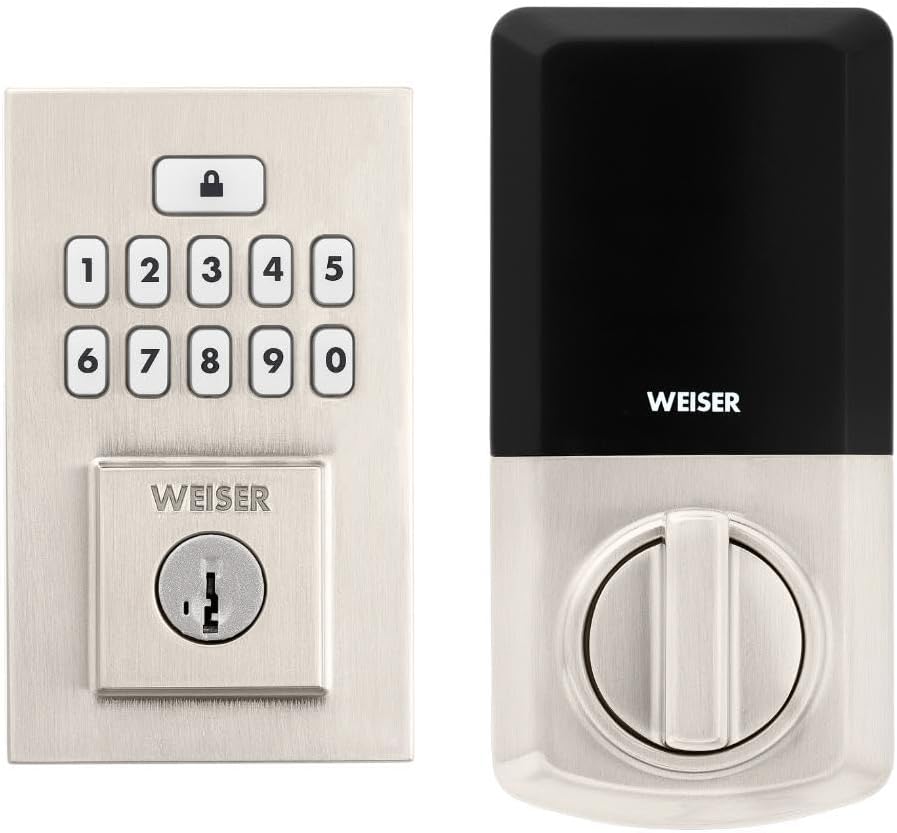
Image: Assembled Weiser SmartCode Keypad Electronic Deadbolt, showing both exterior and interior components.

Image: Close-up of the exterior keypad, featuring the backlit numeric buttons and keyhole.
5. Інструкцыя па эксплуатацыі
5.1 Блакаванне дзвярэй
- Блакаванне адным дотыкам: Press the Lock button (top button with padlock icon) on the keypad. The deadbolt will extend.
- Функцыя аўтаматычнай блакіроўкі: If enabled, the deadbolt will automatically extend after a set period (e.g., 30 seconds) once unlocked.
5.2 Адмыканне дзвярэй
- Выкарыстанне кода карыстальніка: Enter your personalized 4-8 digit user code on the keypad. The deadbolt will retract.
- Выкарыстанне ключа: Устаўце фізічны ключ у замочную свідравіну і павярніце, каб адчыніць.
5.3 Праграмаванне кодаў карыстальнікаў
The lock supports up to 50 user codes and 1 master code. Refer to the detailed programming instructions in the full manual for adding, deleting, or modifying codes.
- Майстар -код: The master code is used to add and delete user codes. It does not unlock the door.
- Карыстальніцкія коды: These codes are used to unlock the door.


Image: Icons illustrating user management, programming, and auto-lock features.
5.4 SmartKey Re-key Technology
The SmartKey re-key technology allows you to re-key your lock in seconds, maintaining key control and protecting against lost, stolen, or unauthorized keys without removing the lock from your door. Use the provided SmartKey tool and follow the instructions carefully.

Image: SmartKey Security feature, demonstrating how to re-key the lock.
6. Тэхнічнае абслугоўванне
6.1 Замена батарэі
The lock operates on 4 AA alkaline batteries. When the batteries are low, the lock will provide an audible and/or visual low battery warning. Replace all four batteries simultaneously to ensure optimal performance.
- Зніміце вечка батарэйнага адсека на ўнутраным блоку.
- Выдаліце старыя батарэі і ўтылізуйце іх належным чынам.
- Устаўце новыя шчолачныя батарэйкі тыпу АА, сачыце за правільнай палярнасцю (+/-).
- Замяніце крышку батарэйнага адсека.
Note: Battery life can vary based on usage frequency and environmental conditions. If the auto-lock feature is frequently used, battery life may be shorter.
6.2 Ачыстка
Пачысціце замак мяккай губкайamp тканінай. Пазбягайце выкарыстання абразіўных ачышчальнікаў, растваральнікаў або хімічных спрэяў, бо яны могуць пашкодзіць пакрыццё і электронныя кампаненты.
7. Выпраўленне непаладак
| праблема | Магчымая прычына | Рашэнне |
|---|---|---|
| Lock does not respond or keypad is not lit. | Селі акумулятары. | Заменіце ўсе чатыры батарэйкі АА. |
| Lock beeps 3 times during programming or code entry. | Incorrect code, programming error, or lock not handed correctly. | Verify the code. Re-attempt programming steps carefully. Perform the door handing process again. If issues persist, reset the unit to factory settings (refer to full manual). |
| Deadbolt extends when door is open (Auto-lock issue). | The lock does not have a sensor to detect if the door is open or closed. Auto-lock activates after the set time regardless of door position. | This is normal operation. Ensure the door is closed before the auto-lock time expires, or disable the auto-lock feature if it causes inconvenience. |
| Keypad is difficult to see at night. | Backlight not active. | The keypad is backlit and stays lit for 30 seconds after inactivity. Ensure there is enough battery power. |
| Lock is not operating smoothly. | Misalignment of door or strike plate, or internal mechanism issue. | Check door and frame alignment. Ensure the strike plate is correctly installed. If the issue persists, contact customer support. |
8. Тэхнічныя характарыстыкі
| Асаблівасць | Дэталь |
|---|---|
| Нумар мадэлі | 9ГЭД92600-003 |
| Памеры прадукту | 6.99 х 2.86 х 13.97 см (2.75 х 1.13 х 5.5 цалі) |
| Вага прадмета | 454 г (1 фунта) |
| Колер | матавы нікель |
| стыль | Сучасны |
| Скончыць | Пэндзаль |
| Матэрыял | Метал |
| Тып замка | Deadbolt, Electronic |
| Клавіятура | 10-Button, Backlit |
| Коды карыстальнікаў | Up to 50 user codes, 1 master code |
| Крыніца харчавання | 4 батарэйкі АА (не ўключаны) |
| Сумяшчальнасць таўшчыні дзвярэй | 1-3/8" to 1-3/4" (35 mm - 44 mm) |
| Гарнітура | Рэгуляваны 2-3/8" або 2-3/4" |
| Асаблівасці | Weather Resistant, Anti-Bump, Auto-Lock, One-Touch Lock, Back-Lit Keypad, SmartKey Security |
| ANSI Grade | 2 клас |
| Краіна паходжання | Кітай |
9. Гарантыя і падтрымка
9.1 Інфармацыя аб гарантыі
The Weiser SmartCode Keypad Electronic Deadbolt comes with a Гарантыя 1 год з даты пакупкі. Гэтая гарантыя распаўсюджваецца на дэфекты матэрыялаў і вырабу пры нармальным выкарыстанні. Калі ласка, захавайце пацвярджэнне пакупкі для прэтэнзій па гарантыі.
For full warranty details and limitations, please refer to the official Weiser webсайт або звярніцеся ў службу падтрымкі кліентаў.
9.2 Падтрымка кліентаў
For technical assistance, troubleshooting, or warranty inquiries, please contact Weiser customer support:
- Інтэрнэт-падтрымка: Visit the official Weiser website for FAQs, video tutorials, and contact forms.
- Падтрымка па тэлефоне: Refer to the contact information provided on the Weiser packaging or webсайт для гадзін падтрымкі па тэлефоне.
- Праграма BILT: Utilize the BILT app for interactive 3D installation and programming guidance.
When contacting support, please have your product model number (9GED92600-003) and purchase date available.