
Уводзіны
The Marantz Cinema 50 is a premium 9.4-channel Audio/Video Receiver (AVR) designed to deliver exceptional sound and video performance for home theater systems. This receiver supports advanced audio formats like Dolby Atmos, DTS:X Pro, IMAX Enhanced, and Auro 3D, alongside 8K/60Hz and 4K/120Hz video pass-through. It features built-in Wi-Fi, Bluetooth, and HEOS multi-room streaming capabilities, offering versatile connectivity and control options.

Малюнак 1: Спераду view of the Marantz Cinema 50 AV Receiver.
Настройка
1. Распакаванне і першапачатковы агляд
Carefully remove the Marantz Cinema 50 from its packaging. Verify that all accessories are present, including the remote control, batteries, AM/FM antennas, wire labels, Audyssey microphone with stand, and AC cord. Inspect the unit for any signs of damage.
2. Фізічныя злучэнні
Connect your speakers, video sources (e.g., Blu-ray player, gaming console), and display (TV/projector) to the appropriate ports on the rear panel of the receiver. The Cinema 50 features 9 HDMI ports (6 In/3 Out) with 8K upscaling and eARC support, 4 subwoofer outputs, a phono input, and various analog and digital inputs.

Figure 2: Rear panel connections of the Marantz Cinema 50.
3. Падключэнне дынамікаў
Connect your speakers to the corresponding speaker terminals. Ensure correct polarity (positive to positive, negative to negative) for optimal sound performance. The receiver supports a 9.4-channel configuration, allowing for flexible speaker arrangements including 7.1.4 or 5.1.6 setups.
4. Network and Wireless Setup
Connect the receiver to your home network via Ethernet or Wi-Fi. Attach the provided Wi-Fi antennas for wireless connectivity. This enables features like HEOS multi-room streaming, AirPlay 2, and access to online music services.
5. Audyssey Room Acoustic Correction
The Marantz Cinema 50 includes Audyssey MultEQ XT32 for automatic room acoustic correction. Use the supplied Audyssey microphone and stand to calibrate your speaker system to your room's unique acoustics. Follow the on-screen instructions for a guided setup process. This process optimizes speaker settings and corrects room acoustics for the best possible sound experience.
Video 1: Demonstrates the setup process, including connecting the Audyssey microphone and navigating the on-screen display for speaker calibration.
Інструкцыя па эксплуатацыі
1. Асноўныя элементы кіравання
The front panel of the Cinema 50 features an input selector knob and a volume knob. A display shows the current input source and volume level. Additional controls are hidden behind a front panel flap for a clean aesthetic.
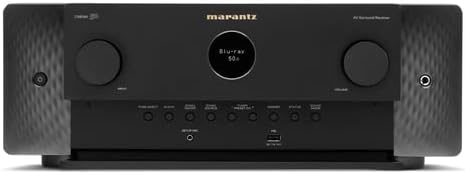
Figure 3: Front panel of the Marantz Cinema 50 with the control flap open.
2. Пульт дыстанцыйнага кіравання
The included remote control provides full functionality for the receiver. It allows you to select input sources, adjust volume, change sound modes, and access setup menus. The remote is designed with clearly labeled buttons for intuitive operation.
3. Sound Modes and Audio Technologies
The Cinema 50 supports a variety of immersive audio formats:
- Dolby Atmos: Creates a multi-dimensional sound experience with overhead effects.
- DTS:X Pro: Object-based audio technology for flexible and immersive sound.
- Палепшаны IMAX: Delivers IMAX's signature sound and picture quality.
- Auro 3D: Provides a realistic three-dimensional sound field.
- Dolby Surround & DTS Neural:X Upmixer: Enhances legacy content to create a 3D sound experience.
- Dolby Height Virtualization & DTS Virtual:X: Creates virtual overhead sound in setups without physical height speakers.
Use the remote control or front panel buttons to cycle through available sound modes to match your content and preference.
4. Multi-Room Music Streaming
The integrated HEOS technology allows for effortless multi-room audio. Stream music from services like Spotify, Pandora, and TuneIn, or via Bluetooth and AirPlay 2, to create a whole-home audio system.
5. Галасавое кіраванне
The receiver is compatible with Amazon Alexa and Siri, allowing for hands-free control of volume, track changes, and input switching.
Відэа 2: Забяспечвае аглядview of the Marantz Cinema 50's features, including its audio capabilities and connectivity options.
Тэхнічнае абслугоўванне
1. Вентыляцыя
The Marantz Cinema 50 generates heat during operation. Ensure adequate ventilation around the unit to prevent overheating. Do not block the ventilation openings on the top or sides of the receiver. Maintain sufficient clearance from other components or enclosed spaces.

Малюнак 4: Унутраны view of the Marantz Cinema 50, highlighting the design for heat dissipation.
2. Уборка
To clean the exterior of the receiver, use a soft, dry cloth. Avoid using abrasive cleaners, solvents, or chemical sprays, as these can damage the finish. For stubborn marks, lightly dampen анучу вадой і акуратна вытрыце.
Ліквідацыю непаладак
If you encounter issues with your Marantz Cinema 50, consider the following basic troubleshooting steps:
- Няма харчавання: Ensure the AC cord is securely connected to both the receiver and a working power outlet.
- Няма гуку: Check all speaker connections for proper polarity and secure fit. Verify that the correct input source is selected and the volume is not muted or set too low. Confirm that your speakers are correctly configured in the setup menu.
- Няма відэа: Ensure all HDMI cables are securely connected between your source devices, the receiver, and your display. Verify that the correct HDMI input is selected on both the receiver and your TV/projector.
- Праблемы з падключэннем да сеткі: Check your Wi-Fi or Ethernet connection. Restart your router and the receiver. Ensure Wi-Fi antennas are properly attached.
- На экране: Utilize the on-screen graphical user interface (GUI) for guided setup and troubleshooting. This interface provides clear instructions for navigating menus, selecting sources, and tuning your AVR.
For persistent issues, consult the comprehensive user manual available on the Marantz support website or contact Marantz customer support.
Тэхнічныя характарыстыкі
| Асаблівасць | Дэталь |
|---|---|
| Памеры прадукту | 15.91 х 17.4 х 6.5 цалі |
| Вага прадмета | 29.8 фунта |
| Нумар мадэлі тавару | КІНО50 |
| Батарэі | Патрабуецца 2 батарэйка ААА (у камплекце) |
| Вытворца | Маранц |
| Тэхналогія падлучэння | Bluetooth, HDMI, Wi-Fi |
| Тып кантролера | Amazon Alexa |
| Асаблівасць | Spotify |
| Сумяшчальныя прылады | Смартфон, дынамік |
| Усяго партоў HDMI | 9 |
| Тып раздыма | HDMI, RCA, Optical, Coaxial |
| Рэжым выхаду гуку | Стэрэа, аб'ёмны гук |
| Канфігурацыя канала аб'ёмнага гуку | 9.4 |
| Кадзіроўка відэа | H.264, H.265/HEVC, MPEG-4, VP9, AV1 |
Што ў скрынцы
The Marantz Cinema 50 package includes the following items:
- Marantz Cinema 50 AV Receiver
- Remote Control and batteries (2 AAA)
- AM / FM антэны
- Этыкеткі для дроту
- Мікрафон і стойка Audyssey
- Шнур пераменнага току
Гарантыя і падтрымка
Каб атрымаць інфармацыю аб гарантыі і тэхнічнай падтрымцы, звярніцеся да афіцыйнага прадстаўніка Marantz. webсайт або дакументацыю, якая пастаўляецца з вашым прадуктам. Захоўвайце пацвярджэнне пакупкі для прэтэнзій па гарантыі.