
Уводзіны
This manual provides comprehensive instructions for the installation, operation, and maintenance of your STRONG SRT 3030 Digital HD Cable Receiver. The SRT 3030 is designed to deliver high-quality digital cable television directly to your home, offering superior image and sound. It features a convenient front USB port for file playback and software updates, an electronic program guide, 32 favorite lists for personalized channel sorting, multilingual audio tracks, and subtitle support. Please read this manual carefully before using the device to ensure optimal performance and safety.
Змест пакета
Калі ласка, уважліва праверце змесціва ўпакоўкі. Калі якія-небудзь прадметы адсутнічаюць або пашкоджаныя, неадкладна звярніцеся да дылера.
- 1x STRONG SRT 3030 HD Cable Receiver
- 1x Пульт дыстанцыйнага кіравання
- 2 батарэйкі AAA
- 1x Power Adapter (PSU 12V/1A/12W)
Асаблівасці прадукту
- Receives free digital SD and HD channels on all cable networks.
- Exceptional image and sound quality.
- Front USB port for media playback, channel list backup, and software updates.
- Electronic Program Guide (EPG) for program information.
- 32 customizable favorite lists for TV and radio stations.
- Supports Dolby Digital Plus audio.
- Parental control features.
- Multilingual menu support.
- 8 event timers with 3 modes.
- 800 program memory capacity.
Прадукт скончаныview
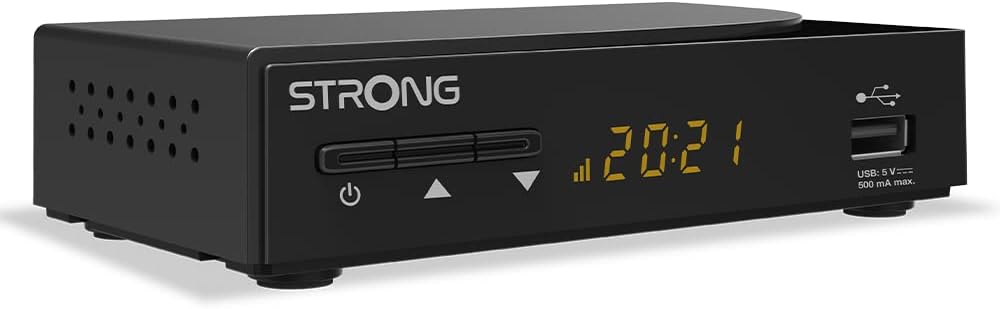
Малюнак 1: У цэлым view of the STRONG SRT 3030 Digital HD Cable Receiver. This image shows the compact black unit with its front panel display and USB port.

Малюнак 2: Фронт view of the receiver, highlighting the power button, channel navigation buttons, digital display, and the accessible USB port.

Малюнак 3: Тыл view of the receiver, showing the "CABLE IN" port, HDMI output, TV SCART connector, and the power input.

Малюнак 4: Збоку view of the receiver, illustrating the ventilation holes designed for heat dissipation.
Настройка
- Падключэнне да тэлевізара: Use an HDMI cable to connect the HDMI OUT port on the receiver to an HDMI IN port on your television. Alternatively, use a SCART cable if your TV does not have an HDMI port.
- Connect to Cable Network: Connect your cable network's coaxial cable to the "CABLE IN" port on the back of the receiver.
- Падключыце харчаванне: Plug the provided power adapter into the DC IN port on the receiver and then into a wall outlet.
- Уключэнне: Press the power button on the front panel of the receiver or on the remote control.
- Майстар пачатковай налады: Follow the on-screen instructions for the initial setup, which typically includes language selection, country, and automatic channel scanning. Allow the receiver to complete the channel scan to find all available digital channels.
Інструкцыя па эксплуатацыі
Асноўныя функцыі
- Уключэнне/выключэнне харчавання: Націсніце УЛАДА на пульце дыстанцыйнага кіравання або на пярэдняй панэлі.
- Выбар канала: Выкарыстоўвайце CH +/- buttons to change channels sequentially, or enter the channel number directly using the numeric keypad.
- Рэгулятар гучнасці: Выкарыстоўвайце VOL +/- кнопкі для рэгулявання гучнасці.
- Адключэнне гуку: Націсніце МУК кнопку, каб часова адключыць гук.
- Электронны тэлегід (EPG): Націсніце EPG кнопка для view program information and schedule recordings.
Навігацыя па меню
Націсніце МЕНЮ button on the remote control to access the main menu. Use the arrow keys (УГОРУ/УНІЗ/НАЛЕВА/НАПРАВА) для навігацыі па варыянтах і OK каб пацвердзіць выбар. Націсніце ВЫХАД каб вярнуцца да прамога тэлебачання.
Кіраванне каналам
- Channel Sorting: In the menu, navigate to "Channel Management" to sort channels by name, LCN, or other criteria.
- Favorite Lists: Create and manage up to 32 favorite lists to quickly access your preferred TV and radio stations.
Функцыі USB
Insert a USB storage device into the front USB port. You can use it for:
- Прайграванне мультымедыя: Play back various media files (e.g., photos, music, videos) stored on the USB device.
- Абнаўленне праграмнага забеспячэння: Update the receiver's firmware by placing the update file on a USB drive and following the instructions in the system settings menu.
- Channel List Backup: Save your customized channel list to the USB device.
Тэхнічнае абслугоўванне
To ensure the longevity and optimal performance of your STRONG SRT 3030 receiver, follow these maintenance guidelines:
- Уборка: Disconnect the power before cleaning. Use a soft, dry cloth to wipe the exterior of the receiver. Do not use liquid cleaners, aerosols, or abrasive materials.
- Вентыляцыя: Ensure that the ventilation openings on the receiver are not blocked. Do not place the receiver on soft surfaces like carpets or blankets that may obstruct airflow.
- Размяшчэнне: Place the receiver in a well-ventilated area, away from direct sunlight, heat sources, and excessive moisture.
Ліквідацыю непаладак
Калі ў вас узнікнуць праблемы з прыёмнікам, звярніцеся да табліцы ніжэй, каб знайсці распаўсюджаныя праблемы і спосабы іх вырашэння.
| праблема | Магчымая прычына | Рашэнне |
|---|---|---|
| Няма малюнка і гуку |
|
|
| Паведамленне «Няма сігналу» |
|
|
| Пульт дыстанцыйнага кіравання не працуе |
|
|
| Cannot play USB media |
|
|
Тэхнічныя характарыстыкі
| Асаблівасць | Спецыфікацыя |
|---|---|
| Марка | Моцны |
| Нумар мадэлі | SRT3030 |
| Колер | Чорны |
| Тэхналогія падлучэння | HDMI |
| Інтэрфейс | HDMI, USB 2.0 |
| Усяго партоў HDMI | 1 |
| Рэжым выхаду гуку | Стэрэа |
| Канфігурацыя канала аб'ёмнага гуку | 2.0 |
| Кадзіроўка відэа | H.264, H.265/HEVC, VP9, AV1, MPEG-4 |
| Сумяшчальныя прылады | TV, personal computer, tablet, smartphone, game console, amplifier, speaker |
| Склад батарэі (пульт дыстанцыйнага кіравання) | Шчолачны |
| Вытворца | МОЦНЫ |
| Краіна паходжання | Кітай |
Гарантыя і падтрымка
For warranty information and technical support, please refer to the documentation included with your product or visit the official Strong webсайт. Захоўвайце чэк аб куплі як пацвярджэнне пакупкі для гарантыйных прэтэнзій.
Інтэрнэт-падтрымка: For further assistance, FAQs, and software updates, please visit the official Strong support page.