
1. Уводзіны
Thank you for choosing the AgfaPhoto Powerstation PPS 600 Pro. This portable power bank is designed to provide reliable power for various devices during outdoor activities, travel, and emergency situations. This manual provides essential information for safe operation, setup, maintenance, and troubleshooting. Please read it thoroughly before using the product.
2. Інструкцыі па тэхніцы бяспекі
- Не разбірайце, не рамантуйце і не мадыфікуйце прыладу. Няправільная зборка можа прывесці да пажару або траўмаў.
- Не падвяргайце прыладу ўздзеянню агню або экстрэмальных тэмператур (вышэй за 60°C / 140°F).
- Не выкарыстоўвайце і не захоўвайце прыладу ў ваннай пакоі або ў месцы, дзе яна можа падвяргацца ўздзеянню вады ці вільгаці.
- Не кідайце, не ўдарайце і не падвяргайце прыладу моцным ударам.
- Захоўваць у месцах, недаступных дзецям.
- Выкарыстоўвайце толькі рэкамендаваныя аксэсуары і зарадныя кабелі.
- Забяспечце належную вентыляцыю падчас выкарыстання і зарадкі, каб пазбегнуць перагрэву.
- In case of leakage from the battery, avoid contact with skin and eyes. Rinse affected areas with water and seek medical attention.
3. Змесціва ўпакоўкі
Праверце, ці ёсць усе прадметы ў скрынцы:
- AgfaPhoto Powerstation PPS 600 Pro
- Power Cord (for AC charging)
- Car Cigarette Lighter Adapter
- Кіраўніцтва карыстальніка
4. Прадукт скончыўсяview
Familiarize yourself with the ports, buttons, and display of your Powerstation PPS 600 Pro.

Image: Front panel of the AgfaPhoto Powerstation PPS 600 Pro, showing the LCD screen, DC output, USB-A ports, USB-C port, and AC output switch.
The unit features a clear LCD display that shows battery level, input power, and output power. Various ports are available for charging different devices simultaneously.
- ВК-дысплей: Shows battery status, input/output wattagе, і індыкатары памылак.
- Выход пастаяннага току: For devices requiring DC power.
- Порты USB-A: Для зарадкі смартфонаў, планшэтаў і іншых прылад з падтрымкай USB.
- Порт USB-C: Для прылад, сумяшчальных з хуткай зарадкай.
- Выхад пераменнага току: Standard wall outlet for appliances.
- Уваходны порт: For charging the power station itself.
5. Настройка
5.1 Першапачатковая зарадка
Before first use, fully charge your AgfaPhoto Powerstation PPS 600 Pro. This ensures optimal battery performance and longevity.
- Connect the provided power cord to the AC input port on the power station.
- Падключыце другі канец шнура харчавання да звычайнай разеткі.
- The LCD display will show the charging status. The unit is fully charged when the battery indicator shows 100%.
Charging can also be done via a solar panel (sold separately) or a car cigarette lighter adapter.

Image: Illustration of the three charging methods for the power station: via car cigarette lighter, AC wall adapter, and solar panel.
6. Інструкцыя па эксплуатацыі
6.1 Уключэнне/выключэнне
- To turn on the unit, press and hold the main power button for a few seconds. The LCD display will illuminate.
- To turn off the unit, press and hold the main power button again until the display turns off.
6.2 Зарадка знешніх прылад
The Powerstation PPS 600 Pro offers multiple output options:
- Выхад USB: Connect your USB-powered devices (smartphones, tablets, drones, cameras) to the USB-A or USB-C ports. The unit will automatically detect and begin charging.
- Выхад пераменнага току: For devices requiring standard wall power (laptops, mini-refrigerators, LED TVs), press the AC ON/OFF button to activate the AC outlet. Plug your device into the AC outlet. Remember to turn off the AC output when not in use to conserve battery.
- Выход пастаяннага току: For 12V DC devices, connect them to the DC output port.

Image: The AgfaPhoto Powerstation PPS 600 Pro connected and charging a laptop, demonstrating its use for portable electronics.

Image: The power station in use during a power outage, providing light and charging a smartphone, highlighting its emergency backup capability.
7. Тэхнічнае абслугоўванне
7.1 Захоўванне
- Захоўвайце электрастанцыю ў прахалодным, сухім месцы, удалечыні ад прамых сонечных прамянёў і крыніц цяпла.
- For long-term storage, charge the unit to approximately 50-80% every 3-6 months to maintain battery health.
- Avoid storing in environments with high humidity or extreme temperatures.
7.2 Ачыстка
- Выкарыстоўвайце мяккую сухую тканіну для ачысткі вонкавага боку прылады.
- Не выкарыстоўвайце абразіўныя ачышчальнікі або растваральнікі.
- Пераканайцеся, што ўсе парты чыстыя ад пылу і смецця.
8. Выпраўленне непаладак
If you encounter issues with your Powerstation PPS 600 Pro, refer to the following common problems and solutions:
| праблема | Магчымая прычына | Рашэнне |
|---|---|---|
| Прылада не ўключаецца | Акумулятар цалкам разраджаны. | Зарадзіце прыладу з дапамогай адаптара пераменнага току. |
| No output from AC port | AC output not activated. Device exceeds power limit. | Press the AC ON/OFF button. Check device wattage against unit specifications. |
| Slow charging of external devices | Device requires higher current. Cable issue. | Ensure you are using the correct USB port (e.g., USB-C PD). Try a different cable. |
| Прылада пераграваецца | Poor ventilation. Excessive load. | Ensure vents are clear. Reduce the number or power of connected devices. Allow unit to cool down. |
Калі праблема не знікне, звярніцеся ў службу падтрымкі кліентаў.
9. Тэхнічныя характарыстыкі
Technical details for the AgfaPhoto Powerstation PPS 600 Pro:
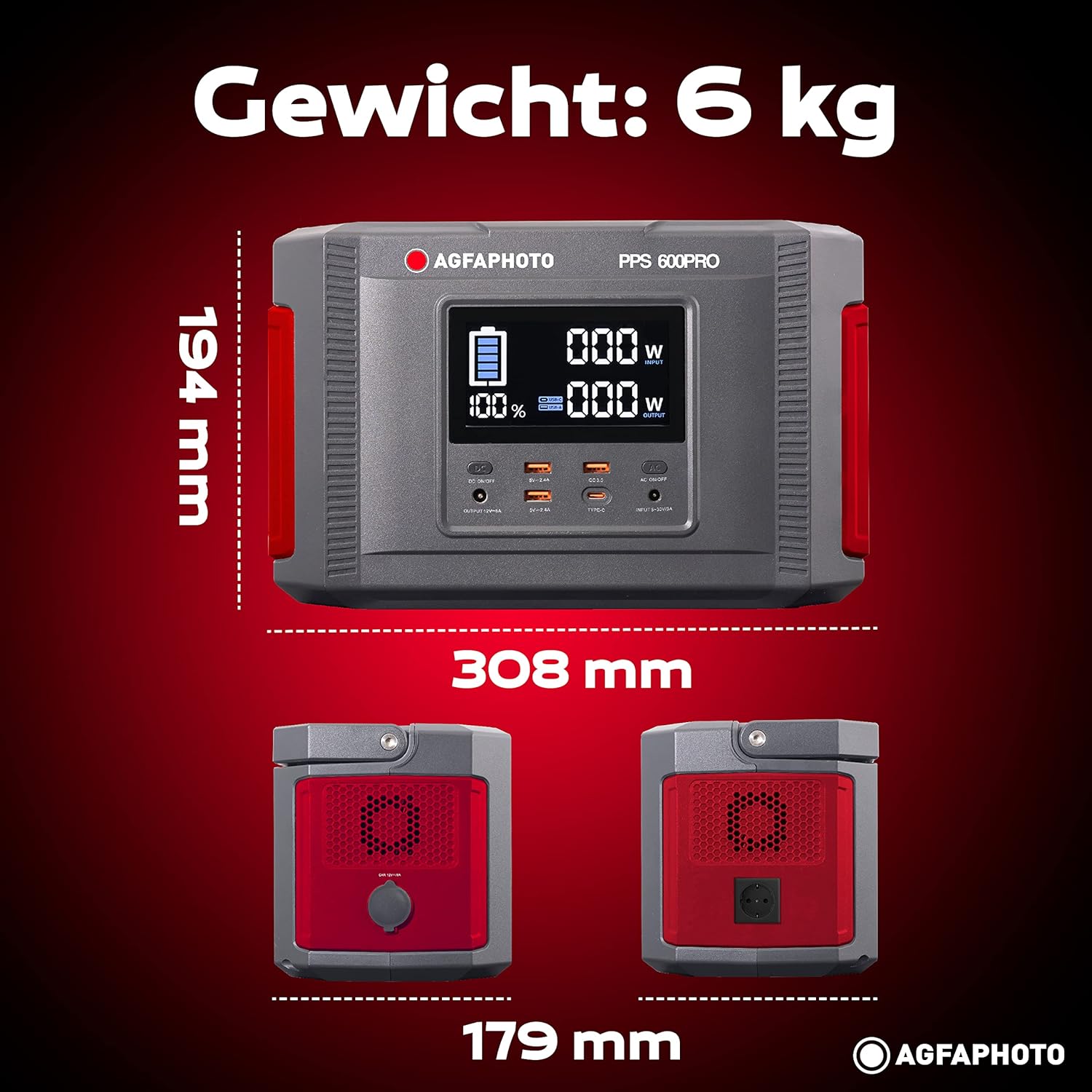
Image: Visual representation of the AgfaPhoto Powerstation PPS 600 Pro's dimensions (308 x 179 x 194 mm) and weight (6 kg).
| Асаблівасць | Спецыфікацыя |
|---|---|
| Марка | AgfaPhoto |
| Нумар мадэлі | 717-854742 (PPS600) |
| Ёмістасць батарэі | 644 Wh |
| Выхадная магутнасць (бесперапынная) | 600 Вт |
| Выхадная магутнасць (пікавая) | 1000 Вт |
| тtage | 220 вольт |
| Вага прадмета | 6.1 кілаграма |
| Памеры (Д х Ш х У) | 308 х 179 х 194 мм |
| Крыніца харчавання | Battery Powered (Solaire, électricité) |
| Рэкамендуемае выкарыстанне | Mobile phones, cameras, laptops, tablets |
| Уключаныя кампаненты | Power cord, USB ports, LCD screen, car cigarette lighter adapter |
| Асаблівасць | Кампактны дызайн |
10. Гарантыя і падтрымка
AgfaPhoto products are manufactured to high-quality standards and are covered by a manufacturer's warranty. For specific warranty terms and conditions, please refer to the warranty card included with your product or visit the official AgfaPhoto webсайт.
For technical support, troubleshooting assistance, or spare parts inquiries, please contact AgfaPhoto customer service. Contact details can typically be found on the product packaging or the official brand webсайт.