
1. Уводзіны
The Fanvil PA2S is a versatile SIP paging gateway designed for media streaming using standard IP/RTP/RTSP protocols. It integrates various functionalities including broadcast, recording, intercom, and security features. This device facilitates audio and video intercom, broadcasting, and security triggers through external device connections, making it suitable for diverse integration solutions.
1.1. Змесціва ўпакоўкі
- Fanvil PA2S Paging Gateway
- Раз'ём клеммной калодкі
2. Прадукт скончыўсяview
The Fanvil PA2S offers a compact design with multiple interfaces for comprehensive communication and security applications.
2.1. Асноўныя магчымасці
- SIP Unified Communication for full connectivity
- HD Audio for clear and far-reaching broadcasts
- Online Broadcasting or MP3 Broadcasting capabilities
- Support for HD Video Linkage
- Cloud Platform for simplified remote management
- Audio line out port for expandable external active speakers
- Recording output via 3.5mm standard audio interface
- NVR video recording with standard RJ45 interface
- Emergency call button interface for active calls
2.2. Схема прылады

Малюнак 1: Фронт view of the Fanvil PA2S SIP Paging Gateway. This image displays the compact black casing of the device, highlighting its overall form factor.
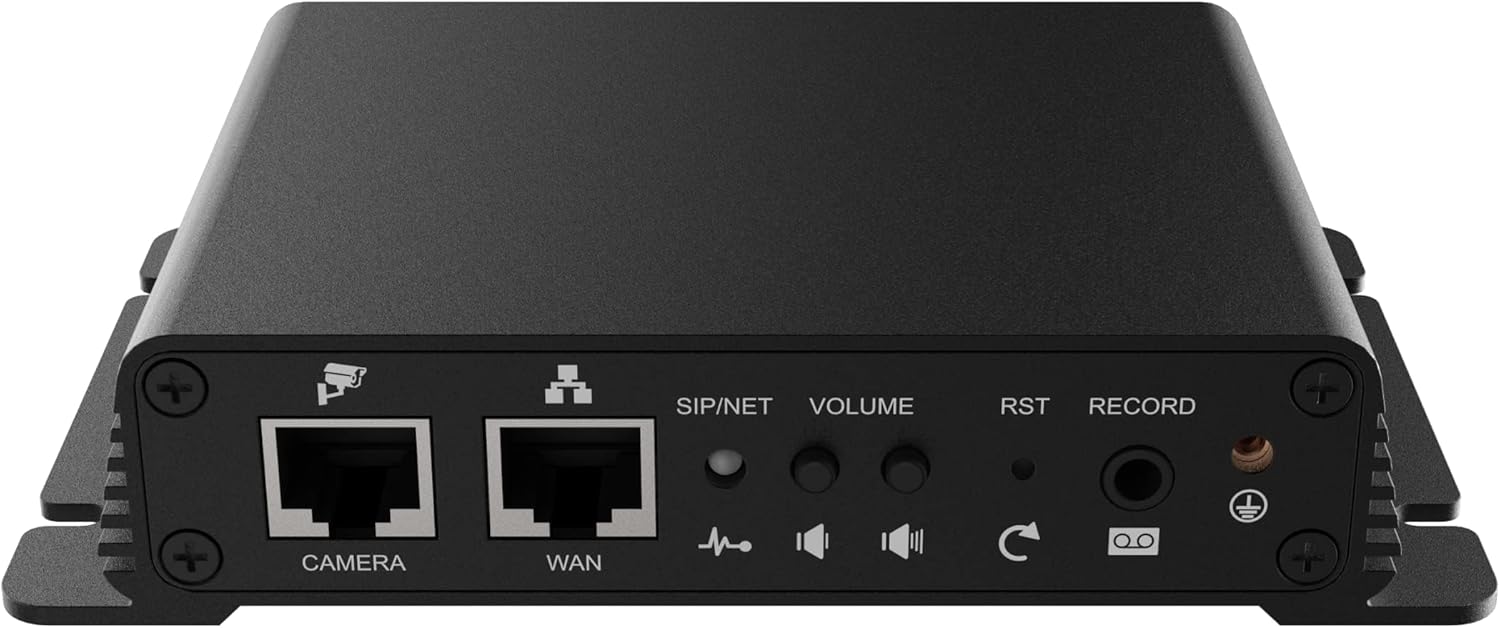
Малюнак 2: Тыл view of the Fanvil PA2S SIP Paging Gateway, showing the various connection ports. From left to right, these include the CAMERA and WAN Ethernet ports, SIP/NET status indicator, VOLUME control, RST (Reset) button, RECORD port, and a ground screw.
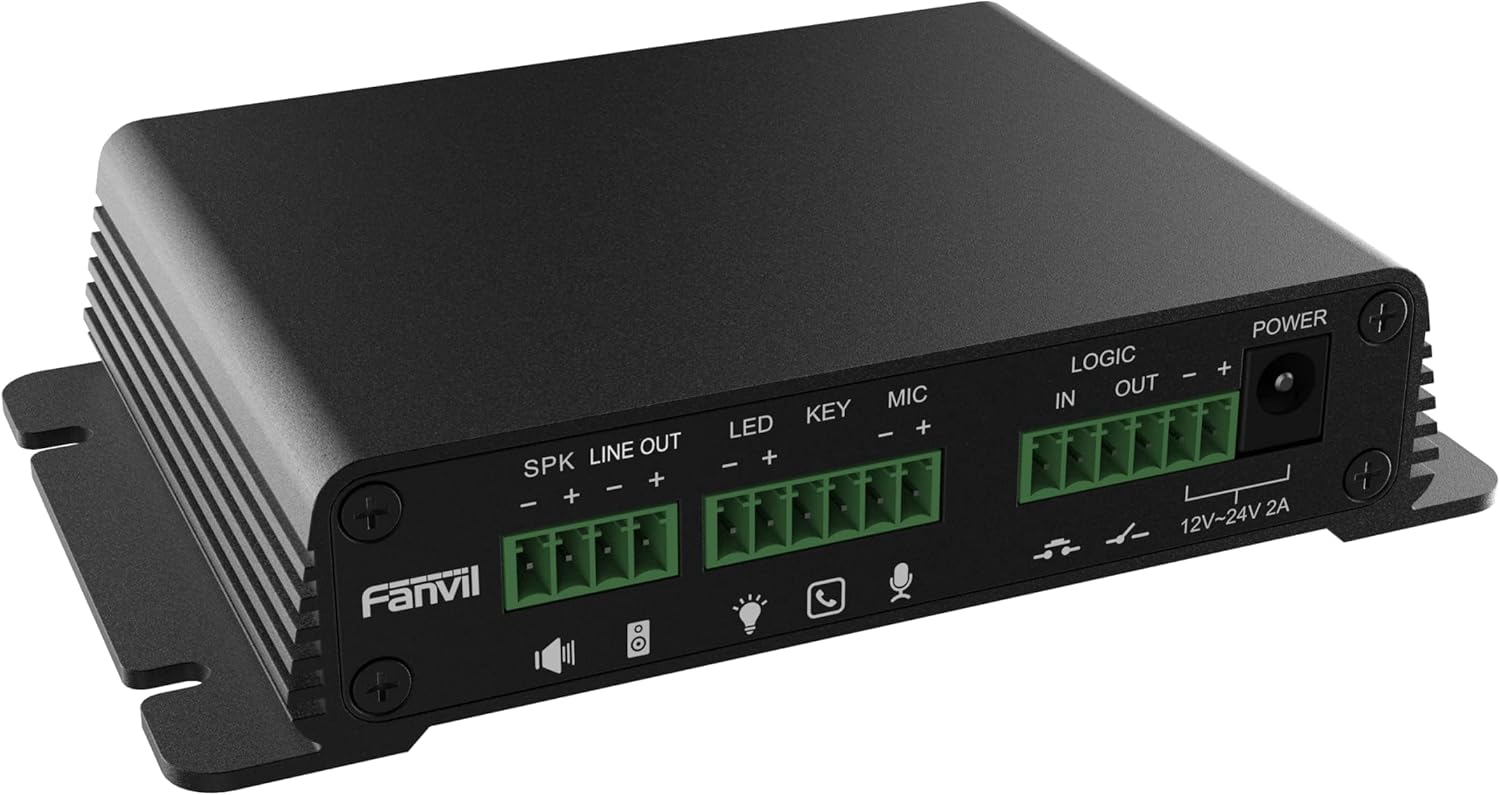
Малюнак 3: Збоку view of the Fanvil PA2S SIP Paging Gateway, detailing the terminal block connectors. These include SPK LINE OUT, LED, KEY, MIC, LOGIC IN/OUT, and POWER input (12V-24V 2A).
3. Настройка
Follow these steps to properly set up your Fanvil PA2S SIP Paging Gateway.
3.1. Падключэнне сілкавання
- Connect the provided power adapter to the POWER input terminal block on the side of the PA2S. Ensure correct polarity (+ and -).
- Plug the power adapter into a suitable electrical outlet. The device will power on automatically.
3.2. Падключэнне да сеткі
- Connect an Ethernet cable from your network switch or router to the WAN port on the rear of the PA2S.
- The SIP/NET LED indicator will illuminate once a network connection is established and the device obtains an IP address.
3.3. Перыферыйныя злучэнні
- Дакладчыкі: Connect external active speakers to the SPK LINE OUT клеммная калодка.
- Мікрафон: Падключыце мікрафон да мікрафон клеммная калодка.
- Emergency Button/Key: Connect an emergency call button or other key input to the КЛЮЧ клеммная калодка.
- Святлодыёдны індыкатар: Connect an external LED indicator to the святлодыёд terminal block for status indication.
- Logic In/Out: Выкарыстоўвайце LOGIC IN і LOGIC OUT terminal blocks for integration with other security or control systems.
- Камера: If using video linkage, connect an IP camera to the КАМЕРА Порт Ethernet.
- Запісваючая прылада: For external recording, connect a recording device to the ЗАПІС 3.5 мм аўдыяраздым.
4. Інструкцыя па эксплуатацыі
This section outlines the basic operation of the Fanvil PA2S.
4.1. Web Доступ да інтэрфейсу
- Obtain the IP address of the PA2S (e.g., via a network scanner or by checking your router's DHCP client list).
- Адкрыйце a web browser and enter the IP address of the PA2S into the address bar.
- Log in using the default credentials (refer to the device's documentation for default username and password).
- Ад ст web interface, you can configure SIP accounts, network settings, audio parameters, and other advanced features.
4.2. SIP Configuration
The PA2S functions as a SIP endpoint. It is compatible with various SIP platforms such as Asterisk, Broadsoft, 3CX, Metaswitch, Elastix, and Avaya. Refer to your SIP server documentation and the PA2S web interface for detailed configuration steps to register the device as an extension.
4.3. Paging and Broadcasting
- Once registered to a SIP server, the PA2S can receive paging calls from other SIP devices.
- Audio received via SIP will be output through the connected speakers.
- The device supports online broadcasting and playback of MP3 files (if configured via the web інтэрфейс).
4.4. Рэгулятар гучнасці
Adjust the output volume using the АБ'ЁМ knob located on the rear of the device or through the web налады інтэрфейсу.
4.5. Emergency Call
If an emergency call button is connected to the КЛЮЧ terminal, pressing it can trigger a pre-configured emergency call to a designated SIP extension or number.
5. Тэхнічнае абслугоўванне
Proper maintenance ensures the longevity and optimal performance of your PA2S.
5.1. Уборка
- Выкарыстоўвайце мяккую сухую тканіну для ачысткі вонкавага боку прылады.
- Не выкарыстоўвайце вадкія ачышчальнікі або аэразольныя спрэі непасрэдна на прыладзе.
5.2. Абнаўленне прашыўкі
Перыядычна правярайце афіцыйны сайт Fanvil website for firmware updates. Firmware updates can provide new features, performance improvements, and security enhancements. Follow the instructions provided with the firmware package for the update process via the web інтэрфейс.
6. Выпраўленне непаладак
This section addresses common issues you might encounter with the Fanvil PA2S.
6.1. Няма ўлады
- Ensure the power adapter is securely connected to both the PA2S and a working electrical outlet.
- Verify the power adapter's specifications match the device requirements (12V-24V 2A).
6.2. Няма падключэння да сеткі
- Check that the Ethernet cable is securely connected to the WAN port and your network device.
- Verify that your network switch or router is functioning correctly.
- Confirm that the SIP/NET LED indicator is illuminated. If not, check network settings via the web interface after a direct PC connection.
6.3. Няма аўдыёвыхаду
- Ensure external speakers are properly connected to the SPK LINE OUT terminal and are powered on.
- Адрэгулюйце АБ'ЁМ knob on the rear of the device.
- Check audio settings in the PA2S web інтэрфейс.
- Verify that the SIP call is successfully established and audio is being sent to the PA2S.
6.4. SIP Registration Failure
- Verify SIP account credentials (username, password, server address) in the web інтэрфейс.
- Забяспечце падключэнне да сеткі да SIP-сервера.
- Праверце налады брандмаўэра ў вашай сетцы, якія могуць блакіраваць SIP-трафік.
6.5. Прылада не рэагуе
If the device becomes unresponsive, press and hold the RST (Reset) button on the rear panel for approximately 5-10 seconds to perform a factory reset. Папярэджанне: A factory reset will erase all configurations and restore default settings.
7. Тэхнічныя характарыстыкі
Technical specifications for the Fanvil PA2S SIP Paging Gateway.
| Асаблівасць | Спецыфікацыя |
|---|---|
| Памеры прадукту (Д х Ш х У) | 5.91 х 5.91 х 3.15 цалі (15 х 15 х 8 см) |
| Вага прадмета | 11.1 унцыі (314.7 грам) |
| Крыніца харчавання | Corded Electric (12V-24V 2A) |
| Колер | Чорны |
| Сумяшчальныя прылады | Asterisk, Broadsoft, 3CX, Metaswitch, Elastix, Avaya |
| Тып тэлефона | Corded (VoIP Phone functionality) |
| Шматлінейная аперацыя | Шматлінейная аперацыя |
| Магчымасць канферэнц-сувязі | Базавы |
| Тып аўтаадказчыка | Лічбавы |
8. Інфармацыя аб гарантыі
Fanvil products are covered by a limited warranty. For detailed information regarding warranty terms, conditions, and duration, please refer to the official Fanvil webсайт або звярніцеся да аўтарызаванага прадаўца. Захоўвайце чэк аб куплі як пацверджанне пакупкі для гарантыйных прэтэнзій.
9. Падтрымка
For technical assistance, product inquiries, or further support, please visit the official Fanvil support website or contact your local distributor. Online resources, FAQs, and firmware downloads are typically available on the manufacturer's webсайт.
Афіцыйны прадстаўнік Фанвіла Webсайт: www.fanvil.com