
RHYTHM 8RZ234SR04
RHYTHM D234 8RZ234SR04 Radio Alarm Clock User Manual
Model: 8RZ234SR04
1. Уводзіны
Дзякуй за пакупкуasing the RHYTHM D234 8RZ234SR04 Radio Alarm Clock. This digital alarm clock features a radio-controlled timekeeping function, an electronic sound alarm with snooze, a thermometer, a hygrometer, and a calendar display. Its compact design and clear LCD make it suitable for various indoor environments. Please read this manual thoroughly before use to ensure proper operation and to maximize the clock's features.
2. Інфармацыя па бяспецы
- Не падвяргайце прыладу ўздзеянню экстрэмальных тэмператур, прамых сонечных прамянёў або высокай вільготнасці.
- Пазбягайце падзення прылады або моцных удараў.
- Не спрабуйце разбіраць або мадыфікаваць прыладу. Гэта прывядзе да анулявання гарантыі.
- Захоўвайце батарэі ў месцах, недаступных дзецям. Пры пападанні ўнутр неабходна неадкладна звярнуцца па медыцынскую дапамогу.
- Утылізуйце выкарыстаныя батарэі ў адпаведнасці з мясцовымі правіламі.
- Use only the specified battery type (AA batteries).
3. Змесціва ўпакоўкі
Пераканайцеся, што ўсе прадметы прысутнічаюць у пасылцы:
- RHYTHM D234 8RZ234SR04 Radio Alarm Clock
- Кіраўніцтва карыстальніка (гэты дакумент)
4. Прадукт скончыўсяview
The RHYTHM D234 8RZ234SR04 features a clear LCD display and easily accessible front-facing control buttons for intuitive operation.
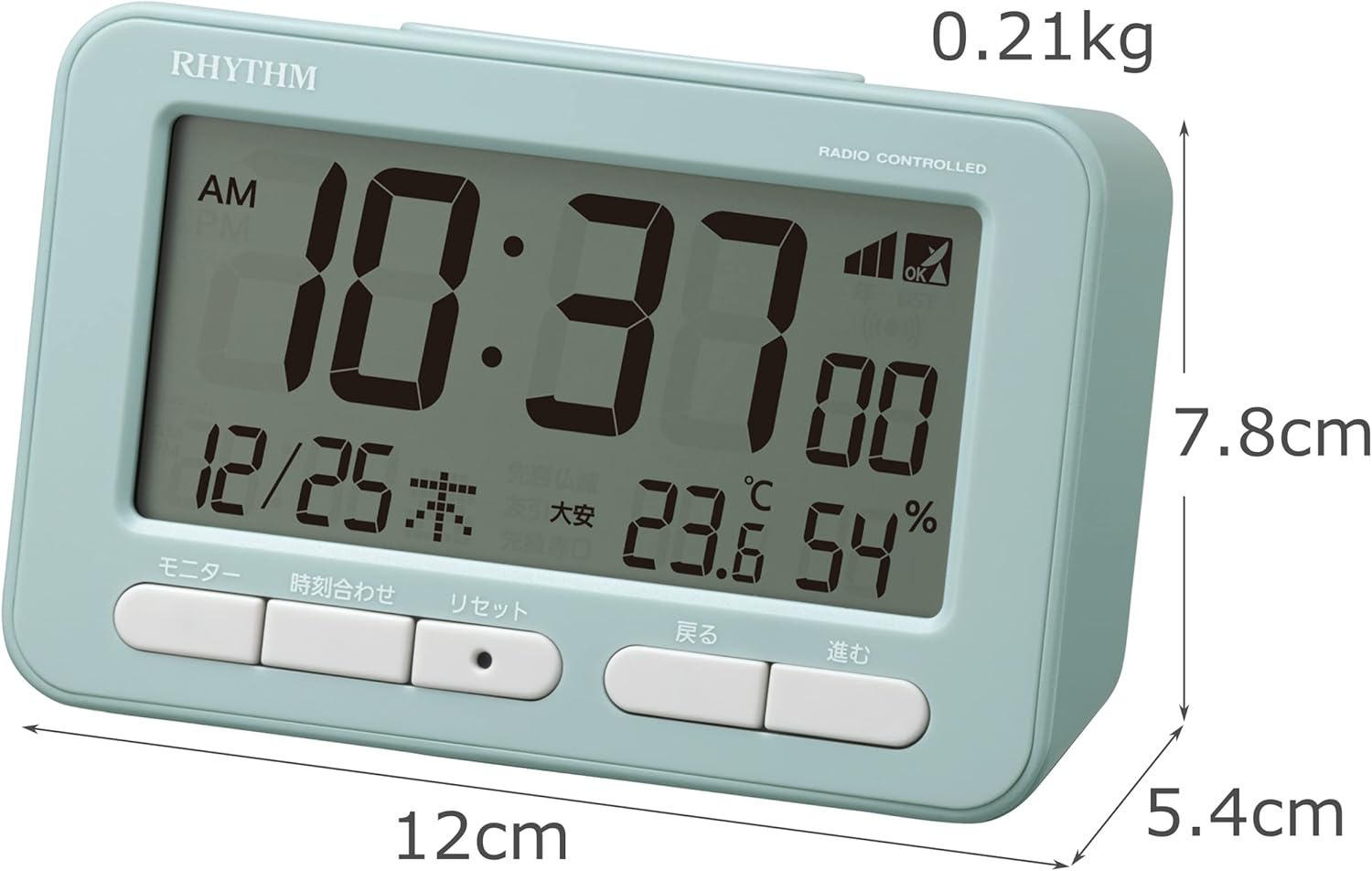
Малюнак 4.1: Фронт view of the RHYTHM D234 8RZ234SR04 Radio Alarm Clock, showing its dimensions (7.8cm H x 12cm W x 5.4cm D) and weight (0.21kg).

Малюнак 4.2: Падрабязны view of the clock's large LCD display and the front control buttons, including 'Monitor', 'Time Set', 'Reset', 'Back', and 'Forward'.
Інфармацыя пра дысплей:
- Час: Displays current time in AM/PM or 24-hour format.
- Дата: Паказвае месяц, дзень і дзень тыдня.
- тэмпература: Displays current ambient temperature in Celsius.
- Вільготнасць: Shows current ambient humidity percentage.
- Radio Wave Reception Indicator: Паказвае сілу сігналу.
- Alarm ON/OFF Indicator: Паказвае, ці ўключаны сігнал трывогі.
Кнопкі кіравання:
- МАНІТОР: Activates backlight or cycles display modes.
- НАБОР ЧАСУ: Enters time/date setting mode.
- Скінуць: Скідае гадзіннік да заводскіх налад.
- BACK (<): Adjusts settings backward.
- FORWARD (>): Adjusts settings forward.
- АДРЫМКА/СВЯТЛО: Activates snooze during alarm or backlight when pressed.
5. Настройка
5.1 Устаноўка батарэі
- Адкрыйце крышку батарэйнага адсека, размешчаную на задняй панэлі гадзін.
- Insert two (2) AA batteries (not included) according to the polarity indicators (+ and -) inside the compartment.
- Надзейна зачыніце крышку батарэйнага адсека.
5.2 Initial Power On and Radio Wave Reception
Upon battery installation, the clock will automatically attempt to receive radio time signals to set the correct time and date. This process may take several minutes.

Малюнак 5.1: Illustration of radio wave time signal reception from two transmission stations, ensuring accurate timekeeping.
- Для аптымальнага прыёму сігналу пастаўце гадзіннік каля акна.
- Avoid placing it near electronic devices that may cause interference (e.g., TVs, computers, mobile phones).
- A signal strength indicator will appear on the display during reception. Once synchronized, the indicator will show a stable signal.
6. Інструкцыя па эксплуатацыі
6.1 Ручная ўстаноўка часу і даты
If radio signal reception is poor or unavailable, you can set the time and date manually:
- Націсніце і ўтрымлівайце УСТАНОВА ЧАСУ кнопку, пакуль не пачне міргаць дысплей часу.
- Выкарыстоўвайце BACK (<) і FORWARD (>) кнопкі для налады гадзіны. Націсніце УСТАНОВА ЧАСУ каб пацвердзіць і перайсці да хвілін.
- Repeat the process for minutes, year, month, and day.
- Прэса УСТАНОВА ЧАСУ апошні раз, каб выйсці з рэжыму налад.
6.2 Налада будзільніка
- Націсніце ТРЫВОГА button (usually located on the side or back, if not on front, refer to product diagram). The alarm time will flash.
- Выкарыстоўвайце BACK (<) і FORWARD (>) кнопкі, каб усталяваць патрэбную гадзіну будзільніка. Націсніце ТРЫВОГА каб пацвердзіць.
- Адрэгулюйце хвіліны з дапамогай BACK (<) і FORWARD (>) кнопкі. Прэс ТРЫВОГА для пацверджання і выхаду.
- Каб уключыць/выключыць будзільнік, націсніце кнопку ТРЫВОГА ВКЛ / ВЫКЛ switch or button. An alarm icon will appear/disappear on the display.
6.3 Выкарыстанне функцыі паўтору будзільніка
Калі гучыць будзільнік, націсніце вялікую кнопку SNOOZE / LIGHT button on the top of the clock. The alarm will pause for approximately 5 minutes and then sound again. This can be repeated multiple times.
6.4 Display Modes and Backlight
The clock continuously displays time, date, temperature, and humidity. To temporarily illuminate the display, press the SNOOZE / LIGHT кнопку. Падсветка ўключыцца на некалькі секунд.

Малюнак 6.1: The clock's display illuminated by its backlight, showing time, date, temperature, and humidity clearly in low light conditions.
6.5 12/24-гадзінны фармат
To switch between 12-hour (AM/PM) and 24-hour formats, locate the 12/24 гадзіны button (often on the back or side) and press it. The display will change accordingly.
7. Тэхнічнае абслугоўванне
7.1 Ачыстка
Wipe the clock with a soft, dry cloth. Do not use abrasive cleaners, solvents, or spray directly onto the unit, as this may damage the finish or internal components.
7.2 Замена батарэі
When the display becomes dim or the clock functions irregularly, it is time to replace the batteries. Follow the battery installation steps in Section 5.1. Replace both batteries simultaneously with new ones of the same type.
8. Выпраўленне непаладак
| праблема | Магчымая прычына | Рашэнне |
|---|---|---|
| Няма дысплея або дысплей цьмяны | Разраджаныя або няправільна ўстаўленыя батарэйкі. | Замяніце батарэйкі новымі батарэйкамі тыпу АА, сачыце за правільнай палярнасцю. |
| Няправільны час/дата | Poor radio signal reception or manual setting error. | Move the clock to a location with better signal. Perform manual time setting if necessary. |
| Будзільнік не гучыць | Сігналізацыя не ўключана або настроена няправільна. | Ensure the alarm is turned ON and the alarm time is set correctly. |
| Temperature/Humidity readings seem inaccurate | Unit placed near heat/cold sources or in extreme conditions. | Relocate the clock to a stable indoor environment away from direct heat, cold, or moisture. Allow time for readings to stabilize. |
9. Тэхнічныя характарыстыкі
- Нумар мадэлі: 8RZ234SR04
- Памеры: 7.8 см (В) х 12 см (Ш) х 5.4 см (Г)
- Вага: Approximately 0.21 kg (7.5 oz)
- Крыніца харчавання: 2 x AA batteries (sold separately)
- Рух: Radio-controlled (Automatic time synchronization)
- Тып дысплея: ВК
- Будзільнік: Electronic sound, 4-level volume change, with Snooze function
- Thermometer Range: -9.9°C да 50°C
- Hygrometer Range: ад 20% да 95%
- Каляндар: Programs until December 31, 2099
- матэрыял: Пластыкавыя
- Тып мацавання: Стальніца
- Асаблівасці: Backlight, 12/24-hour display option
10. Гарантыя і падтрымка
For warranty information and customer support, please refer to the documentation provided at the time of purchase or contact your local RHYTHM distributor. Keep your purchase receipt as proof of purchase for any warranty claims.
Ask a question about this manual
Ask about setup, troubleshooting, compatibility, parts, safety, or missing instructions. Manuals+ will review the question and use this page’s manual context to help answer it.